
Key takeaways
- Outstanding ergonomic comfort for long working sessions
- MagSpeed metal wheel with fast free-spin and precise ratchet modes
- Accurate 8,000 DPI tracking, even on glass surfaces
- Near-silent Quiet Clicks and seamless multi-device Flow
What's inside
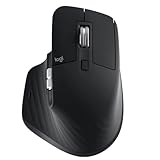
The Logitech MX Master 3S is a wireless productivity mouse built for professionals, creators, and anyone who spends long hours navigating documents, timelines, and spreadsheets. It combines a sculpted ergonomic body, an 8,000 DPI sensor that tracks even on glass, and Logitech’s signature ultra-fast MagSpeed scroll wheel, all wrapped in near-silent Quiet Clicks.
This is not a twitch-gaming mouse; it is a comfort-and-workflow tool for developers, editors, writers, and multitaskers who value precision and quiet operation over low latency. If your day is filled with scrolling, app-switching, and cross-device work, the MX Master 3S is designed to make that faster and less fatiguing. Gamers and buyers who want the very latest features or a more compact travel mouse should consider the alternatives noted below.
As an Amazon Associate we earn from qualifying purchases at no extra cost to you. Product prices and availability are accurate as of the date shown and are subject to change.




⚡ Save on Your Next PC — Amazon Prime
Prime members get fast free shipping on the systems above, plus early access to Prime Day & Black Friday PC deals. New members get a 30-day free trial.
Watch: Logitech MX Master 3S Review — Video Review
Design & Build
The MX Master 3S has one of the most comfortable shapes in the business, with a tall arch that supports the palm, a dedicated thumb rest, and a sculpted contour that suits right-handed users during marathon sessions. Build quality is excellent, with premium materials and a reassuring heft that feels planted rather than heavy. The standout is the metal MagSpeed wheel, which switches between ratcheted and free-spinning modes, plus a separate thumb wheel for horizontal scrolling and a gesture button. It charges over USB-C and pairs with up to three devices.
Performance
In daily use, the 3S excels at the things productivity users care about. The 8,000 DPI sensor is accurate on virtually any surface, including glass, and the MagSpeed wheel’s free-spin mode flings through long documents in a single flick. The Quiet Clicks are genuinely quiet, a real benefit in shared offices and on calls, without feeling mushy. Flow functionality lets you move the cursor seamlessly between multiple computers and even copy content across them, which is a productivity multiplier for multi-device workflows.
The limitations are contextual rather than flaws. For gaming it is the wrong tool, with Bluetooth or the Logi Bolt receiver introducing latency and weight that competitive play does not want. The shape strictly serves right-handers, and at over 140 grams it is heavier than travel-focused mice. It is also a premium purchase, and the arrival of a newer MX Master model means some buyers will weigh whether to spend more for the latest features.
Pros & Cons
- Outstanding ergonomic comfort for long working sessions
- MagSpeed metal wheel with fast free-spin and precise ratchet modes
- Accurate 8,000 DPI tracking, even on glass surfaces
- Near-silent Quiet Clicks and seamless multi-device Flow
- Not suitable for competitive gaming due to latency and weight
- Right-handed only, with a heavier body unsuited to travel
- Premium price, now sitting below a newer flagship model
Alternatives to Consider
If you want the newest features, the Logitech MX Master 4 adds haptic feedback to the same productivity-focused formula for buyers who want the latest generation. Those who prefer a smaller, more portable mouse should look at the Logitech MX Anywhere 3S, which keeps fast scrolling and glass tracking in a compact travel body. And if you are building a full desk setup, the Logitech MX Keys S Combo bundles a matching performance keyboard and mouse for a coherent workspace.
Frequently Asked Questions
Is the MX Master 3S good for gaming?
Not really. It is a productivity mouse, and its wireless connection and heft introduce latency and weight that competitive gaming avoids. For work, browsing, and creative apps, however, it is superb.
What makes the scroll wheel special?
The MagSpeed metal wheel automatically shifts between a precise ratchet mode and a near-frictionless free-spin mode, letting you scroll line by line or fly through hundreds of rows in one motion.
Can it work across multiple computers?
Yes. It pairs with up to three devices, and Logitech Flow lets you glide the cursor between computers and even copy and paste content across them, which is ideal for multi-machine setups.
Are the clicks really quiet?
They are noticeably quieter than a standard mouse without feeling soft, which makes the 3S well suited to open offices, libraries, and video calls where click noise is distracting.
Verdict
The Logitech MX Master 3S remains the benchmark productivity mouse in 2026, blending exceptional comfort, a brilliant scroll wheel, quiet operation, and genuinely useful multi-device features. It is the wrong choice for gaming and asks a premium price now that a newer model exists, but for professionals and creators who live in their software all day, it is a purchase that pays back in comfort and efficiency every single session.
