Key takeaways
- Form factor: Handhelds like the Steam Deck and ROG Ally use tiny M.2 2230 drives, while desktops and most laptops take standard 2280. Confirm your device’s slot size before buying, since a 2280 drive will not fit a Deck.
- Capacity: With 100GB+ games, 1TB fills fast. A 2TB drive like the Sabrent Rocket Q4 or Silicon Power UD90 holds a genuinely large library, while 512GB suits a handful of favorites or a handheld on a budget.
- Speed: PCIe Gen4 NVMe drives hit up to 5,000MB/s, cutting load times noticeably versus SATA. For a Steam library, sequential and random speeds both matter for fast installs and quick level loading.
- Internal vs external: Internal NVMe drives are fastest and best for your main library. External SSDs like the Transcend ESD420 and Addlink P50 let you carry games between devices or expand a console over USB.
- Compatibility: Some drives are single-sided and low-power specifically for handhelds. The WD SN740 and Sabrent Rocket Q4 2230 are designed for Steam Deck and ROG Ally thermals and space constraints.
Modern games are enormous, with single AAA titles now consuming 100GB to 200GB each, so a large, fast SSD is essential for anyone with a serious Steam library. A quick NVMe drive slashes load times, eliminates texture pop-in, and lets you keep dozens of games installed at once instead of constantly uninstalling to make room. For handhelds like the Steam Deck and ROG Ally, the right compact 2230 SSD can even double or quadruple your storage in a slot the size of a fingernail.
This roundup reviews the best SSDs for a large Steam library in 2026, covering both handheld-friendly 2230 drives like the 2TB Sabrent Rocket Q4 and portable external options like the Transcend ESD420. We explain form factors, speeds, and capacities so you can expand your library without bottlenecks or compatibility surprises.
Our top picks
![SABRENT Rocket Q4 2230 NVMe SSD 2TB – PCIe Gen4 M.2 Internal SSD for Steam Deck, ROG Ally, Surface Pro, Mini PCs – DRAM-Less QLC, Up to 5GB/s, Single-Sided, Compact Form Factor [SB-213Q-2TB]](https://m.media-amazon.com/images/I/41QldUwQDlL._SL500_.jpg)


As an Amazon Associate we earn from qualifying purchases at no extra cost to you. Ratings are shown as listed on Amazon.
⚡ Save on Your Next PC — Amazon Prime
Prime members get fast free shipping on the systems above, plus early access to Prime Day & Black Friday PC deals. New members get a 30-day free trial.
Watch: Best SSD for a Large Steam Library — Video Review
How to Choose
- Form factor: Handhelds like the Steam Deck and ROG Ally use tiny M.2 2230 drives, while desktops and most laptops take standard 2280. Confirm your device’s slot size before buying, since a 2280 drive will not fit a Deck.
- Capacity: With 100GB+ games, 1TB fills fast. A 2TB drive like the Sabrent Rocket Q4 or Silicon Power UD90 holds a genuinely large library, while 512GB suits a handful of favorites or a handheld on a budget.
- Speed: PCIe Gen4 NVMe drives hit up to 5,000MB/s, cutting load times noticeably versus SATA. For a Steam library, sequential and random speeds both matter for fast installs and quick level loading.
- Internal vs external: Internal NVMe drives are fastest and best for your main library. External SSDs like the Transcend ESD420 and Addlink P50 let you carry games between devices or expand a console over USB.
- Compatibility: Some drives are single-sided and low-power specifically for handhelds. The WD SN740 and Sabrent Rocket Q4 2230 are designed for Steam Deck and ROG Ally thermals and space constraints.
The Best Picks Reviewed
Sabrent Rocket Q4 2230 NVMe SSD (2TB)
This is the top handheld upgrade. A 2TB PCIe Gen4 M.2 2230 drive built for the Steam Deck, ROG Ally, and mini PCs, it hits up to 5GB/s in a compact single-sided form factor that fits tight handheld slots. Two terabytes transforms a Deck into a machine that holds dozens of large games, making it the best capacity-and-compatibility pick for portable gaming.
Silicon Power UD90 2230 (2TB)
The UD90 2230 is a strong value 2TB option for Steam Deck owners, offering PCIe Gen4 speeds up to 5,000MB/s read and 3,200MB/s write in the compact 2230 size. It delivers the same massive capacity as pricier drives with dependable performance, making it a smart choice for expanding a handheld library affordably.
WD SN740 512GB M.2 2230 (OEM)
For a budget handheld boost, the WD SN740 512GB is a proven single-sided 2230 NVMe Gen4 drive designed for the Steam Deck, ROG Ally, and ultrabooks. While 512GB is smaller, it is an inexpensive, reliable way to add fast storage to a handheld, ideal if you rotate a focused set of games rather than hoarding a huge library.
Transcend ESD420 1TB External SSD
The ESD420 is a versatile portable option, offering 1TB at up to 2,000MB/s over USB with MagSafe compatibility. It lets you carry games between devices, expand a console, or offload your library, and its magnetic attach makes it handy for iPhone and Mac users too. A flexible external pick for gaming on the move.
Addlink P50 500GB Portable SSD Stick
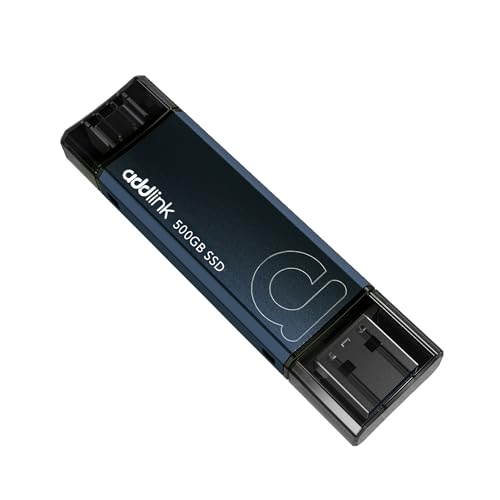
The Addlink P50 is a pocketable USB 3.2 Gen 2 stick delivering up to 1,050MB/s with both USB-C and USB-A connectors. At 500GB in a thumb-drive form, it is perfect for carrying a few games to play on a Steam Deck, PS5, or laptop, offering plug-and-go portability for your favorite titles.
Frequently Asked Questions
What SSD size does the Steam Deck use?
The Steam Deck and ROG Ally use the compact M.2 2230 form factor, not the standard 2280. Drives like the Sabrent Rocket Q4 2230 and WD SN740 are made specifically for these slots, so always confirm the 2230 size before buying for a handheld.
How big of an SSD do I need for my Steam library?
With modern games hitting 100GB to 200GB each, 1TB fills quickly. A 2TB drive like the Sabrent Rocket Q4 or Silicon Power UD90 comfortably holds a large, varied library, while 512GB works if you keep a focused rotation of a few titles.
Is an internal or external SSD better for games?
Internal NVMe drives are faster and best for your primary library and fastest load times. External SSDs like the Transcend ESD420 are more flexible, letting you carry games between a Deck, console, and PC, though they run slower over USB than internal Gen4 drives.
Will a faster SSD reduce my game load times?
Yes. A PCIe Gen4 NVMe drive at up to 5,000MB/s loads levels and textures faster than SATA or hard drives, reducing wait times and pop-in. For handhelds, upgrading to a fast 2230 NVMe like the Rocket Q4 noticeably improves load performance.
Final Thoughts
Expanding your Steam library starts with the right drive for your device. For Steam Deck and ROG Ally owners, the 2TB Sabrent Rocket Q4 2230 is the best upgrade, with the Silicon Power UD90 as a great-value alternative and the WD SN740 512GB for budget builds. If you want portability, the Transcend ESD420 and Addlink P50 let you carry games anywhere. Match the form factor to your hardware, prioritize 2TB for a large library, and enjoy faster loads with room to spare.