Key takeaways
- Open Standard vs. Proprietary: FreeSync is an open standard developed by AMD, meaning manufacturers don’t pay royalties, leading to wider adoption and lower monitor costs. G-Sync is NVIDIA’s proprietary technology, requiring a dedicated hardware module in the monitor, which increases manufacturing costs and typically results in higher monitor prices.
- Hardware Requirements: FreeSync works with compatible AMD Radeon GPUs and often, with limited functionality, with NVIDIA GPUs (as “G-Sync Compatible”). G-Sync requires a compatible NVIDIA GeForce GPU.
- Performance Tiers: FreeSync has various tiers: FreeSync (basic tear-free), FreeSync Premium (adds LFC and at least 120Hz at FHD), and FreeSync Premium Pro (adds HDR support and advanced color capabilities). G-Sync has its own tiers: G-Sync Compatible (basic), G-Sync (standard module), G-Sync Ultimate (highest-end performance and HDR).
- Certification Process: G-Sync monitors undergo a stringent certification process by NVIDIA, ensuring a high baseline performance. FreeSync certification is less rigorous, though Premium and Premium Pro tiers have more defined requirements.
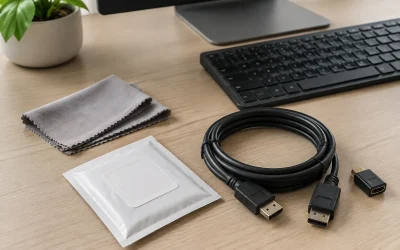
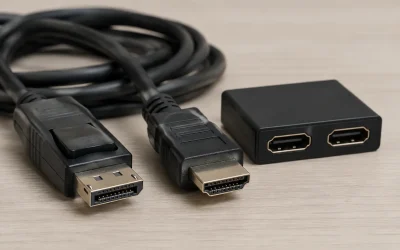
- Cable Requirements: For high refresh rates and resolutions (like 4K 144Hz or 8K 120Hz), a high-quality DisplayPort cable is essential. Cables like the Capshi 8K 4K DisplayPort Cable 1.4 or Ubluker 10K 8K DisplayPort 2.1 Cable are recommended to ensure full bandwidth and support for features like FreeSync and G-Sync.
What's inside
For gamers in 2026, achieving buttery-smooth gameplay with zero screen tearing is no longer a luxury, but a fundamental expectation. Two technologies dominate this quest for visual perfection: AMD’s FreeSync and NVIDIA’s G-Sync. While both aim to synchronize your monitor’s refresh rate with your graphics card’s frame output, they approach the problem with different philosophies and hardware requirements. Understanding these distinctions is crucial to making an informed decision for your next gaming setup.
This comparison will break down the core differences, weigh the pros and cons of each, and help you determine which adaptive sync technology is the right fit for your gaming rig, whether you’re rocking an AMD or NVIDIA GPU, and what kind of monitor you’re considering. We’ll look at real-world performance, compatibility, and the impact on your overall gaming experience.
As an Amazon Associate we earn from qualifying purchases at no extra cost to you.






⚡ Save on Your Next PC — Amazon Prime
Prime members get fast free shipping on the systems above, plus early access to Prime Day & Black Friday PC deals. New members get a 30-day free trial.
Watch: FreeSync vs G-Sync: Which Is Better? — Video Review
Quick Verdict
In 2026, both FreeSync and G-Sync offer excellent solutions for tear-free gaming. G-Sync generally offers a more premium, consistent experience with stricter certification, but often comes at a higher price. FreeSync, being an open standard, is more widespread and affordable, with its higher tiers (FreeSync Premium and Premium Pro) rivaling G-Sync’s performance. The best choice hinges on your GPU, budget, and desired level of display performance.
Key Differences
- Open Standard vs. Proprietary: FreeSync is an open standard developed by AMD, meaning manufacturers don’t pay royalties, leading to wider adoption and lower monitor costs. G-Sync is NVIDIA’s proprietary technology, requiring a dedicated hardware module in the monitor, which increases manufacturing costs and typically results in higher monitor prices.
- Hardware Requirements: FreeSync works with compatible AMD Radeon GPUs and often, with limited functionality, with NVIDIA GPUs (as “G-Sync Compatible”). G-Sync requires a compatible NVIDIA GeForce GPU.
- Performance Tiers: FreeSync has various tiers: FreeSync (basic tear-free), FreeSync Premium (adds LFC and at least 120Hz at FHD), and FreeSync Premium Pro (adds HDR support and advanced color capabilities). G-Sync has its own tiers: G-Sync Compatible (basic), G-Sync (standard module), G-Sync Ultimate (highest-end performance and HDR).
- Certification Process: G-Sync monitors undergo a stringent certification process by NVIDIA, ensuring a high baseline performance. FreeSync certification is less rigorous, though Premium and Premium Pro tiers have more defined requirements.
- Cable Requirements: For high refresh rates and resolutions (like 4K 144Hz or 8K 120Hz), a high-quality DisplayPort cable is essential. Cables like the Capshi 8K 4K DisplayPort Cable 1.4 or Ubluker 10K 8K DisplayPort 2.1 Cable are recommended to ensure full bandwidth and support for features like FreeSync and G-Sync.
AMD FreeSync
AMD’s FreeSync technology has democratized adaptive sync, making it accessible to a much wider audience. By leveraging the DisplayPort Adaptive-Sync standard, FreeSync allows monitors to dynamically adjust their refresh rate in real-time to match the frame rate output of your AMD GPU. This eliminates screen tearing and stuttering, providing a smoother visual experience. The FreeSync Premium and Premium Pro tiers further enhance this by guaranteeing higher refresh rates and better HDR capabilities, respectively, making them strong contenders for serious gamers.
The widespread availability and often more competitive pricing of FreeSync monitors, such as the Samsung 27” Odyssey G5 (G50F) Series QHD Gaming Monitor, make it an attractive option for budget-conscious gamers or those who prioritize a broad selection of display choices. Even NVIDIA users can often benefit from FreeSync, as many NVIDIA GPUs support “G-Sync Compatible” mode, which utilizes the Adaptive-Sync protocol.
NVIDIA G-Sync
NVIDIA’s G-Sync technology has long been the gold standard for high-end adaptive sync. Its proprietary hardware module ensures a consistently exceptional experience, characterized by virtually zero tearing, minimal stuttering, and excellent variable overdrive for reduced ghosting at various refresh rates. G-Sync monitors, often found in premium offerings like the ASUS TUF Gaming 27” 1440P HDR Monitor (VG27AQ3A), typically undergo rigorous testing to meet NVIDIA’s performance standards.
While G-Sync generally commands a higher price tag, the unwavering quality and reliability it offers are often worth the investment for NVIDIA enthusiasts who want the absolute best visual fidelity. The G-Sync Compatible designation on some FreeSync monitors means they’ve met NVIDIA’s minimum requirements for adaptive sync, but they don’t feature the full G-Sync module and may not offer the same level of performance consistency.
Which Should You Buy?
- If you have an AMD GPU: FreeSync is your native and most cost-effective solution. Opt for FreeSync Premium or Premium Pro for the best experience, especially if HDR is important to you.
- If you have an NVIDIA GPU: You have two primary options: G-Sync certified monitors for the guaranteed best experience, or “G-Sync Compatible” FreeSync monitors for a more budget-friendly entry into adaptive sync.
- Consider your budget: G-Sync monitors are generally more expensive than comparable FreeSync displays. If budget is a primary concern, FreeSync is likely the better route.
- Look at specific monitor features: Beyond adaptive sync, consider resolution, refresh rate, panel type (IPS, VA, TN), response time, and HDR support. Ensure any chosen monitor is paired with a capable DisplayPort cable like the IVANKY VESA Certified 8K DisplayPort Cable 1.4 or a longer variant like the Capshi 8K 4K DisplayPort Cable 1.4, 35ft if needed.
Frequently Asked Questions
What is screen tearing and why does adaptive sync fix it?
Screen tearing occurs when your graphics card outputs frames at a different rate than your monitor’s refresh rate. This causes the monitor to display parts of multiple frames simultaneously, resulting in a visible “tear” across the screen. Adaptive sync technologies synchronize the monitor’s refresh rate with the GPU’s frame output, eliminating this mismatch and the resulting tearing.
Can I use G-Sync with an AMD GPU?
No, G-Sync technology is proprietary to NVIDIA and requires a compatible NVIDIA GeForce GPU. However, many AMD GPUs can utilize FreeSync monitors, and some FreeSync monitors are designated “G-Sync Compatible,” meaning they can work with NVIDIA GPUs to a certain extent.
Are FreeSync and G-Sync cables different?
Both FreeSync and G-Sync rely on the DisplayPort interface. The crucial factor is the quality and specification of the DisplayPort cable itself. For high refresh rates and resolutions (e.g., 4K 144Hz or 8K 120Hz), you need a certified DisplayPort 1.4 or newer cable, such as the Ubluker 10K 8K DisplayPort 2.1 Cable, to ensure sufficient bandwidth.
Is FreeSync Premium Pro worth it?
FreeSync Premium Pro is designed for high-performance HDR gaming. If you have a compatible HDR display and an AMD GPU capable of outputting HDR, it offers enhanced color depth and contrast for a more immersive visual experience. For those prioritizing top-tier HDR gaming, it’s a valuable feature.
Final Verdict
As of 2026, the choice between FreeSync and G-Sync is less about one being definitively superior and more about aligning with your existing hardware and budget. AMD’s FreeSync offers an excellent, accessible, and increasingly capable solution across its various tiers. NVIDIA’s G-Sync continues to provide a premium, highly consistent experience for GeForce users willing to invest a bit more. Regardless of your choice, ensuring you have a high-quality DisplayPort cable is paramount for unlocking the full potential of either technology.