Key takeaways
- Bandwidth: DisplayPort 1.4 handles 4K 120Hz with DSC; DP 2.1 pushes far higher; HDMI 2.1 delivers 48Gbps for 4K 120Hz and 8K 60Hz.
- Adaptive sync: DisplayPort has the longest, most reliable track record for FreeSync and G-Sync on PC.
- Multi-monitor: DisplayPort MST hubs and splitters drive several displays from one port; HDMI does not do native MST.
- TVs and consoles: HDMI 2.1 is the standard on TVs and game consoles.
- Cable pitfalls: Uncertified cables silently cap resolution or refresh; certification matters.
- Directionality: Some DP-to-HDMI cables are one-directional (source to display) and must be oriented correctly.
What's inside
Plugging in a new monitor seems simple until you notice two capable ports on the back of your GPU and wonder which one unlocks the full experience. In 2026, DisplayPort and HDMI 2.1 are both fast enough for high-refresh 4K gaming, but they differ in bandwidth, adaptive-sync behavior, and which devices they suit best. Picking the right one and the right cable can be the difference between 120Hz and a locked 60Hz.
The confusion is understandable because both standards have multiple versions, and a cable that looks identical may or may not carry the bandwidth you need. This guide compares DisplayPort and HDMI 2.1 for PC gaming and covers the adapters and splitters that keep a multi-monitor setup working cleanly.
As an Amazon Associate we earn from qualifying purchases at no extra cost to you.

![DGYBDFC DisplayPort to Dual HDMI Adapter 1 in 2 Out, 4K60Hz Display Port DP 1.4 to 2 HDMI Splitter for PC Graphics Card Monitor Support Windows Extended Mode, [MacOS Only Mirror Mode], No DP Cables](https://m.media-amazon.com/images/I/41BHW4tWlVL._SL160_.jpg)


⚡ Save on Your Next PC — Amazon Prime
Prime members get fast free shipping on the systems above, plus early access to Prime Day & Black Friday PC deals. New members get a 30-day free trial.
Watch: DisplayPort vs HDMI 2.1 for Gaming — Video Review
Quick Verdict
For a PC monitor, DisplayPort is usually the better default: it delivers high bandwidth, rock-solid variable refresh, and easy multi-monitor daisy chaining via MST hubs. Choose HDMI 2.1 when connecting to a TV or a display whose best mode runs over HDMI. For everything else, a VESA-certified DisplayPort cable is the safe pick.
Key Differences
- Bandwidth: DisplayPort 1.4 handles 4K 120Hz with DSC; DP 2.1 pushes far higher; HDMI 2.1 delivers 48Gbps for 4K 120Hz and 8K 60Hz.
- Adaptive sync: DisplayPort has the longest, most reliable track record for FreeSync and G-Sync on PC.
- Multi-monitor: DisplayPort MST hubs and splitters drive several displays from one port; HDMI does not do native MST.
- TVs and consoles: HDMI 2.1 is the standard on TVs and game consoles.
- Cable pitfalls: Uncertified cables silently cap resolution or refresh; certification matters.
- Directionality: Some DP-to-HDMI cables are one-directional (source to display) and must be oriented correctly.
DisplayPort for Gaming
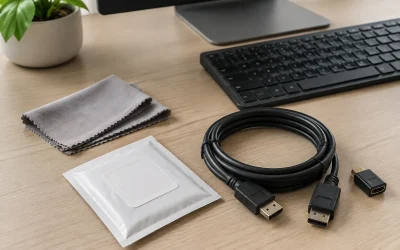
DisplayPort is the enthusiast’s connector of choice on PC. A VESA-certified DP 1.4 cable like the Capshi or IVANKY 8K DisplayPort cables carries enough bandwidth for 4K 120Hz or 1440p high-refresh gaming, and DP 2.1 cables push well beyond that for future panels. Adaptive sync over DisplayPort is the most reliable path for both FreeSync and G-Sync Compatible modes.
DisplayPort also shines for multiple monitors. An MST hub such as a DisplayPort-to-dual-HDMI splitter can drive two displays from a single output, which is handy on GPUs with limited ports. If you are connecting a gaming monitor to a desktop, start with DisplayPort.
HDMI 2.1 for Gaming
HDMI 2.1 closed most of the gap with a full 48Gbps of bandwidth, enough for 4K at 120Hz or 8K at 60Hz with the right certified cable. It is the natural choice when your display is a TV, since living-room panels standardize on HDMI, and it carries features like variable refresh rate and auto low-latency mode for console-style gaming.
The catch is cabling and adapters. A DisplayPort-to-HDMI 2.1 cable is often uni-directional, meaning the DP end must connect to the source (your GPU) and the HDMI end to the display. Use the wrong orientation or a non-certified cable and you can lose high-refresh modes entirely, so buy quality here.
Which Should You Buy?
- Use DisplayPort for a desktop-to-monitor connection and the most dependable adaptive sync.
- Use HDMI 2.1 when your display is a TV or its best mode runs over HDMI.
- Buy VESA-certified DP cables to guarantee 4K 120Hz or high-refresh 1440p.
- Check directionality on DP-to-HDMI cables and adapters before blaming your GPU.
- Use MST hubs from DisplayPort for clean multi-monitor setups.
Frequently Asked Questions
Is DisplayPort better than HDMI for gaming?
On a PC monitor, generally yes, thanks to reliable adaptive sync and multi-monitor support. For TVs and consoles, HDMI 2.1 is the right connector.
Can HDMI 2.1 do 4K 120Hz?
Yes. With a certified 48Gbps cable, HDMI 2.1 supports 4K at 120Hz and 8K at 60Hz, matching what most gamers need.
Why is my monitor stuck at 60Hz?
Usually a cable that lacks the bandwidth or a wrong-direction DP-to-HDMI adapter. Swap to a VESA-certified cable and confirm the source and display ends are oriented correctly.
Can one DisplayPort run two monitors?
Yes, using an MST hub or DisplayPort splitter, which lets a single output drive two displays as an extended desktop.
Final Verdict
For a gaming PC connected to a monitor, DisplayPort is the smart default: high bandwidth, the most reliable adaptive sync, and easy multi-monitor expansion. Reach for HDMI 2.1 when your display is a TV or its top mode lives on HDMI. Whichever you choose, invest in a VESA-certified cable and mind adapter directionality to unlock the full refresh rate.