Our Top Picks



A second screen changes how a gaming desk feels. A tablet propped at eye level can hold a map, a Discord chat, a stream, or a build guide while the main monitor stays clear for the game itself. The problem is the propping part: leaning a tablet against a monitor base or a stack of books invites slips, glare, and a sore neck.
A good tablet stand fixes the angle, holds the tablet steady through long sessions, and frees the desk space underneath. The five stands below cover the main styles — clamp-on desk arms, a gooseneck mount, a weighted desktop stand, a bedside arm, and a rotating kiosk-style base — so there is a fit for a tight desk, a couch setup, or a streaming rig.
As an Amazon Associate, we earn from qualifying purchases.
How to Choose a Tablet Stand for Gaming
Mount style. Clamp-on arms attach to the desk edge and leave the surface clear, which suits crowded gaming desks. Weighted desktop stands sit on the desk and move anywhere in seconds. Bedside and floor-style arms work for couch and bed gaming, where no desk edge is in reach.
Device size and weight. Check the stand’s supported screen range and load limit against your tablet. A 12.9-inch iPad Pro is far heavier than a Fire HD 8, and a stand rated for small tablets will droop under a large one. If you use a case, confirm the holder’s grip range covers the added thickness.
Adjustment range. A stand that tilts and rotates lets you switch between landscape for maps and portrait for chat, and lets you kill glare by shifting the angle. A 360-degree rotating base is handy when you turn the tablet toward a friend or a camera.
Stability. Aluminum arms and weighted bases resist wobble better than thin plastic. If you tap the screen often — to mark a map or pause a stream — a wobbly stand gets annoying fast.
Cable access. A tablet running maps or chat all session needs charging. Stands with an open back or a cable slot keep the charging cable from pulling the tablet out of position.
1. Pisipi Aluminum Tablet Stand Arm — Best Desk-Mount Arm

The Pisipi is a clamp-on desk arm built from aluminum alloy, and it is the most capable mount in this lineup. A three-section telescopic arm reaches about 40 cm from the desk edge, and the 360-degree rotating base lets you swing the tablet between a straight-ahead gaming view and an angled second-screen position. The C-clamp fits desks up to 2.36 inches thick, with soft silicone pads that protect the desk surface.
It handles screens from 4.7 to 15.6 inches, which covers phones, tablets, and even small portable monitors, and its load limit of 3.3 lb is enough for a large iPad Pro. The retractable clip accepts devices up to 0.55 inches thick, so most cases can stay on. Note that the listing showed no featured offers available at the time of writing — confirm availability before ordering.
Specs
- Mount type: C-clamp desk arm, fits desks up to 2.36 in thick
- Screen size: 4.7 to 15.6 in
- Load capacity: 3.3 lb
- Material: Aluminum alloy
- Arm: 3-section telescopic, about 40 cm reach
- Rotation: 360-degree base
- Weight: 1.61 lb
- ASIN: B0F8P4F8RJ
2. TeQable Gooseneck Tablet Stand — Best Flexible Clamp Mount
The TeQable trades rigid arms for a solid metal gooseneck, which bends into whatever shape your setup needs. Clamp it to a desk, a shelf, or a bedside table, bend the neck into an S-curve, and the tablet hangs where you want it. The ball-joint holder rotates freely, so switching between portrait and landscape takes one hand.
The gooseneck design has a real limit: the maker recommends keeping device weight under about 1 kg, and the listing itself warns that a straight arm will droop — bend it into an S-shape and tighten the clamp firmly. Within that limit, it is a simple, light mount for smaller tablets, phones, and e-readers. Note that the listing showed no featured offers available at the time of writing — confirm availability before ordering.
Specs
- Mount type: C-clamp gooseneck, fits surfaces up to 2.32 in thick
- Screen size: 4.7 to 13.5 in
- Load capacity: About 2.2 lb
- Material: Metal, plastic, silicone
- Arm: 13.7 in gooseneck
- Rotation: 360-degree ball-joint holder
- Weight: 1.48 lb
- Warranty: 12 months
- ASIN: B0F325MSGJ
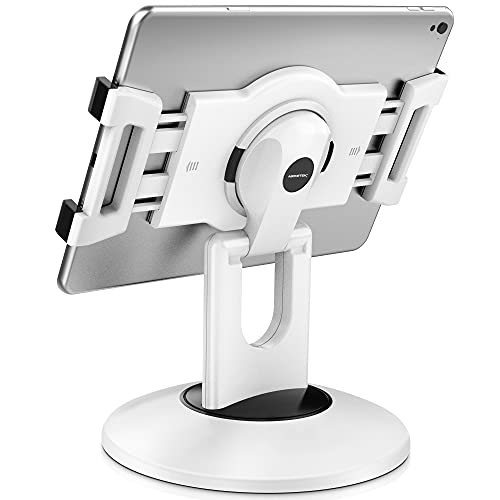
3. AboveTEK Retail Kiosk iPad Stand — Best Rotating Desktop Stand
The AboveTEK is a weighted tabletop stand with a 360-degree rotating base, built for counter and reception use but just as useful on a gaming desk. The folding arm adjusts the viewing angle, and the swivel base turns the tablet toward whoever needs to see it — handy for showing a teammate a map or turning the screen toward a camera during a stream.
Two rubber-padded bracket holders come in the box, together fitting tablets from 6 to 13 inches. The stand is compact at about 7.1 by 7.1 inches on the desk, and it includes a dedicated channel for the charging cable. Some tablets are not compatible with this stand — the maker lists the iPad mini 6th generation, Lenovo Tab P11, Galaxy Tab S6 Lite, and several Fire tablets among the exceptions — so check the fit list before ordering. Note that the listing showed no featured offers available at the time of writing — confirm availability before ordering.
Specs
- Mount type: Weighted tabletop stand
- Screen size: 6 to 13 in
- Material: Plastic with rubber-padded brackets
- Rotation: 360-degree base
- Dimensions: 7.1 x 7.1 x 10.6 in
- Weight: 1.5 lb
- In the box: Stand base, folding arm, 2 adjustable brackets
- ASIN: B06XB7KWGV
4. SAMHOUSING Bed Tablet Mount — Best for Couch and Bed Gaming
The SAMHOUSING arm is the pick for gaming away from the desk. Its four-jointed aluminum arm clamps to a headboard, a bed frame, or a desk edge, and a strong spring holds the tablet overhead or at an angle for reading, streaming, or handheld-style play with a controller. The arm rotates a full 360 degrees, so the tablet can face up, face down, or sit vertical.
It fits devices from 4.7 to 11 inches and holds up to about 3.3 lb, which covers most tablets and the Nintendo Switch. The four joints are the selling point here: they let you fold the arm flat against the headboard when the session ends, instead of leaving a stand sticking out into the room. A three-year warranty backs the build.
Specs
- Mount type: Clamp-on folding arm for headboard or desk
- Screen size: 4.7 to 11 in
- Load capacity: About 3.3 lb
- Material: Aluminum arm
- Joints: 4, fully adjustable
- Rotation: 360 degrees
- Weight: 2.05 lb
- Warranty: 3 years
- ASIN: B07P8YHKLF
5. UGREEN Dual Rod Tablet Stand — Best Simple Desktop Stand
The UGREEN is the simplest stand here, and for many desks it is all you need. Two aluminum rods support the tablet from a weighted base, the angle adjusts to your eye line, and the 360-degree rotating base lets you spin the tablet around without picking it up. There is nothing to clamp and nothing to assemble — set it down and slide the tablet in.
It fits iPad Pro models up to 13 inches, iPad Air and mini, phones, and e-readers, and the silver aluminum finish matches most desk setups. Because it is a passive stand with no clamp, it is also the easiest to move between a gaming desk and a kitchen counter or a bedside table.
Specs
- Mount type: Weighted desktop stand, dual rod support
- Screen size: Fits iPad Pro up to 13 in, iPad Air, iPad mini, phones, e-readers
- Material: Aluminum
- Rotation: 360-degree base
- Dimensions: 6.85 x 6.1 x 2.09 in (package)
- Weight: 1.3 lb
- Color: Silver
- ASIN: B0DGXKF4G8
Tablet Stand Comparison
| Stand | Mount type | Max screen | Load limit | Best for |
|---|---|---|---|---|
| Pisipi | C-clamp desk arm | 15.6 in | 3.3 lb | Large tablets and portable monitors |
| TeQable | C-clamp gooseneck | 13.5 in | 2.2 lb | Small tablets, flexible positioning |
| AboveTEK | Weighted tabletop | 13 in | Not stated | Shared viewing, rotating base |
| SAMHOUSING | Clamp-on folding arm | 11 in | 3.3 lb | Couch and bed gaming |
| UGREEN | Weighted desktop | 13 in | Not stated | Simple, portable desktop use |
FAQ
Can a tablet stand hold a 12.9-inch iPad Pro?
Yes, if the stand’s size range and load limit cover it. The Pisipi arm and the UGREEN desktop stand both list 13-inch iPad Pro models as compatible, and the Pisipi’s 3.3 lb limit covers the tablet’s weight. Lighter gooseneck mounts may droop under a large tablet, so check the load limit first.
Do I need a clamp mount or a desktop stand?
A clamp mount frees desk space and holds the tablet at eye level, which suits a crowded gaming desk. A desktop stand is easier to move and needs no desk edge, which suits a shared desk or a setup you rearrange often.
Can I use a tablet stand for a portable monitor?
Some can. The Pisipi arm supports screens up to 15.6 inches, which covers most portable monitors, as long as the monitor stays within the 3.3 lb load limit. Check the holder’s grip range against the monitor’s thickness before ordering.
Will a stand work with a tablet case on?
Most holders accept a case. The Pisipi clip fits devices up to 0.55 inches thick, and the TeQable holder fits devices around 0.6 inches thick. Thick rugged cases may exceed those limits, so measure your cased tablet first.
Can I charge the tablet while it is on the stand?
Yes. Stands with an open back or a cable channel — like the AboveTEK — keep the charging cable clear of the holder. With clamp arms, route the cable along the arm so its weight does not pull the tablet out of position.
Conclusion
For a gaming desk, the Pisipi desk arm is the strongest all-round pick: it holds the largest screens, clamps out of the way, and adjusts to any angle. The TeQable gooseneck is the flexible option for smaller tablets, the AboveTEK rotating stand suits shared viewing, the SAMHOUSING arm is the one to get for couch and bed play, and the UGREEN desktop stand is the simplest way to put a second screen at eye level. Match the mount style to where you play, check the load limit against your tablet, and the second screen will stay put for the whole session.
More from Amazon
Programs that pair well with the guide above. Offers and eligibility are set by Amazon and may change.
Free shipping on eligible items, Prime Video and more. Eligible new members can start with a free trial.
Start a Prime free trialAd-free music streaming. Eligible new subscribers can start with a free trial.
Try Music Unlimited freeA Prime membership for ages 18-24 with a trial period. Eligibility is set by Amazon.
See Prime for Young AdultsAudiobooks and podcasts to listen to on the go. Eligible new members can start with a free trial.
Try Audible freeAs an Amazon Associate we earn from qualifying purchases.