Our Top Picks
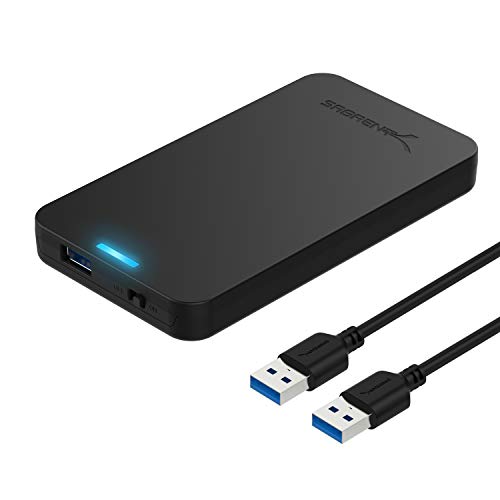 SABRENT 2.5in SATA to USB 3.0 Tool-Free SSD/HDDSATA Black4.9 x 3.1 x 0.5 inches0.1 poundsCheck on Amazon
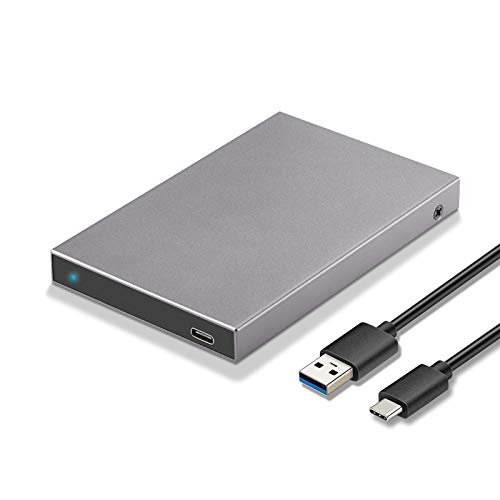 SSK 2.5" Hard Drive Enclosure SATA to USB-C2.5inch enclosure Adapter0.2 poundsDigitalCheck on Amazon
 Amazon Basics 2.5-inches SATA HDD or SSD Hard2.5-inches4.3 x 2.7 x 0.4 inches0.1 poundsCheck on Amazon

That 2.5-inch SATA SSD left over from a laptop upgrade still has years of life in it. A USB enclosure turns it into portable storage you can carry between machines, plug into a console, or keep on the desk as a dedicated game library drive. The bridge chip and the port decide how fast your drive runs, and the shell decides how well it survives a backpack.
Every pick below fits standard 2.5-inch SATA hard drives and SSDs that are 7 mm or 9.5 mm thick, and every one is bus-powered, so no wall adapter is needed. These are enclosures for 2.5-inch SATA drives only. They do not fit M.2 drives, and they are not docks or complete external drives.
As an Amazon Associate, we earn from qualifying purchases.
How to Choose a SATA SSD Enclosure
Speed ceiling. A SATA III drive tops out at 6 Gbps, and that sets the ceiling for the whole chain. A USB 3.0 enclosure caps the link at 5 Gbps, just under what the drive can do, while a USB 3.1 or 3.2 Gen 2 enclosure with a 10 Gbps port removes the USB bottleneck entirely. In practice, game loading from a 5 Gbps enclosure is barely slower than from an internal SATA port, because game loads mix sequential reads with small random reads. UASP support matters more than the headline number for sustained transfers: it lets the enclosure handle multiple commands at once, which shows up as steadier speeds during large game installs.
Fit. Nearly every 2.5-inch SATA SSD is 7 mm thick and fits everywhere, and most 2.5-inch laptop hard drives are 7 mm or 9.5 mm. Older high-capacity laptop drives at 12.5 mm or 15 mm will not fit any enclosure here. Foam pads in the box, included with several picks below, take up the slack around a slim 7 mm drive so it does not rattle.
Tool-free or screwed shut. A tool-free enclosure slides open so you can swap drives in seconds, which suits anyone who rotates drives for backups. A screw-closed aluminum shell takes a minute to open but holds the drive more rigidly and usually sheds heat better, which suits a drive that lives in the enclosure permanently.
Material. Aluminum shells act as a heat sink during long writes, such as installing a 100 GB game or cloning a full drive. Plastic shells are lighter, and they are fine for a drive that mostly idles or handles short bursts of reads.
Cable and port. Check what is in the box. Some enclosures ship with a USB-C to USB-C cable only, which is perfect for a modern laptop and useless on a desktop with only USB-A ports unless you add an adapter. Others include both cables. The enclosure-side connector is usually USB-C or Micro-B 3.0.
Health features. TRIM and S.M.A.R.T. passthrough let your operating system and drive utilities see the SSD through the bridge chip, so the drive can run its own cleanup and report its health. Not every bridge chip passes these commands through, so if an SSD will live in the enclosure long term, a pick that lists TRIM and S.M.A.R.T. support is worth favoring.
Consoles. A PS4, Xbox One, or Xbox Series console accepts a USB drive as extended storage, and games made for those consoles run from it. PS5 games are the exception: they cannot run from USB storage and can only be kept there as cold storage. Format the drive as exFAT if it will move between a PC and a console.
1. SABRENT EC-UASP — Best Classic Tool-Free Enclosure
The EC-UASP has been the default answer for turning a spare laptop drive into portable storage for years: slide the cover off, drop the drive in, slide it shut. No screws, no drivers, no tools. The USB 3.0 link runs at up to 5 Gbps with UASP support, close enough to the SATA III ceiling that game loads feel the same as they do from an internal drive. It accepts 7 mm and 9.5 mm drives, hot-swaps without a reboot, and works with Windows and macOS out of the box.
The shell is plastic, which keeps the enclosure light enough to toss in a laptop bag without noticing it, and the manual lists support for drives up to 16 TB. The box holds the enclosure and a USB 3.0 cable and nothing else, so plan on using your operating system’s own tools for cloning or formatting.
Specs
- Interface: USB 3.0, up to 5 Gbps, UASP support
- Drive fit: 2.5-inch SATA HDD and SSD, 7 mm and 9.5 mm
- Material: Plastic
- Dimensions: 4.9 x 3.1 x 0.5 inches
- Weight: 3 oz
- Max capacity: 16 TB per the manual
- Install: Tool-free slide-off cover, hot-swappable, plug and play
- In the box: Enclosure and USB 3.0 cable
- Warranty: 1 year
2. SSK HE-C600 — Best Aluminum USB-C Enclosure
The HE-C600 wraps a 2.5-inch SATA drive in an aluminum shell with a USB-C 3.1 Gen 2 port, which makes it the pick for anyone whose laptop has moved on from USB-A. The 6 Gbps SATA link and UASP support let a SATA SSD run at its full speed, and the aluminum body pulls heat away during long installs. It takes 7 mm and 9.5 mm drives up to 10 TB, installs without tools, and needs no drivers.
The listing notes compatibility with PS4, PS5, and Xbox consoles as well as PCs and single-board computers, so this is a solid choice for a drive that splits its time between a gaming PC and a console. The included cable is Type-C to USB-A; USB-C-only hosts will want a USB-C to USB-C cable to go with it.
Specs
- Interface: USB-C 3.1 Gen 2, 6 Gbps, UASP support
- Drive fit: 2.5-inch SATA HDD and SSD, 7 mm and 9.5 mm
- Material: Aluminum
- Dimensions: 4.57 x 2.95 x 0.79 inches
- Weight: 3.87 oz
- Max capacity: 10 TB
- Install: Tool-free, plug and play, no drivers needed
- In the box: Enclosure and Type-C to USB-A cable
- Compatibility: PC, PS4, PS5, Xbox, Raspberry Pi
3. Amazon Basics 2.5-Inch SATA Enclosure — Simplest Pick
The Amazon Basics enclosure does exactly one job with no fuss: it houses a 2.5-inch SATA drive and connects it over USB 3.0 at up to 5 Gbps. The tool-free cover slides off, the drive drops onto the SATA connector, and the enclosure is hot-swappable and plug and play on Windows and macOS. It supports SATA I, II, and III drives from 7 mm to 9.5 mm thick, and the box includes two self-adhesive foam sponges to hold a slim 7 mm drive snug.
The shell mixes aluminum and plastic, and a blue LED shows power and blinks during data transfers, which is useful when you want to confirm a long copy has finished before unplugging. This is the enclosure to buy when the drive inside matters more than the enclosure around it: a backup drive or a spare game library that stays plugged in at the desk.
Specs
- Interface: USB 3.0, up to 5 Gbps
- Drive fit: 2.5-inch SATA I, II, and III HDD and SSD, 7 mm to 9.5 mm
- Material: Aluminum and plastic
- Dimensions: 4.3 x 2.7 x 0.4 inches
- Weight: 2.24 oz
- Install: Tool-free, hot-swappable, plug and play
- In the box: Enclosure, USB 3.0 cable, and 2 self-adhesive foam sponges
- Extras: Blue LED power and activity indicator, bus-powered
4. UGREEN CM300 (70499) — Best for USB-C Laptops
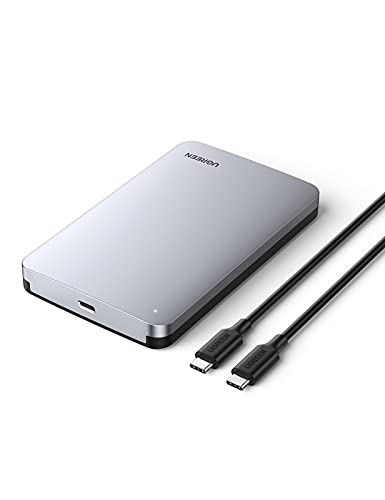
The CM300 is UGREEN’s aluminum USB-C enclosure for 2.5-inch SATA drives, and it makes the most of a modern laptop’s ports. Its USB-C 3.2 Gen 2 port runs at up to 10 Gbps, so the USB link never holds back a SATA III drive, and the ASM235CM bridge chip supports UASP for steadier sustained transfers. The silver aluminum shell is lined with EVA padding that cushions the drive, and the enclosure takes 7 mm and 9.5 mm drives up to 6 TB.
The included cable is USB-C to USB-C at 50 cm, which suits a laptop or a handheld PC, though a desktop with only USB-A ports will need a separate cable or adapter. At 103 g, the CM300 is light for a metal enclosure.
Specs
- Interface: USB-C 3.2 Gen 2 port, up to 10 Gbps; 6 Gbps SATA
- Drive fit: 2.5-inch SATA HDD and SSD, 7 mm and 9.5 mm
- Chipset: ASM235CM with UASP support
- Material: Aluminum, silver
- Dimensions: 5.24 x 3.23 x 0.59 inches
- Weight: 103 g
- Max capacity: 6 TB
- Install: Tool-free slide-off cover with EVA padding
- In the box: Enclosure and 50 cm USB-C to USB-C cable
- Warranty: 1 year
5. Cable Matters 201079 — Best All-Rounder With Both Cables
The Cable Matters 201079 covers every host port you are likely to meet. It ships with both a USB-C to USB-C cable and a USB-C to USB-A cable, each rated for 10 Gbps, so it works with a new laptop and an old desktop without buying anything extra. The 10 Gbps Gen 2 link, UASP support, and TRIM and S.M.A.R.T. passthrough make it the most complete pick here for an SSD that will live in the enclosure long term, since the drive stays visible to your system’s health tools.
The premium aluminum shell holds 2.5-inch SATA I, II, and III drives up to 5 TB, and the listing notes compatibility with Thunderbolt 3, Thunderbolt 4, and USB4 ports. An adhesive foam pad in the box keeps a slim drive from shifting.
Specs
- Interface: USB-C Gen 2, 10 Gbps, UASP support
- Drive fit: 2.5-inch SATA I, II, and III HDD and SSD
- Material: Aluminum
- Weight: 3.4 oz
- Max capacity: 5 TB
- Extras: TRIM and S.M.A.R.T. passthrough, Thunderbolt 3, Thunderbolt 4, and USB4 compatible
- In the box: Enclosure, USB-C to USB-C 10 Gbps cable, USB-C to USB-A 10 Gbps cable, adhesive foam pad
- Warranty: 1-year limited warranty
Quick Comparison
| Enclosure | Interface | Top speed | Shell | Best for |
|---|---|---|---|---|
| SABRENT EC-UASP | USB 3.0 | 5 Gbps | Plastic | Everyday tool-free use |
| SSK HE-C600 | USB-C 3.1 Gen 2 | 6 Gbps | Aluminum | Console and PC sharing |
| Amazon Basics | USB 3.0 | 5 Gbps | Aluminum and plastic | Simple backup drive |
| UGREEN CM300 | USB-C 3.2 Gen 2 | 10 Gbps port | Aluminum | USB-C laptops |
| Cable Matters 201079 | USB-C Gen 2 | 10 Gbps | Aluminum | Any host, both cables included |
If you only need one enclosure and your machines are a mix of old and new, the Cable Matters 201079 covers every port with both cables in the box. For a USB-C-only laptop, the UGREEN CM300 gives the fastest link a SATA drive can use.
Frequently Asked Questions
Can I run games directly from a SATA SSD in a USB enclosure?
Yes, on PC. A game installed on an SSD in a USB enclosure loads within a small margin of the same game on an internal SATA drive, because the SATA III ceiling of 6 Gbps is the limiting factor either way. Consoles differ: PS4, Xbox One, and Xbox Series consoles run their own games from USB extended storage, but PS5 games cannot run from USB and can only be stored there until copied back.
Will a USB 3.0 enclosure slow down my SSD?
Only slightly. USB 3.0 tops out at 5 Gbps while SATA III reaches 6 Gbps, so a 5 Gbps enclosure gives up a small slice of sequential speed. Game loading and everyday file work rarely notice the difference. If you move large files often, pick a Gen 2 enclosure with a 10 Gbps port.
Do these enclosures work with hard drives too?
Yes. Every pick here accepts 2.5-inch SATA hard drives as well as SSDs, as long as the drive is 7 mm or 9.5 mm thick. A 3.5-inch desktop hard drive will not fit, and it needs external power that a bus-powered enclosure cannot supply.
Can I use a 2.5-inch SATA enclosure with an M.2 SSD?
No. M.2 drives use a different connector and a much smaller form factor, so they physically cannot fit a 2.5-inch bay. M.2 drives need their own M.2 enclosure, matched to the drive type: NVMe enclosures for NVMe drives, and SATA enclosures for M.2 SATA drives.
Conclusion
A good SATA enclosure is a small purchase that rescues a drive from a drawer and turns it into storage you will actually use. The SABRENT EC-UASP is the safe default, the SSK HE-C600 and UGREEN CM300 bring aluminum shells and USB-C to the table, the Amazon Basics enclosure keeps things simple, and the Cable Matters 201079 covers every host with both cables included.
FAQ
Can I run games directly from a SATA SSD in a USB enclosure?
Will a USB 3.0 enclosure slow down my SSD?
Do these enclosures work with hard drives too?
Can I use a 2.5-inch SATA enclosure with an M.2 SSD?
More from Amazon
Programs that pair well with the guide above. Offers and eligibility are set by Amazon and may change.
Free shipping on eligible items, Prime Video and more. Eligible new members can start with a free trial.
Start a Prime free trialAd-free music streaming. Eligible new subscribers can start with a free trial.
Try Music Unlimited freeA Prime membership for ages 18-24 with a trial period. Eligibility is set by Amazon.
See Prime for Young AdultsAudiobooks and podcasts to listen to on the go. Eligible new members can start with a free trial.
Try Audible freeAs an Amazon Associate we earn from qualifying purchases.