Key takeaways
- Razer Naga V2 HyperSpeed offers 19 programmable buttons, a Focus Pro 30K sensor, and long battery life. See specs, strengths, limits, and who it suits.
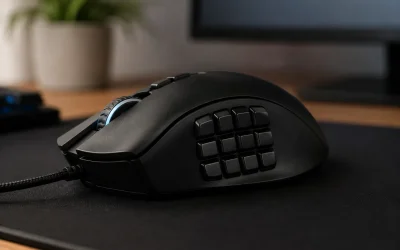
A mouse for massively multiplayer games lives or dies by its side buttons. In a raid or a long dungeon run, the difference between a comfortable thumb grid and a cramped one shows up in every skill rotation. The Razer Naga V2 HyperSpeed is built around that idea, with a 12-button thumb grid, a total of 19 programmable buttons, and a wireless link that can switch to Bluetooth for a second device.
This guide walks through what the mouse is, what the Amazon listing actually specifies, and where it fits. It covers the sensor, the switches, the battery, and the shape, then turns to the practical checks that matter before buying: hand size, grip style, game type, and whether a wireless MMO mouse with a fixed thumb grid matches how you play.
As an Amazon Associate we earn from qualifying purchases
What the Razer Naga V2 HyperSpeed Is
The Naga V2 HyperSpeed is a wireless ergonomic MMO mouse from Razer. The Amazon listing describes it as a best-in-slot wireless ergonomic MMO mouse, with the emphasis on skill rotations and command mapping. The 19 programmable buttons are arranged so the thumb can reach a full grid of 12 buttons on the side, while the remaining buttons cover the usual clicks, scroll wheel, and top controls.
Two wireless links are built in. Razer HyperSpeed Wireless on 2.4 GHz is the low-latency link for gaming, and Bluetooth is the second link for longer sessions or for a second computer. The listing states that HyperSpeed Wireless is 25 percent faster than other wireless technology, and that Bluetooth gives longer hours of use. The mouse runs on a single AA battery, which is included, so there is no charging cable routine and no dock to keep on the desk.
Specifications
| Specification | Detail |
|---|---|
| Brand | Razer |
| Model | Naga V2 HyperSpeed |
| Model number | RZ01-03600100-R3U1 |
| ASIN | B0BGJT87N2 |
| Colour | Black |
| Programmable buttons | 19 |
| Sensor | Focus Pro 30K Optical Sensor |
| Scroll wheel | HyperScroll Technology, dual mode |
| Switches | Mechanical Mouse Switches Gen-2, up to 60 million clicks |
| Connectivity | HyperSpeed Wireless 2.4 GHz and Bluetooth, USB |
| Movement detection | Optical |
| Hand orientation | Right |
| Compatible devices | Personal Computer |
| Hardware platform | PC |
| Range | 10.0 metres |
| Battery | 1 AA battery required, included |
| Battery life | Up to 400 hours on Bluetooth, up to 250 hours on HyperSpeed Wireless |
| Item dimensions | 4.71 x 2.96 inches |
| Item weight | 3.35 ounces |
| Power source | Battery powered |
| Warranty | 2 year manufacturer |
The specifications above come from the Amazon listing. The sensor name, Focus Pro 30K, refers to the optical sensor in the title, and the listing states that it tracks on a wider variety of surfaces including glass. The switch lifespan of up to 60 million clicks is the figure given for the Gen-2 mechanical switches, which use gold-plated contact points according to the listing.
What Works Well
The thumb grid is the clear centre of the design. Twelve side buttons give an MMO player a full set of skills, macros, and commands under one thumb, and the total of 19 programmable buttons leaves room for mapping the essentials and the advanced commands together. For a player who binds abilities, potions, mounts, and chat commands to the mouse, that layout removes a lot of reaching across the keyboard.
Battery life is the third strength. Up to 400 hours on Bluetooth and up to 250 hours on HyperSpeed Wireless from a single AA battery means the mouse can run for weeks of regular play before a battery change. The HyperScroll wheel adds flexibility as well, with a free-spin mode for moving through long pages and a tactile mode for precise steps, so the same wheel works for browsing, inventory management, and in-game commands.
Limitations to Know Before Buying
The fixed thumb grid is both the strength and the limit. A player who wants a swappable side panel, a different button layout, or a smaller grid will not find that option here. The shape is right-handed and ergonomic, with a finger rest on the right side, so left-handed players should look elsewhere. Hand size also matters: a large ergonomic shell with a full thumb grid suits a palm or relaxed claw grip, but a player with small hands may find the far buttons harder to reach.
Weight is another point to weigh. At 3.35 ounces with the battery installed, the mouse is heavier than a lightweight esports mouse built for fast shooters. That weight gives it a planted feel for MMO play, where the mouse moves in shorter, controlled motions, but it is a poor match for a player who wants the lightest possible mouse for flick shots. The listing gives no polling rate for this model, so a buyer who cares about that figure should confirm it with Razer before buying.
The AA battery is a trade-off as well. It avoids charging downtime and keeps the mouse simple, but it means keeping spare batteries on hand and accepting that the weight changes slightly as the battery is used.
Who It Fits
This mouse fits an MMO or MOBA player who uses many abilities, macros, and commands and wants them on the thumb. It suits a player who plays long sessions on a PC, values a long battery life, and wants both a low-latency wireless link and a Bluetooth link for a second device. It also fits a player who already uses Razer software for button mapping and wants a mouse that slots into that setup.
It fits less well for a competitive shooter player who needs the lightest mouse available, a left-handed player, or a player with small hands who struggles to reach a full 12-button grid. It is also a weaker match for someone who wants a mouse with swappable side panels or a rechargeable battery, since neither is listed for this model. A player who mainly plays strategy games with few mouse commands may find the thumb grid more than they need.
What to Check Before Buying
Start with grip and hand size. Hold a mouse of similar length and width if possible, and check whether the thumb can reach the back row of the side grid without shifting the whole hand. A palm grip suits the ergonomic shell best, while a fingertip grip may feel less secure on a mouse of this size.
Next, check the connection plan. Decide whether the 2.4 GHz link will go to the gaming PC and Bluetooth to a laptop or a second machine, and confirm that the PC has a spare USB port for the dongle. The listing states a range of 10 metres, but a clear line of sight and a dongle close to the mouse will give the most reliable link in a busy desk setup.
Frequently Asked Questions
How many programmable buttons does the Naga V2 HyperSpeed have?
The Amazon listing states 19 programmable buttons. Twelve of those form the thumb grid on the side of the mouse, and the rest cover the main clicks, scroll wheel, and top controls. The buttons are intended for mapping commands, skills, and macros, so the exact layout depends on how the player configures them.
How long does the battery last?
The listing gives up to 400 hours on Bluetooth and up to 250 hours on Razer HyperSpeed Wireless at 2.4 GHz, from a single AA battery. The battery is included, and the mouse is battery powered rather than rechargeable. Actual battery life will vary with use, connection type, and how often the mouse is in active play.
Does the mouse work on glass?
The listing states that the Focus Pro 30K optical sensor provides tracking on a wider variety of surfaces including glass. That makes the mouse more flexible about desk surfaces than a sensor with a narrower surface range, although a clean, flat surface will still give the most consistent tracking in practice.
Is the Naga V2 HyperSpeed suitable for fast shooters?
It can be used for shooters, but the design is aimed at MMO play. The ergonomic right-handed shape, the full thumb grid, and the weight of 3.35 ounces suit controlled MMO movement rather than the lightest, fastest flicks. A player who mainly plays competitive shooters may prefer a lighter mouse with fewer side buttons.
FAQ
How many programmable buttons does the Naga V2 HyperSpeed have?
How long does the battery last?
Does the mouse work on glass?
Is the Naga V2 HyperSpeed suitable for fast shooters?
More from Amazon
Programs that pair well with the guide above. Offers and eligibility are set by Amazon and may change.
Free shipping on eligible items, Prime Video and more. Eligible new members can start with a free trial.
Start a Prime free trialAd-free music streaming. Eligible new subscribers can start with a free trial.
Try Music Unlimited freeA Prime membership for ages 18-24 with a trial period. Eligibility is set by Amazon.
See Prime for Young AdultsAudiobooks and podcasts to listen to on the go. Eligible new members can start with a free trial.
Try Audible freeAs an Amazon Associate we earn from qualifying purchases.