Key takeaways
- Learn how to choose a gaming mouse that fits your hand, grip, and games, from sensor and shape to weight, polling, and buttons, without the guesswork.
A gaming mouse is the one peripheral your hand touches through every match, every ranked climb, and every late-night session, so picking the wrong one shows up fast: a shape that cramps your ring finger after an hour, a sensor that spins out on fast flicks, or a cable that drags across the pad at the worst moment. The real decision is not which mouse carries the biggest specification number on the box, but which combination of shape, weight, sensor, and buttons matches your hand, your grip, and the games you actually play.
This guide walks through the full decision in order, from measuring your hand and naming your grip style to reading sensor and polling numbers, weighing wired against wireless, and setting sensitivity once the mouse arrives. It covers players who live in fast shooters, players who need a dozen thumb buttons for sprawling online worlds, and players who want one mouse for ranked nights and everyday work alike.
As an Amazon Associate, we earn from qualifying purchases.
How to Choose
Start with your hand and your grip
Measure your hand before you look at a mouse. Stretch your middle finger from the wrist crease to the tip and note the length, then measure across the knuckles for width, because those two numbers decide which shell sizes are in the running. Next, watch how your hand sits on your mouse: palm flat and resting means a palm grip, fingers arched with the palm lifted means a claw grip, and only fingertips touching means a fingertip grip. Each grip asks for a different shape, since palm players need length and a hump, claw players need a shape that locks the knuckles without forcing the wrist, and fingertip players need a short, low shell that stays out of the way.
Read the sensor, not the headline number
A huge maximum DPI number tells you almost nothing about how a mouse aims. What matters is tracking that stays accurate when you move fast, so look for a modern optical sensor with high IPS and acceleration ratings, which describe how quickly the sensor can follow a flick without losing the cursor. Lift-off distance matters just as much: a sensor that keeps tracking a few millimetres above the pad will jump the crosshair every time you reposition the mouse, while a low lift-off distance keeps the aim still. Optical sensors are the standard for gaming because they track cleanly on cloth pads, while older laser sensors can feel less steady on the same surface.
Weight changes how the mouse feels
Weight is the first thing your hand notices, and it shapes every swipe. A light mouse, roughly in the 50 to 65 gram range, starts and stops with less effort, which suits fast flicks and long sessions where the wrist does most of the work. A heavier mouse, closer to 90 grams and above, feels planted and steady, which some players prefer for careful tracking and slow, deliberate aim. Balance matters as much as the number on the spec sheet: a mouse that is front-heavy will drag differently from one with the weight centred under the palm. Some models let you add or remove small weights to find your own balance point.
Wired, wireless, or both
Wired mice never need charging and never drop a connection, and the only real drawback is cable drag, which a light, flexible paracord-style cable and a tidy desk layout mostly solve. Modern wireless mice have closed the gap, with low-latency wireless links and polling rates that match wired models, so the choice now comes down to habits rather than raw speed. Wireless brings a clean desk and no drag at all, but it adds a battery to watch, a receiver or charging dock to keep track of, and a little extra weight. Some mice work both ways, which is handy when the battery runs low mid-session and you can plug in and keep playing.
Buttons, wheel, and software
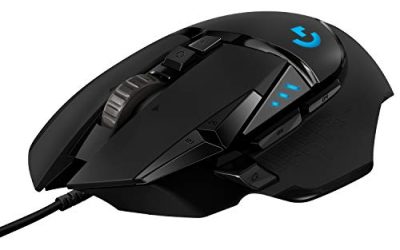
Count the buttons your games actually use before you count the buttons on the mouse. Shooter players usually need two thumb buttons for actions like melee and reload, while players of sprawling online worlds and strategy games often want a full thumb grid for abilities and macros. The main clicks matter too: optical switches feel crisp and tend to avoid double-click faults, while mechanical switches give a familiar tactile snap. Check the scroll wheel as well, since a notched wheel suits weapon swapping and a free-spinning wheel suits long documents. Companion software ties it together with sensitivity steps, button remapping, and profiles that save your setup on the mouse itself.
Shape, size, and the surface under it
Length, width, and hump position decide whether a mouse disappears into your hand or fights it. Compare the shell measurements with your hand size: a mouse much longer than your hand forces the fingers to stretch, while one much shorter leaves the palm unsupported and strains the wrist. A high rear hump fills a palm grip, a low, flat top suits claw and fingertip grips, and side curves decide where the thumb and ring finger rest. Coating matters for grip when hands get warm, with matte textures holding steady and glossy shells turning slick. The pad underneath counts too, since a worn pad and tired mouse feet add drag that no sensor can fix.
Which One Fits Your Situation
You mainly play fast shooters
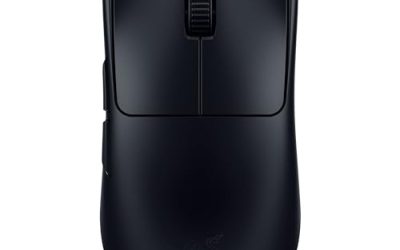
Look for a light mouse with a clean, low-profile shape that matches your grip, a modern optical sensor with a low lift-off distance, and a high polling rate for smooth flicks. Two thumb buttons are enough for most shooters, and a flexible cable or a wireless link keeps the mouse free on wide swipes. Skip thumb grids and extra bulk, since every stray button is something your hand must manage while tracking a moving target.
You play MMOs or strategy games
Pick a mouse with a thumb grid or a row of side buttons, because a dozen abilities on the mouse beats reaching across the keyboard. A slightly heavier shell is fine here, since aim work is slower and steadier than in a shooter, and comfort matters more across long sessions. Set up profiles so each game gets its own button layout, and keep the sensor steady rather than chasing the highest DPI number on the list.
You want one mouse for games and work
Choose a comfortable ergonomic shape with a good scroll wheel, since you will live with this mouse through work hours and evening matches. Wireless is a strong fit here, with a long battery life and a receiver that stays in the laptop, plus a second connection mode for switching between machines. Side buttons pull double duty for shortcuts like copy, paste, and browser back, and a quiet, controlled click keeps the mouse pleasant to use all day.
You have large hands or a tight desk
If your hand measures long and wide, look for a full-size ergonomic mouse with a high hump and a long shell, and measure before ordering. A palm grip on an undersized mouse cramps the fingers within an hour, so shell length matters most. If the desk is tight, a compact mouse or a wireless link frees up space, and a smaller pad still works with a low lift-off distance for frequent repositioning.
Common Mistakes
- Buying on the biggest DPI number alone, when sensor stability, lift-off distance, and shape decide far more of your aim than the headline figure ever will.
- Copying a professional player’s mouse and sensitivity settings, even though a different hand size, grip style, and desk setup make the same settings feel wrong for you.
- Ignoring grip style and hand measurements, then wondering why a popular mouse cramps your fingers or leaves your palm unsupported after an hour of play.
- Setting polling to the highest rate without checking that the connection stays stable, and skipping the week of small sensitivity adjustments that turn a new mouse into a familiar one.
- Forgetting the surface underneath, since a worn mouse pad, dirty mouse feet, and a dragging cable add friction that no sensor upgrade can fix.
Frequently Asked Questions
What DPI should I use for gaming?
Start around 800 DPI with a sensitivity that lets you turn 180 degrees with one arm sweep, then adjust in small steps over a few sessions. Most players settle between 400 and 1600 DPI, because lower settings give finer control. The right number is the one that lets you flick to a target and track it without overshooting, not the biggest number on the spec sheet.
Is wireless fast enough for competitive play?
Yes, wireless gaming mice use low-latency links with polling rates that match wired models, and many players have switched without noticing a difference. Keep the receiver close to the mouse, watch the battery before a long session, and pick a model with a wired fallback so a flat battery never ends a match. A basic wireless office mouse is a different story, since it is not built for fast play.
How do I know my grip style?
Hold your current mouse the way you do mid-match and look at your hand. A palm flat against the shell is a palm grip, an arched hand with the palm lifted is a claw grip, and only fingertips touching is a fingertip grip. Your grip can shift between games, so check it in the game you play most and choose a shape that suits that grip.
Does a lighter mouse make me aim better?
A lighter mouse can help with fast flicks and long sessions because it takes less effort to move, but it does not fix aim on its own. Some players aim more steadily with a little extra weight, since a planted mouse resists small tremors. The best test is to borrow or try mice in different weight ranges and notice which one lets you stop exactly on target without overshooting.
How many buttons do I need on a gaming mouse?
Shooters usually need just two thumb buttons, while sprawling online worlds and strategy games reward a thumb grid with six to twelve buttons for abilities and macros. Extra buttons only help when you can reach them without shifting your grip, so a few well-placed buttons beat a crowded side panel. If you mostly play one genre, match the button count to that genre and ignore the rest of the lineup.
How long should a gaming mouse last?
A well-made gaming mouse usually lasts several years of play, with the main clicks rated for tens of millions of presses. Mouse feet wear down first and are easy to replace, while a fraying cable or swelling battery means it is time to retire the mouse. Clean the sensor and feet now and then, and store the mouse where the cable does not bend at the same spot every day.
FAQ
What DPI should I use for gaming?
Is wireless fast enough for competitive play?
How do I know my grip style?
Does a lighter mouse make me aim better?
How many buttons do I need on a gaming mouse?
How long should a gaming mouse last?
More from Amazon
Programs that pair well with the guide above. Offers and eligibility are set by Amazon and may change.
Free shipping on eligible items, Prime Video and more. Eligible new members can start with a free trial.
Start a Prime free trialAd-free music streaming. Eligible new subscribers can start with a free trial.
Try Music Unlimited freeA Prime membership for ages 18-24 with a trial period. Eligibility is set by Amazon.
See Prime for Young AdultsAudiobooks and podcasts to listen to on the go. Eligible new members can start with a free trial.
Try Audible freeAs an Amazon Associate we earn from qualifying purchases.