3 Best Wired Headsets for PS5 Gaming (November 2026)
Find the best wired headsets for PS5 with clear chat, Tempest 3D Audio support, and long-session comfort. Compare wired picks for the DualSense controller.
A wired headset removes two worries on PS5: a battery running low in the middle of a match and a connection that needs pairing before you can play. You plug a cable into the DualSense controller or a USB port on the console, and you are ready. The real decision is not wired against wireless. It is which wired connection, which microphone, and which fit will hold up through the way you actually play, through long sessions.
The three headsets below cover the main ways PS5 players buy. Competitive players who want a light PlayStation headset should look at the Razer BlackShark V2 X PlayStation. Players who want a fuller sound and a sturdy frame for long sessions should look at the HyperX Cloud III. Players who split time between PS5 and PC, and who like USB-C and software tuning, should look at the SteelSeries Arctis Nova 3. Each one is a wired headset that works with PS5, chosen from its Amazon listing title and specifications.
Quick Picks
As an Amazon Associate we earn from qualifying purchases
The simplest wired setup on PS5 is a 3.5mm cable plugged into the DualSense controller. It carries game sound and chat, it lets you use the controller mute button, and it works the moment you plug it in. A USB connection plugs into the console itself and can unlock extra features on some headsets, such as a dedicated sound card or software controls, but it ties the headset to the console rather than the controller. If you play on the couch and move around, a 3.5mm cable gives you more freedom. If you sit close to the console, USB is worth considering.
Tempest 3D Audio and Soundstage
Tempest 3D Audio is the PS5 system that places sounds around you, so footsteps, gunfire, and environmental cues feel like they come from a direction rather than from inside your head. A wired headset connected to the DualSense controller or the console can carry that sound, but the headset still needs drivers and tuning that keep positional cues clear. Look for a wide, open soundstage rather than heavy bass alone, because bass that overwhelms the midrange can bury the small sounds that matter in a match. A headset with a spatial audio mode can help, yet the PS5 setting itself does most of the work, so a clean, balanced driver matters more than a long feature list.
Microphone Clarity and Chat Balance
A good PS5 headset microphone picks up your voice clearly and keeps background noise out of party chat. A cardioid pickup pattern, which focuses on sound from one direction, helps here, and a bendable boom lets you place the microphone close to your mouth. A flip-to-mute design or a clear mute indicator keeps you from talking when you think you are muted. Just as important is the balance between game sound and chat volume. The PS5 lets you adjust that balance in its sound settings, and some headsets add on-ear controls for volume, so you can turn a teammate up without losing the game sound underneath. Try the balance settings before you judge a microphone.
Comfort, Weight, and Build
Comfort decides whether a headset stays on your head for a full session or comes off after an hour. Lighter headsets put less pressure on the top of your head, while memory foam ear cushions spread the clamping force around your ears instead of pressing on one spot. A padded headband matters as much as the ear cushions, especially for players who wear glasses, because a hard band can press frames into the side of your head. Build matters too: a metal frame or reinforced headband survives being set down, picked up, and packed away far better than a headset made only from thin plastic. Check the weight and the cushion material before you commit.
The 3 Best Options
Razer BlackShark V2 X PlayStation
Top Pick
Razer BlackShark V2 X PlayStation
Best for: Competitive PS5 players who want a light, plug-and-play headset made for PlayStation.
Competitive PS5 players who want a light, plug-and-play headset made for PlayStation.
Watch out for
The 3.5mm connection means the headset relies on the PS5 and the DualSense controller for audio processing, so it does not add its own USB sound features.
This is the most PS5-focused headset in this guide, and that focus shows in the way it is built. It connects through a 3.5mm jack, so it plugs straight into the DualSense controller and works with the PS5 without any extra hardware. The drivers are tuned for competitive play, with clear highs and mids that keep footsteps and callouts easy to hear, and the lightweight frame stays comfortable when a session runs long. The cardioid microphone keeps your voice clear in party chat, while the passive noise cancellation and memory foam cushions help block out room noise.
Watch out for: The 3.5mm connection means the headset relies on the PS5 and the DualSense controller for audio processing, so it does not add its own USB sound features.
HyperX Cloud III
Runner-Up
HyperX Cloud III
Best for: Players who want a sturdy, comfortable headset for long PS5 sessions with flexible connection choices.
The HyperX Cloud III is the comfort-first pick in this guide, built around large angled drivers and thick memory foam that suit long sessions. It ships with USB-C, USB-A, and 3.5mm connections, so you can plug it into the DualSense controller for couch play or into the console through USB when you want the included sound processing. The angled drivers and DTS Spatial Audio give game sound a wide, roomy feel, and the detachable microphone keeps voice chat clear while staying out of the way when you only want to listen. The durable frame and memory foam headband are made for headsets that get used every day.
Watch out for: It is heavier than the lightest headsets in this guide, so players who prefer a barely-there fit should check the weight first.
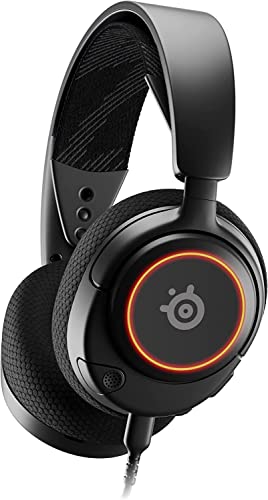
SteelSeries Arctis Nova 3
SteelSeries Arctis Nova 3
Best for: Players who split time between PS5 and PC and want a USB-C headset with software tuning on PC.
The SteelSeries Arctis Nova 3 is the pick for players who move between PS5 and PC and want one wired headset for both. It connects through USB-C, with a 3.5mm analog cable included, so it works with the PS5 through USB or with the DualSense controller through the analog cable. The Hi-Fi drivers and 360-degree spatial audio give game sound a wide, detailed presentation, and the ClearCast Gen 2 microphone is built to keep voice chat clear. AirWeave memory foam earcups and a lightweight frame keep it comfortable, and the RGB lighting can be adjusted on PC through SteelSeries software.
Watch out for: The RGB lighting and software tuning need a PC, so on PS5 the headset runs with its standard sound and lighting settings.
Which One Fits Your Situation
You play competitive multiplayer most nights
Choose the Razer BlackShark V2 X PlayStation. Its light frame, clear drivers, and cardioid microphone are built around competitive play, and the 3.5mm connection plugs straight into the DualSense controller. You get positional sound through the PS5, clear callouts for your squad, and a headset that stays comfortable through a run of matches without adding weight you will notice by the third game.
You play long story games and want comfort first
Choose the HyperX Cloud III. Its angled 53mm drivers and memory foam cushions suit hours of story-driven play, and the choice of USB-C, USB-A, and 3.5mm connections lets you set it up the way your room is arranged. The durable frame holds up to daily use, and the detachable microphone stays out of the way when you are playing alone and only want to listen.
You also play on PC or Switch
Choose the SteelSeries Arctis Nova 3. Its USB-C connection works with PS5 and PC, the included 3.5mm cable covers the DualSense controller and Switch, and the software tuning on PC lets you shape the sound for different games. One wired headset covers your main platforms, so you do not need a separate headset for each machine you play on.
You want the simplest plug-and-play setup
Choose the Razer BlackShark V2 X PlayStation or the HyperX Cloud III through the 3.5mm jack. Plug the cable into the DualSense controller, set the PS5 audio output to the headset, and play. There is no battery to charge, no pairing step, and no software to install on the console, which makes either headset a good fit for a shared living room or a second PS5 setup.
Common Mistakes
Buying a wireless-only headset when you wanted a wired connection, then finding it needs a dongle or a charge before it works.
Choosing a headset with a short cable and sitting too far from the console or the controller to play comfortably.
Turning the volume up to hear footsteps and losing the midrange detail that makes positional sound useful.
Ignoring the microphone position and then sounding distant or muffled in party chat.
Picking a heavy headset for long sessions without checking the weight and the cushion material first.
Frequently Asked Questions
Do wired headsets work with Tempest 3D Audio on PS5?
Yes, wired headsets work with Tempest 3D Audio when they are connected to the DualSense controller through the 3.5mm jack or to the console through USB. Turn on 3D Audio in the PS5 sound settings and select the headset as the output device. The console handles the spatial processing, so the headset needs clean, balanced drivers to keep directional cues clear rather than a special mode of its own.
Can I use a wired headset with the DualSense controller?
Yes, any wired headset with a 3.5mm plug works with the DualSense controller. Plug the cable into the jack at the bottom of the controller, and the PS5 will send game sound and chat to the headset. You can mute the microphone with the button on the controller, adjust the volume in the PS5 quick menu, and keep playing while the controller charges through its own cable.
Is USB or 3.5mm better for PS5?
Neither connection is better for every player; the right choice depends on how you play. A 3.5mm connection is simpler, works through the DualSense controller, and gives you freedom to move on the couch. A USB connection plugs into the console and can unlock extra features on some headsets. If you want the simplest setup, start with 3.5mm.
Do I need to charge a wired headset?
No, a wired headset draws its sound through the cable, so there is no battery to charge and no charging step before you play. That is one of the main reasons players choose wired headsets for PS5. The only cable you need to keep charged is the DualSense controller itself, which you can charge through its own USB cable while you play with the headset plugged in.
R
Razer Gaming Series Editorial Team
We compare specs, materials and verified owner reviews before a product earns a spot. Rankings are never paid.
FAQ
Do wired headsets work with Tempest 3D Audio on PS5?
Yes, wired headsets work with Tempest 3D Audio when they are connected to the DualSense controller through the 3.5mm jack or to the console through USB. Turn on 3D Audio in the PS5 sound settings and select the headset as the output device. The console handles the spatial processing, so the headset needs clean, balanced drivers to keep directional cues clear rather than a special mode of its own.
Can I use a wired headset with the DualSense controller?
Yes, any wired headset with a 3.5mm plug works with the DualSense controller. Plug the cable into the jack at the bottom of the controller, and the PS5 will send game sound and chat to the headset. You can mute the microphone with the button on the controller, adjust the volume in the PS5 quick menu, and keep playing while the controller charges through its own cable.
Is USB or 3.5mm better for PS5?
Neither connection is better for every player; the right choice depends on how you play. A 3.5mm connection is simpler, works through the DualSense controller, and gives you freedom to move on the couch. A USB connection plugs into the console and can unlock extra features on some headsets. If you want the simplest setup, start with 3.5mm.
Do I need to charge a wired headset?
No, a wired headset draws its sound through the cable, so there is no battery to charge and no charging step before you play. That is one of the main reasons players choose wired headsets for PS5. The only cable you need to keep charged is the DualSense controller itself, which you can charge through its own USB cable while you play with the headset plugged in.
Affiliate disclosure. As an Amazon Associate we earn from qualifying purchases at no extra cost to you. Prices accurate as of the date shown.
Compare the best Bluetooth gaming keyboards from ASUS, SteelSeries, Razer, Corsair and Logitech G, with tri-mode connections, switch types and battery life explained.
Four starter keyboards for new gamers compared: quiet membrane, mecha-membrane and first mechanical picks with spill resistance, wrist rests and simple controls.
Find the best wireless phone headsets for hands-free calls. Compare five Bluetooth headsets with call microphones, long talk time, and comfortable all-day fits.
'The best chairs for gaming and have back problems sorted: adjustable lumbar support, ergonomic backrests and seat-depth controls for comfortable sessions.'
The best keyboards for developers combine quiet typing, programmable keys and comfort. See five boards built for long coding sessions and multi-device setups.
Compare the best Nintendo Switch 2 TV docks for big-screen play — cradle, hub, and travel picks with 4K output, charging, and per-generation fit compared.
Compare 5 studio monitor speakers for gaming desks: flat, accurate near-field pairs from KRK, JBL, Edifier, PreSonus, and Mackie, with inputs and desk fit.