Our Top Picks
Buying a webcam today is a decision about light and framing, not about the resolution printed largest on the box. Almost every serious model now offers 4K or a strong 1080p image; what separates them is how big the sensor behind the lens is, whether the camera can follow you or expects you to sit still, and whether its microphone makes a separate headset unnecessary. A camera that flatters a dim room and frames you without fiddling is worth more than a sharper sensor that needs studio lighting to earn its numbers.


This guide is for streamers, remote workers and teachers choosing a general-purpose webcam from what is actually on sale now, rather than a niche model for one job. It mixes the main design philosophies available today, a fixed premium desk camera, two creator cameras from Razer, and a motorised tracking camera, and it quotes resolution, sensor and microphone details from each model’s Amazon listing so the comparison rests on stated hardware.
Quick Picks
As an Amazon Associate we earn from qualifying purchases.
| Product | Best for | Key spec from title |
|---|---|---|
| Logitech MX Brio | Desk workers who sit still and present often | 4K at 30fps or 1080p at 60fps, with Show Mode |
| Razer Kiyo Pro Ultra | Creators filming in dim rooms | 4K with a 1/1.2-inch Sony STARVIS 2 sensor |
| Insta360 Link 2 | Teachers and presenters who move around | Two-axis gimbal with AI tracking, 4K |
| Razer Kiyo Pro | Streamers who want smooth 1080p on a budget path | 1080p at 60fps with HDR and adaptive light sensor |
How to Choose
Sensor size decides how you look in real rooms
Resolution is easy to print; light gathering is not. A larger sensor collects more light per pixel, which means a cleaner image in the evening lighting most homes actually have, less noise, and a more natural separation between you and the background. The Kiyo Pro Ultra’s unusually large sensor is its whole argument, while smaller-sensor cameras lean on processing to compensate. If your room is bright and consistent, sensor size matters less. If you record at night, on grey days or away from windows, it is the first spec to compare and the hardest one to fix later with software.
Fixed framing or a camera that follows you
A fixed webcam frames a rectangle and trusts you to stay in it, which suits desk work and calls perfectly well. A gimbal camera such as the Link 2 physically pans and tilts to keep you centred, which suits teaching, demonstrations and anyone who stands or moves. Tracking adds moving parts, setup time and modes to learn, and it earns its keep only when your presentation style actually leaves the chair. Decide honestly how you present: a fixed camera you never think about beats a clever camera whose tracking you end up switching off.
Resolution and frame rate trade against each other
Most 4K webcams record 4K at 30 frames per second and step up to 60 frames per second at 1080p, and the listings here follow that pattern. For video calls, the platform compresses your feed anyway, so 1080p at 60fps often looks smoother and more natural than 4K at 30. For recording content you edit later, 4K gives cropping room and detail worth keeping. Match the mode to the destination: live calls reward frame rate and exposure, recorded content rewards resolution, and a camera that offers both lets you stop choosing in advance.
Microphones and privacy are part of the camera
A webcam’s microphone decides whether you can skip a headset on quick calls. Dual noise-reducing microphones, offered on the MX Brio and the Link 2, hold up in a quiet room; in a noisy one, any webcam mic loses to a headset, so treat it as a convenience rather than a replacement. Privacy hardware matters just as much: a physical shutter, like the MX Brio’s, or a lens that parks itself facing down, like the Link 2’s, ends the question of whether the camera is watching far more convincingly than a software indicator light.
The 4 Best Options
Logitech MX Brio
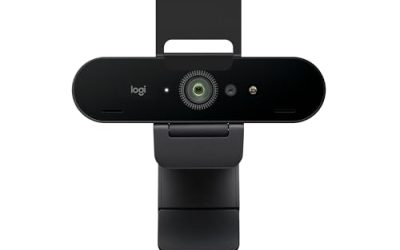
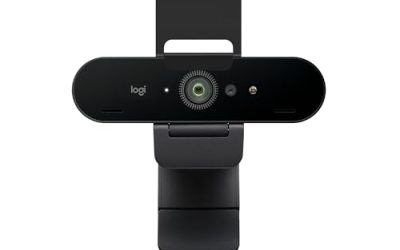
The MX Brio is the complete desk webcam for people who sit in one place and present from it. It records 4K at 30fps or 1080p at 60fps from an 8.5MP Sony STARVIS sensor, carries dual beamforming microphones with noise reduction, and adds a Show Mode that tilts the view down to your desk for showing documents or sketches. A built-in privacy shutter closes the lens physically, the mount adjusts without tools, and the listing names Microsoft Teams, Zoom and Google Meet among its supported platforms. It is the least theatrical camera here and, for a fixed desk, the most rounded.
Specs
- Resolution: 4K at 30fps or 1080p at 60fps
- Sensor: 8.5MP Sony STARVIS
- Microphone: dual beamforming mics with noise reduction
- Modes: Show Mode for desk-down presenting
- Privacy: built-in privacy shutter
- Connection: USB-C
- Model: 960-001545, Graphite
Best for: remote workers and presenters with a fixed desk who want one camera that handles calls and recordings well.
Watch out for: framing is fixed, so if you stand, pace or demonstrate away from the desk, a tracking camera serves you better.
ASIN: B0BFJ4CRKD
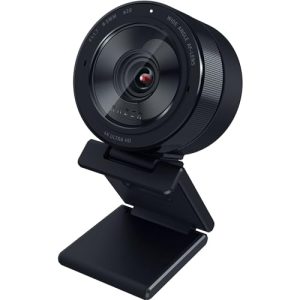
Razer Kiyo Pro Ultra
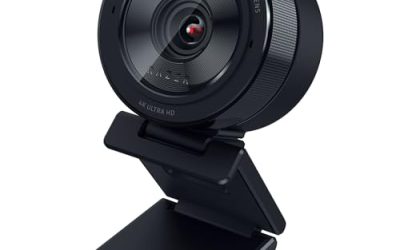
The Kiyo Pro Ultra is built around the largest sensor fitted to a webcam, a 1/1.2-inch Sony STARVIS 2 behind an f/1.7 lens, and that hardware shows exactly where webcams usually struggle: dim rooms, mixed lighting and backgrounds you would rather soften. It records 4K, corrects exposure automatically as light changes, and includes a built-in microphone and a physical shutter. The listing positions it for content creation, streaming, gaming and video calls, with OBS and XSplit named alongside Zoom and Teams. If your recording environment is a bedroom or a living room rather than a lit studio, this is the camera designed for it.
Specs
- Resolution: 4K Ultra HD
- Sensor: 1/1.2-inch Sony STARVIS 2
- Lens: f/1.7 wide-angle autofocus lens
- Lighting: auto light correction
- Microphone: built-in microphone
- Privacy: built-in shutter
- Model number: RZ19-04420100-R3U1
Best for: creators and streamers who record in ordinary room lighting and want the cleanest image a webcam sensor can give.
Watch out for: it is a fixed camera with a premium brief, so the money buys image quality, not movement or tracking features.
ASIN: B0CT6FFK4R
Insta360 Link 2

The Link 2 answers a different problem: it follows you. Its camera sits on a two-axis gimbal and uses AI tracking to pan and tilt as you move, with gesture control to start and stop tracking without returning to the keyboard. The 1/2-inch sensor records 4K at 30fps or 1080p at 60fps, autofocus is phase-detection, and dedicated modes handle a whiteboard and an overhead desk view. Dual noise-cancelling microphones are built in, and after inactivity the lens points itself down for privacy. For teachers, coaches and demonstrators, it replaces the camera operator entirely.
Specs
- Resolution: 4K at 30fps or 1080p at 60fps
- Sensor: 1/2-inch
- Movement: two-axis gimbal with AI tracking and gesture control
- Focus: phase-detection autofocus, HDR video
- Microphone: dual AI noise-cancelling microphones
- Modes: Whiteboard and DeskView, portrait mode
- Model number: CINSABNB
Best for: teachers, presenters and streamers who move, demonstrate or use a whiteboard while on camera.
Watch out for: the gimbal and its modes need a little setup and rehearsal, and the graphite standard kit should be confirmed against the fixed-frame Link 2C variant when ordering.
ASIN: B0DF2SL974
Razer Kiyo Pro

The Kiyo Pro is the streaming-focused 1080p option, and its specification is aimed at live video rather than recorded detail: uncompressed 1080p at 60 frames per second, HDR, and an adaptive light sensor that adjusts the image as room light shifts. Its wide-angle lens offers an adjustable field of view, so the same camera can frame a tight head-and-shoulders shot or a wider room view for a gaming stream. The listing names OBS, XSplit, Twitch, Zoom and Teams, which describes its natural habitat precisely. For a streamer whose platform compresses everything anyway, its smooth, well-exposed 1080p is the sensible place to spend.
Specs
- Resolution: Full HD 1080p at 60fps
- Sensor: adaptive light sensor with HDR
- Lens: wide-angle with adjustable field of view
- Compatibility: OBS, XSplit, Twitch, Zoom and Teams, as stated on the listing
- Use case: streaming, gaming and video calls
Best for: streamers and gamers who want smooth 60fps video and forgiving exposure without moving to a 4K creator camera.
Watch out for: there is no 4K mode, so creators who record and crop their footage later should look at the Kiyo Pro Ultra or MX Brio instead.
ASIN: B08T1MWX6J
Which One Fits Your Situation
You work from a desk and live in video meetings
Choose the MX Brio. Its fixed framing matches a seated routine, Show Mode covers the moments you need to display paperwork or a product on the desk, and the dual microphones and physical shutter handle the two things meetings actually test: being heard clearly and being visibly off camera afterwards. It is the camera in this guide you can install, angle once, and then forget exists.
You record content in a room with ordinary lighting
Choose the Kiyo Pro Ultra. The big STARVIS 2 sensor and fast lens are specifically the hardware that keeps a face clean and a background soft when the light is a ceiling bulb rather than a key light. You give up tracking and the MX Brio’s desk mode, and in exchange your recorded footage holds up without rebuilding the room around the camera.
You teach, coach or present on your feet
Choose the Link 2. A fixed camera cannot follow a demonstration, and a wider lens just makes you smaller; the gimbal keeps you framed at a useful size while the whiteboard and desk modes handle the two surfaces teachers actually use. Budget a short rehearsal to learn its gestures and tracking behaviour before the first real session, and it will quietly do a second person’s job.
You stream games and care about smooth motion
Choose the Kiyo Pro. Your platform will compress the stream regardless, so its uncompressed 1080p at 60fps, HDR and adaptive exposure deliver more visible quality than a 4K badge would. The adjustable field of view lets you widen for a room shot or tighten for a face cam, and the saving against the 4K models is better spent on lighting, which your viewers will notice first.
Common Mistakes
- Buying on resolution alone while ignoring sensor size, then discovering the 4K image falls apart in evening light.
- Paying for a tracking gimbal when every call happens seated at the same desk, then never enabling the tracking.
- Expecting any webcam microphone to replace a headset in a noisy room with other people talking.
- Forgetting that meeting platforms compress your video, so the camera’s exposure and frame rate matter more than its peak resolution.
- Leaving a camera without a physical shutter or privacy mode on a shared family computer and relying on an indicator light.
Frequently Asked Questions
Is 4K worth it for video calls?
Mostly no, and occasionally yes. Meeting platforms compress and downscale your feed, so your colleagues will rarely see 4K; exposure, frame rate and microphone quality shape their impression far more. Where 4K earns its place is recording: footage you edit, crop or publish keeps the detail. If your camera time is all live calls, a 1080p model like the Kiyo Pro is a rational buy rather than a compromise.
Which of these works best in a dark room?
The Kiyo Pro Ultra, because its advantage is physical: a 1/1.2-inch sensor and an f/1.7 lens gather more light before any processing begins. The Kiyo Pro’s adaptive light sensor and HDR handle changing light well for its class, and the MX Brio’s STARVIS sensor is designed for low-light sensitivity. No webcam repeals physics, though; an inexpensive lamp facing you improves every camera in this guide more than any setting.
Do I still need a separate microphone?
For quiet rooms and calls, the dual microphones in the MX Brio and Link 2 are sufficient, and they keep a desk simple. For streaming, recording or a room with other voices, a headset or desk microphone wins on placement, because it sits near your mouth instead of across the desk. Start with the camera’s microphone, then add audio gear if your audience or your team reports a problem.
Will these webcams work with my laptop and meeting apps?
All four are USB cameras aimed at the main platforms: the listings name Zoom, Teams and Google Meet across the group, and the Razer models add OBS and XSplit for streaming. The checks are the port, since several use USB-C and older laptops may need an adapter, and companion software features, which can be platform-specific. The image is universal; the modes deserve a compatibility glance before ordering.
FAQ
Is 4K worth it for video calls?
Which of these works best in a dark room?
Do I still need a separate microphone?
Will these webcams work with my laptop and meeting apps?
More from Amazon
Programs that pair well with the guide above. Offers and eligibility are set by Amazon and may change.
Free shipping on eligible items, Prime Video and more. Eligible new members can start with a free trial.
Start a Prime free trialAd-free music streaming. Eligible new subscribers can start with a free trial.
Try Music Unlimited freeA Prime membership for ages 18-24 with a trial period. Eligibility is set by Amazon.
See Prime for Young AdultsAudiobooks and podcasts to listen to on the go. Eligible new members can start with a free trial.
Try Audible freeAs an Amazon Associate we earn from qualifying purchases.