5 Best Keyboards for Developers to Code With (November 2026)
The best keyboards for developers combine quiet typing, programmable keys and comfort. See five boards built for long coding sessions and multi-device setups.
A developer touches the keyboard more than any other tool on the desk, and the wrong one turns an eight-hour coding session into a slow ache in the wrists and a stream of small interruptions. Switch feel, key layout, programmability and ergonomics matter far more than the lighting effects that dominate most keyboard roundups, because the board has to stay comfortable and predictable through thousands of keystrokes a day. Choosing well means matching the board to the way you actually write code, not to a spec sheet.
This guide is for backend engineers, full-stack developers, data engineers and anyone who writes code for a living and wants a board that keeps up. The five keyboards below were chosen from the names and specifications on their Amazon product pages, covering hot-swappable mechanical boards with open firmware, quiet low-profile boards for shared offices, and a split ergonomic board for long days at the desk.
Quick Picks
As an Amazon Associate we earn from qualifying purchases.
Product
Best for
Key spec from title
Keychron K8 Pro
Remapping keys and swapping switches
Hot-swappable Gateron G Pro Blue switches with QMK/VIA
Low-profile scissor keys with Smart Actions and multi-device switching
Logitech MX Mechanical
Mechanical feel in a low-profile frame
Low-profile Tactile Quiet switches, Bluetooth and Logi Bolt
Logitech Ergo K860
Wrist comfort on long coding days
Curved split keyframe with a memory foam wrist rest
How to Choose
Switch Feel and Noise
The switch under each key decides how a board feels and sounds, and developers who type all day should treat that as the first decision, not an afterthought. Tactile switches give a small bump as the key registers, which helps touch typists keep rhythm without bottoming out hard, while linear switches travel smoothly and clicky switches add an audible snap that some people love and their neighbours do not. In a shared office or a video call, a quiet tactile or low-profile switch keeps the typing from carrying across the room. Low-profile switches also shorten the distance fingers travel, which can reduce fatigue over a long session, though some typists find them too shallow at first.
Programmability and Layers
A keyboard that can be remapped turns repetitive coding work into single keystrokes, and that is where the real productivity gain lives. Open firmware such as QMK and VIA lets every key move, macros stack onto one key, and layers turn a compact board into several layouts at once, so a function row can become a second set of shortcuts for an editor or a terminal. Logitech boards use their own software instead, which covers the common tasks such as launching apps and automating sequences, but only on the operating systems the software supports. Before buying, check whether remapping needs a cable and whether the layout is stored on the board itself.
Layout and Ergonomics
Layout decides how much desk space the board takes and whether your hands sit in a natural position through a long session. A tenkeyless or 75 percent board drops the number pad and leaves room for the mouse, which shortens the reach to it and keeps the shoulders square, while a full-size board keeps the pad for developers who type numbers often. A split or curved keyframe angles each half toward its hand, which can ease wrist strain for people who already feel discomfort by mid-afternoon. A wrist rest helps only when it supports the palms without bending the wrists upward, and tilt legs matter because some typists want a flat board while others need a slight negative slope.
Connectivity and Multi-Device Support
Most developers work across more than one machine, so the way a keyboard connects deserves the same attention as its switches. Bluetooth pairing with two or three devices lets one board serve a work laptop, a desktop and a tablet with a single keypress to switch between them, while a USB receiver or a wired connection gives a more stable link for machines on the same desk. Battery life varies widely, from a couple of weeks with backlighting on to many months with it off, so check whether the board charges over USB-C while you keep typing. Also confirm the board works with every operating system you use, since some function keys behave differently across Windows, macOS and Linux.
The 5 Best Options
Keychron K8 Pro
Top Pick
Keychron K8 Pro
Best for: Developers who remap keys, build macros and swap switches often.
87-key tenkeyless layout with hot-swappable Gateron G Pro Blue switches
QMK and VIA remapping through the Keychron Launcher web app
Bluetooth 5.1 for up to 3 devices plus wired USB-C mode
4,000 mAh battery, up to 100 hours of typing at the lowest backlight brightness
The K8 Pro is the board for developers who want to change everything about their keyboard and keep changing it. Its hot-swappable sockets accept most three-pin and five-pin MX-style switches, so a switch can be pulled out by hand and a different one pressed in without soldering, and the QMK and VIA firmware lets any key be remapped with macros and layers. The tenkeyless layout keeps the function row, arrows and navigation cluster while dropping the number pad, and Bluetooth pairs with three devices alongside a wired USB-C mode. It is a practical pick for a developer who treats the keyboard as a configurable tool rather than a fixed accessory.
Watch out for: The Blue switches are clicky and loud in shared spaces, and remapping works in wired mode only, though the saved layout then works in both modes.
Keychron Q1 Pro
Runner-Up
Keychron Q1 Pro
Best for: Developers who want one premium-feeling board for a permanent desk setup.
75 percent layout, 81 keys, with a programmable knob
CNC-machined aluminium case with a double-gasket mount and polycarbonate plate
Hot-swappable Keychron K Pro Banana switches
QMK and VIA programmable, with layers stored on the board
Developers who want one premium-feeling board for a permanent desk setup.
Watch out for
Sources disagree on whether a 2.4 GHz wireless mode exists, so confirm before buying if a dongle matters to you, and the fully assembled board is heavy at over 1.7 kg.
The Q1 Pro is the settled-desk board in this guide, built to be bought once. Its case is machined from a single block of aluminium and mounted on a double-gasket design with a polycarbonate plate, which gives it a solid, cushioned feel that plastic boards do not match. The 75 percent layout keeps 81 keys including the function row and arrows, every switch socket is hot-swappable, and QMK and VIA handle remapping and macros. A programmable knob sits in the corner for volume or scrolling, and the double-shot PBT keycaps resist shine. It weighs more than the other boards here, so it suits a desk it rarely leaves.
Watch out for: Sources disagree on whether a 2.4 GHz wireless mode exists, so confirm before buying if a dongle matters to you, and the fully assembled board is heavy at over 1.7 kg.
Logitech MX Keys S
Logitech MX Keys S
Best for: Developers who want quiet typing and fast switching between a laptop, a desktop and a tablet.
Full-size low-profile keyboard with spherically dished scissor keys
Smart Actions through the Logi Options+ app to automate repetitive tasks
Smart backlighting that lights up as hands approach
Connects to up to 3 devices via Bluetooth Low Energy or the included Logi Bolt receiver
Developers who want quiet typing and fast switching between a laptop, a desktop and a tablet.
Watch out for
Smart Actions need the Logi Options+ app on Windows or macOS, and FileVault on macOS can block Bluetooth password entry at startup, in which case the Logi Bolt receiver is the fix.
The MX Keys S is the quiet workhorse for developers who type in shared spaces and switch between machines all day. Its low-profile scissor keys give a fluid, precise feel without the travel of a full mechanical switch, and the spherically dished keys guide fingers to the centre of each key. Smart Actions in the Logi Options+ app automate repetitive sequences with a single keystroke, the backlighting brightens as hands approach and adjusts to the time of day, and Easy-Switch keys jump between up to three paired devices. It is a full-size board with a number pad, so developers who type numbers often keep everything in reach.
Watch out for: Smart Actions need the Logi Options+ app on Windows or macOS, and FileVault on macOS can block Bluetooth password entry at startup, in which case the Logi Bolt receiver is the fix.
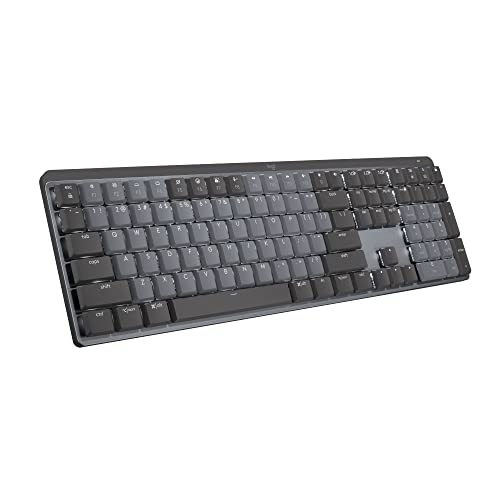
Logitech MX Mechanical
Logitech MX Mechanical
Best for: Developers who want mechanical feedback without a tall, loud gaming board.
Full-size keyboard with low-profile Tactile Quiet mechanical switches
Smart illumination with backlit keys
Bluetooth Low Energy and Logi Bolt receiver, pairs with up to 3 devices
USB-C charging, up to 15 days with backlighting on and up to 10 months with it off
The MX Mechanical brings real mechanical key feel to a low-profile frame, for developers who like switches but not tall boards. Its Tactile Quiet switches give a gentle bump without a loud click, and the low-profile design keeps the wrist angle closer to a laptop keyboard, so the transition feels natural for people coming from one. Smart illumination adjusts to the room, the board pairs with up to three devices over Bluetooth or the Logi Bolt receiver, and the metal top case gives it a solid feel on the desk. It is full-size, so the number pad stays, and the battery stretches far with the backlighting turned off.
Watch out for: The switches are not hot-swappable, and key remapping is limited to the profiles the Logi Options+ software exposes.
Logitech Ergo K860
Logitech Ergo K860
Best for: Developers with wrist strain who want a split layout without relearning how to type.
Full-size curved split keyframe with an integrated number pad
Pillowed wrist rest with a memory foam layer
Adjustable palm lift with tilt legs at 0, -4 and -7 degrees
The Ergo K860 is the board for developers whose wrists complain before the workday ends. Its curved, split keyframe angles each half toward its hand, which reduces wrist bending and forearm strain, and the pillowed wrist rest adds a memory foam layer that supports the palms without pushing the wrists upward. Adjustable palm lift legs set the tilt to zero, minus four or minus seven degrees, so it adapts to sitting and standing desks. The keys use a quiet Perfect Stroke design, the full-size layout keeps the number pad, and two AAA batteries power it for up to two years. It is a membrane board, not a mechanical one.
Watch out for: The one-piece design fixes the split angle, so developers with very wide shoulders may need a fully separable split board instead.
Which One Fits Your Situation
You Remap Everything and Swap Switches
Choose the Keychron K8 Pro if your editor and terminal shortcuts live on custom layers and you like trying different switches. The hot-swappable sockets and QMK and VIA firmware give you more control than any other board here, and the tenkeyless layout leaves room for the mouse. Pick the Q1 Pro instead if you want the same programmability in a heavier, more premium case that stays on one desk.
You Want the Quietest Desk in the Office
Choose the Logitech MX Keys S when typing noise matters more than switch feel. Its low-profile scissor keys stay quiet through long sessions, and Smart Actions take over the repetitive sequences that eat into a coding day. The MX Mechanical is the fallback if you miss the bump of a mechanical switch but still need a board that will not carry across an open office.
Your Wrists Hurt by Mid-Afternoon
Choose the Logitech Ergo K860 when comfort is the deciding factor. The curved split keyframe and memory foam wrist rest change the angle of your hands rather than asking you to type differently, and the adjustable palm lift lets you tune the tilt to your chair and desk height. Give it a week of full-speed typing before judging it, since the split layout feels unfamiliar on the first day.
You Switch Between a Laptop, a Desktop and a Tablet
Choose the MX Keys S or the MX Mechanical, since both pair with three devices and switch between them with a single keypress. The Keys S suits developers who prefer a soft, quiet key, while the MX Mechanical suits those who want a mechanical bump. The Keychron boards also pair with three devices over Bluetooth, but their remapping software is easier to reach over a cable.
Common Mistakes
Buying a clicky switch for a shared office and discovering the noise bothers everyone nearby.
Choosing a gaming board for coding and paying for polling rates and lighting that never help write code.
Picking a compact layout without checking whether you actually use the number pad every day.
Ignoring whether remapping software runs on your operating system before the board arrives.
Skipping the wrist rest and tilt adjustment, then blaming the keyboard for strain the setup caused.
Frequently Asked Questions
Do developers need a mechanical keyboard?
No, a mechanical keyboard is a preference, not a requirement for writing code. What matters is a switch feel you can type on for hours, a layout that fits your desk, and remapping for your editor shortcuts. Many developers work happily on low-profile boards such as the MX Keys S, while others prefer the tactile feedback of a mechanical switch. Choose by typing feel and ergonomics.
Is QMK and VIA better than Logitech Options+ for coding?
QMK and VIA give deeper control, since every key can move, macros can stack onto one key, and layers live on the board itself, for developers who build custom layouts for editors and terminals. Logitech Options+ covers the common tasks such as app shortcuts and automated sequences, but only on Windows and macOS, for the keys Logitech exposes. Complex shortcuts favour open firmware; simple ones work with either approach.
Are hot-swappable switches worth it for a work keyboard?
Hot-swappable sockets are worth it when you want to change switch feel without buying a new board, since switches pull out by hand and replacements press in. They also let you replace a single worn switch instead of the whole keyboard. The benefit is smaller when you already know the switch you like, in which case a fixed board with the right switch from the start is simpler.
Can one keyboard work with a Mac, a Windows PC and a tablet?
Yes, every board in this guide pairs with more than one device. The Logitech boards switch between three devices over Bluetooth or their receiver, the Keychron boards pair with three devices over Bluetooth, and the Ergo K860 pairs with three over Bluetooth or its Unifying receiver. Mac and Windows layouts label some keys differently, so check the legends, and confirm any remapping software runs on each system you use.
R
Razer Gaming Series Editorial Team
We compare specs, materials and verified owner reviews before a product earns a spot. Rankings are never paid.
FAQ
Do developers need a mechanical keyboard?
No, a mechanical keyboard is a preference, not a requirement for writing code. What matters is a switch feel you can type on for hours, a layout that fits your desk, and remapping for your editor shortcuts. Many developers work happily on low-profile boards such as the MX Keys S, while others prefer the tactile feedback of a mechanical switch. Choose by typing feel and ergonomics.
Is QMK and VIA better than Logitech Options+ for coding?
QMK and VIA give deeper control, since every key can move, macros can stack onto one key, and layers live on the board itself, for developers who build custom layouts for editors and terminals. Logitech Options+ covers the common tasks such as app shortcuts and automated sequences, but only on Windows and macOS, for the keys Logitech exposes. Complex shortcuts favour open firmware; simple ones work with either approach.
Are hot-swappable switches worth it for a work keyboard?
Hot-swappable sockets are worth it when you want to change switch feel without buying a new board, since switches pull out by hand and replacements press in. They also let you replace a single worn switch instead of the whole keyboard. The benefit is smaller when you already know the switch you like, in which case a fixed board with the right switch from the start is simpler.
Can one keyboard work with a Mac, a Windows PC and a tablet?
Yes, every board in this guide pairs with more than one device. The Logitech boards switch between three devices over Bluetooth or their receiver, the Keychron boards pair with three devices over Bluetooth, and the Ergo K860 pairs with three over Bluetooth or its Unifying receiver. Mac and Windows layouts label some keys differently, so check the legends, and confirm any remapping software runs on each system you use.
Affiliate disclosure. As an Amazon Associate we earn from qualifying purchases at no extra cost to you. Prices accurate as of the date shown.
Compare the best Bluetooth gaming keyboards from ASUS, SteelSeries, Razer, Corsair and Logitech G, with tri-mode connections, switch types and battery life explained.
Four starter keyboards for new gamers compared: quiet membrane, mecha-membrane and first mechanical picks with spill resistance, wrist rests and simple controls.
Find the best wireless phone headsets for hands-free calls. Compare five Bluetooth headsets with call microphones, long talk time, and comfortable all-day fits.
Find the best wired headsets for PS5 with clear chat, Tempest 3D Audio support, and long-session comfort. Compare wired picks for the DualSense controller.
'The best chairs for gaming and have back problems sorted: adjustable lumbar support, ergonomic backrests and seat-depth controls for comfortable sessions.'
Compare the best Nintendo Switch 2 TV docks for big-screen play — cradle, hub, and travel picks with 4K output, charging, and per-generation fit compared.
Compare 5 studio monitor speakers for gaming desks: flat, accurate near-field pairs from KRK, JBL, Edifier, PreSonus, and Mackie, with inputs and desk fit.


 Logitech MX Mechanical
 Logitech Ergo K860