Best Wireless Phone Headsets: 5 Picks for Clear Calls on the Go
Find the best wireless phone headsets for hands-free calls. Compare five Bluetooth headsets with call microphones, long talk time, and comfortable all-day fits.
A phone pressed to your ear works for a quick call, but it falls short when calls fill your day. A dedicated wireless phone headset keeps both hands free, holds the microphone close to your mouth, and lets you move around while you talk. For drivers, field workers, remote workers, and anyone who spends long stretches on the phone, that difference adds up fast.
The best wireless phone headsets share a few traits. They pair with a phone over Bluetooth, carry a microphone built for voice rather than music, and stay comfortable through hours of wear. Beyond that, they split into two broad shapes. Mono earpieces sit in one ear with a small hook or gel tip, keeping the other ear open to the room around you. Over-head mono headsets use a padded band and a larger ear cushion, with a boom microphone that stays fixed in front of your mouth. Neither shape is better in every situation, so the right pick depends on where you take calls and how long you wear the headset.
This guide compares five wireless headsets made for phone calls. Each one connects to a phone by Bluetooth, includes a microphone tuned for calls, and is listed on Amazon US. You will find talk time, Bluetooth details, fit notes, and honest considerations for each model, followed by a buying guide, setup guidance, and answers to common questions.
The Poly Voyager 5200 is the classic premium mono earpiece for phone calls, and it remains a strong choice years after launch. Its defining feature is a four-microphone array paired with six layers of WindSmart technology, which is designed to cut wind, chatter, and traffic noise so your voice stays clear on the other end of the line. For anyone who takes calls outdoors, in a car, or in a busy office, that microphone setup is the main reason to choose this model.
Bluetooth 5.0 gives the Voyager 5200 a wireless range of up to 98 feet from a paired phone, and multipoint technology lets it stay connected to two devices at once, so a call on a second phone can come through without re-pairing. Voice controls let you answer or ignore calls by speaking, and a dedicated button summons Siri, Google Assistant, or Cortana. Caller ID announcements and talk-time alerts keep you informed without pulling the phone from your pocket.
The headset is pocket-sized and light, with an ergonomic shape meant for all-day wear. A moisture-resistant P2i coating adds protection against sweat and light rain, and the box includes ear tips in small, medium, and large sizes so you can tune the fit. Talk time runs up to 7 hours on a charge, with charging over a micro-USB cable.
Considerations
Mono sound means music and media play through one ear only, which suits calls but not immersive listening.
Charging uses micro-USB rather than the newer USB-C connector, so it may need a separate cable from your phone charger.
The earpiece fit depends on finding the right ear tip size, so try all three included sizes before judging comfort.
At roughly an ounce, it is light, but some wearers still prefer an over-head band for very long sessions.
The Jabra Talk 45 is one of the lightest wireless phone headsets you can buy, weighing just 7.2 grams. It is a mono in-ear earpiece with an ear hook, built around HD voice and a two-microphone system that adjusts volume to the surrounding environment. The result is a headset that nearly disappears on the ear while keeping calls clear, which makes it a natural pick for people who wear a headset for hours but dislike bulk.
Talk time runs up to 6 hours, with up to 8 days of standby, so the headset can sit ready between calls without constant charging. A single button gives one-touch access to Siri or Google Assistant, and voice guidance speaks status updates such as connection and battery state. Beyond calls, the Talk 45 streams GPS directions, music, and podcasts from a paired phone, so it can stay in your ear between calls rather than going back in a pocket.
The box includes EarGels in several sizes, an ear hook, a car charger, and a USB cable. The ear hook is removable, and the headset can be worn on either ear, which helps if you switch ears during a long day of calls.
Considerations
Up to 6 hours of talk time is shorter than the other earpieces in this guide, so heavy callers may need a midday top-up.
Charging uses micro-USB, which is an older connector than the USB-C port on most current phones.
The in-ear fit relies on the EarGel seal, so getting the size right matters for both comfort and call clarity.
Its microphone setup is simpler than the four-microphone array on the Voyager 5200, so very windy settings may challenge it more.
The BlueParrott B450-XT is the over-head option in this guide, and it is built for people who live on the phone in loud places. It pairs a large cushioned earcup and padded headband with a boom microphone that blocks background noise, making it a common sight among drivers, warehouse staff, and field workers. If an earpiece feels too small or slips during a long shift, this is the shape to look at first.
Talk time stretches up to 24 hours on a single charge, far beyond any earpiece here, and standby runs up to 500 hours. Bluetooth 5.0 with NFC pairing connects to a phone quickly, and the wireless range reaches up to 300 feet from a Class 1 device, so you can step away from your phone without dropping a call. Multipoint support keeps two devices connected at once.
The headset charges over USB-C, carries IP54 dust and moisture protection, and includes a vehicle charger, two microphone windscreens, and a choice of leatherette or foam ear cushions in the box. A customizable BlueParrott Button can be set to mute, speed dial, push-to-talk, and other functions through the companion app, and voice control answers or rejects calls hands-free.
Considerations
The over-head design is larger and heavier than any earpiece, so it takes up more room in a bag and feels different to wear.
One ear stays covered while the other stays open, which is normal for mono headsets but worth knowing before you buy.
The rugged, work-focused styling may feel like overkill for quiet home-office calls.
A full charge takes around 3 hours, so plug it in the night before a heavy call day.
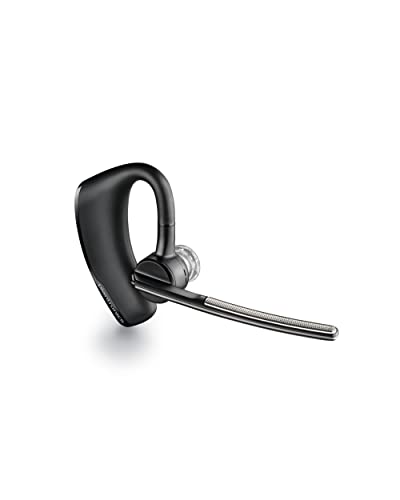
The Poly Voyager Legend is the predecessor to the Voyager 5200, and it still earns a place here because its call-focused design holds up well. A triple-microphone array with active digital signal processing handles noise and wind, while a water-resistant nano-coating protects the headset from sweat and light rain. It is a mono earpiece with an ear hook and gel tips, shaped for long wear.
What sets the Legend apart is its Smart Sensor technology. The headset knows when you put it on, so it can answer an incoming call automatically as you lift it to your ear, and it can pause or route audio when you take it off. Voice controls handle answering, ignoring, and redialing, and a dedicated button reaches your phone voice assistant. Talk time runs up to 7 hours, with up to 11 days of standby, and the Bluetooth range reaches up to 33 feet from a paired phone.
Controls sit on the earpiece itself, with touch and voice control plus mute and volume buttons, so you can manage a call without touching the phone. The headset works with Android phones, iPhones, and tablets, and its light build keeps it comfortable through a full day of calls.
Considerations
Its Bluetooth generation is older than the Bluetooth 5.0 models in this guide, so range and connection features are more limited.
The included components vary by listing, so confirm what is in the box on the listing you choose.
As an older model, it lacks USB-C charging and the newer multipoint range of the Voyager 5200.
Smart sensors can surprise first-time users, so spend a few minutes learning the tap and voice commands before an important call.
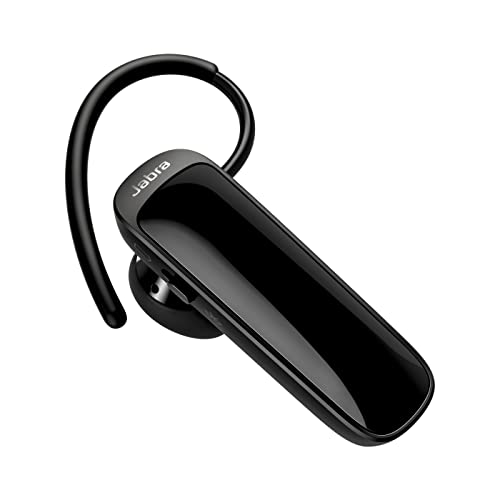
The Jabra Talk 25 SE is the straightforward pick in this guide: a light mono earpiece that focuses on clear calls and long battery life without extra complexity. It weighs 8.6 grams, uses an omni-directional microphone with an 11 mm dynamic speaker, and is tuned for HD calls with crisp, natural-sounding voice on both ends.
Talk time runs up to 9 hours, the longest of any earpiece in this guide, with up to 10 days of standby. A Power Nap function switches the headset off when it has been disconnected for an hour, which helps the battery last between uses. Bluetooth 5.0 pairs with up to eight devices and stays connected to two at once, so a work phone and a personal phone can share one headset. It also streams music, podcasts, and GPS directions from a paired phone.
The box includes three sets of EarGels, an ear hook, and a micro-USB cable, and the headset fits either ear. A one-year warranty covers the headset, and the simple control layout keeps answering, ending, and muting calls to a few button presses.
Considerations
The omni-directional microphone picks up sound from all directions, so it has less background-noise blocking than a multi-microphone boom design.
Charging uses micro-USB rather than USB-C.
Mono audio means one-ear listening, so it is a call-first headset rather than a music headset.
The design is deliberately simple, so there is no companion app or customizable button.
How to Choose a Wireless Phone Headset
Start with where you take calls. If you work outdoors, drive, or move through noisy spaces, a multi-microphone array or a boom microphone matters more than any other feature. If your calls happen in a quiet room, a simple earpiece with a single microphone can sound just as good and weigh far less.
Next, weigh talk time against size. Earpieces in this guide run from 6 to 9 hours of talk time and weigh under 10 grams, which makes them easy to carry and forget you are wearing. Over-head models trade that lightness for much longer talk time and a fixed boom microphone, which suits people who stay on calls all day without a break.
Fit style deserves real attention. An in-ear earpiece with gel tips seals gently in the ear canal, while an ear hook adds stability for movement. An over-head band spreads weight across the head and holds the microphone steady, but it also covers one ear fully. If you can, try the included tip sizes and wear the headset for a full call before deciding.
Check the connection details. Bluetooth 5.0 models generally give longer range and steadier multipoint connections than older Bluetooth versions. Multipoint itself is worth having if you carry two phones or switch between a phone and a tablet. Also confirm the charging connector, since most models here still use micro-USB while only the BlueParrott uses USB-C.
Finally, think about controls and extras. Voice controls, a mute button, and a voice-assistant button all help when your hands are busy. A companion app adds customization on some models, while others keep things simple with physical buttons only. Choose the level of complexity you will actually use, since a feature you never touch adds nothing to a call.
Fit and Installation
Pairing a wireless phone headset takes a few minutes and follows the same pattern on nearly every model. Charge the headset fully first, then put it in pairing mode, usually by holding the power or call button until the indicator light flashes. Open the Bluetooth settings on your phone, select the headset name, and confirm the connection. Once paired, the headset should reconnect automatically whenever it is switched on near the phone.
Fit comes next, and it matters as much as pairing. For earpieces, try each included EarGel size and wear the headset for a full call, checking that it stays put when you turn your head and that your voice sounds clear to the other caller. The ear hook can be shaped gently or swapped to the other ear if your model allows it. For over-head models, adjust the band so the ear cushion sits flat and the boom rests near the corner of your mouth without touching your lips.
If your headset supports multipoint, pair the primary phone first, then add the second device while the first stays connected. Check the companion app for your model, if one exists, since it often holds firmware updates and button settings. Keep the charging cable in a fixed spot, such as your desk or car, so the headset is charged before a busy day. A quick habit of charging overnight avoids a dead headset in the middle of an important call.
Frequently Asked Questions
Can I use a wireless phone headset with both iPhone and Android?
Yes. Every headset in this guide connects over standard Bluetooth, so it pairs with iPhones, Android phones, and most tablets. Voice-assistant buttons work with Siri on iPhone and Google Assistant on Android, and call controls such as answer, end, and mute work across both platforms.
Do mono headsets play music and podcasts?
Yes, mono headsets can stream audio from a paired phone, but the sound comes through one ear only. That is fine for podcasts, GPS directions, and audiobooks, where stereo separation adds little. For music, a mono earpiece sounds thinner than stereo earbuds or headphones, so these headsets are best thought of as call-first devices that also handle media.
How can I make my voice clearer on calls?
Position matters most. On an earpiece, make sure the microphone opening is not blocked by hair or clothing, and keep the ear tip sealed so you hear the caller well enough to speak at a normal level. On a boom model, adjust the boom so the microphone sits near the corner of your mouth. Taking calls away from fans, open windows, and traffic also helps any microphone perform at its best.
Can I pair one headset with two phones at the same time?
Most of the headsets in this guide support multipoint, which keeps two devices connected at once. The Jabra Talk 25 SE, Poly Voyager 5200, and BlueParrott B450-XT all list multipoint support, so a call on either paired phone can reach the headset. Check the listing for your model if two-phone use is a must-have, since the exact behavior varies by model.
Conclusion
The best wireless phone headsets make calls simpler: a microphone that keeps your voice clear, a fit you can wear for hours, and a battery that lasts through your call load. The Poly Voyager 5200 leads for all-around call quality with its four-microphone array, the Jabra Talk 45 wins on feather-light comfort, and the Jabra Talk 25 SE gives earpiece wearers the longest talk time. The BlueParrott B450-XT is the pick for long shifts and loud settings, while the Poly Voyager Legend remains a solid classic with smart sensors that answer calls as you put the headset on.
Match the headset to your day rather than chasing a single feature. Light earpieces suit quiet offices and short calls, over-head boom models suit long shifts and noisy places, and long talk time matters most when charging breaks are rare. Pick the shape that fits, pair it once, and your phone can stay in your pocket while your calls stay clear.
As an Amazon Associate, we earn from qualifying purchases.
R
Razer Gaming Series Editorial Team
We compare specs, materials and verified owner reviews before a product earns a spot. Rankings are never paid.
FAQ
Can I use a wireless phone headset with both iPhone and Android?
Yes. Every headset in this guide connects over standard Bluetooth, so it pairs with iPhones, Android phones, and most tablets. Voice-assistant buttons work with Siri on iPhone and Google Assistant on Android, and call controls such as answer, end, and mute work across both platforms.
Do mono headsets play music and podcasts?
Yes, mono headsets can stream audio from a paired phone, but the sound comes through one ear only. That is fine for podcasts, GPS directions, and audiobooks, where stereo separation adds little. For music, a mono earpiece sounds thinner than stereo earbuds or headphones, so these headsets are best thought of as call-first devices that also handle media.
How can I make my voice clearer on calls?
Position matters most. On an earpiece, make sure the microphone opening is not blocked by hair or clothing, and keep the ear tip sealed so you hear the caller well enough to speak at a normal level. On a boom model, adjust the boom so the microphone sits near the corner of your mouth. Taking calls away from fans, open windows, and traffic also helps any microphone perform at its best.
Can I pair one headset with two phones at the same time?
Most of the headsets in this guide support multipoint, which keeps two devices connected at once. The Jabra Talk 25 SE, Poly Voyager 5200, and BlueParrott B450-XT all list multipoint support, so a call on either paired phone can reach the headset. Check the listing for your model if two-phone use is a must-have, since the exact behavior varies by model.
Affiliate disclosure. As an Amazon Associate we earn from qualifying purchases at no extra cost to you. Prices accurate as of the date shown.
Compare the best Bluetooth gaming keyboards from ASUS, SteelSeries, Razer, Corsair and Logitech G, with tri-mode connections, switch types and battery life explained.
Four starter keyboards for new gamers compared: quiet membrane, mecha-membrane and first mechanical picks with spill resistance, wrist rests and simple controls.
Find the best wired headsets for PS5 with clear chat, Tempest 3D Audio support, and long-session comfort. Compare wired picks for the DualSense controller.
'The best chairs for gaming and have back problems sorted: adjustable lumbar support, ergonomic backrests and seat-depth controls for comfortable sessions.'
The best keyboards for developers combine quiet typing, programmable keys and comfort. See five boards built for long coding sessions and multi-device setups.
Compare the best Nintendo Switch 2 TV docks for big-screen play — cradle, hub, and travel picks with 4K output, charging, and per-generation fit compared.
Compare 5 studio monitor speakers for gaming desks: flat, accurate near-field pairs from KRK, JBL, Edifier, PreSonus, and Mackie, with inputs and desk fit.

 1. Poly Voyager 5200
 2. Jabra Talk 45
 3. BlueParrott B450-XT
 4. Poly Voyager Legend
 5. Jabra Talk 25 SE