Key takeaways
- Want the best 50 dollar headsets? This guide explains drivers, comfort, microphones and compatibility so you can choose a budget gaming headset with confidence.
As an Amazon Associate we earn from qualifying purchases.
A headset budget that stops at the fifty-dollar mark still leaves room for a genuinely good gaming headset, but only if you spend it on the right strengths. The real decision is not which brand looks best on the shelf; it is which trade-off you can live with every session — thinner ear cushions, a simpler microphone, or a wired connection instead of wireless freedom. Every headset in this range gives something up, so the smart move is to match the sacrifice to the way you actually play.
This guide is written for PC players building a first setup, console players who want one headset for every system they own, students and younger players buying with saved-up money, and anyone replacing a broken headset without starting over at a higher tier. Each headset type below is judged on the names and specifications shown on its Amazon product page, so you can compare drivers, weight, microphone design and connection type on equal terms before you choose.
How to Choose
Driver Size and Sound Direction
Driver size is the figure most shoppers reach for first, but it tells you nothing on its own. A well-tuned 40mm driver inside a closed ear cup can sound clearer than a loosely tuned 50mm driver in a leaky shell, so read the driver figure alongside the ear cup design and the frequency response on the product page. For competitive play, direction matters more than bass: look for headsets that describe stereo imaging or virtual surround support, because hearing where a reload comes from is worth more than extra low-end rumble. If you split time between games and music, favour a balanced tuning over a bass-heavy one, since a headset that only booms will tire your ears during long sessions.
Comfort for Long Sessions
Comfort decides whether a headset gets used or ends up hanging on a hook, so treat weight and clamping force as seriously as sound. At this budget, most headsets land between roughly 230 and 300 grams: lighter frames with a suspension strap spread pressure across the top of your head, while heavier models lean on thick padding to stay tolerable. Check the ear cushion material on the product page — memory foam and soft leatherette usually seal better and feel cooler than thin fabric over hard foam. If you wear glasses, look for eyewear channels or a looser clamp, because a tight frame pressing your temples against your glasses ends a session faster than any sound flaw.
Microphone Clarity and Muting
A budget headset microphone will never sound like a studio microphone, but it can still keep your callouts clear if you pick the right design. Boom microphones that sit close to your mouth pick up far less room noise than microphones built into an ear cup, and a flexible boom lets you position it where your voice comes through best. Flip-to-mute is the most useful control at this tier: raising the boom to mute is faster and more reliable than hunting for a small button mid-match. Check whether the listing mentions microphone noise reduction, and remember that an open window, a loud fan or clicky keyboard switches will overwhelm any budget microphone.
Compatibility and Connection Type
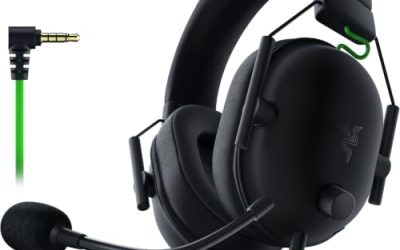
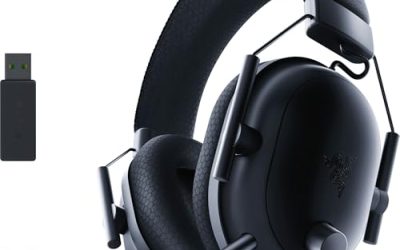
Almost every headset in this range connects through a single 3.5mm jack, which is a strength rather than a limitation: one plug works with a PC, PlayStation, Xbox, Switch and most phones. The catch is the PC splitter — desktops with separate headphone and microphone sockets need a Y-splitter cable, and not every box includes one, so check the included components list before you buy. Wireless models at this budget exist, but they usually trade sound quality or battery life for the convenience of no cable. If you play across platforms, a wired headset with a detachable cable is the safer choice, because a frayed cable can be replaced while a broken wireless receiver cannot.
Which One Fits Your Situation
The headset that suits you best depends on where you play and what you play. A PC player who spends long evenings in competitive shooters needs a clear microphone so callouts land, a lightweight frame that stays comfortable through a full session, and a cable long enough to reach the tower without pulling. A console player on a sofa wants a headset that plugs straight into the controller, with simple inline controls for volume and mute that can be found without looking. Someone who switches between a laptop, a phone, and a handheld needs a standard connection that works everywhere without an adapter, while a student sharing a room should look for closed earcups that keep game audio in and background noise out. Younger players and smaller heads need an adjustable band and earcups that do not clamp too hard, and anyone who also takes calls or watches videos will appreciate a detachable microphone and a fold-flat design for the bag. Think about your platform, your room, and your longest sessions before you choose.
You Play Competitive Shooters on PC
Pick the lightest wired headset you can find with a clear stereo image and a boom microphone that mutes by flipping up. Footstep direction and fast callouts matter far more than bass depth here, and a headset that stays comfortable through a long ranked session will do more for your results than any surround sound label. Make sure a splitter cable is included if your desktop uses separate audio sockets.
You Switch Between Console and PC
Choose a wired headset with a single 3.5mm plug and a detachable cable, so one headset moves from your controller to your laptop without adapters or pairing. Look for a volume control on the ear cup rather than in software, because console players cannot always reach a settings menu mid-game. A sturdy headband matters too, since a headset that travels between rooms takes more knocks than one that never leaves a desk.
You Need a First Headset for a Younger Player
Go for the lightest model with soft ear cushions, a simple flip-to-mute microphone, and a headband that adjusts without stiff sliders. Younger players notice weight and pinching long before they notice driver size, and a headset that is easy to put on and mute will actually get used for homework calls and chatting with friends as well as games. Avoid models with a permanently attached cable that cannot be replaced.
You Play Mostly Single-Player Story Games
Favour comfort and a warm, balanced sound over microphone features, since you will spend long stretches listening to dialogue, music and ambient sound with nobody on the other end. Large ear cups with memory foam cushions help here, as does a headset with a long cable that lets you lean back from the screen. A detachable microphone is a bonus, because removing it turns a gaming headset into a comfortable pair of headphones for films and music.
Common Mistakes
- Buying on driver size alone. A bigger driver number looks impressive on a listing, but the tuning, the ear cup seal and the cushion material shape the sound just as much. A 40mm driver in a well-sealed closed cup regularly sounds clearer and more focused than a 50mm driver in a loose shell, so compare the full specification list — driver size, frequency response, ear cup design and cushion type — instead of letting one number decide for you. Read the whole listing the way you would read a spec sheet, and treat any single headline figure as a hint rather than a verdict on sound quality.
- Ignoring the weight until it is too late. Shoppers compare sound features for hours and then forget that the headset will sit on their head for three or four hours at a stretch. A difference of fifty grams is easy to feel by the end of an evening, and a heavy headset with a stiff clamp will give you a headache long before its drivers become the limiting factor. Check the listed weight and favour suspension headbands or lighter frames when the numbers are close, and remember that a headset you take off halfway through a session is a headset that has already failed you.
- Forgetting the splitter cable. Many desktop PCs still use separate sockets for headphones and microphone, and a headset with a single combined plug will only carry game audio without a Y-splitter. Buyers discover this after the box arrives, then wait days for a separate cable while the headset sits unused. Read the included components list on the product page before ordering, and confirm a splitter is in the box if your PC needs one. A two-minute check of the listing saves a return, a reorder and a weekend of gaming with no voice chat.
- Choosing wireless at the cost of everything else. Cutting the cable feels like freedom, but at this budget wireless models often give up driver quality, microphone clarity or battery life to hit the tier. A headset that dies mid-match, crackles at range, or sounds thin next to its wired rivals is a poor trade for convenience. Unless you genuinely play far from your screen, a wired headset gives you more sound and a better microphone for the same money, and it never needs charging before a session starts.
- Expecting one headset to do every job perfectly. A budget headset is a bundle of compromises, and the model with the best microphone is rarely the model with the deepest bass or the lightest frame. Decide which two strengths matter most for your games — direction and comfort for shooters, warmth and cushioning for story games, simplicity and lightness for younger players — and accept a weaker third area rather than chasing a perfect all-rounder that does not exist at this tier. The buyers who end up happiest are the ones who ranked their own priorities before they opened a single listing.
Frequently Asked Questions
Are wired headsets better than wireless ones at this budget?
In most cases, yes. A wired headset puts the budget into drivers, cushions and a microphone, while a wireless model at the same tier must also pay for a battery, a receiver and charging parts. That usually means thinner sound or a weaker microphone. Wired headsets also never run out of charge mid-match and work with any device that has a standard audio jack. That simplicity is hard to beat.
Do I need a splitter cable for my PC?
It depends on your PC. Laptops and consoles with a single combined audio socket work with one plug and need nothing extra. Desktop PCs with separate green and pink sockets for headphones and microphone need a Y-splitter to carry both game audio and your voice. Check the included components on the product page to see whether one is in the box. Check the box contents before you order.
What driver size should I look for?
Most headsets in this range use 40mm or 50mm drivers, and either size can sound good when the tuning and ear cup seal are right. Treat the number as a starting point, not a verdict: read the frequency response and cushion details too, and favour headsets that describe clear stereo imaging if you play competitive games where hearing direction matters. Comfort and imaging matter just as much.
Can one headset work on PC, PlayStation, Xbox and Switch?
Yes, if it uses a standard 3.5mm connection. A single-plug wired headset works with controllers and handhelds across all of those platforms, which is why it is the most flexible choice at this budget. Just confirm that your desktop has a combined socket or a splitter cable, and check the listing for the platforms it names before you order.
FAQ
Are wired headsets better than wireless ones at this budget?
Do I need a splitter cable for my PC?
What driver size should I look for?
Can one headset work on PC, PlayStation, Xbox and Switch?
More from Amazon
Programs that pair well with the guide above. Offers and eligibility are set by Amazon and may change.
Free shipping on eligible items, Prime Video and more. Eligible new members can start with a free trial.
Start a Prime free trialAd-free music streaming. Eligible new subscribers can start with a free trial.
Try Music Unlimited freeA Prime membership for ages 18-24 with a trial period. Eligibility is set by Amazon.
See Prime for Young AdultsAudiobooks and podcasts to listen to on the go. Eligible new members can start with a free trial.
Try Audible freeAs an Amazon Associate we earn from qualifying purchases.