Key takeaways
- Find the best bluetooth headsets for work with clear call audio, strong noise cancelling, all-day comfort and battery life that lasts a full working day.
As an Amazon Associate we earn from qualifying purchases.
A work headset has to do a different job from a music headset or a gaming headset, and that difference is the real decision behind this purchase. Callers need to hear your voice without office chatter, keyboard taps or street noise bleeding through, while you need to hear them clearly enough to follow a fast conversation without asking for repeats. Comfort matters just as much, because a headset that pinches after an hour will sit in a drawer no matter how good it sounds.
Remote workers who live on video calls, office staff sharing a room with colleagues, customer support teams on calls all day, and hybrid workers moving between desk, phone and meeting room all shop for the same kind of headset. This guide explains the specifications listed on Amazon product pages, shows how to read them without being misled, and walks through the choices that keep a work headset comfortable and reliable.
How to Choose
Microphone Clarity and Noise Handling
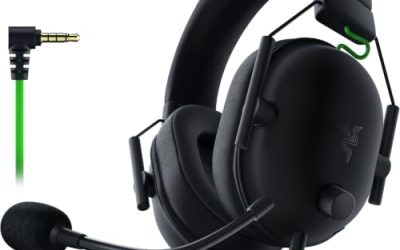
A work headset is judged first by how you sound to the person on the other end, so the microphone deserves more attention than the speakers. A boom microphone that sits close to your mouth picks up your voice directly and makes it easier for callers to follow you, while a microphone built into the earcup has to work harder to separate your voice from the room. Look for a listing that mentions noise reduction or a microphone designed to favour speech, and check whether the boom can be moved or muted. An earcup mute control lets you cough or ask a colleague a quick question without fumbling for a button on screen.
Noise Cancelling and Focus
Noise cancelling decides how well you can concentrate when the room around you refuses to stay quiet. Active noise cancelling uses microphones and processing to reduce steady background sound such as air conditioning, traffic hum or office chatter, while passive isolation comes from earcups that seal around the ear and block sound physically. A headset that combines both usually copes best in a busy room, though the seal matters more than the marketing label, so earcup size and cushion material deserve a close look. Some headsets let a little ambient sound back in when you need to hear a doorbell or a colleague, which helps if you work alone at home.
Comfort for a Full Workday
Comfort is the feature you notice most by the middle of the afternoon, so it deserves the same attention as sound quality. Weight is the simplest number to compare: a lighter headset feels less tiring across a long day, especially with a well-padded headband that spreads pressure evenly. Earcup depth matters too, because shallow cups press against the ear and cause soreness, while deeper cups give the ear room to sit naturally. Memory foam cushions seal well and feel soft, while fabric-covered cushions breathe more easily in a warm room. Glasses wearers should check the cushions, since a firm seal against the arms can turn into a headache by the end of a long meeting.
Battery Life, Range and Multipoint Pairing
Battery life decides whether a headset survives your working day or gives up before the last call. Listings quote separate figures for listening time and talk time, and talk time matters for work, because transmitting your voice drains the battery faster than playing music. Quick charging that adds an hour or so from a short charge can rescue a forgotten overnight charge, though it cannot replace a battery that covers a full shift. Wireless range matters if you stand up or walk to another room while staying on a call. Multipoint pairing keeps the headset connected to a laptop and a phone at once, which suits workers who take calls on both devices.
Over-Ear, On-Ear or Mono: Picking a Wearing Style
The wearing style shapes almost everything else about a work headset, from comfort to how much of the room you hear. Over-ear headsets cover the whole ear, which usually gives the strongest noise isolation, the fullest sound and the most room for a large battery, though they are also the heaviest and warmest option across a long day. On-ear headsets rest on the ear rather than around it, so they feel lighter and cooler, but they press directly on the ear and can become uncomfortable after a few hours, and they let in more background sound. A mono earpiece covers one ear only, leaving the other free to hear colleagues and the room, which suits reception desks, warehouses and anyone who needs to stay aware of their surroundings. Mono models are light and easy to wear for long stretches, though they give a narrower sound and are less pleasant for music between calls. The honest test is your own working pattern: if you sit at one desk and take calls all day, over-ear comfort and isolation usually win, while a job that mixes calls with face-to-face conversation often suits a mono earpiece better.
Bluetooth, Platform Compatibility and Call Software
A work headset is only useful if it connects cleanly to the tools your workplace actually uses. Bluetooth is the connection most work headsets rely on, and a newer Bluetooth version generally brings a more stable link and better handling when you move away from your laptop, though the version number alone does not guarantee good call quality. Some headsets also include a small USB adapter that plugs into a laptop and provides a dedicated wireless link, which can be more reliable than a laptop’s built-in Bluetooth in a busy office full of competing signals. Compatibility with call platforms matters just as much as the connection itself, so check whether the listing mentions certification or tested support for the software your team uses, such as Teams or Zoom, and whether the mute and answer buttons on the headset actually control those calls. A headset that pairs with a phone and a laptop at the same time removes a daily annoyance, while one that only remembers a single device forces you to repair it every time you switch. Before buying, confirm which devices you will use it with and whether the headset’s controls, microphone and charging method all fit that setup.
Build Quality, Charging and Everyday Durability
A work headset gets handled far more than a headset kept at a gaming desk, so build quality decides how long it stays pleasant to use. The headband takes the most stress, so a metal or reinforced band usually outlasts a thin plastic one, especially if you stretch the headset on and off several times a day. Hinges and yokes are the next weak point, because they should move smoothly without creaking, and a design with fewer moving parts often lasts longer than one with elaborate folding joints. Cushions wear out eventually on every headset, so removable ear pads are a quiet advantage because they can be replaced rather than forcing a whole new purchase. Charging deserves the same scrutiny, since a headset that charges over a common USB-C cable is far easier to keep topped up than one with a proprietary cradle or cable you have to hunt for. Check the warranty length and the return policy before buying, because a headset that feels fine in the first week can still develop a rattle, a loose connection or a fading battery within the first months of daily use.
Which One Fits Your Situation
Back-to-Back Video Calls All Day
If your calendar is a wall of video calls, prioritise microphone clarity, a reliable mute control and a battery that covers talk time rather than just music playback. An over-ear headset with a boom microphone keeps your voice clear through hours of meetings, while multipoint pairing lets a phone call interrupt without a scramble to reconnect. Comfort matters most here, so look for light weight, soft cushions and a headband that does not press on one spot by mid-afternoon.
An Open-Plan Office or a Noisy Household
Workers in shared spaces need isolation and noise handling above everything else. A headset with active noise cancelling and well-sealing earcups cuts down the chatter, keyboard noise and background television that otherwise leaks into every call. A boom microphone with noise reduction keeps your own voice clean for colleagues, and a clear mute indicator helps the people around you know when you are on a call.
Moving Between Desk, Phone and Meeting Rooms
Hybrid workers who switch devices and rooms all day should prioritise multipoint pairing, wireless range and quick charging. A headset that stays connected to a laptop and a phone at once removes the daily repair routine, while a strong wireless link lets you walk to a meeting room without dropping the call. A foldable design and a travel case make the headset easier to carry, and a USB-C charging cable means one charger covers the headset and the laptop.
Long Shifts and Call-Centre Work
Call-centre and support workers need a headset built for constant use, so durability, replaceable cushions and a microphone that stays comfortable hour after hour matter most. A mono earpiece suits staff who also talk to people in the room, while a stereo over-ear model suits agents who need to block out a busy floor. Either way, a sturdy headband and a simple mute control will cause fewer problems than a delicate model with features nobody on the floor uses.
Common Mistakes
- Buying for music first and calls second. A headset tuned for deep bass and wide sound can still have a weak microphone, so a model that sounds superb for songs may leave callers straining to hear you. Read the microphone description with the same care you give the speaker details, and treat a clear boom microphone and noise reduction as essential features rather than extras.
- Ignoring where the microphone sits. A microphone built into the earcup is far from your mouth and picks up far more room noise than a boom that rests near your lips. If your calls matter, a headset with a microphone you can position close to your mouth will make a bigger difference than any software setting, and a mute control you can reach without looking is worth just as much.
- Choosing a fit that only feels fine for ten minutes. A headset that feels comfortable in the first minutes can still clamp too hard, press on glasses or trap heat after two hours of calls. Weight, earcup depth, cushion material and headband padding all shape long-term comfort, so a light headset with deep, soft cups usually serves a full working day better than a heavier model with a tighter grip.
- Forgetting to check device and platform compatibility. A headset that pairs beautifully with a phone may behave differently with a laptop, and one that works with one call platform may not control mute and answer buttons on another. Confirm that it connects to the devices you use every day, that multipoint pairing covers your laptop and phone together, and that its controls work with your team’s call software before you commit.
- Trusting the headline battery figure without reading the detail. Listings often lead with listening time, which is longer than talk time, and both figures assume moderate volume and ideal conditions. For work, talk time is the number that counts, so check that figure specifically, look for quick charging as a safety net, and build a habit of charging overnight rather than discovering a flat battery five minutes before a meeting.
Frequently Asked Questions
Can I use a Bluetooth headset with Teams and Zoom?
Yes, most Bluetooth headsets for work connect to laptops and phones and carry audio for Teams, Zoom and similar call software without extra equipment. Check the listing for certification or tested support for the platform your team uses, and confirm that the headset’s mute and answer buttons control calls in that software.
Is a mono or stereo headset better for work calls?
A mono headset covers one ear and leaves the other free, which suits reception work, warehouses and anyone who needs to hear colleagues while on a call. A stereo headset covers both ears, giving stronger noise isolation and fuller sound, which suits open-plan offices and home workers who want to shut out the room.
How long should a work headset battery last on one charge?
A work headset should cover a full working day of calls without needing a midday charge, so look at the talk time figure rather than the longer listening time quoted in most listings. Talk time is shorter because transmitting your voice uses more power, and real use at higher volume shortens it further.
Do I need active noise cancelling for a home office?
Active noise cancelling helps most when your home office sits near traffic, household noise or a shared living space, because it reduces steady background sound while you work. In a quiet spare room it matters far less, and a well-sealing over-ear headset may give you enough isolation on its own.
FAQ
Can I use a Bluetooth headset with Teams and Zoom?
Is a mono or stereo headset better for work calls?
How long should a work headset battery last on one charge?
Do I need active noise cancelling for a home office?
More from Amazon
Programs that pair well with the guide above. Offers and eligibility are set by Amazon and may change.
Free shipping on eligible items, Prime Video and more. Eligible new members can start with a free trial.
Start a Prime free trialAd-free music streaming. Eligible new subscribers can start with a free trial.
Try Music Unlimited freeA Prime membership for ages 18-24 with a trial period. Eligibility is set by Amazon.
See Prime for Young AdultsAudiobooks and podcasts to listen to on the go. Eligible new members can start with a free trial.
Try Audible freeAs an Amazon Associate we earn from qualifying purchases.