Our Top Picks
 Logitech Zone Vibe 100 Lightweight Wireless Over EarOne Size8.8 x 7.7 x 3.4 inches0.4 poundsCheck on Amazon
 Logitech H390 Wired USB-A Headset with Noise Cancelling1 Pack3.23 x 8.35 x 10.24 inches0.44 poundsCheck on Amazon
Laptop buyers face a real choice: the built-in mic on most laptops picks up keyboard clicks, fan noise and room echo, so calls sound distant and muffled. A headset with a clear mic fixes that, but the wrong one adds bulk to a bag, needs a dongle the laptop lacks, or dies halfway through a meeting. The decision is not about the loudest sound — it is about a mic people can hear, a fit that survives a full workday, and a connection that matches the ports on the laptop.

This guide is for remote workers, students, frequent travelers and anyone who takes calls from a laptop in a shared room. The five headsets below were chosen from names and specs on Amazon product pages, with an eye on weight, mic clarity, connection type and battery life where it applies. Each one works with a laptop out of the box, with no desktop amplifier or extra sound card needed.
Quick Picks
As an Amazon Associate we earn from qualifying purchases
| Product | Best for | Key spec from title |
|---|---|---|
| Poly Blackwire 5220 | Switching between laptop, phone and tablet | USB-C, USB-A and 3.5 mm in one headset |
| Logitech Zone Vibe 100 | Light wireless travel | 185 g with 18 hours of talk time |
| Jabra Evolve2 40 | All-day wired calls | 3-mic USB-C with busylight |
| Jabra Evolve2 65 | Multi-day battery life | 37 hours of talk time |
| Logitech H390 | Simplest plug-and-play setup | USB-A with in-line volume and mute |
How to Choose
Match the Connection to Your Laptop Ports
Start by looking at the ports on the laptop, because the wrong connector turns a good headset into a dongle hunt. New thin laptops often ship with USB-C only, while older machines still carry USB-A and a 3.5 mm jack. A USB-C headset plugs straight into a modern laptop, a USB-A model needs an adapter, and a 3.5 mm headset works almost anywhere but may need a splitter for separate mic and headphone jacks. Bluetooth skips cables entirely, yet it needs charging and can lag on older laptops. Wired USB headsets never run out of power and usually sound the same on every call.
Mic Clarity Matters More Than Speaker Size
For laptop calls, the microphone decides whether people hear every word or keep asking for repeats. A boom mic that sits close to the mouth beats built-in mics that sit far away, and noise-canceling mic tech cuts keyboard clicks, fan hum and nearby voices. Look for a mic that flips up to mute, because a clear mute control stops accidental hot-mic moments. Three-mic arrays add more isolation in noisy rooms, while a single mic can still sound fine in a quiet home office. Speaker size matters less here: a 30 mm driver can sound clear on calls, while a big driver with a weak mic still leaves callers guessing.
Weight and Fit for All-Day Wear
Grams add up over a workday, so weight deserves a real look before buying. A 185-gram headset can feel fine after four hours of calls, while a heavier model presses on the ears and the top of the head. On-ear cushions breathe better in warm rooms, over-ear cups block more outside sound, and memory foam spreads pressure so no single spot aches. Check the headband padding too, since a thin band digs in faster than a wide one. Foldable earcups and a travel case matter for laptop bags, where a headset gets tossed in beside chargers and notebooks.
Battery Life and Charging for Wireless Picks
Wireless headsets free the user from cables, but only while the battery lasts, so talk time is the number that counts. Listening time always runs longer than talk time, because the mic and the wireless link draw power during calls. A headset with 18 hours of talk time covers two full workdays, while a 37-hour model can run a whole week of meetings. Quick charging helps too: a short top-up before a call can save a meeting. Keep the USB cable in the laptop bag, because a wireless headset with a wired mode still works when the battery dies.
The 5 Best Options
Poly Blackwire 5220
The Blackwire 5220 is the most adaptable headset in this group because it connects three ways: USB-C, USB-A through an included adapter, and a 3.5 mm jack for phones and tablets. That matters for laptop owners, because a single headset can move from a new USB-C laptop to an older machine or a phone without a second purchase. The flexible boom mic carries noise-canceling tech, Dynamic EQ shapes voices for calls, and a carrying case keeps the cable tidy in a bag. It is certified for Microsoft Teams and Zoom, so it behaves well in the apps most people use for work calls.
Specs
- USB-C, USB-A adapter and 3.5 mm connections in one headset
- Flexible noise-canceling boom mic with Dynamic EQ and SoundGuard
- 32 mm drivers, 32 ohms, mic range 100 Hz to 8 kHz
- On-ear design, 138 grams, carrying case included
- Certified for Microsoft Teams and Zoom; 2-year warranty
Best for: Laptop owners who switch between a work laptop, an older machine and a phone.
Watch out for: It is wired only, so there is no wireless mode for walking away from the desk.
ASIN: B0CPNYF89X
Logitech Zone Vibe 100
The Zone Vibe 100 is the lightest wireless pick here at 185 grams, and it feels built for people who carry a laptop everywhere. Multipoint Bluetooth pairs with a laptop and a phone at once, so a call on one device does not mean missing a ring on the other. The flip-to-mute mic tucks away when the headset becomes music headphones, and a full charge gives 18 hours of talk time or 20 hours of listening. On-ear controls handle volume, calls and pairing, and the Logi Tune app adjusts sidetone, mic level and EQ.
Specs
- 40 mm drivers, multipoint Bluetooth with 30 m range
- Flip-to-mute noise-canceling mic with 2 omni-directional mics
- 18 hours talk time, 20 hours listening time per charge
- 185 grams, memory foam ear cushions, on-ear controls
- USB-C and USB-A wired mode, 3.5 mm jack, 1-year warranty
Best for: Travelers who want a light wireless headset that pairs with a laptop and a phone at once.
Watch out for: It needs charging, so a dead battery ends wireless calls unless the USB cable is handy.
ASIN: B09NBVS84T
Jabra Evolve2 40

The Evolve2 40 is a wired USB-C headset built around call quality, with three digital MEMS microphones that focus on the speaker’s voice and cut room noise. There is no battery to charge and no Bluetooth pairing to manage, which makes it a steady pick for back-to-back meetings at a desk or a kitchen table. A visible busylight tells people nearby that a call is in progress, memory foam ear cushions keep long sessions comfortable, and a soft pouch protects the headset in a laptop bag. It meets Microsoft Teams open-office requirements and carries Jabra SafeTone hearing protection.
Specs
- 40 mm drivers, 3 digital MEMS microphones
- Mic range 100 Hz to 14 kHz, speaker range 20 Hz to 20 kHz
- USB-C connection, on-ear design, 188 grams with cable
- Busylight visible from all angles, soft pouch included
- Microsoft Teams certified, Jabra SafeTone, 2-year warranty
Best for: Remote workers who spend hours on calls and want wired reliability with no charging.
Watch out for: The cable ties the headset to the laptop, so standing up mid-call means unplugging first.
ASIN: B08B8XJMB2
Jabra Evolve2 65
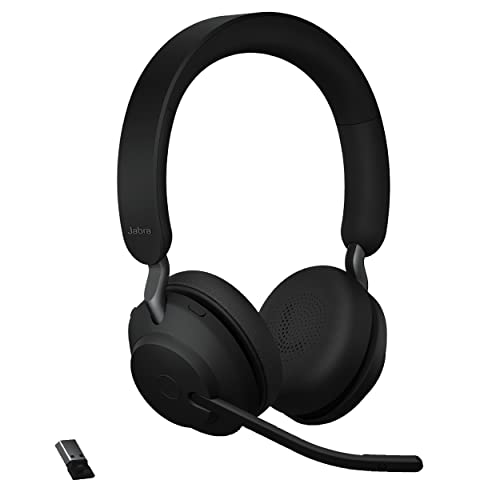
The Evolve2 65 is the wireless workhorse of this group, with up to 37 hours of battery life on a single charge and a 15-minute top-up that adds up to 8 hours of use. Bluetooth 5.0 pairs with a laptop and a phone, while the included Link 380 adapter gives a steadier wireless link for laptops that struggle with built-in Bluetooth. Three microphones handle calls, passive noise cancelling softens the room, and a carry case plus an optional charging stand keep the headset ready between meetings. It is a strong fit for people who move between rooms all day.
Specs
- 40 mm speakers, 3-microphone call technology
- Up to 37 hours of battery life, 15-minute charge for up to 8 hours of use
- Bluetooth 5.0 with Link 380 adapter and 1.2 m USB-C to USB-A cable
- Passive noise cancelling, carry case included
- UC certified for Teams, Cisco, Mitel and Avaya
Best for: All-day callers who need multi-day battery life and a wireless link that stays steady.
Watch out for: It ships with a USB-A adapter, so USB-C-only laptops need their own adapter or a Bluetooth connection.
ASIN: B0897YVLPF
Logitech H390
The H390 is the simplest headset here: plug the USB-A connector into a laptop and it works, with no software, no pairing and no battery to think about. A rotating noise-canceling mic sits on the left side and tucks out of the way when calls end, while in-line controls on the 6.23 ft cable handle volume and mute. Fine-tuned 30 mm drivers deliver clear stereo audio for meetings and music, and the adjustable headband with leatherette ear cushions suits long sessions. It works with Windows, macOS and ChromeOS, which makes it an easy spare headset to keep in a laptop bag.
Specs
- 30 mm drivers, USB-A plug-and-play, no software needed
- Rotating noise-canceling mic, mic range 100 Hz to 10 kHz
- 6.23 ft cable with in-line volume and mute controls
- 0.44 lb, adjustable headband, leatherette ear cushions
- Works with Windows, macOS and ChromeOS; 2-year warranty
Best for: Anyone who wants the simplest wired headset for laptop calls with no setup at all.
Watch out for: It uses USB-A only, so USB-C-only laptops need an adapter that is not included.
ASIN: B000UXZQ42
Which One Fits Your Situation
You Work from Cafes and Shared Spaces
Pick the Poly Blackwire 5220. Its wired USB-C connection never needs charging, the boom mic cuts cafe noise, and the three connection types cover any laptop handed to you at a shared desk. The carrying case keeps the cable from tangling in a bag.
You Travel Light and Hate Cables
Pick the Logitech Zone Vibe 100. At 185 grams it is the lightest headset here, multipoint Bluetooth pairs with a laptop and a phone at once, and the flip-to-mute mic tucks away when the headset turns into music headphones on a flight. The 18 hours of talk time covers a full travel day.
You Are on Calls All Day
Pick the Jabra Evolve2 65 for wireless freedom, with 37 hours of battery life that outlasts a week of meetings, or the Jabra Evolve2 40 if a wired connection and no charging sound better. Both carry three-mic call tech and a busylight that guards focus time.
You Want the Simplest Setup Possible
Pick the Logitech H390. It plugs into a USB-A port and works at once, with no software, no pairing and no battery to watch. The in-line controls handle volume and mute, and the rotating mic tucks away when the call ends. Keep a small USB-C adapter in the bag for newer laptops.
Common Mistakes
- Buying a USB-A-only headset for a laptop that has USB-C ports and no adapter in the box.
- Assuming a Bluetooth headset mic sounds the same as a wired boom mic on every call.
- Forgetting to check battery life, then losing a wireless headset mid-meeting with no cable nearby.
- Picking a heavy desktop gaming headset for a laptop bag, then leaving it at home because it is too bulky to carry.
- Skipping the mute control check, then staying live on a call while talking to someone in the room.
Frequently Asked Questions
Do I need a USB-C headset for a new laptop?
Not always. Many new laptops still carry a USB-A port or a 3.5 mm jack, and a small adapter bridges the gap for USB-C-only machines. A USB-C headset plugs in directly and skips the adapter, which is handy, but a USB-A or 3.5 mm headset works just as well with the right adapter. Check the laptop ports first, then match the headset to them.
Is a wireless headset mic as clear as a wired one?
Close, but not identical. A wired boom mic sits near the mouth and sends a steady signal, while a wireless mic compresses audio over Bluetooth and can pick up more room noise. Modern three-mic designs close much of that gap in quiet rooms. For important calls in noisy places, a wired headset still has the edge, while wireless wins for moving around the house.
Can I use these headsets with a phone too?
Yes, most of them. The Blackwire 5220 connects to a phone through its 3.5 mm jack, the Zone Vibe 100 and Evolve2 65 pair over Bluetooth, and the Evolve2 40 works with phones that have a USB-C port. The H390 is the exception: it needs a USB-A port, so it only fits a phone through an adapter. Check the phone port before assuming a wired headset will plug straight in.
Why does my laptop mic sound worse than a headset mic?
A laptop mic sits far from the mouth, next to a fan and a keyboard, so it picks up clicks, hum and room echo along with the voice. A headset mic sits close to the mouth and often carries noise-canceling tech that filters the rest out. That shorter distance is the whole trick: the voice stays loud and clear while the room fades into the background.
FAQ
Do I need a USB-C headset for a new laptop?
Is a wireless headset mic as clear as a wired one?
Can I use these headsets with a phone too?
Why does my laptop mic sound worse than a headset mic?
More from Amazon
Programs that pair well with the guide above. Offers and eligibility are set by Amazon and may change.
Free shipping on eligible items, Prime Video and more. Eligible new members can start with a free trial.
Start a Prime free trialAd-free music streaming. Eligible new subscribers can start with a free trial.
Try Music Unlimited freeA Prime membership for ages 18-24 with a trial period. Eligibility is set by Amazon.
See Prime for Young AdultsAudiobooks and podcasts to listen to on the go. Eligible new members can start with a free trial.
Try Audible freeAs an Amazon Associate we earn from qualifying purchases.