Key takeaways
- Set the headset to stereo first and disable extra spatial processing in both the headset software and Windows.
- In Overwatch 2, enable the game’s headphone-oriented audio option if available on your platform, then compare it with ordinary stereo in the Practice Range.
- Keep master volume high enough for quiet footsteps, but reduce it if loud ultimate effects become fatiguing.
- Use a modest equalizer: reduce sub-bass below roughly 80 Hz by 2–4 dB and leave the presence range around 1–4 kHz close to neutral.
- Use push-to-talk or a carefully chosen voice-activation threshold so breathing, keyboard noise, and fan noise do not occupy team comms.
- Set microphone sidetone to a low or medium level. Too much sidetone can make your own voice distracting during a fight.
The best gaming headset for Overwatch 2 is the SteelSeries Arctis Nova Pro Wireless for players who want the strongest combination of positional audio, clear team communication, comfort, and flexible connections; the Logitech G Pro X 2 LIGHTSPEED is the better lighter-weight competitive alternative, while a wired headset remains the best value.
Quick verdict: which Overwatch 2 headset should you buy?
| Headset | Best for | Connection options | Battery claim | Typical market range |
|---|---|---|---|---|
| SteelSeries Arctis Nova Pro Wireless | Best overall and multi-platform setups | 2.4GHz wireless, Bluetooth, wired base station | Two swappable batteries; about 20 hours per battery | Usually $300–$350 |
| Logitech G Pro X 2 LIGHTSPEED | Competitive PC play and long sessions | 2.4GHz wireless, Bluetooth, 3.5mm wired | Up to about 50 hours | Usually $200–$250 |
| Razer BlackShark V2 Pro (2023) | Microphone clarity and value-focused wireless play | 2.4GHz wireless, Bluetooth | Up to about 70 hours | Usually $150–$200 |
| HyperX Cloud III Wireless | Comfort, battery life, and simple PC gaming | 2.4GHz wireless | Up to about 120 hours | Usually $100–$150 |
| SteelSeries Arctis Nova 7 | Simultaneous game audio and phone chat | 2.4GHz wireless, Bluetooth, 3.5mm wired | Up to about 38 hours | Usually $150–$180 |
Battery figures are manufacturer claims and vary with volume, wireless mode, lighting, microphone use, and battery age. PC compatibility, console support, and available features can also differ between platform versions.

HyperX Cloud III S – Wireless Gaming Headset for PS5, PS4, Switch, PC, Mac, and Mobile, Up to 120-Hour (2.4GHz) / 200-Hour (Bluetooth) Battery, 53mm Angled Drivers, Detachable Mic – Black
Included for 'Best Gaming Headset for Overwatch 2: Top Picks' because the listing specifies Wireless Gaming Headset for PS5 and PS4, details this guide uses to compare options.
View on Amazon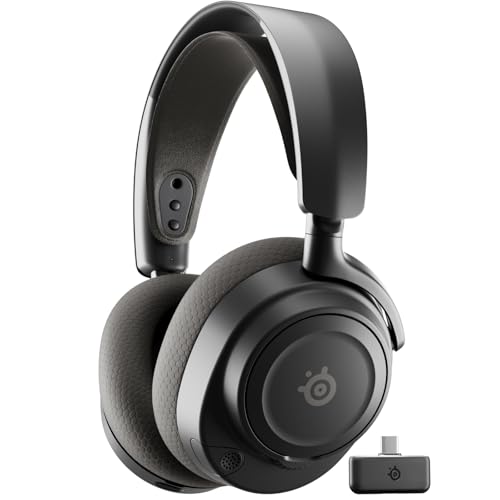
SteelSeries Arctis Nova 7 Wireless Gen 2 Gaming Headset - Black
Included for 'Best Gaming Headset for Overwatch 2: Top Picks' because the listing specifies Black, details this guide uses to compare options.
View on Amazon
Razer BlackShark V2 Pro Wireless Gaming Headset, 70 Hr Battery, Black
Included for 'Best Gaming Headset for Overwatch 2: Top Picks' because the listing specifies 70 Hr Battery and Black, details this guide uses to compare options.
View on AmazonWhat matters most in Overwatch 2
Positional audio is more important than oversized bass
Overwatch 2 rewards hearing direction and timing: footsteps approaching from behind, a Tracer blinking to one side, an ultimate cue before the visual effect appears, or a teammate calling from outside your field of view. A headset with controlled bass and a clear midrange usually helps more than one with dramatic low-end impact.
Excessive bass can make explosions and weapon effects exciting while masking quieter footsteps and voice lines. A wide, natural stereo presentation is also preferable to an exaggerated “7.1” effect that smears left-right placement. Virtual surround can be worth trying, but compare it against ordinary stereo in the Practice Range rather than assuming more channels mean better accuracy.
Microphone clarity affects fights, not just social chat
Good team communication needs intelligible consonants at low latency. Your team should be able to distinguish “left,” “right,” “back,” and hero names while several abilities are active. The Razer BlackShark V2 Pro and Logitech G Pro X 2 LIGHTSPEED are particularly appealing when microphone quality is a priority, while the Arctis Nova Pro Wireless offers useful software processing and microphone monitoring.
Noise suppression should remove keyboard clicks and fan noise without cutting the beginning or end of words. If your room is quiet, use moderate processing or none at all. Aggressive suppression can make short callouts sound clipped, which is worse than a small amount of background noise.
Comfort is a competitive feature
A headset that becomes hot, tight, or heavy after an hour encourages you to adjust it during a match. That movement can break concentration and change the headset’s seal, altering perceived bass and positional cues. The Cloud III Wireless is a strong comfort-and-battery choice, while the G Pro X 2 LIGHTSPEED is relatively light and suitable for long PC sessions. The Nova Pro Wireless adds useful features but has a more substantial base-station and headset setup.
People who wear glasses should pay particular attention to ear-cup pressure. A softer cushion may seal better around frames, but a very tight clamp can become uncomfortable. If possible, prioritize a return policy when buying any closed-back headset for extended competitive use.
Head-to-head: the top Overwatch 2 choices
SteelSeries Arctis Nova Pro Wireless: best overall
The Nova Pro Wireless is the most complete option for players who switch between PC, PlayStation, or other supported devices. Its wireless base station provides easy control, sidetone, connection management, and dual-device functionality. The swappable battery system is more useful than a large single battery: one cell can charge while the other powers the headset.
Its main advantage in Overwatch 2 is control. You can tune the sound, monitor your voice, and manage game/chat balance without constantly opening software. Its limitations are price, weight compared with simpler headsets, and the possibility that its active noise cancellation and software features add complexity you do not need.
Logitech G Pro X 2 LIGHTSPEED: best for competitive PC play
The G Pro X 2 LIGHTSPEED combines low-latency wireless operation with Bluetooth and a 3.5mm input. Its long battery life makes it practical for players who do not want to charge every night, and its lightweight design suits long ranked sessions.
Choose it when you want a focused competitive headset without a separate wireless control base. Its sound is detailed enough for directional cues, but the best result depends on sensible equalization. Avoid boosting bass simply because the default presentation seems less dramatic than a music-focused headset.
Razer BlackShark V2 Pro: best microphone-focused value
The 2023 BlackShark V2 Pro is a strong fit for players whose priority is being understood during fast team fights. Its detachable microphone and wireless operation keep the desk uncluttered, and its stated battery life is among the better options in this group.
It is less flexible than the Nova Pro Wireless because it does not provide the same base-station controls or universal wired feature set. It is a better match for a PC or console setup where straightforward 2.4GHz wireless matters more than switching between multiple sources.
HyperX Cloud III Wireless: best battery and comfort value
The Cloud III Wireless is a practical choice for players who want to charge infrequently. Its comfortable closed-back design and long claimed runtime make it well suited to daily play, work, and gaming without frequent cable management.
It is not the most feature-rich headset here: Bluetooth and simultaneous device features are not its main selling points. Select it when comfort, battery life, and uncomplicated wireless gaming matter more than advanced mixing.
SteelSeries Arctis Nova 7: best for game audio plus phone chat
The Nova 7 is useful when you want to hear Overwatch 2 through 2.4GHz wireless while keeping a phone connected over Bluetooth. That can be convenient for a group call, music, or notifications. It also includes a wired option, making it more versatile than a wireless-only model.
Its sound and microphone are competitive for the price, but the Nova Pro Wireless offers more premium controls and the Cloud III Wireless offers substantially longer claimed battery life. The Nova 7 makes the most sense for people who will actually use its dual-wireless functionality.
Settings that improve directional cues
Start with a clean baseline rather than stacking every surround feature available:
- Set the headset to stereo first and disable extra spatial processing in both the headset software and Windows.
- In Overwatch 2, enable the game’s headphone-oriented audio option if available on your platform, then compare it with ordinary stereo in the Practice Range.
- Keep master volume high enough for quiet footsteps, but reduce it if loud ultimate effects become fatiguing.
- Use a modest equalizer: reduce sub-bass below roughly 80 Hz by 2–4 dB and leave the presence range around 1–4 kHz close to neutral.
- Use push-to-talk or a carefully chosen voice-activation threshold so breathing, keyboard noise, and fan noise do not occupy team comms.
- Set microphone sidetone to a low or medium level. Too much sidetone can make your own voice distracting during a fight.
These are starting points, not universal competitive settings. Head shape, ear-cup seal, hearing, and room noise all change the result. The correct choice is the setting in which you can identify direction without raising volume to uncomfortable levels.
Wireless, wired, or Bluetooth?
For ranked PC play, 2.4GHz wireless is usually the best balance of freedom and latency. A USB wireless dongle provides a dedicated gaming link and avoids the higher latency and bandwidth-sharing behavior that can affect Bluetooth audio. Bluetooth is convenient for a phone or laptop, but it should not be the first choice for serious match audio when a 2.4GHz mode is available.
Wired headsets remain excellent for value and reliability. They do not need charging, have no wireless interference, and often cost less. A wired model is especially sensible if you sit close to your PC and already own a good USB microphone. The trade-off is cable drag, less freedom to move, and fewer integrated controls.
Decision matrix
| Your situation | Best direction | Why |
|---|---|---|
| You play ranked on PC and want minimum distractions | Logitech G Pro X 2 LIGHTSPEED | Light design, low-latency wireless, long battery life |
| You switch between PC and console | SteelSeries Arctis Nova Pro Wireless | Base-station routing and broad connection flexibility |
| Your teammates complain that your voice is unclear | Razer BlackShark V2 Pro | Strong microphone-focused design and wireless convenience |
| You forget to charge devices | HyperX Cloud III Wireless | Very long claimed battery runtime |
| You need phone audio while gaming | SteelSeries Arctis Nova 7 | 2.4GHz gaming audio plus Bluetooth connectivity |
| You want the lowest purchase cost | A quality wired headset | No battery, wireless hardware, or charging premium |
How much battery do you really need?
Battery claims can look larger than the difference you experience in practice. Suppose you play four hours per evening and a wireless headset delivers 50 hours under your typical settings. The simple estimate is:
50 hours ÷ 4 hours per evening = 12.5 evenings between charges.
If higher volume, microphone processing, and Bluetooth reduce practical runtime by 20%, the estimate becomes about 40 hours, or 10 evenings. That is already enough for most players. A swappable-battery model is more valuable when you play long tournament blocks or dislike any charging interruption; otherwise, a 40–70-hour headset may already exceed your needs.
Final recommendation
Choose the SteelSeries Arctis Nova Pro Wireless if you want the most complete Overwatch 2 setup, especially across multiple devices. Choose the Logitech G Pro X 2 LIGHTSPEED for a lighter competitive PC headset with excellent battery life. Pick the Razer BlackShark V2 Pro when microphone clarity is the deciding factor, or the HyperX Cloud III Wireless when comfort and battery life matter most. If you do not need wireless freedom, a good wired headset can deliver the clearest value and consistent audio with fewer failure points.