Our Short List of 3

- Best for: Desktop typists and gamers who want a fast, full-size optical keyboard with premium keycaps and a wrist rest included.
- Linear optical switches with a light, smooth keystroke and short actuation
- Polling rate of up to 8000 Hz for low input latency
- Doubleshot PBT keycaps that resist wear and shine
- Dedicated media keys, digital dial, and included magnetic wrist rest

- Best for: Typists and gamers who want to fine-tune every key and get the quickest possible repeated presses.
- Adjustable actuation from 1.5 mm to 3.6 mm per key
- Rapid Trigger mode for faster repeated key presses
- Dual-step actuation for two commands on one key
- Doubleshot PBT keycaps, media keys, dial, and magnetic wrist rest

- Best for: Typists who want the widest adjustable actuation range and a premium, rigid full-size board.
- OmniPoint adjustable switches with 0.1 mm to 4.0 mm actuation range
- OLED smart display and clickable metal volume roller
- Aircraft-grade aluminium alloy frame for stability
- Per-key RGB lighting and USB passthrough
All 5 Picks at a Glance
| Product | Specs | Action |
|---|---|---|
| 1. Razer Huntsman V2 Linear Optical — Best Overall for Fast Typing |
| Check price on Amazon |
| 2. Razer Huntsman V2 Analog — Best Adjustable Actuation |
| Check price on Amazon |
| 3. SteelSeries Apex Pro — Best Hall Effect Speed |
| Check price on Amazon |
 4. Logitech G915 TKL — Best Low-Profile Wireless |
| Check price on Amazon |
 5. Keychron K3 Max — Best Compact Low-Profile Pick |
| Check price on Amazon |
Our Top Picks
- Razer Huntsman V2 Optical Gaming Keyboard: Linear OpticalHuntsman V217.53 x 5.52 x 1.71 inches0 poundsCheck on Amazon
- SteelSeries Apex Pro HyperMagnetic Gaming KeyboardPro Full Size5.5 x 17.2 x 1.6 inches2.14 poundsCheck on Amazon
- Logitech G915 TKL Tenkeyless Lightspeed Wireless RGB MechanicalTKL15.2 x 5.9 x 0.9 inches1.8 poundsCheck on Amazon
Introduction
Typing speed is rarely about finger speed alone. The keyboard under your hands decides how far each key must travel before it registers, how much force each press demands, and how quickly your fingers can reset for the next keystroke. A board with a short, light actuation point lets you move through words with less effort, while a mushy keyboard forces you to bottom out every key.
The best keyboards to type faster share a few traits: switches that actuate early, a consistent feel across the board, and a layout that keeps your hands in a natural position. Optical and Hall effect switches lead the field because they sense keystrokes with light or magnets instead of metal contacts, removing debounce delay and allowing adjustable actuation. Low-profile mechanical switches cut travel distance so each press finishes sooner.
This guide explains what makes a keyboard faster to type on, then compares five computer keyboards sold on Amazon US, covering optical, Hall effect, and low-profile mechanical designs.
Disclosure: As an Amazon Associate, we earn from qualifying purchases.
How to Choose a Keyboard That Helps You Type Faster
Switch type matters most
The switch under each keycap decides the feel and speed of every keystroke. Linear switches move straight down with no tactile bump, which suits fast, repeated presses. Tactile switches add a small bump at the actuation point, giving feedback that many touch typists prefer for accuracy. Clicky switches add an audible click on top of the bump, which some people love and coworkers often do not.
Optical switches use a beam of light to detect a keypress, so there is no physical contact to wear out and no debounce delay. Hall effect switches use magnets and let you adjust the actuation point per key, so the space bar can be set deep to prevent accidents while letter keys actuate with the lightest touch. Standard mechanical switches are still fast when they use a light spring and short travel, and they offer the widest choice of replacement keycaps.
Actuation point and travel distance
Actuation point is how far a key travels before it registers, measured in millimetres. A standard mechanical switch often actuates around 2.0 mm, while fast switches can actuate at 1.0 to 1.5 mm. That small difference adds up across thousands of keystrokes a day. Total travel matters too: a key that bottoms out at 3.0 mm instead of 4.0 mm lets your finger start the next press sooner.
Adjustable actuation, found on Hall effect boards, takes this further. You can set frequently used keys to a hair trigger and set keys you hit by accident to a deeper press. Rapid trigger is a related feature that resets a key the moment you start lifting it, rather than waiting for it to return past a fixed point, which makes repeated presses of the same key noticeably quicker.
Layout and ergonomics
A full-size layout includes a number pad, which is useful for data entry but pushes the mouse further from your dominant hand. A tenkeyless layout drops the number pad and keeps the mouse closer, which many fast typists prefer. A 75 percent layout goes further, compressing the function row and navigation keys into a compact frame while keeping the keys most people use daily.
Ergonomics matter because speed collapses when your wrists hurt. A detachable wrist rest and adjustable tilt feet help you maintain a neutral wrist position through long sessions. Low-profile boards sit closer to the desk surface, which suits people who rest their wrists on the desk.
Keycaps and build quality
Keycap material affects durability and feel. Double-shot PBT keycaps resist shine and wear far longer than thin ABS caps, and their legends will not fade after months of heavy typing. A solid frame keeps the board from flexing under fast typing, which protects accuracy and consistency.
Stabilisers on the longer keys, such as the space bar, Enter, and Shift, are easy to overlook and hard to ignore once you notice them. Well-lubricated stabilisers keep those keys from rattling or sticking, so the keys you hit most often feel as smooth as the rest of the board.
Connectivity and extra features
Wired connections still offer the lowest and most consistent latency. Wireless boards have closed the gap with fast 2.4 GHz connections, and Bluetooth is convenient for switching between a laptop, a tablet, and a desktop.
Per-key RGB lighting is a matter of taste, but backlighting itself is practical for typing in dim rooms. Dedicated media keys and a volume dial are small conveniences that save you from reaching for the mouse during a work session. Onboard memory is worth having if you move the keyboard between computers, because it carries your key remaps and lighting settings with the board instead of leaving them in software on one machine.
Top Picks: The Best Keyboards to Type Faster
1. Razer Huntsman V2 Linear Optical — Best Overall for Fast Typing
- Best for: Desktop typists and gamers who want a fast, full-size optical keyboard with premium keycaps and a wrist rest included.
- Linear optical switches with a light, smooth keystroke and short actuation
- Polling rate of up to 8000 Hz for low input latency
- Doubleshot PBT keycaps that resist wear and shine
- Dedicated media keys, digital dial, and included magnetic wrist rest
Desktop typists and gamers who want a fast, full-size optical keyboard with premium keycaps and a wrist rest included.
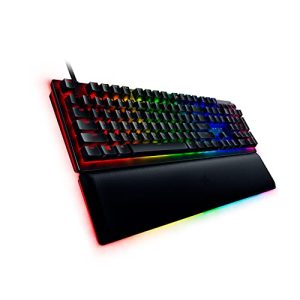
The Razer Huntsman V2 with Linear Optical Switches Gen-2 is the strongest all-round pick for typing faster, because it combines an optical switch with a short, smooth keystroke and a full-size layout that suits both work and play. The Gen-2 linear optical switches actuate with a light, consistent press and include sound dampeners that keep the board quieter than earlier optical designs. With a polling rate of up to 8000 Hz, the board reports keystrokes to the computer with very low input latency.
The doubleshot PBT keycaps resist the shine and wear that makes cheaper keycaps slippery over time. Dedicated media keys and a digital dial sit above the number pad for volume and playback control, and a magnetic wrist rest is included for long sessions.
This is a full-size wired board, so it takes up more desk space than a compact model. It suits typists who want a fast, quiet, full-featured keyboard for a dedicated desktop setup and who value a number pad for data entry.
Pros:
Cons:
2. Razer Huntsman V2 Analog — Best Adjustable Actuation
- Best for: Typists and gamers who want to fine-tune every key and get the quickest possible repeated presses.
- Adjustable actuation from 1.5 mm to 3.6 mm per key
- Rapid Trigger mode for faster repeated key presses
- Dual-step actuation for two commands on one key
- Doubleshot PBT keycaps, media keys, dial, and magnetic wrist rest
Typists and gamers who want to fine-tune every key and get the quickest possible repeated presses.
The Razer Huntsman V2 Analog uses analog optical switches that measure exactly how far each key is pressed, rather than treating every press as a simple on or off. That allows adjustable actuation from 1.5 mm to 3.6 mm on a per-key basis, so you can set your most-used letter keys to a very light touch while giving the space bar and Enter key a deeper actuation point that prevents accidental presses.
Rapid Trigger mode lets a key reset and register again the moment you begin to release it, instead of waiting for the key to rise past a fixed reset point, so repeated presses become quicker and less tiring. Dual-step actuation lets you bind two actions to one keypress, with one command firing at a shallow press and a second at a full press.
Like the linear version, it includes doubleshot PBT keycaps, dedicated media keys, a digital dial, and a magnetic wrist rest, plus a USB passthrough port. The analog switches have a learning curve, since tuning actuation points takes some time in the companion software, and the full-size frame is large. It suits typists who enjoy customising their setup and who want the fastest possible repeated keystrokes.
Pros:
Cons:
3. SteelSeries Apex Pro — Best Hall Effect Speed
- Best for: Typists who want the widest adjustable actuation range and a premium, rigid full-size board.
- OmniPoint adjustable switches with 0.1 mm to 4.0 mm actuation range
- OLED smart display and clickable metal volume roller
- Aircraft-grade aluminium alloy frame for stability
- Per-key RGB lighting and USB passthrough
Typists who want the widest adjustable actuation range and a premium, rigid full-size board.
The SteelSeries Apex Pro is a full-size HyperMagnetic keyboard built around OmniPoint adjustable switches, and it remains one of the fastest typing boards available thanks to its actuation range of 0.1 mm to 4.0 mm across 40 levels per key. That range is wider than most adjustable boards, so you can set letter keys to an extremely light trigger for maximum speed while keeping modifier keys deeper to avoid mistakes. The magnetic switches register presses without physical contact, which removes debounce delay.
An OLED smart display in the top-right corner shows settings, profiles, and notifications from supported applications. A clickable metal roller controls volume, and dedicated media keys handle playback. The aluminium alloy frame gives the board a rigid, premium feel that stays stable under rapid typing, and the per-key RGB lighting is fully customisable. USB passthrough is included for a mouse or headset dongle.
The full-size layout and premium construction make this a desk-bound board rather than a portable one, and the sheer number of customisation options can feel overwhelming at first. It suits fast typists who want the widest actuation range available, a rock-solid frame, and a display that keeps settings visible at a glance.
Pros:
Cons:
4. Logitech G915 TKL — Best Low-Profile Wireless
- Best for: Typists who want a slim, wireless, low-profile board with a short keystroke and a tidy desk footprint.
- Low-profile linear switches with short travel for quick keystrokes
- LIGHTSPEED wireless plus Bluetooth for flexible connectivity
- Slim tenkeyless aluminium frame that saves desk space
- Dedicated media controls and long battery life
Typists who want a slim, wireless, low-profile board with a short keystroke and a tidy desk footprint.
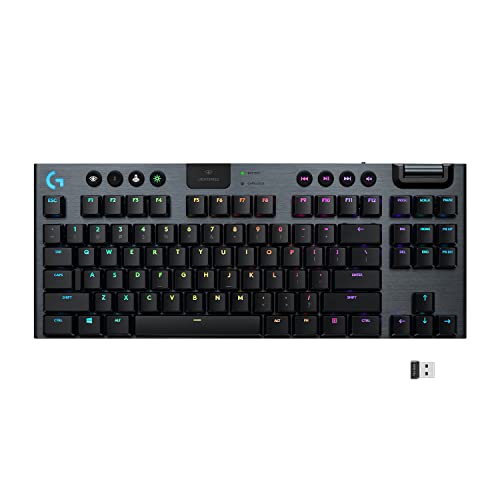
The Logitech G915 TKL takes a different route to typing speed: low-profile mechanical switches with short travel, in a slim tenkeyless frame that keeps the board close to the desk surface. This listing is the linear switch version, which gives a smooth keystroke with no bump to push through, so each press finishes sooner and your fingers travel less distance overall.
Wireless performance is a strength here. LIGHTSPEED 2.4 GHz wireless offers a fast, reliable connection for gaming, while Bluetooth lets you pair the board with a laptop or tablet. The brushed aluminium top plate gives the board a slim, premium look, and dedicated media controls sit along the top edge for quick volume and playback adjustments.
The tenkeyless layout drops the number pad, which keeps the mouse closer to your dominant hand and suits smaller desks. The low-profile keycaps use a different stem from standard mechanical keycaps, so replacement keycap choices are more limited than on a standard-height board. It suits typists who want a fast, slim, wireless board for a clean desk setup and who prefer a shorter keystroke to a tall mechanical feel.
Pros:
Cons:
5. Keychron K3 Max — Best Compact Low-Profile Pick
- Best for: Typists who want a compact, portable, low-profile board that works across Mac, Windows, and multiple devices.
- Compact 75 percent layout with function row and arrow keys
- Low-profile linear Gateron switches with short travel
- 2.4 GHz wireless, Bluetooth for three devices, and wired USB-C
- QMK and VIA support, hot-swappable switches, Mac and Windows layouts
Typists who want a compact, portable, low-profile board that works across Mac, Windows, and multiple devices.
The Keychron K3 Max is a 75 percent low-profile mechanical keyboard that packs a full set of keys into a compact frame, keeping the function keys and arrow keys. This listing uses low-profile Gateron Red switches, which are linear and light, with a short travel distance that suits fast, repeated typing. The hot-swappable version lets you change switches without soldering, so you can try a different feel later without buying a new keyboard.
Connectivity covers 2.4 GHz wireless, Bluetooth for up to three devices, and wired USB-C, so the board works across a desktop, a laptop, and a tablet. QMK and VIA support allows deep remapping and custom layers, which appeals to typists who want to move keys around or build shortcuts for their workflow. The board supports both Mac and Windows layouts, with a physical switch to change operating system modes. Double-shot PBT keycaps and acoustic foam inside the case help the board sound and feel more refined than its size suggests.
The compact 75 percent layout takes a short adjustment period if you are used to a full-size board, and the low-profile switches use their own keycap size, so standard-height keycap sets will not fit. It suits typists who travel between desks, use both Mac and Windows, or simply want a fast, compact board that leaves room for the mouse.
Pros:
Cons:
Comparison Table
| Keyboard | Switch Type | Layout | Actuation | Connectivity | Standout Feature |
|---|---|---|---|---|---|
| Razer Huntsman V2 Linear | Linear optical Gen-2 | Full-size | Short optical actuation | Wired USB | 8000 Hz polling, doubleshot PBT keycaps |
| Razer Huntsman V2 Analog | Analog optical | Full-size | 1.5–3.6 mm adjustable | Wired USB | Rapid Trigger, dual-step actuation |
| SteelSeries Apex Pro | OmniPoint Hall effect | Full-size | 0.1–4.0 mm adjustable | Wired USB | Widest actuation range, OLED display |
| Logitech G915 TKL | Low-profile linear mechanical | Tenkeyless | Short low-profile travel | LIGHTSPEED, Bluetooth, wired | Slim wireless design, media controls |
| Keychron K3 Max | Low-profile linear Gateron Red | 75 percent | Short low-profile travel | 2.4 GHz, Bluetooth, wired USB-C | Compact frame, QMK and VIA support |
Frequently Asked Questions
Do optical switches really help you type faster?
Optical switches can help, mainly because they remove debounce delay and often actuate earlier than standard mechanical switches. The difference is small on any single keypress, but it adds up across a long document, and the light actuation reduces finger fatigue, which is what usually slows people down.
Is a low-profile keyboard better for typing speed?
A low-profile keyboard can be better if you prefer a short keystroke, because the keys travel less distance before they register and bottom out, letting you move to the next key sooner. Others prefer the deeper travel of a standard mechanical switch for the feedback it gives. There is no universal winner, so the best choice is the travel distance that feels natural to your hands.
What actuation point is best for fast typing?
A light actuation point between 1.0 mm and 2.0 mm suits most fast typists, because the key registers before your finger has travelled far. Adjustable boards let you go lighter still, down to 0.1 mm on some Hall effect models, but an extremely light setting can cause accidental presses until you adjust to it. Start with a moderate setting and lower it gradually over a few days.
Does keyboard layout affect typing speed?
Layout affects typing speed mainly through comfort and reach. A tenkeyless or 75 percent board keeps the mouse closer and reduces shoulder strain, which helps you stay comfortable during long sessions. A full-size board is better if you enter a lot of numbers, since a dedicated number pad is faster than the number row.
How long does it take to get faster on a new keyboard?
Most typists need a few days to a week to reach their normal speed on a new keyboard, and a little longer if the switch type or layout is very different from what they used before. Typing speed usually dips at first as your fingers learn the new key spacing and actuation point, then recovers and often improves past your old baseline.
Conclusion
The best keyboards to type faster shorten the distance between thinking and typing. Optical and Hall effect switches lead the field because they actuate early, register with minimal delay, and let you tune the keystroke to your fingers. Low-profile mechanical boards offer a different kind of speed, with a short, light keystroke in a slim frame.
For most typists, the Razer Huntsman V2 Linear is the safest all-round choice, with fast optical switches, durable keycaps, and a wrist rest in the box. If you want to tune every key, the Huntsman V2 Analog and the SteelSeries Apex Pro both offer adjustable actuation, with the Apex Pro providing the widest range. If a slim, wireless board suits your desk better, the Logitech G915 TKL delivers low-profile speed without a cable, while the Keychron K3 Max packs similar speed into a compact 75 percent frame.
Whichever route you choose, give yourself time to adjust to the new switch feel, and check the switch type and layout before ordering, since each model sells in several variants.
FAQ
Do optical switches really help you type faster?
Is a low-profile keyboard better for typing speed?
What actuation point is best for fast typing?
Does keyboard layout affect typing speed?
How long does it take to get faster on a new keyboard?
More from Amazon
Programs that pair well with the guide above. Offers and eligibility are set by Amazon and may change.
Free shipping on eligible items, Prime Video and more. Eligible new members can start with a free trial.
Start a Prime free trialAd-free music streaming. Eligible new subscribers can start with a free trial.
Try Music Unlimited freeA Prime membership for ages 18-24 with a trial period. Eligibility is set by Amazon.
See Prime for Young AdultsAudiobooks and podcasts to listen to on the go. Eligible new members can start with a free trial.
Try Audible freeAs an Amazon Associate we earn from qualifying purchases.