Searching for the best keyboards ubder 40 means hunting for a board that feels far more expensive than its modest billing suggests — and yes, “ubder” is simply a common misspelling of “under”, so this guide covers keyboards in the under-forty range. A tight budget no longer forces a choice between a mushy membrane board and a flimsy frame: the five keyboards below include a genuine mechanical board with a metal top plate, two full-size RGB boards with spill resistance, a compact wireless mechanical board, and a plain wired workhorse for typing all day. Each one is a keyboard only — no bundled mice, headsets or extras padding the list — and each one earns its place for a different kind of user, from gamers building a first setup to students typing essays late into the night.
The trick with this range is knowing where the money went. A board can look identical to a pricier model in photos and still feel hollow under your fingers, while another board with a plainer shell can type beautifully for years. The buying criteria below explain what actually matters at this level, then each pick is matched to the person it suits best, with its weak points stated plainly so you can choose with your eyes open.
How to Choose
1. Switch type and feel
Switches decide how a keyboard feels more than any other feature. True mechanical switches give a distinct bump or click on every press and usually last longer than membrane keys. Membrane boards use a rubber layer under the keys, which makes them quieter and cheaper but can feel soft or vague. In between sit hybrids such as Logitech Mech-Dome keys, which pair a membrane base with a mechanical-style tactile bump. If you type all day, a tactile or quiet switch keeps fatigue down; if you game, a crisp actuation helps you feel each press land. Try to match the switch to your room too — clicky switches carry through walls and into voice calls, while quiet switches suit shared spaces.
2. Layout and size
Full-size boards keep the number pad, function row and navigation cluster, which suits data entry, spreadsheets and anyone who types numbers often. Tenkeyless boards drop the number pad and free up desk space for mouse movement, which many gamers prefer. Compact 60 percent boards go further, dropping the function row and arrow keys onto a function layer, which saves the most space but demands a learning curve. Measure your desk before you buy: a full-size board needs room for the pad and your mouse, while a compact board leaves space for notebooks, a drink and a phone.
3. Wired or wireless
Wired USB boards are the simplest option in this range: plug in and type, with no batteries to charge and no connection dropouts. Wireless boards add freedom, and the better ones in this guide connect three ways — Bluetooth for laptops and tablets, a 2.4 GHz receiver for low-lag gaming, and a wired USB-C cable for charging or a direct connection. Bluetooth that pairs with several devices at once is handy if you switch between a desktop and a laptop. If you play fast-paced games, a wired connection or the 2.4 GHz receiver is the safer choice over Bluetooth alone.
4. Backlighting and lighting
Backlighting matters most in dim rooms, late-night sessions and rooms with poor overhead light. Single-colour red LED lighting is the simplest version and keeps the board easy to read at night. RGB lighting splits the board into zones or lights each key, and the best versions let you adjust brightness, pick effects and dim the board when you want darkness. Zone lighting colours groups of keys together, while per-key lighting colours each key on its own. Check whether the lighting can be adjusted from the keyboard itself, since software-only controls are less handy when you switch computers.
5. Build quality and spill resistance
Weight is a useful clue at this level: a metal top plate adds heft that stops the board sliding around during fast typing or gaming. Plastic frames can still be solid if they are thick and well braced, but thin, hollow frames flex and creak. Spill resistance is a genuine plus for desks that hold drinks — several boards in this guide are built to shrug off drips and splashes, with one carrying an IP32 water-resistance rating. Keycap quality matters too: double-shot keycaps keep their legends from wearing smooth, while thin printed legends fade with heavy use.
6. Extras that earn their keep
A wrist rest or palm rest takes strain off your wrists during long sessions, and a magnetic rest that snaps on and off is the most convenient kind. Dedicated media controls let you pause, skip and change volume without leaving your game or your document. Hot-swappable sockets let you pull switches out and fit different ones later with no soldering, which turns a budget board into a board that grows with your taste. Adjustable feet set the typing angle, and a braided or detachable cable survives more wear than a thin fixed cable. Treat extras as tie-breakers, not reasons to buy: a board with a great rest and poor switches is still a poor board.
The Redragon K552 Kumara is the board that made budget mechanical keyboards a real category, and it remains the strongest first mechanical board in this guide. It is a tenkeyless board with 87 keys, Outemu Blue mechanical switches and a metal top plate that gives it a reassuring weight on the desk. The switches are clicky and tactile, with a clear bump and an audible click on every press, and the board supports full anti-ghosting with N-key rollover, so fast key combinations register cleanly in games. Red LED backlighting keeps the legends readable in a dark room, and the double-shot keycaps resist wear far better than printed legends.
Layout: tenkeyless, 87 keys
Switches: Outemu Blue mechanical, clicky and tactile
Backlighting: red LED
Connection: wired USB
Build: metal top plate, splash-resistant design, double-shot keycaps
Extras: full anti-ghosting, N-key rollover
Who it is for: first-time mechanical keyboard buyers, gamers who want a compact TKL layout, and typists who like a loud, crisp click under their fingers.
Caveats: the clicky Blue switches are loud, so they suit a private room better than a shared office or a late-night household. The K552 name covers several variants — red LED, rainbow and RGB backlighting, and different switch colours — so confirm the listing matches the red-backlit Outemu Blue version before ordering. There is no number pad, and Mac support is limited.
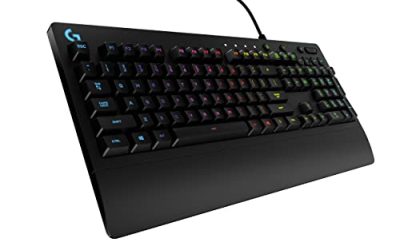
The Logitech G213 Prodigy is a full-size board built for people who want a comfortable, polished keyboard for gaming and everyday work in one package. Its Mech-Dome keys pair a membrane base with a mechanical-style tactile bump, giving a responsive press that is quieter than a clicky mechanical switch. LIGHTSYNC RGB lighting runs across five zones with a wide range of colours, adjustable through Logitech G HUB software. Spill resistance is built into the design, so splashes run off the surface instead of soaking into the keys, and an integrated palm rest with adjustable feet sets a comfortable typing angle.
Who it is for: gamers and students who want a full-size board with a number pad, quieter keys for shared rooms, and media controls for music and video.
Caveats: Mech-Dome keys are not true mechanical switches, so the feel is softer and less crisp than a mechanical board. The RGB lighting is zoned rather than per-key, which is less granular than boards that light each key on its own. The switches are fixed, so you cannot swap them later.
The SteelSeries Apex 3 is the quietest board in this guide, and the one to pick when keyboard noise matters. Its whisper-quiet switches use a soft membrane layer, so keystrokes land with a muted press instead of a sharp mechanical snap — a real advantage in shared rooms and on voice calls, where keyboard clatter bleeds into the microphone. The board carries 10-zone RGB lighting that splits the keyboard into ten lit areas you can colour through SteelSeries software, and an IP32 water-resistance rating that guards against drips and splashes from above. A premium magnetic wrist rest ships in the box and snaps onto the front of the board for long sessions.
Who it is for: players and typists in shared rooms, households and dorms, anyone who wants a full-size board with a wrist rest included, and people who keep a drink on the desk.
Caveats: the membrane switches feel soft next to a mechanical board, and typists who love a crisp tactile snap may find the press a little vague. The board is full-size, so it needs the most desk space of the picks here. Lighting is zoned, not per-key.
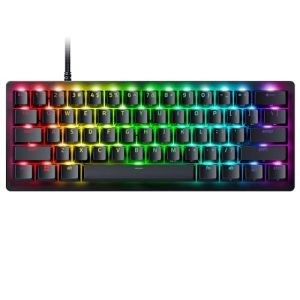
The Royal Kludge RK61 is the compact pick: a 60 percent mechanical board with 61 keys that takes up far less desk space than a full-size board and travels well in a bag. Triple-mode connectivity is its headline feature — Bluetooth that pairs with up to three devices, a 2.4 GHz receiver for lower-lag gaming, and a wired USB-C connection through the included coiled cable with its metal aviator connector. This listing uses Brown switches, which are tactile, giving a small bump as each key actuates without the sharp click of a clicky switch, and the sockets are hot-swappable, so a switch can be pulled out and replaced with no soldering. RGB backlighting rounds out a board that punches well above its size.
Who it is for: small desks, travellers, laptop users who want one board for several devices, and anyone curious about swapping switches later.
Caveats: there is no number pad, no dedicated function row and no arrow cluster, so those keys live on a function layer you must learn. The RK61 comes in several switch colours and colourways, so confirm the Brown-switch version before ordering — a separate listing covers the Red-switch variant. The remapping software is Windows-only, which limits customisation on other systems.
The Logitech K120 is the plain workhorse of this guide, and sometimes plain is exactly right. It is a full-size wired keyboard with 104 keys, quiet low-profile membrane keys and a spill-resistant design, and it connects over USB with true plug-and-play setup on Windows — no software, no batteries, no pairing. The slim, sturdy frame stays put on the desk, the curved space bar and familiar standard layout need no adjustment period, and the board is built to the same reliability standard as Logitech keyboards that cost several times as much. For typing documents, answering email and working through spreadsheets, it simply gets out of the way.
Who it is for: offices, home workstations, students on a tight budget, and anyone who needs a dependable second keyboard for a spare desk or a family computer.
Caveats: there is no backlighting, so it is a poor fit for dark rooms, and there are no media keys or extra controls. The membrane feel is basic next to the mechanical boards in this guide, and the glossy keycaps show fingerprints more readily than matte caps.
Comparison Table
Keyboard
Layout
Switch type
Lighting
Connection
Standout feature
Redragon K552 Kumara
Tenkeyless, 87 keys
Outemu Blue mechanical
Red LED
Wired USB
Metal top plate, clicky mechanical feel
Logitech G213 Prodigy
Full-size, 104 keys
Mech-Dome hybrid
LIGHTSYNC RGB, 5 zones
Wired USB
Spill resistance, palm rest, media keys
SteelSeries Apex 3
Full-size, 104 keys
Whisper-quiet membrane
10-zone RGB
Wired USB
IP32 water resistance, magnetic wrist rest
Royal Kludge RK61
60 percent, 61 keys
Brown tactile, hot-swappable
RGB
Bluetooth, 2.4 GHz, USB-C
Triple-mode wireless, compact size
Logitech K120
Full-size, 104 keys
Quiet membrane
None
Wired USB
Plug-and-play simplicity, spill resistance
Which One Is Right for You?
Start with the switch feel you want, then let layout narrow the field. If you want your first real mechanical keyboard and you like a loud, crisp click, the Redragon K552 Kumara is the obvious pick — its metal plate and TKL layout suit gaming desks, and its clicky switches make typing feel deliberate. If you share a room or take voice calls, choose the SteelSeries Apex 3 for its whisper-quiet keys and included wrist rest, or the Logitech G213 Prodigy for its quieter Mech-Dome keys, full-size layout and spill resistance.
Desk space is the next decider. A full-size board — the G213, the Apex 3 or the K120 — suits data entry and anyone who uses a number pad daily, but it needs the widest desk. The K552 drops the pad for more mouse room, and the RK61 shrinks the board to a 60 percent footprint that fits small desks and bags, at the cost of learning a function layer for arrows and function keys.
For a shared family computer, a spare desk or a pure typing workload, the Logitech K120 is the sensible choice: no software to install, no batteries to charge, and a spill-resistant frame that forgives accidents. For a setup that moves between a desktop, a laptop and a tablet, the RK61 is the only pick here that connects three ways and pairs with several devices at once. Whichever you choose, confirm the exact switch colour and backlighting variant on the listing before ordering, since several of these models ship in more than one version.
Frequently Asked Questions
Are keyboards in this range good enough for daily use?
Yes, for most people. The boards in this guide come from established keyboard makers and use proven switch designs — mechanical, membrane and hybrid — that hold up to daily typing and gaming. The main compromises at this level are simpler lighting, fixed switches on most boards and plainer keycaps, not reliability. A board with a metal top plate or a spill-resistant design will usually outlast a lighter board with the same switches.
Should a first keyboard be mechanical or membrane?
Mechanical switches suit people who want a distinct tactile feel and a board they can customise later, especially a hot-swappable model such as the RK61. Membrane switches suit people who want quiet typing, a lower profile and a simpler setup, and they are the right choice for shared rooms and voice calls. Neither type is better in every case — the right choice depends on how loud your room can be and how much you value key feel over quiet operation.
Do I need a number pad?
If you type numbers often — spreadsheets, data entry, accounting homework — a full-size board with a number pad saves time and errors. If you mostly game, write or browse, a tenkeyless or 60 percent board frees desk space for your mouse and keeps your hands closer together, which many players find more comfortable. A compact board is a poor fit only when the number pad is part of your daily workflow.
Why do some of these keyboards come in several versions?
Several popular keyboards ship with different switch colours, backlighting styles and colourways under the same model name. The K552, for example, comes in red LED, rainbow and RGB versions with different switch colours, and the RK61 comes in Brown, Red and Blue switch versions. Always check the switch type and backlighting stated on the listing you order, since the feel and the lighting change with the version.
Disclosure: As an Amazon Associate, we may earn from qualifying purchases.
R
Razer Gaming Series Editorial Team
We compare specs, materials and verified owner reviews before a product earns a spot. Rankings are never paid.
FAQ
Which One Is Right for You?
Start with the switch feel you want, then let layout narrow the field. If you want your first real mechanical keyboard and you like a loud, crisp click, the Redragon K552 Kumara is the obvious pick — its metal plate and TKL layout suit gaming desks, and its clicky switches make typing feel deliberate. If you share a room or take voice calls, choose the SteelSeries Apex 3 for its whisper-quiet keys and included wrist rest, or the Logitech G213 Prodigy for its quieter Mech-Dome keys, full-size layout and spill resistance.
Are keyboards in this range good enough for daily use?
Yes, for most people. The boards in this guide come from established keyboard makers and use proven switch designs — mechanical, membrane and hybrid — that hold up to daily typing and gaming. The main compromises at this level are simpler lighting, fixed switches on most boards and plainer keycaps, not reliability. A board with a metal top plate or a spill-resistant design will usually outlast a lighter board with the same switches.
Should a first keyboard be mechanical or membrane?
Mechanical switches suit people who want a distinct tactile feel and a board they can customise later, especially a hot-swappable model such as the RK61. Membrane switches suit people who want quiet typing, a lower profile and a simpler setup, and they are the right choice for shared rooms and voice calls. Neither type is better in every case — the right choice depends on how loud your room can be and how much you value key feel over quiet operation.
Do I need a number pad?
If you type numbers often — spreadsheets, data entry, accounting homework — a full-size board with a number pad saves time and errors. If you mostly game, write or browse, a tenkeyless or 60 percent board frees desk space for your mouse and keeps your hands closer together, which many players find more comfortable. A compact board is a poor fit only when the number pad is part of your daily workflow.
Why do some of these keyboards come in several versions?
Several popular keyboards ship with different switch colours, backlighting styles and colourways under the same model name. The K552, for example, comes in red LED, rainbow and RGB versions with different switch colours, and the RK61 comes in Brown, Red and Blue switch versions. Always check the switch type and backlighting stated on the listing you order, since the feel and the lighting change with the version.
Affiliate disclosure. As an Amazon Associate we earn from qualifying purchases at no extra cost to you. Prices accurate as of the date shown.
Find the best lubricant for keyboards in this lube guide: GPL 205g0, Tribosys 3203 and 3204, spring oils and stabiliser greases for linear and tactile switches.
Find the best keyboards for note 9 with our guide to Bluetooth keyboards, keyboard cases and USB-C options, plus Samsung DeX tips for the Galaxy Note 9.
A plain-English guide to the best asus rgb keyboards: ROG switches, layouts, Aura Sync lighting and wireless modes, so you can pick the right board first time.
Discover the best vintage mechanical keyboards, from the IBM Model M and Cherry G80 to retro-styled modern boards, with switch, keycap and buying advice.
Shopping for the best mechanical keyboards under 30? Compare switch types, layouts, build quality and extras, and learn how to pick a board on a tight budget.
Compare the best CSGO keyboards for CS2 with rapid trigger, adjustable actuation and compact layouts built for counter-strafing and fast, precise play.




 Logitech K120 Wired Keyboard