Key takeaways
- Find the best keyboards for league of legends with fast, consistent switches, the right layout and lasting comfort for ranked games and long sessions.
As an Amazon Associate we earn from qualifying purchases.
In League of Legends, the keyboard carries almost every decision in a fight. Your left hand rests on Q, W, E and R for abilities, D and F for summoner spells, and the number keys for items, while your right hand works the mouse, so a board that feels vague, sticky or inconsistent shows up the moment a teamfight starts. The real choice is not which keyboard looks best on a desk, but which one lets you land a combo the same way every time, without your fingers fighting the switches.
This guide is written for ranked players climbing the ladder, casual players who mainly queue normal games and ARAM, and anyone moving from a laptop keyboard or a cheap membrane board to their first proper gaming keyboard. Instead of ranking individual models, it walks through switch feel, layout, connection speed and comfort, so you can judge any keyboard against the way League is actually played and pick the one that fits your hands, your desk and your habits.
How to Choose
Switch Feel and Actuation
The switch is what you feel on every key press, so it deserves the most attention. Linear switches travel straight down with no bump, which suits smooth, rapid presses for combos and kiting, while tactile switches give a small bump as the key registers, which tells some players exactly when an ability fired. Actuation matters too: a key that registers early in the press feels faster but can fire by accident under heavy resting fingers, so very light switches suit few players who hover over keys between fights. Try the switch in a shop before buying, because a board that feels right for ten minutes is far more likely to feel right after three hours of ranked games.
Layout and Size
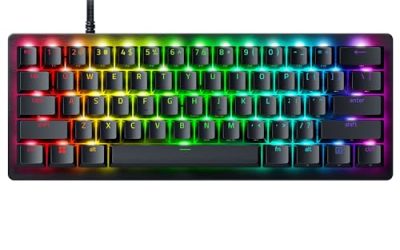
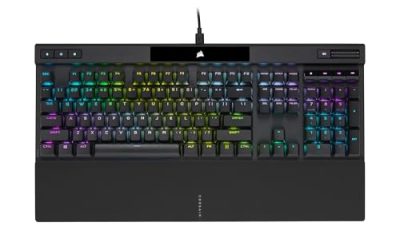
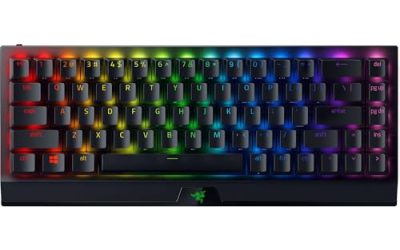
League uses a small cluster of keys on the left side of the board, so layout matters more than key count. A tenkeyless board drops the number pad but keeps the function row and arrows, giving your mouse more room to sweep without changing how your left hand sits. A 65 percent or 60 percent board goes further, cutting the function row and navigation keys to free even more space, which suits low-sensitivity players. Full-size boards work if your desk is deep and your sensitivity is high, but the extra width pushes the mouse further out and can force an awkward shoulder angle over a long session. Pick the smallest layout that keeps every key you actually use.
Response Speed and Connection
A keyboard that registers presses late turns a clean flash into a grey screen, so check connection speed first. A wired connection is the simplest way to keep input delay low, and it never needs charging or a dongle, which is why competitive players still plug in. A 2.4 GHz wireless connection from a gaming brand can feel just as quick, with the receiver close and the battery charged, but Bluetooth is a poor choice for ranked games because it adds delay and can stutter when other devices crowd the signal. Polling rate, how often the board reports to the computer, is the other figure to check: higher rates mean fresher input, though the gap between common rates is small.
Comfort, Build and Keycaps
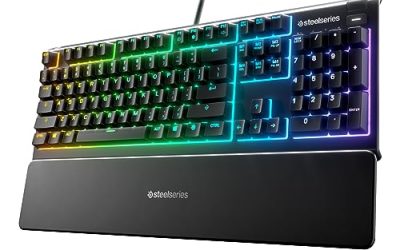
League games run long, and a keyboard that hurts your wrists by the third match is a bad keyboard no matter how fast its switches are. Start with keycap material: doubleshot PBT keycaps resist the shine and smoothing that makes cheaper ABS caps feel slippery after months of play, and their legends stay readable far longer. A solid frame keeps the board planted during frantic fights, while adjustable feet let you set an angle that keeps wrists neutral instead of bent upward. A detachable wrist rest helps if you play with your palms down, and hot-swappable sockets are a useful bonus, because they let you change a single switch that starts to feel wrong without replacing the whole board.
Which One Fits Your Situation
Ranked Climber Chasing Fast Combos
A ranked climber needs a board that never makes them second-guess a key press. Choose linear or Hall effect switches with a short, consistent actuation, a wired connection, and a tenkeyless layout that leaves the mouse plenty of room for wide flicks. Keep the extras minimal: a clean layout, reliable keycaps and a firm frame matter far more in a promotion series than lighting effects or macro keys you will never press mid-fight.
Casual Player Who Mainly Queues Normals and ARAM
Casual players get more from comfort and durability than from the fastest switch on the market. A mid-range mechanical board with tactile or light linear switches, doubleshot keycaps and a wrist rest will feel like a big step up from a membrane keyboard without demanding a new habit. ARAM throws constant teamfights at you, so a board that stays comfortable and consistent through back-to-back games is worth more than a feature list built for tournament play.
Small Desk or Low-Sensitivity Mouse Player
When desk space is tight, the keyboard has to shrink so the mouse can move. A 65 percent or tenkeyless board gives the mouse arm room to sweep without knocking into the keyboard edge, which matters most at low sensitivity. Check that the keys you need for items, pings and the shop are still within easy reach of your left hand, and angle the board slightly if that keeps your wrist straighter during long sessions.
Long Sessions and Aching Wrists
If your wrists ache after a few games, the keyboard setup is part of the problem. Pick a low-profile board or a standard board with a wrist rest, set the feet so your wrists stay flat rather than bent back, and choose lighter switches. Take a short break between games to stretch your fingers and forearms, and treat persistent pain as a sign to change the setup or talk to a clinician rather than something to play through.
Common Mistakes
- Buying a full-size board that crowds the mouse. A full-size keyboard looks complete on a desk, but the number pad eats the space your mouse needs to move, and on a narrow desk that forces the mouse into a cramped arc that ruins aim and camera control. Low-sensitivity players suffer most, because every wide sweep ends with the mouse bumping the keyboard edge or sliding off the pad, and the shoulder has to twist further to compensate. Before ordering, measure the space between the keyboard and the edge of the desk, check how far your mouse travels in a normal game, and choose a tenkeyless or smaller layout if the two overlap. A board that leaves the mouse room to breathe is worth more in a teamfight than a number pad you never touch during a match.
- Choosing switches by hype instead of feel. Rapid trigger and Hall effect switches get plenty of attention online, yet the fastest switch on paper is a poor pick if it fires every time you brush a key. Players who rest heavy fingers on Q, W, E and R often find ultra-light switches cause accidental ability casts, wasted summoner spells and items fired at nothing, which costs far more games than a slightly slower actuation ever will. The fix is simple: try the switch before committing, and if you cannot try it in person, pick a middle-weight linear or tactile switch with a clear actuation point rather than the lightest option available. A switch that matches your finger weight keeps your combos deliberate, and deliberate presses win more fights than hair-trigger ones.
- Ignoring keycap wear until the legends vanish. Cheap ABS keycaps feel fine on day one, then slowly turn smooth and shiny under your fingertips, and the printed legends on the keys you press most wear away until Q and R are blank. That matters in League because you glance down more than you admit, especially when learning a new champion or returning after a break, and a slippery key surface makes your fingers drift off home position during long fights. Doubleshot PBT keycaps solve both problems, because the legend is a separate piece of plastic rather than printed ink, and the textured surface stays grippy for years. When comparing boards, check the keycap material in the listing and treat it as a durability feature, not a cosmetic detail.
- Playing ranked over Bluetooth or a tired wireless link. Bluetooth is convenient for typing and browsing, but it was never built for competitive play, and its extra delay plus occasional stutter can turn a well-timed flash into a death. The same applies to a 2.4 GHz wireless board with a nearly flat battery or a receiver buried behind a metal case, because the link degrades quietly and the first sign is a key press that arrives a beat late. Use a wired connection for ranked games, or keep a wireless board charged and its receiver on a short extension cable in clear view of the board. Test the setup in a normal game first, and if a key ever feels delayed, switch to a cable before queuing ranked again.
- Skipping comfort and blaming your aim. Many players blame their mechanics when the real problem is a keyboard that forces their wrist into a bent angle for hours. A board with no wrist rest, feet set too high, or switches that demand heavy force on every press builds fatigue that shows up as missed skillshots and sloppy kiting late in a session, and the player assumes their aim has gone rather than their hands being tired. Fix the setup first: lower the board angle, add a wrist rest, pick lighter switches, and sit so your forearm runs straight into your hand. Small ergonomic changes cost nothing and often do more for late-game accuracy than another week of practice on a setup that fights you.
Frequently Asked Questions
Do I need a mechanical keyboard for League of Legends?
No, you can reach any rank on a membrane keyboard, because League rewards game knowledge, positioning and decision-making far more than hardware. A mechanical board helps in a different way: its switches feel consistent from press to press, the keys register at a predictable point, and a good board stays comfortable through long sessions. If your keyboard feels mushy or misses presses, upgrade, but it will not replace practice.
Is a tenkeyless or 60 percent keyboard better for League?
Tenkeyless is the safer default, because it keeps the function row and arrow keys while freeing the mouse space a full-size board wastes. A 60 percent board suits players with small desks or very low mouse sensitivity, since the extra room helps wide mouse movements, but it moves useful keys onto layers you have to learn. Try tenkeyless first unless your desk is genuinely too small for it.
Are Hall effect and rapid trigger keyboards worth it for League?
They can be, but only if the feature matches the way you play. Rapid trigger resets a key the moment you start lifting it, which helps fast repeated presses, and adjustable actuation lets you set a shallow press for abilities. If you rest heavy fingers on your keys, though, the same sensitivity can cause accidental casts, so the benefit depends on your hand habits rather than the feature list alone.
Can I use a wireless keyboard for ranked League games?
Yes, provided the wireless link is a proper 2.4 GHz gaming connection rather than Bluetooth, the receiver has a clear path to the board, and the battery is charged before you queue. Many wireless gaming boards now feel indistinguishable from wired ones in normal play, but Bluetooth adds delay and can stutter, so it belongs on a spare setup rather than your ranked games. Keep a cable as backup.
FAQ
Do I need a mechanical keyboard for League of Legends?
Is a tenkeyless or 60 percent keyboard better for League?
Are Hall effect and rapid trigger keyboards worth it for League?
Can I use a wireless keyboard for ranked League games?
More from Amazon
Programs that pair well with the guide above. Offers and eligibility are set by Amazon and may change.
Free shipping on eligible items, Prime Video and more. Eligible new members can start with a free trial.
Start a Prime free trialAd-free music streaming. Eligible new subscribers can start with a free trial.
Try Music Unlimited freeA Prime membership for ages 18-24 with a trial period. Eligibility is set by Amazon.
See Prime for Young AdultsAudiobooks and podcasts to listen to on the go. Eligible new members can start with a free trial.
Try Audible freeAs an Amazon Associate we earn from qualifying purchases.