Our Top Picks
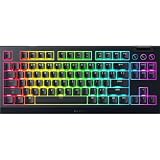
 Razer BlackWidow V4 X Mechanical Gaming Keyboard20.5 x 8 x 2 Inch18.36 x 6.01 x 1.71 Inches2.51 PoundsCheck on Amazon
 Redragon K668 108-Key Hot-Swap Wired RGB Gaming Keyboard17.3 x 4.7 x 17.3 inches1.9 PoundsCheck on Amazon
The Razer BlackWidow V4 X with Yellow switches is the best pick here for a quiet mechanical gaming keyboard, because Razer’s Yellow switch is a silent linear design and the board adds six dedicated macro keys and per-key Chroma RGB. A quiet mechanical keyboard keeps the fast, repeatable feel of individual switches while cutting the clack of a typical clicky board, which matters in shared rooms, late-night sessions and voice chat. If you want a compact wireless board, the AULA F75 Pro is the stronger choice, and the SteelSeries Apex 3 is included only as a quiet non-mechanical runner-up.
Quick List
- SteelSeries Apex 3 – runner-up for buyers who want a quiet, water-resistant full-size board and accept a non-mechanical design
- Razer BlackWidow V4 X (Yellow) – best overall for a silent linear switch with macro keys and RGB
- SOLAKAKA KI99 Pro – best for a wireless, near-full-size layout with quiet switches and a gasket build
- Redragon Hot-Swappable Red Switch Keyboard – best for a wired, hot-swap board with linear switches and PBT keycaps
- AULA F75 Pro – best for a compact 75% wireless board with a knob and pre-lubed linear switches
- Redragon K668 – best for a wired full-size board with foam dampening and extra hotkeys
Which One Is Right for You?
| If you… | Choose |
|---|---|
| want a proper silent mechanical switch from an established brand | Razer BlackWidow V4 X (Yellow) |
| want a small desk footprint and wireless freedom | AULA F75 Pro |
| want wireless but still need a numpad | SOLAKAKA KI99 Pro |
| want to swap switches later on a wired budget board | Redragon Red-switch model or Redragon K668 |
| need extra media and shortcut keys and a full-size layout | Redragon K668 |
| want a quiet, spill-resistant board and do not need true mechanical switches | SteelSeries Apex 3 |
Two points shape every choice below. First, linear switches such as Reds and Yellows are generally quieter than tactile or clicky ones, though they still make a bottoming-out sound unless the board is dampened. Second, build features such as foam, gasket mounting and lubed switches have as much effect on the final sound as the switch type.

SteelSeries Apex 3 Gaming Keyboard - Black | 10-Zone RGB Illumination – IP32 Water Resistant – Premium Magnetic Wrist Rest (Whisper Quiet Gaming Switch)
Chosen because it specifies Black and 10-Zone RGB Illumination.
View on AmazonRazer BlackWidow V4 X Mechanical Gaming Keyboard, Yellow Switches, Black | Linear & Silent Switches, 6 Dedicated Macro Keys, Chroma RGB, Doubleshot ABS Keycaps, Roller & Media Controls, Snap Tap
Chosen because it specifies Yellow Switches and Black.
View on Amazon
SOLAKAKA KI99 Pro Wireless Mechanical Keyboard with Quiet Switch, Hot Swappable Pre-Lubed Switches with RGB Backlit, Gasket Structure Computer Gaming Keyboard (BlackBlue, Silent Switch)
Chosen because it specifies Hot Swappable Pre-Lubed Switches with RGB Backlit and Gasket Structure Computer Gaming Keyboard (BlackBlue.
View on Amazon
Redragon Mechanical Gaming Keyboard Wired, 11 Programmable Backlit Modes, Hot-Swappable Red Switch, Anti-Ghosting, Double-Shot PBT Keycaps, Light Up Keyboard for PC Mac
Chosen because it specifies 11 Programmable Backlit Modes and Hot-Swappable Red Switch.
View on Amazon
AULA F75 Pro Wireless Mechanical Keyboard,75% Hot Swappable Custom Keyboard with Knob,RGB Backlit,Pre-lubed Reaper Switches,Side Printed PBT Keycaps,2.4GHz/USB-C/BT5.0 Mechanical Gaming Keyboards
Chosen because it specifies 75% Hot Swappable Custom Keyboard with Knob and RGB Backlit.
View on AmazonRedragon K668 108-Key Hot-Swap Wired RGB Gaming Keyboard, Extra 4 Hotkeys | Dedicated Shortcut Keys for Mute, Calc & Desktop, Cushioned Noise Dampening for Creamy Thocky Sound, Swap-Ready, PRO Software
Chosen because it specifies Extra 4 Hotkeys and Dedicated Shortcut Keys for Mute.
View on AmazonAll 6 Picks in Detail
1. SteelSeries Apex 3 – Runner-Up for Quiet, Non-Mechanical Typing
As an Amazon Associate we earn from qualifying purchases at no extra cost to you.

The Apex 3 does not fit the “mechanical” part of this topic, and it is important to say so plainly. SteelSeries’ own marketing calls its switches “Whisper Quiet,” and independent descriptions identify the board as a rubber-dome design rather than one with individual mechanical switches. We place it here as a runner-up for readers who want the quietest possible full-size gaming board and care more about silence and water resistance than about mechanical feel.
The listing highlights 10-zone RGB, an IP32 water-resistance rating and a magnetic wrist rest, which makes it a practical option for a shared room or a desk where a drink might get knocked over. Because the lighting is zone-based rather than per-key, customization is more limited than on the other boards.
Who should still consider it? Someone who shares a bedroom or open-plan space, types for long stretches and drinks at the desk will value the quiet feel and the water resistance. Someone who wants the crisp, individually actuated feel of mechanical switches, wants to swap switches or plans to customize keycaps will be happier with one of the other five boards. Treat the Apex 3 as a sensible quiet-gaming fallback, not as a mechanical keyboard.
- Whisper Quiet switches per the listing; not a hot-swappable mechanical board
- 10-zone RGB illumination
- IP32 water resistance
- Magnetic wrist rest included per the listing
- Full-size layout; confirm on the product page
Pros:
- Very quiet in everyday typing
- Water resistance and a comfortable wrist rest
Cons:
- Not a true mechanical keyboard, so it cannot take swappable mechanical switches
- Zone lighting rather than per-key lighting
Compared with the BlackWidow V4 X, it is quieter in some ways but offers none of the mechanical customization.
2. Razer BlackWidow V4 X (Yellow) – Best Overall Silent Mechanical Board

The BlackWidow V4 X with Yellow switches is the best fit for the topic: a genuine mechanical keyboard whose switches are described as linear and silent. Razer’s Yellow switch has a smooth, straight keystroke with no bump, and the manufacturer says built-in dampeners keep it quiet. The board adds six dedicated macro keys on the left, doubleshot keycaps and Chroma RGB, so it works well for MMO and productivity macros as well as shooters.
Razer lists the Yellow switch with a short 1.2mm actuation point and a light actuation force, which suits fast, repeated presses. As with any linear switch, hammering keys to the bottom still makes a thud, so a light touch makes the biggest difference to noise.
The macro column is the practical differentiator. Six dedicated keys can hold copy-and-paste sequences, voice-chat push-to-talk or build orders in strategy games, and because they sit apart from the main block, you are less likely to hit them by accident. Pairing the board with a soft desk mat takes some of the remaining thud out of bottoming out, and the software lets you tune lighting and macros without touching the switches.
- Razer Yellow switches, linear and silent per the listing
- Six dedicated macro keys
- Chroma RGB lighting
- Doubleshot keycaps per the listing
- Wired connection with media controls; confirm layout details on the product page
Pros:
- Silent linear switch from an established maker
- Macro keys and per-key RGB
Cons:
- Wired only
- Switches are not described as hot-swappable, so you cannot change switches
It is a better match for quiet gaming than the Redragon boards, which rely on standard switches plus dampening.
3. SOLAKAKA KI99 Pro – Best Wireless Near-Full-Size Option

The KI99 Pro is a wireless mechanical keyboard with quiet switches, pre-lubed hot-swappable switches, RGB backlighting and a gasket structure, according to its listing. Manufacturer material describes it as a compact 96% layout, which keeps the numpad while trimming the footprint, plus a control knob and three connection modes (Bluetooth, 2.4GHz and wired). It suits a user who wants a tidy desk, uses a numpad for spreadsheets or macros and wants quiet keys.
Gasket mounting and layers of dampening are meant to soften the bottom-out sound, and hot-swap sockets let you change switches later. Many of the finer details come from the seller’s own materials, so confirm switch type, battery capacity and connection options on the product page.
A near-full-size wireless board occupies a useful middle ground: you keep the numpad for spreadsheets, calculators and game macros, but you gain several centimeters of desk space compared with a full-size board. Because the quiet character of this model comes from the combination of switches, lube and gasket layers, avoid swapping in clicky switches if noise is your priority, and check the battery and charging details on the listing before you rely on it for travel.
- Quiet switches, pre-lubed and hot-swappable per the listing
- Gasket structure per the listing
- 96% style layout per manufacturer material; confirm on listing
- Wireless with multiple connection modes per manufacturer material
- RGB backlighting
Pros:
- Wireless freedom with a numpad kept
- Hot-swappable and gasket-mounted
Cons:
- Less brand history and third-party documentation
- Switch details vary by variant, so check which one you are buying
Compared with the AULA F75 Pro, it keeps more keys but takes more desk space.
4. Redragon Hot-Swappable Red Switch Keyboard – Best Wired Hot-Swap Starter

This Redragon listing describes a wired mechanical gaming keyboard with 11 programmable backlight modes, hot-swappable Red switches, anti-ghosting and double-shot PBT keycaps. Red switches are linear and relatively light, which makes them one of the quieter standard options compared with blue or brown switches, though they are not silent switches. Hot-swap sockets mean you can later swap in silent linears if you want to reduce noise further.
It suits a gamer who wants a wired board with upgradeable switches and durable keycaps without paying a premium. The listing text does not state the layout size here, so confirm whether it is full-size or compact before ordering.
This is the board to buy if you like the idea of tinkering. With hot-swap sockets, you can start with the supplied Reds, decide after a few weeks whether the sound suits you and then upgrade to silent linear switches without soldering. Budget extra for switches, a puller and some O-rings if you go that route, and check that the replacement switch type fits the sockets the listing describes.
- Wired connection per the listing
- Hot-swappable Red (linear) switches
- Double-shot PBT keycaps per the listing
- 11 programmable backlight modes
- Layout size: confirm on listing
Pros:
- Hot-swap sockets allow later quieting upgrades
- PBT keycaps resist shine over time
Cons:
- Red switches are quieter than clicky ones but not silent
- Wired only
Against the K668, this model is the simpler choice, since it does not add extra hotkeys.
5. AULA F75 Pro – Best Compact Wireless 75% Board

The AULA F75 Pro is a 75% wireless mechanical keyboard with a knob, RGB backlighting, pre-lubed Reaper switches and side-printed PBT keycaps. Manufacturer information describes a gasket-mounted body with several layers of foam and padding, tri-mode connection (Bluetooth, 2.4GHz wireless and USB-C wired) and a large rechargeable battery. Reaper switches are linear, so the typing sound is smooth rather than clicky, and the dampening layers deepen the sound.
It suits players with limited desk space who want to swap between a laptop, tablet and gaming PC. A 75% layout drops the numpad but keeps arrow keys and the function row, which is a good balance for gaming.
The knob is genuinely useful during games: it handles volume without leaving the keys, and it can be reassigned to other functions through the board’s software or shortcut layers. With 4000mAh of battery listed by manufacturer sources, a wireless 75% board like this typically lasts a good while between charges with the lighting turned down, though results depend heavily on backlight brightness and connection mode, so use wired mode when you want zero battery worry.
- 75% layout with a multifunction knob
- Hot-swappable, pre-lubed Reaper linear switches per the listing
- Side-printed PBT keycaps per the listing
- Tri-mode wireless connectivity per manufacturer material
- Gasket-mount style construction per manufacturer material
Pros:
- Compact, wireless and well dampened
- Hot-swap sockets and a knob for volume
Cons:
- No numpad
- Reaper switches are linear but not marketed as silent
It is the most refined build here for typing sound at a smaller size, compared with the KI99 Pro, which keeps a larger layout.
6. Redragon K668 – Best Wired Full-Size With Foam and Extra Hotkeys

The Redragon K668 is a 108-key wired RGB gaming keyboard, with 104 standard keys plus four extra shortcut keys for mute, calculator and desktop functions, and hot-swappable switches. Its listing mentions cushioned, noise-absorbing foam, and retailer pages describe 3.5mm sound-absorbing foam inside. The version listed here uses a Red-style linear switch according to retailer descriptions, though some K668 variants carry different switches, so verify which one you are ordering.
It suits anyone wanting a full-size board with extra media keys on a modest budget, and the foam helps reduce the hollow ping typical of cheaper boards.
The four extra keys for mute, calculator, screen lock and desktop are small conveniences that you notice every day, especially for work-from-home use alongside gaming. The foam layer helps tone down the hollow case sound common on budget boards, and the hot-swap sockets mean you can change switches later. Keep in mind that a full-size, wired board takes up the most desk space of the group, so measure your desk before buying.
- 108-key full-size layout with four dedicated hotkeys
- Hot-swappable switches
- Sound-absorbing foam per the listing
- Wired USB connection
- RGB backlighting
Pros:
- Dampening foam and hot-swap sockets for the price class
- Extra shortcut keys for daily use
Cons:
- Large footprint and wired only
- Switch variant can differ between listings
It differs from the other Redragon model by adding more keys and a stronger focus on foam dampening.
Specs Compared
| Keyboard | Layout | Switch type | Hot-swap | Connectivity | Noise features |
|---|---|---|---|---|---|
| SteelSeries Apex 3 | Full-size (confirm on listing) | Whisper Quiet, non-mechanical design | No | Wired | Quiet switch design |
| Razer BlackWidow V4 X | Full-size with macro keys (confirm on listing) | Yellow linear, silent | Not stated | Wired | Silent switches, dampeners |
| SOLAKAKA KI99 Pro | 96% style (confirm on listing) | Quiet, pre-lubed | Yes | Wireless (modes: confirm on listing) | Gasket structure |
| Redragon (Red switch model) | Confirm on listing | Red linear | Yes | Wired | Confirm on listing |
| AULA F75 Pro | 75% | Reaper linear, pre-lubed | Yes | Tri-mode wireless and wired | Gasket mount, padding layers |
| Redragon K668 | 108-key full-size | Linear (variant: confirm on listing) | Yes | Wired | Sound-absorbing foam |
How We Chose These
This guide is research-based. We read each listing’s title and feature text for switch type, layout, connectivity, hot-swap support and any noise-reduction features, and checked manufacturer pages for Razer, SteelSeries, Redragon, AULA and SOLAKAKA to confirm what each product claims. We favored boards with linear or silent switches and with construction that dampens sound, and we separated true mechanical boards from the Apex 3, which is not a mechanical design. Anything a listing leaves unspecified is marked for confirmation on the product page.
What to Look For
Switch type and sound
Switch family sets the baseline for noise. Clicky switches, such as Blues, add a deliberate click and are the loudest. Tactile switches have a bump with moderate noise. Linear switches, such as Reds and Yellows, have no bump or click, so they are the quietest standard option. Silent linear switches add internal dampers that soften both the downstroke and the return. A silent switch is typically the quietest choice for shared spaces.
Construction and dampening
Foam inside the case, a gasket mount and pre-lubed switches all reduce hollow or ringing sounds. A budget board with foam and lubed linears can sound quieter than a premium board with bare, clacky switches. Keycap material matters too: thicker PBT keycaps usually sound deeper and lower in pitch than thin ABS ones, which can sound sharper.
Hot-swap and upgrade paths
Hot-swap sockets let you pull out switches and fit different ones without soldering. That means a Red-switch board can become much quieter later with silent linear switches. Check whether sockets take 3-pin or 5-pin switches, and confirm the board is compatible with the switch brand you want.
Layout and connectivity
Full-size boards keep the numpad and cost the most desk space. 96% and 75% layouts save room; a 75% layout keeps arrow keys and the function row but drops the numpad. Wireless boards offer a tidier desk, but for competitive play many players prefer a wired or 2.4GHz connection for consistent latency.
A simple way to reduce noise on any board
Type with a lighter touch, avoid bottoming out each press, and put a desk mat or thick keyboard pad under the board. Rubber O-rings that fit under keycaps can reduce the thud, and a soft desk surface absorbs vibration. As a rule of thumb, combining a linear switch, foam and a mat gives a larger drop in noise than any single change.
Reading the dampening claims. Marketing terms such as “gasket structure,” “five-layer dampening” and “sound-absorbing foam” describe real construction methods, but they are not decibel measurements, and the sound you hear also depends on your desk, your typing force and your keycaps. A gasket mount lets the plate flex slightly, which softens the end of each keystroke. Foam under the PCB and inside the case fills the hollow space that otherwise acts like a drum. If a listing lists several such features, that is a better sign than a single claim, but you should still treat it as a design intention rather than a guarantee.
Gaming-specific considerations. Quiet switches do not slow you down. Linear switches register at a fixed point with no bump, which many players like for rapid repeated presses and strafing. Check the polling rate and whether the board supports anti-ghosting or full key rollover, so that simultaneous presses register correctly. If you use macro keys, look at whether the software is required for them to work, since some boards need an app running in the background.
Stabilizers and large keys. The space bar, Enter and Shift keys use stabilizer wires that can rattle, and that rattle is often the loudest part of a budget board. Pre-lubed stabilizers, mentioned on some listings here, are a good sign. If you notice a rattle on any board, a small dab of dielectric grease on the stabilizer wire is a common fix, though it is worth checking what the warranty says about opening the board first. Also consider your typing posture: a wrist rest and a slightly angled board reduce the force with which you strike the keys, which in turn reduces the sound you make.
Putting it together. A worked example: if you share a room and play at night, a wired board with a silent linear switch is the simplest solution, because it needs no tuning. If you are happy to tinker, a hot-swap board with foam can reach a similar sound level after a switch upgrade. If you want portability and a small footprint, a gasket-mounted wireless 75% board gives the best balance, and you can use wired mode for competitive sessions.
Questions
Are linear switches really quieter than tactile or clicky ones?
Generally yes, because they lack a click mechanism or tactile bump. They can still make a thud when you bottom out, so dampening and a light touch matter.
What is a silent switch?
A silent switch has internal padding that cushions the stem at the top and bottom of travel, so the sound is much softer than a standard linear switch. Razer’s Yellow switch is an example.
Is the SteelSeries Apex 3 a mechanical keyboard?
No. Its Whisper Quiet switches are generally described as a rubber-dome style design rather than individual mechanical switches. That is why it is listed as a runner-up.
Can I make a cheap mechanical keyboard quieter?
Yes. Add O-rings, place the board on a mat, and, if it is hot-swappable, install silent linear switches. Lubing the switches and stabilizers can also reduce rattle.
Is a wireless keyboard good for gaming?
Modern 2.4GHz wireless is reliable for most players. Bluetooth is better for casual use and travel, and wired is the safest choice for the lowest and most consistent latency.
Do PBT keycaps change the sound?
They tend to sound deeper and more muted than thin ABS keycaps, and they resist the shiny wear that ABS develops over time.
Update History
- October 20, 2026 – Initial publication; product set drawn from current catalog listings.
- Check the product page for current specifications and availability before buying.
Sources
- Manufacturer product and specification pages for Razer, SteelSeries, Redragon, AULA and SOLAKAKA keyboards
- Retailer listing titles and specification fields for each keyboard
- Independent buying guides on silent gaming keyboards and switch types