Our Top Picks
 Logitech G PRO X TKL Rapid Tenkeyless WiredTKL - Wired14.06 x 5.91 x 1.5 inches0.3 poundsCheck on Amazon
For a CS2 player, the keyboard decision is really about stopping exactly when you intend to shoot. Counter-strafing only works when the opposite movement key releases cleanly, and a slow reset can leave you moving through the first bullets. Utility lineups add another demand, because jump, crouch, and walk keys must behave the same way every round, on every site execute, whether you are taking first contact or holding a quiet angle alone.


This guide is for competitive CS2 players who want that release and re-press behaviour under their own control, rather than fixed by a conventional switch. The five keyboards below were chosen from the names and specifications on their Amazon pages, prioritising listings that state rapid trigger, adjustable actuation, or esports positioning in their own wording.
Quick Picks
As an Amazon Associate we earn from qualifying purchases
| Product | Best for | Key spec from title |
|---|---|---|
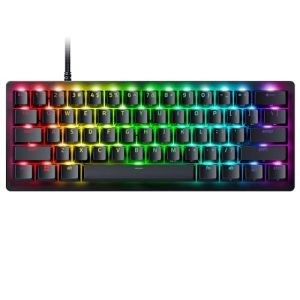
| Razer Huntsman V3 Pro Mini | Low-sensitivity players who need maximum mouse room | Rapid Trigger |
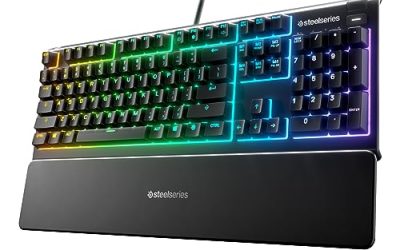
| SteelSeries Apex Pro TKL Gen 3 | Players who want an OLED display and TKL layout | OmniPoint 3.0 HyperMagnetic Switches |
| Logitech G PRO X TKL Rapid | Players who want a volume roller on a TKL board | Magnetic Analog Switches with Rapid Trigger |
| Keychron K2 HE | Players who also need wireless for a second device | Hall Effect Gateron Double-Rail Magnetic Switch |
| SteelSeries Apex Pro Mini Gen 3 | Players who want a compact board with Rapid Tap | OmniPoint 3.0 HyperMagnetic Switches |
How to Choose
Actuation and Rapid Trigger
Begin with how a key resets, because that moment decides how cleanly a counter-strafe ends. On a fixed-reset board, the key must travel back past a set point before it can register again. Rapid trigger changes that rule, so the key can reset as soon as it begins moving upward and press again without a full release. Adjustable actuation matters alongside it: a shallow setting on A and D can feel immediate, while a deeper setting on crouch or jump can reduce accidental inputs during a lineup.
Polling Rate and Connection
Check the connection wording on the listing instead of assuming every mode performs alike. A wired USB-C board reports through the cable at all times, which suits a fixed desk and tournament-style play. A model that also offers 2.4 GHz wireless should state its polling rate for that mode, as the Keychron K2 HE does with 1000 Hz for its 2.4 GHz and wired modes. Bluetooth is useful for a laptop or tablet beside your setup, but it should not be the mode you pick for a competitive match.
Layout Size for Mouse Room
Measure the space to the right of your keyboard before choosing a layout, especially if you play on low sensitivity and sweep the mouse widely. A 60 percent board such as the Huntsman V3 Pro Mini or Apex Pro Mini Gen 3 leaves the most room, but removes dedicated arrow and function keys. A tenkeyless design keeps arrows and a function row while dropping the number pad. A 75 percent layout sits between them, keeping arrows in a tighter frame that takes some adjustment.
Switch Feel and Keycaps
Read the switch name carefully, because analog optical and magnetic Hall effect switches achieve similar tuning in different ways. Razer uses analog optical switches on the Huntsman line, while SteelSeries, Logitech G, and Keychron use magnetic designs on the boards in this guide. Then look at the keycaps and top case. Doubleshot PBT caps resist shine through long sessions, textured caps help fingers stay placed without looking down, and a metal top plate or frame changes how firm the board feels under rapid taps.
The 5 Best Options
Razer Huntsman V3 Pro Mini
This 60 percent board suits the CS2 player who angles the keyboard, plays on low sensitivity, and wants the widest possible mouse arc beside it. Its dual-purpose modifier keys double as arrow keys when tapped, which softens the usual compact-layout compromise for menus and demos. Onboard adjustment through the number row also appeals if you prefer changing actuation or rapid trigger sensitivity at the board, then saving the result without opening software before a match.
Specs
- Brand: Razer
- Switches: Razer Analog Optical Switch Gen-2
- Actuation range: 0.1 to 4.0 mm adjustable
- Features: Rapid Trigger, Razer Snap Tap, dual-purpose modifier keys
- Keycaps: Textured doubleshot PBT
- Case: Brushed aluminum top plate
- Layout: 60 percent, model RZ03-04990200-R3U1
- Contents: Keyboard, USB Type A to Type C cable, product information guide
Best for: Players who want the smallest footprint here for wide mouse movement.
Watch out for: Confirm you can work without a dedicated function row and separate arrow cluster.
ASIN: B0CG7C1NVP
SteelSeries Apex Pro TKL Gen 3
Choose this tenkeyless model if you want adjustable keys without giving up a function row, arrows, or a small display. The listing highlights game-ready presets and Protection Mode, which lowers sensitivity on surrounding keys, a useful idea when fat-fingered utility keys can ruin an execute. Its OLED screen gives settings a visible home on the board itself. That combination fits players who tinker between maps, yet still want a familiar TKL footprint for everyday use outside matches.
Specs
- Brand: SteelSeries
- Switches: OmniPoint 3.0 HyperMagnetic
- Actuation: Adjustable, 40 levels, 0.1 to 4.0 mm range stated by the manufacturer
- Features: Rapid Trigger, Rapid Tap/SOCD, Protection Mode, game-ready presets
- Display: OLED
- Lighting: RGB
- Keycaps: PBT
- Connection: USB-C
Best for: TKL players who want presets, Protection Mode, and an onboard OLED display.
Watch out for: Check the exact variant, because a separate full-size Gen 3 model is also listed.
ASIN: B0DGZLHN8G
Logitech G PRO X TKL Rapid
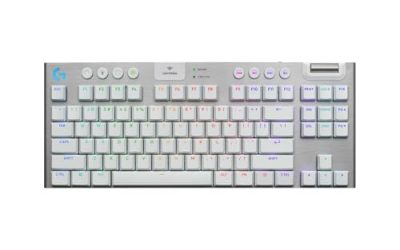
This wired tenkeyless board fits players who want rapid trigger behaviour presented in a straightforward esports package, with a volume roller and media buttons kept on the deck. Logitech G states the design drew input from esports athletes, and the listing points to on-the-fly switch travel configuration as well as deeper control through G HUB. A detachable cable makes packing for a LAN or a friend’s setup simpler, while the tenkeyless shape preserves dedicated keys many compact boards remove.
Specs
- Brand: Logitech G
- Switches: Magnetic analog
- Actuation force: 35g stated for the analog switches
- Features: Rapid Trigger, KEYCONTROL, LIGHTSYNC RGB
- Layout: Tenkeyless, model 920-013131
- Keycaps: Dual-shot PBT stated in the product description
- Connection: Detachable USB-C cable
- Controls: Volume roller and media buttons
Best for: Players who want a wired TKL board with a roller and detachable cable.
Watch out for: Verify the black Rapid model number, because other PRO X TKL versions exist.
ASIN: B0DJD163HT
Keychron K2 HE

Pick the K2 HE if your desk serves both play and ordinary work, and you want magnetic-switch tuning without committing to a wired-only board. Its 75 percent frame keeps arrow keys in a compact body, while the web-based Launcher handles remapping, macros, actuation points, and rapid triggering without an installed configurator. Tri-mode connection also helps if you switch between a gaming PC and a second machine. For CS2, use its wired or 2.4 GHz mode rather than Bluetooth, following the polling information on its listing.
Specs
- Brand: Keychron
- Switches: Gateron Double-Rail Magnetic, Hall effect
- Layout: 75 percent, 84 keys, model KBKCK2HF1
- Connectivity: 2.4 GHz wireless, Bluetooth 5.2, USB-C
- Polling: 1000 Hz for 2.4 GHz and Type-C wired modes stated on the listing
- Features: Adjustable actuation point, QMK, Launcher configurator, rapid triggering
- Frame: Aluminum and wood, PBT keycaps
- Dimensions: 12.62 x 4.99 x 1.6 inches
Best for: Players who want a 75 percent board that can also connect wirelessly to other devices.
Watch out for: Note that its keycap legends are not shine-through, as stated on the listing.
ASIN: B0DCVPGB9N
SteelSeries Apex Pro Mini Gen 3

This Mini version suits players who liked the Apex Pro idea but would rather trade the TKL frame for more desk clearance. SteelSeries describes Rapid Tap as prioritising the last pressed key in a pair, with up to five pairings, and links that behaviour directly to counter-strafing and peeking. Per-key lubrication, triple-layer sound-dampening foam, and improved stabilisers also address feel, so the board is not only about speed settings. It is the compact pick for someone who still wants Protection Mode and presets.
Specs
- Brand: SteelSeries
- Switches: OmniPoint 3.0 HyperMagnetic
- Actuation range: 0.1 to 4.0 mm stated in the product description
- Features: Rapid Trigger, Rapid Tap/SOCD, Protection Mode, game-ready presets
- Layout: Mini, model 64913
- Lighting: RGB
- Keycaps: Double Shot PBT
- Connection: USB-C
Best for: Compact-board players who want Rapid Tap pairings for counter-strafing.
Watch out for: Confirm the Mini layout works for you, as it is smaller than the TKL Gen 3.
ASIN: B0F11HCGST
Which One Fits Your Situation
You Play on Low Sensitivity and Sweep Widely
Take the Razer Huntsman V3 Pro Mini when desk space is the limiting factor in your aim. Its 60 percent frame leaves the most room beside the board, and the dual-purpose modifiers still provide arrow input when tapped. The Apex Pro Mini Gen 3 is the alternative if you prefer SteelSeries pairings, but the Razer is the clearest space-first choice in this group.
You Want a Familiar Layout for Play and Work
Look at the SteelSeries Apex Pro TKL Gen 3 or the Logitech G PRO X TKL Rapid, because both keep a function row and arrow keys. Choose the SteelSeries for its OLED display and Protection Mode, or the Logitech G for its volume roller, media buttons, and detachable cable. Either avoids the layer learning that a 60 percent board demands during ordinary typing.
You Switch Between a Gaming PC and Another Device
The Keychron K2 HE is the only board here built around three connection modes, so it fits a desk shared with a laptop or tablet. Play CS2 through its wired or 2.4 GHz connection, then move to Bluetooth for the second device when the match ends. Its 75 percent layout also keeps arrows available without returning to a full-width frame.
You Keep Hitting Neighbouring Utility Keys
Begin with a board that offers Protection Mode, meaning the Apex Pro TKL Gen 3 or the Apex Pro Mini Gen 3. Lower sensitivity around the key you press can help when a grenade key sits close to movement keys during a fast execute. Pick the TKL if you need the extra dedicated keys, and the Mini when mouse room matters more.
Common Mistakes
- Setting every key to the shallowest actuation, then blaming the board for accidental jumps, crouches, and utility pulls during rounds.
- Buying a 60 percent layout without checking how you will reach arrow keys, function keys, and demo controls you already use.
- Using a Bluetooth connection for competitive play when the same board offers a wired or faster wireless mode on its listing.
- Turning on paired-key priority features without checking current CS2 and tournament rules for the event or league you enter.
- Swapping in ordinary mechanical switches on a magnetic board whose listing limits compatibility to its own magnetic switch type.
Frequently Asked Questions
Does rapid trigger help counter-strafing in CS2?
Rapid trigger can help the release side of the movement, because a key can reset as soon as it begins moving upward instead of waiting for a fixed reset point. That earlier reset gives you a cleaner window to press the opposite direction and stop. It does not replace timing practice, so spend time in a practice map rebuilding the habit after changing the setting.
Is a 60 percent keyboard enough for CS2?
Yes, provided your essential binds fit on the base layer or on layers you can reach without thinking. Movement, crouch, jump, walk, and utility keys matter more than a number pad in a match. The compromise appears outside rounds, in menus, demo review, and typing, where missing dedicated arrows and function keys can slow routine tasks noticeably.
Should I use the shallowest actuation setting?
Not necessarily, and not on every key at once. A shallow point on A and D may suit quick strafes, while utility, jump, or crouch keys often benefit from a deeper press that is harder to trigger by accident. Change one group at a time, play several matches, and keep the setting only if your movement stays clean under pressure.
How is this list different from a general low-latency guide?
This article is kept on a distinct basis from a general low-latency keyboard guide. Instead of treating latency as a broad trait, it selects boards whose own listings position them for competitive FPS play through rapid trigger, adjustable actuation, paired-key features, or esports wording. Layout for mouse room and counter-strafing behaviour therefore carry more weight here than they would in a general guide.
FAQ
Does rapid trigger help counter-strafing in CS2?
Is a 60 percent keyboard enough for CS2?
Should I use the shallowest actuation setting?
How is this list different from a general low-latency guide?
More from Amazon
Programs that pair well with the guide above. Offers and eligibility are set by Amazon and may change.
Free shipping on eligible items, Prime Video and more. Eligible new members can start with a free trial.
Start a Prime free trialAd-free music streaming. Eligible new subscribers can start with a free trial.
Try Music Unlimited freeA Prime membership for ages 18-24 with a trial period. Eligibility is set by Amazon.
See Prime for Young AdultsAudiobooks and podcasts to listen to on the go. Eligible new members can start with a free trial.
Try Audible freeAs an Amazon Associate we earn from qualifying purchases.