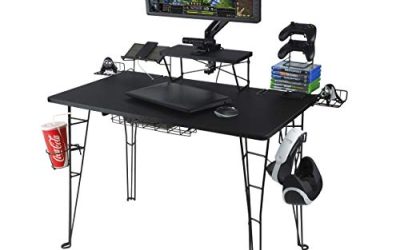
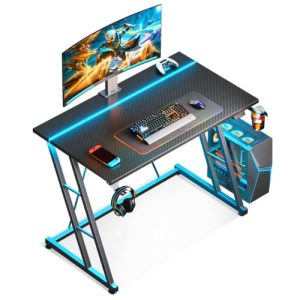
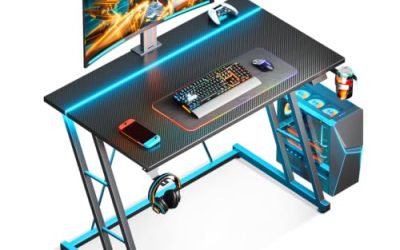
Our Top Picks
 SEDETA 55" Gaming Desk with 6 Drawers and55.1 x 19.7 x 55 inches17.8 x 55 x 55 inches42.9 poundsCheck on Amazon
 SEVEN WARRIOR L Shaped Gaming Desk with LED50.4 INCH50.4 x 50.4 x 34.1 inches40.3 poundsCheck on Amazon
 Grandder Gaming Desk 47 Inch with Power Outlet47 Inch19.7 x 47 x 29.5 inches29.3 poundsCheck on Amazon
The real decision under 200 is not finding the flashiest desk you can afford. It is choosing which trade-offs you can live with: a narrower top, a lighter frame, or fewer built-in extras. Every desk in this guide gives you a proper gaming surface with room for monitors and a keyboard, but they split sharply on size, storage, and power. Measure your room first, count your monitors, and decide whether you need drawers, a tower rack, or simply a wide flat top.
This guide is for first-time setup builders putting together a station from scratch, students fitting a desk into a bedroom or shared room, and home workers whose desk pulls double duty for daytime work and evening play. The five desks below were chosen from the names and specifications on their Amazon product pages, covering L-shaped corners, straight wide tops, and storage-heavy designs, all inside the same price band.
Quick Picks
As an Amazon Associate we earn from qualifying purchases
| Product | Best for | Key spec from title |
|---|---|---|
| SEDETA 55-Inch Gaming Desk | A gamer who stores a lot | 6 drawers and hutch |
| SEVEN WARRIOR 50.4-Inch L-Shaped Desk | A first corner setup on a tight budget | LED light and power outlets |
| YOUDENOVA 59-Inch Gaming Desk | A gamer with a large PC tower | 4 drawers and PC tower stand |
| AODK 63-Inch Gaming Desk | A builder who wants the PC on display | PC display stand |
| Grandder 47-Inch Gaming Desk | A small room that needs flexible storage | Reversible shelves and storage drawer |
How to Choose
Desktop size and room fit
Start with the tape measure, not the product photos. A 47-inch desk fits a single monitor plus a keyboard with room to spare, while a 63-inch top holds two monitors, a laptop, and a stream deck without crowding your mouse hand. Depth matters as much as width: a shallow 18-inch top pushes a 27-inch monitor closer to your eyes than most buyers expect, while a 24-inch-deep top leaves space for a monitor arm base behind the screen. Check the wall and the chair clearance too, because an L-shaped desk needs a real corner and a straight desk needs a clear run of wall.
Storage, shelves and drawers
Storage decides how tidy the setup stays after the first month. Cloth drawers hold cables, controllers, and game cases, but they will not carry heavy loads the way wood or metal bins do, so keep power bricks and books out of them. A hutch adds vertical storage for collectibles and headsets, while an open tower rack keeps a full-size PC off the floor and in view. Shelves that swap sides let you flip the layout when the room changes. Count what you actually own before paying for storage you will never fill.
Built-in power and lighting
A built-in power strip changes daily use more than any other feature at this price. Two or three AC outlets plus USB ports on the desktop mean phones, headsets, and controllers charge within reach instead of under the desk. LED strips are a different question: some run from a remote, others need a phone app, and a few sync with music through a built-in microphone. Decide whether you want lighting as a permanent part of the room or a feature you will switch off after a week, then check how it is controlled.
Frame strength and assembly
Budget desks stand or fall on the frame, not the tabletop. X-shaped or T-shaped steel legs with adjustable foot pads stay level on uneven floors, while a thin frame wobbles every time you lean on the desk during a match. Check the stated weight limit and treat it as a ceiling, not a target, especially with a heavy monitor arm clamped to the edge. Assembly usually takes one person between 30 and 60 minutes with the included tools, but a second pair of hands helps with L-shaped tops. Read the parts list before you start.
The 5 Best Options
SEDETA 55-Inch Gaming Desk
The SEDETA is the storage pick of this group, and it earns that spot with six cloth drawers plus a hutch instead of a single shelf. The 55-inch top is wide enough for two monitors and a laptop, the reversible L-shape fits either corner, and the built-in power strip keeps charging on the desktop. App-controlled RGB lighting with music sync gives the setup a finished look without extra gear. This is the budget-tier desk for a buyer whose gear collection keeps growing and needs a home for all of it.
Specs
- 55-inch reversible L-shaped desktop
- 6 cloth drawers plus hutch storage
- RGB LED lighting with app control and music sync
- Built-in power supply with 2 AC outlets and 2 USB ports
- Monitor stand for ergonomic screen height
- Maximum load capacity of 200 lbs
Best for: A gamer who stores a lot of gear and wants drawers plus a hutch in one desk.
Watch out for: The cloth drawers suit cables and controllers, not heavy books or power bricks.
ASIN: B0FM3H76D4
SEVEN WARRIOR 50.4-Inch L-Shaped Desk
The Seven Warrior is the cheapest way into a proper corner gaming desk, and it still ships with the features that usually cost more: LED lighting, a built-in power strip, a full monitor stand, a cup holder, and a headphone hook. The 50.4-inch L-shape fits two monitors in a corner that a straight desk would waste, and the X-shaped steel legs keep the frame steady during long sessions. This is the budget-tier desk for a first setup where every accessory would otherwise be a separate purchase.
Specs
- 50.4-inch L-shaped desktop with carbon fiber surface
- LED lights with power outlets built in
- Built-in socket with 4 outlets and 2 USB ports
- Full monitor stand for extra desktop space
- Cup holder and headphone hook included
- X-shaped steel leg design with adjustable foot pads
Best for: A first corner setup where the desk itself has to supply the lighting, power, and monitor stand.
Watch out for: The listing sells several colors, so confirm the color variant before ordering.
ASIN: B093BL5TW4
YOUDENOVA 59-Inch Gaming Desk

The YOUDENOVA solves a specific problem: a full-size PC tower that has nowhere good to sit. Its open rack holds a large tower off the floor and in view, while four fabric drawers swallow cables, controllers, and game cases. The 59-inch top is wide enough for two monitors with a keyboard and mouse pad, and the monitor shelf lifts screens toward eye level. This is the mid-range desk for a buyer whose tower is too big for a standard shelf and too nice to hide under the desk.
Specs
- 59-inch reversible desktop
- 4 fabric drawers for storage
- Open PC tower stand for a full-size tower
- RGB LED lighting
- Monitor shelf for ergonomic viewing
- Built-in power outlets for charging devices
Best for: A gamer with a large PC tower who wants it on display and off the floor.
Watch out for: Measure the tower against the open rack before ordering, since full towers vary in height.
ASIN: B0FM876ZRF
AODK 63-Inch Gaming Desk

The AODK is the widest desk in this guide, and its headline feature is the elevated PC display stand built for panoramic cases. If your case is a wide showpiece model, the stand puts it at eye level instead of on the floor, while the 63-inch top still leaves room for two monitors and peripherals. Three drawers hide cables and controllers, the RGB strip runs the length of the setup, and a side display shelf holds collectibles. This is the premium-tier desk for a builder whose PC is part of the room, not just part of the setup.
Specs
- 63-inch reversible desktop
- Elevated PC display stand for panoramic cases
- 3 drawers for cables, controllers, and clutter
- RGB LED lighting
- Side display shelf for collectibles
- Reversible layout for left or right corners
Best for: A builder who wants a wide top and a display stand for a panoramic PC case.
Watch out for: The 63-inch width needs a long clear wall, so measure the room before ordering.
ASIN: B0FXXHRM88
Grandder 47-Inch Gaming Desk
The Grandder is the compact pick, built for rooms where a 55-inch L-shaped desk simply does not fit. At 47 inches it still holds a monitor, keyboard, and mouse with space left over, and the reversible shelves and storage drawer swap sides to match the room instead of fighting it. A built-in power outlet with USB and Type-C charging keeps phones and headsets topped up, and the RGB strip adds the gaming look without extra hardware. This is the mid-range desk for small bedrooms, dorms, and shared spaces.
Specs
- 47-inch desktop with carbon fiber surface
- Reversible shelves and storage drawer
- Built-in power outlet with USB and Type-C charging
- RGB LED lighting with remote control
- Alloy steel frame with adjustable foot pads
- Model number E101-47T
Best for: A small room where the desk layout has to flip to fit the space.
Watch out for: The top is shallower than wider desks, so a large monitor on a stand sits close to your eyes.
ASIN: B0DK4YRRPY
Which One Fits Your Situation
You have a corner and a lot to store
Pick the SEDETA 55-inch desk. Six drawers plus a hutch hold more gear than any other desk here, the reversible L-shape fits either corner, and the built-in power strip means chargers live on the desktop. It is the best match when the setup keeps growing and the room needs the storage as much as the surface.
You are building your first setup on a tight budget
Pick the SEVEN WARRIOR 50.4-inch desk. It bundles LED lighting, power outlets, a monitor stand, a cup holder, and a headphone hook into one low-cost corner desk, so there is nothing essential left to buy separately. The L-shape also uses corner space that a straight desk would waste, and the carbon fiber surface wipes clean easily.
You own a large PC tower
Pick the YOUDENOVA 59-inch desk for a standard full tower, or the AODK 63-inch desk if the case is a wide panoramic model. Both keep the tower off the floor and in view, with drawers for the rest of the gear. The AODK wins when the case itself is a showpiece worth displaying.
Your room is small
Pick the Grandder 47-inch desk. It is the narrowest top here, the shelves and drawer swap sides to fit the room, and the built-in charging covers the essentials without extra hardware. Measure the depth first, since a shallow top suits a single monitor better than a dual-monitor arm setup, and leave room for the chair to slide back..
Common Mistakes
- Buying by width alone and ignoring depth, so a big monitor ends up too close to your eyes.
- Assuming every color variant of a listing carries the same features and stock, instead of checking the exact variant.
- Loading cloth drawers with heavy books and power bricks, which they were never built to hold.
- Clamping a heavy monitor arm to a thin desktop edge without checking the weight limit first.
- Ordering a 63-inch desk before measuring the wall, the door swing, and the chair clearance around it.
Frequently Asked Questions
Can a desk under 200 hold two monitors?
Yes, if the top is wide enough and the frame is rated for the load. A 55-inch or wider desk holds two monitors with a keyboard, while a 47-inch top suits one monitor plus a laptop better. Check the weight limit and use the monitor stand or a monitor arm to keep screens at eye level without crowding the desktop.
Do these gaming desks need assembly?
Yes, every desk here arrives flat-packed and needs assembly with the included tools and instructions. Most buyers finish in 30 to 60 minutes, and a second person helps with L-shaped tops and hutches. Lay out the parts first, follow the numbered steps, and tighten the frame bolts before loading the desktop.
Are the LED lights and power outlets built in or add-ons?
They are built into the desks listed here, not separate accessories. The power strip sits in the desktop with AC outlets and USB ports, and the LED strip mounts under the top or the monitor stand. Control varies by model: some use a remote, others use a phone app, so check the listing before ordering.
How do I choose between an L-shaped desk and a straight desk?
Pick an L-shaped desk when you have a free corner and want separate zones for gaming and work, or when you need two monitors plus a laptop. Pick a straight desk when the wall is long and clear, or when the room has no usable corner. Measure both options against the room, since an L-shape that does not fit the corner wastes more space than it saves.
FAQ
Can a desk under 200 hold two monitors?
Do these gaming desks need assembly?
Are the LED lights and power outlets built in or add-ons?
How do I choose between an L-shaped desk and a straight desk?
More from Amazon
Programs that pair well with the guide above. Offers and eligibility are set by Amazon and may change.
Free shipping on eligible items, Prime Video and more. Eligible new members can start with a free trial.
Start a Prime free trialAd-free music streaming. Eligible new subscribers can start with a free trial.
Try Music Unlimited freeA Prime membership for ages 18-24 with a trial period. Eligibility is set by Amazon.
See Prime for Young AdultsAudiobooks and podcasts to listen to on the go. Eligible new members can start with a free trial.
Try Audible freeAs an Amazon Associate we earn from qualifying purchases.