Key takeaways
- Find the best RGB LED strips for gaming computer desks: lengths, RGBIC vs RGB, app control, mounting tips and safe installation for a clean setup glow.
As an Amazon Associate we earn from qualifying purchases.
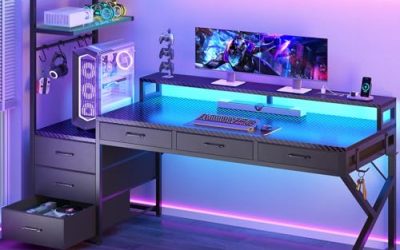
A strip of RGB light behind a monitor or along the back edge of a desk can change how a whole gaming setup feels, but the strip itself is only part of the decision. Length, brightness, colour control, adhesive quality and power all decide whether the glow looks clean and stays put, or peels away and distracts you mid-game. The wrong length leaves a dark gap at one end; the wrong control method leaves you reaching behind the desk every time you want a different colour.
This guide is written for PC gamers building or tidying a desk setup, for streamers who want steady background colour on camera, and for anyone replacing a strip that failed. It walks through the strip types, lengths and features that matter most for a gaming computer desk, so you can compare listings on their specifications and pick a strip that fits the desk you actually own.
What RGB, RGBIC and Addressable Mean
Most strips sold for gaming desks fall into three groups, and the label on the box decides what the light can actually do. A standard RGB strip shows one colour along its whole length at any moment. You can switch that colour, dim it or run a preset pattern, but every LED shows the same colour at the same time. It is the simplest option, and for a single-colour glow behind a monitor it is often enough.
An RGBIC strip adds a control chip that divides the strip into segments, so different parts can show different colours at once. That is what creates rainbow gradients, flowing effects and the chasing patterns you see in setup photos. RGBIC strips usually need their own app, and many cannot be cut, so the length you buy is the length you live with.
Addressable strips, often sold as WS2812B or similar, give control of individual LEDs and are aimed at builders who want to program effects or sync lighting with a PC through software such as OpenRGB or SignalRGB. They offer the most flexibility and the most setup work, including a separate controller in many cases.
A fourth detail worth checking is whether the strip can show a usable white. RGB-only strips make white by mixing red, green and blue, which often looks pink or blue. Strips with a dedicated white channel, sold as RGBW or RGBWW, give a cleaner white for times when you want plain light instead of colour.
How to Choose
Measure the Desk Before You Buy
Measure the run the strip will follow before you look at any listing. For monitor backlighting, measure the monitor width plus the sides if the strip wraps around the back. For a desk edge, measure the back edge and any return along the sides, then add slack for corners. A strip that is too short leaves a dark patch that draws the eye; a strip that is far too long forces a loose coil behind the desk, which looks messy and traps heat. Many kits come in 6.6, 16.4, 32.8 and 65.6 foot lengths, and some can be cut at marked points while others cannot, so check the cutting rule on the product page before you choose a size.
Choose the Colour Technology for the Look You Want
Decide how the light should behave before you compare brands. A plain RGB strip suits a setup that stays one colour, such as a steady blue or purple glow behind the monitor. An RGBIC strip suits anyone who wants gradients, rainbow flows or several colours on the desk at once, and it is the type most often seen in gaming setup photos. Addressable strips suit builders who want to sync lighting with games or PC software and are happy to configure a controller. If you also want the strip to work as plain task lighting sometimes, look for an RGBW or RGBWW model with a dedicated white channel, since mixed-colour white from an RGB strip can look tinted.
Check How You Will Control It Every Day
Control matters more than most buyers expect, because it decides whether the lights get used or left on one setting. A remote control is quick and needs no phone, but it needs line of sight and is easy to lose behind a desk. App control over Wi-Fi or Bluetooth gives scenes, timers and music sync, yet it means another app and account on your phone. Voice control through Alexa or Google Assistant is handy when your hands are on the keyboard, but it only works on models that list it. Check whether the strip keeps its last setting after a power cut, so it does not reset to a default colour every time the PC powers down.
Look at Power, Adhesive and the Fine Print
Power and mounting decide whether a strip lasts or fails in a month. Check the adapter that comes in the box and confirm it matches the strip length, since a long run on an underpowered adapter can dim at the far end. Look for a strong 3M adhesive backing plus mounting clips in the box, and clean the desk surface with the wipe many kits include before you stick anything down. Note whether the strip is rated for indoor use only and whether it can be cut, extended or joined to a second strip. A warranty of at least a year is a good sign that the maker stands behind the LEDs and the power supply.
Which One Fits Your Situation
One Monitor on a Small Desk
A short RGB or RGBIC strip of around 6.6 feet is usually enough for a single monitor on a compact desk. Mount it on the back of the monitor for bias lighting, keep the controller within reach, and pick a model with a remote so you are not opening an app for a quick colour change.
A Wide Desk or Two Monitors
For a wide desk or a dual-monitor setup, look for a 16.4 foot RGBIC strip that can run behind both screens and along the desk edge in one line. Segmented colour stops the run looking flat, and a single app or remote keeps both halves in sync instead of fighting two controllers.
A Streamer Who Needs Colour on Camera
Streamers should choose a strip with app control, saved scenes and a clean white mode, so the background colour matches the stream theme and can change between segments without fuss. Mount the strip out of the camera frame, keep the brightness moderate to avoid colour spill on your face, and test how the colour reads on camera before going live.
A Renter Who Cannot Mark the Desk
If the desk is rented or borrowed, pick a strip with strong adhesive that still peels cleanly, or use the mounting clips and cable channels that come in the box instead of extra glue. Avoid drilling, and test a small piece of adhesive on a hidden spot first so removal does not lift the finish.
Staying Safe with LED Strips
LED strips run on low-voltage power, but they still deserve the same care as any electrical accessory on a desk full of expensive gear. Start by reading the instructions that come in the box and using only the adapter supplied with the strip, since a mismatched adapter can overheat or damage the LEDs. Plug the adapter into a wall outlet or a surge-protected power strip with spare capacity, and keep it where air can move around it rather than buried under cables or fabric.
Unplug the strip before you install, cut or move it, and never cut a strip except at the marked cut points shown on the product page or instructions. A cut in the wrong place can break the circuit or expose conductors. Keep strips away from water, damp surfaces and direct heat, and do not run them behind a radiator or along a hot PC exhaust. Most strips sold for desks are for indoor use only, so do not use them outside unless the listing states an outdoor rating.
Do not leave a long strip coiled in a tight roll while it is switched on at full brightness, because the coiled section can trap heat. Spread the strip out along the desk or monitor, and leave a little slack at corners instead of pulling it tight. Check the strip and adapter now and then for warmth, discoloration or a smell of hot plastic, and unplug them if anything seems wrong. Keep cables routed away from chair wheels and feet, use the clips or channels supplied to hold the strip in place, and replace a damaged strip or adapter rather than taping over exposed wiring.
Common Mistakes
- Buying the longest strip on sale without measuring the desk, then coiling the extra length behind the monitor where it traps heat and looks untidy.
- Sticking the strip to a dusty or greasy surface without cleaning it first, so the adhesive fails within weeks and the strip sags into view.
- Choosing a strip that cannot be cut, then trying to fold the extra length around a corner and cracking the circuit.
- Placing the strip where the LEDs are directly visible from the chair, which creates glare and eye fatigue instead of a soft glow on the wall.
- Forgetting to check the control method, and ending up with an app-only strip when a simple remote would have suited a shared desk much better.
Frequently Asked Questions
How long should an LED strip be for a gaming desk?
Measure the run first. A single monitor usually needs about 6.6 feet for the back, while a wide desk or two monitors often need 16.4 feet to cover the back edge in one run. Buy the length that matches the measurement, and only choose a longer kit if the product page says it can be cut or extended.
Can I cut an RGB LED strip to fit my desk?
Many strips can be cut, but only at the marked cut points printed along the strip, usually every few inches. Unplug the strip first, cut exactly on the mark, and check the product page before buying, because RGBIC and some smart strips cannot be cut at all.
Will an LED strip damage my desk or leave marks?
A strip with good adhesive should peel off a smooth desk without damage, but results vary by finish. Test a small section on a hidden spot first, clean the surface before sticking, and use the mounting clips supplied if you want to avoid adhesive on the desk entirely.
Can I use an LED strip behind my monitor to reduce eye strain?
A soft glow behind the monitor can make a bright screen feel less harsh in a dark room, because the wall behind it is no longer black. Keep the brightness low and choose a neutral colour or warm white rather than a saturated colour that competes with the screen.
FAQ
How long should an LED strip be for a gaming desk?
Can I cut an RGB LED strip to fit my desk?
Will an LED strip damage my desk or leave marks?
Can I use an LED strip behind my monitor to reduce eye strain?
More from Amazon
Programs that pair well with the guide above. Offers and eligibility are set by Amazon and may change.
Free shipping on eligible items, Prime Video and more. Eligible new members can start with a free trial.
Start a Prime free trialAd-free music streaming. Eligible new subscribers can start with a free trial.
Try Music Unlimited freeA Prime membership for ages 18-24 with a trial period. Eligibility is set by Amazon.
See Prime for Young AdultsAudiobooks and podcasts to listen to on the go. Eligible new members can start with a free trial.
Try Audible freeAs an Amazon Associate we earn from qualifying purchases.