Our Top Picks
Replacement mouse skates are model-specific, so the best pick is the set made for your mouse: if you own a Logitech G502 Wireless, the HOTLINEGAMES 3.0 Plus set in 0.8mm is the strongest match in this group, and if your mouse is not on the list, the Digital Creation DC PTFE universal skates are the most flexible choice. Mouse skates (also called mouse feet) are the thin PTFE pads on the bottom of a mouse that let it glide, and worn or chipped ones make the mouse feel scratchy and inconsistent. Replacing them is a cheap, ten-minute fix that restores smooth tracking.
Quick List
- HOTLINEGAMES 3.0 Plus for Logitech G502 Wireless (0.8mm) – best for G502 Wireless owners
- HOTLINEGAMES 3.0 Plus for G502 Hero and Proteus Spectrum – best for wired G502 Hero-family mice
- HOTLINEGAMES 3.0 Plus for Logitech MX Master 3S / 3 – best for refreshing a productivity mouse that gets gaming use
- 2Sets Mouse Skates for Logitech G502 Lightspeed / Hero – best as an alternate G502 set when you want a second option
- HOTLINEGAMES 3.0 Plus for Logitech G600 MMO – best for MMO mouse users with a G600
- Digital Creation DC PTFE Mouse Skates – best universal option for mice without a dedicated set
Which One Is Right for You?
| If you… | Choose |
|---|---|
| use a mouse that is not covered by any model-specific set | Digital Creation DC PTFE universal |
| own the wireless Logitech G502 (Lightspeed) | HOTLINEGAMES for G502 Wireless |
| own a wired G502 Hero or Proteus Spectrum | HOTLINEGAMES for G502 Hero and Proteus |
| want a second source for G502 Lightspeed or Hero feet | 2Sets Mouse Skates for G502 Lightspeed / Hero |
| use an MX Master 3S or 3 and want it to glide better | HOTLINEGAMES for MX Master 3S / 3 |
| use an MMO mouse such as the G600 | HOTLINEGAMES for G600 |
The golden rule is to match the skate set to the exact mouse model and version. Several listings in this group cover different G502 variants, and a set made for one version can be the wrong thickness or shape for another. Check your mouse’s model name on its underside before ordering.

HOTLINEGAMES 2Sets 3.0 Plus Rounded Curved Edges Mouse Feet Skates Compatible with Logitech G502 Wireless Gaming Mouse feet Replacement (0.8mm,Glide Feet Pads, White PTFE) Professional Upgrade Kit
Chosen because it specifies Glide Feet Pads and White PTFE) Professional Upgrade Kit.
View on Amazon
HOTLINEGAMES 2Sets 3.0 Plus Rounded Curved Edges Mouse Feet Skates Compatible with G502 Hero, Proteus Spectrum RGB Gaming Mouse feet Replacement (0.7mm,Smooth,Pure White PTFE) Professional Upgrade
Chosen because it specifies Proteus Spectrum RGB Gaming Mouse feet Replacement (0.7mm and Smooth.
View on Amazon
HOTLINEGAMES 2Sets 3.0 Plus Rounded Curved Edges Mouse Feet Skates Compatible with Logitech MX Master 3S / 3 Gaming Mouse Feet Replacement (0.8mm, Smooth Glide, Pure PTFE) Professional Mice Upgrade
Chosen because it specifies Smooth Glide and Pure PTFE) Professional Mice Upgrade.
View on Amazon
2Sets Mouse Skates Pads Mouse Feet Replacement for Logit G502 Lightspeed Hero Wireless Gaming Mouse
Picked as a relevant option in this category.
View on Amazon
HOTLINEGAMES 2Sets 3.0 Plus Rounded Curved Edges Mouse Feet Skates Compatible with Logitech G600 MMO Gaming Mouse feet Replacement (0.7mm,Smooth Glide,Pure White PTFE) Professional Mice Upgrade Kit
Chosen because it specifies Smooth Glide and Pure White PTFE) Professional Mice Upgrade Kit.
View on Amazon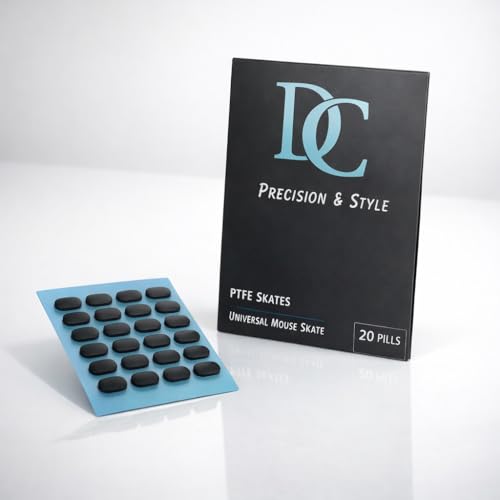
Digital Creation DC PTFE Mouse Skates, Universal Fit for All Gaming & Office Mice, Ultra-Smooth 100% Pure Teflon Replacement Feet, Low Friction Glide Pads (Pill Shape 20 Count)
Chosen because it specifies Universal Fit for All Gaming & Office Mice and Ultra-Smooth 100% Pure Teflon Replacement Feet.
View on AmazonFour of the six picks are from the same HOTLINEGAMES 3.0 Plus line, so the real decision is about fit rather than brand. Owners of Logitech mice outside this list, or of mice from other makers, should lean on the universal pack and plan for a little trimming. Owners of a G502 should first work out whether the mouse is the wireless Lightspeed model, the wired Hero model or a newer G502 X version, because the sets in this guide do not cover every variation. If you are still unsure, the safest approach is to compare a photo of your mouse’s underside with the listing images before you order, and to measure the length of the longest foot on the mouse as a sanity check.
It is also worth keeping expectations realistic. New skates restore the glide your mouse had when it was new; they will not make a heavy mouse light or turn an office mouse into a competition mouse. For most players the gain is a cleaner, more consistent start-and-stop feel, especially after months of use on a cloth pad, and that is a very good return for a small, simple repair.
All 6 Picks in Detail
1. HOTLINEGAMES 3.0 Plus for Logitech G502 Wireless – Best for G502 Wireless Owners
As an Amazon Associate we earn from qualifying purchases at no extra cost to you.

This listing is for a two-set pack of HOTLINEGAMES’ 3.0 Plus skates cut for the Logitech G502 Wireless. The listing describes rounded, curved edges, replacement feet in pure PTFE and a thickness of 0.8mm. Rounded edges matter because a sharp edge can catch on cloth pads and make the mouse feel like it is snagging when you change direction. The two sets give you a spare for the next time the feet wear down.
It suits owners of the wireless G502 who want a factory-like glide or a smoother feel than worn stock feet. Do not use it on a wired G502; the manufacturer sells separate sets for those versions.
- Cut for the Logitech G502 Wireless per the listing
- Two sets per pack
- 0.8mm thickness per the listing
- Rounded, curved edges
- PTFE material
Pros:
- Model-specific shape means no trimming
- Includes a spare set
Cons:
- Only suits one mouse version
- Thicker than some stock feet, which can matter for sensor height on some mice
It is the wireless counterpart of the G502 Hero set below; the two are not interchangeable.
When you fit the skates, remove the old pads carefully with a thin plastic tool, clean away adhesive residue with isopropyl alcohol and let the surface dry before pressing the new feet in place. Press firmly for several seconds and avoid using the mouse hard for the first hour so that the adhesive can cure fully.
2. HOTLINEGAMES 3.0 Plus for G502 Hero and Proteus Spectrum – Best for Wired G502 Mice

This is the same style of 3.0 Plus rounded-edge skate set, but cut for the G502 Hero and Proteus Spectrum RGB mice. Retail versions of this set are described as 0.7mm thick, slightly thinner than the wireless version, which reflects the different bottom shell and sensor on the wired mouse. It suits players who still use a wired G502 and want to freshen up the glide.
Using the wireless G502 set on a Hero mouse can leave the sensor sitting at the wrong height, so buy the set that names your mouse. If you cannot tell which G502 you own, check the model name printed on the underside of the mouse.
- Cut for the G502 Hero and Proteus Spectrum per the listing
- Two sets per pack
- Thickness: roughly 0.7mm per retail listings; confirm on the product page
- Rounded edge design
- PTFE glide material
Pros:
- Shaped for the wired G502 family
- Spare set for the next replacement
Cons:
- Not interchangeable with the wireless G502 set
- Thickness figure should be confirmed against your mouse
It is the wired alternative to pick number 1 and shares its design language.
Before installing, compare the new feet against your old ones for shape and thickness. If the original feet were noticeably thinner, the new ones may raise the mouse slightly, which most users adapt to quickly. If tracking feels off after the swap, lift the mouse off the pad and test again to make sure the sensor is not skipping.
3. HOTLINEGAMES 3.0 Plus for Logitech MX Master 3S / 3 – Best for a Productivity Mouse That Sees Gaming

The MX Master 3S and 3 are productivity mice rather than purpose-built gaming mice, so this set is a better fit for someone who does design or office work and wants a smoother glide than for a competitive player. The listing is written for these two models and describes rounded edges and a 0.8mm thickness on the same 3.0 Plus platform. We include it because the listing positions it as a gaming-mouse feet replacement and because many people do play on these mice, but the MX Master’s weight and shape are not aimed at esports.
It suits users whose stock feet have worn flat, whose mouse has begun to feel sticky on a pad, or who want a bit more slide on cloth surfaces.
- Cut for the Logitech MX Master 3S and MX Master 3 per the listing
- Two sets per pack
- 0.8mm thickness per retail listings; confirm on the product page
- Rounded edges
- PTFE material
Pros:
- Brings new life to a worn productivity mouse
- Spare set included
Cons:
- Only for the two named models
- Not a performance upgrade for an esports-grade setup
Compared with the G502 sets, it addresses a different kind of user, one who values comfort and ergonomics over raw glide.
Be careful when prying off the original feet on a mouse with a tight shell, and avoid forcing the shell open, since there are no screws to remove on many models. A hair dryer on low heat can soften the adhesive and make the old feet easier to lift.
4. 2Sets Mouse Skates for Logitech G502 Lightspeed / Hero – Best Alternate G502 Set

This listing names no brand in its title: “2Sets Mouse Skates Pads Mouse Feet Replacement for Logit G502 Lightspeed Hero Wireless Gaming Mouse.” It targets the same G502 family as the first two picks but mentions both Lightspeed and Hero, which are different versions. That ambiguity is the main thing to resolve before buying: confirm on the product page which version the shape and thickness fit.
It suits shoppers who want an alternative source of G502 feet and who are comfortable checking the details. Because the title is generic, treat claims about material or thickness as unconfirmed until the product page states them.
- Two sets per pack per the listing title
- Intended for the Logitech G502 family; confirm Lightspeed versus Hero fit
- Thickness: confirm on listing
- Material: confirm on listing
- Brand: not stated in the listing title
Pros:
- Spare set for the G502 family
- Gives an alternative to the branded options
Cons:
- Lack of a named brand and thickness figure in the listing
- Possible confusion between the wireless and wired G502 versions
Next to the HOTLINEGAMES G502 sets, it provides less published detail, which makes those sets the safer choice.
If you do choose it, measure your old feet with calipers if you can, and compare them with the dimensions on the product page. Always keep the original feet if they are not completely worn, so you can compare the glide before and after.
5. HOTLINEGAMES 3.0 Plus for Logitech G600 MMO – Best for MMO Mouse Owners

The Logitech G600 is an MMO mouse with a thumb-button grid, and this set restores its glide with 3.0 Plus skates cut for it. The listing mentions a 0.7mm thickness and a smooth glide type. The G600 is a heavier, older mouse, and fresh PTFE can make a noticeable difference in how easily it moves, which is useful because MMO players do a lot of repeated dragging with heavy buttons under the thumb.
It suits owners of the G600 who still love the mouse and want to extend its life rather than replace it.
- Cut for the Logitech G600 MMO per the listing
- Two sets per pack
- 0.7mm thickness per the listing
- Smooth glide type
- Rounded edges, as with the rest of the range
Pros:
- Fits a specific, older mouse that is hard to find parts for
- Spare set included
Cons:
- Only useful if you own that exact mouse
- Does not help with the mouse’s weight
It is the most specialized pick here and the least useful to anyone without a G600.
Because older mice often have heavily worn feet, clean the bottom shell thoroughly before applying the new skates, as built-up dirt and old adhesive reduce the grip of the new pads.
6. Digital Creation DC PTFE Mouse Skates – Best Universal Option
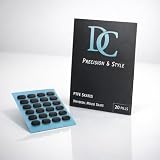
Digital Creation’s DC PTFE skates are marketed as universal for gaming and office mice, made of 100 percent pure PTFE with a low-friction finish. The appeal is flexibility: if your mouse does not have a dedicated set, a universal pack gives you material you can shape to fit. The listing text available to us is cut off, so confirm what shapes and sizes are included, whether the pads are pre-cut, and what thickness is supplied.
It suits users of mice without model-specific sets, anyone building a custom skate layout, and anyone who wants to try a different glide on a favorite mouse. It also demands more care at installation, since you will be matching the shape yourself.
- Universal fit for gaming and office mice per the listing
- 100 percent pure PTFE per the listing
- Low-friction replacement feet
- Thickness and shapes included: confirm on listing
- Pack quantity: confirm on listing
Pros:
- Works with a wide range of mice
- Pure PTFE for smooth glide
Cons:
- You may need to trim or arrange pieces yourself
- Shape and thickness details are not fully shown in the listing
It is the opposite of the HOTLINEGAMES sets: more flexible, but less plug-and-play.
If trimming is needed, use a sharp craft knife on a cutting mat and cut slowly, leaving slightly rounded corners. Rounded corners are less likely to catch on a cloth pad and tend to last longer.
Specs Compared
| Skate set | Target mouse | Material | Thickness | Edges | Quantity |
|---|---|---|---|---|---|
| HOTLINEGAMES 3.0 Plus (G502 Wireless) | Logitech G502 Wireless | PTFE | 0.8mm | Rounded, curved | 2 sets |
| HOTLINEGAMES 3.0 Plus (G502 Hero / Proteus) | G502 Hero, Proteus Spectrum | PTFE | About 0.7mm (confirm on listing) | Rounded, curved | 2 sets |
| HOTLINEGAMES 3.0 Plus (MX Master 3S / 3) | Logitech MX Master 3S and 3 | PTFE | 0.8mm (confirm on listing) | Rounded, curved | 2 sets |
| 2Sets Mouse Skates (G502 Lightspeed / Hero) | Logitech G502 family | Confirm on listing | Confirm on listing | Confirm on listing | 2 sets |
| HOTLINEGAMES 3.0 Plus (G600 MMO) | Logitech G600 | PTFE | 0.7mm | Rounded, curved | 2 sets |
| Digital Creation DC PTFE | Universal, gaming and office mice | 100% pure PTFE | Confirm on listing | Confirm on listing | Confirm on listing |
How We Chose These
This guide is built on research, not bench work. We read the title and feature text of each listing for the target mouse, material, thickness, edge shape and pack quantity, then checked HOTLINEGAMES product pages and retailer descriptions to confirm thickness figures and compatibility notes across versions. We prioritized clear model compatibility, PTFE material and a stated thickness, since the wrong fit is the most common reason skates fail. Anywhere a listing does not state a value, the guide says to confirm it on the product page rather than assume it.
What to Look For
Exact model and version compatibility
Skate sets are cut to the footprint of a specific mouse. A set for the G502 Wireless will not necessarily fit the wired G502 Hero, and variants like the G502 X have their own sets. Check your mouse’s model and version on the underside, and read the compatibility line in the listing. If your mouse has no dedicated set, a universal sheet or pre-cut packs can work, but they require more care.
Thickness and sensor height
Thickness usually falls between 0.6mm and 0.8mm. The skate thickness sets the mouse’s height off the pad, so a set that is too thick can push the sensor out of its ideal range, causing tracking issues or frame skipping, while a set that is too thin may let the shell scrape the pad. A rule of thumb is to match the thickness of your original feet, and to check that the skate matches the manufacturer’s stated figure for your model. A worked example: if the stock feet measure 0.7mm and the replacement set is 0.8mm, the mouse sits about a tenth of a millimeter higher, which most sensors handle, but a jump of half a millimeter or more is risky.
Material and edge shape
PTFE, short for polytetrafluoroethylene, is the standard glide material because of its low friction. Rounded or curved edges reduce the chance of the skate catching on cloth, and they tend to wear in a more even way than hard square edges. Some brands add proprietary lubricant layers, but the base material remains PTFE.
Installation and break-in
Clean the mouse bottom with isopropyl alcohol, remove old pads gently (low heat helps) and press the new skates firmly for at least ten seconds each. Give the adhesive a short time to cure before heavy use. A new skate can feel fast or slightly scratchy at first, and glide often settles after a few hours of use on a clean pad.
Glide speed and control. Skates differ in how fast they feel. Smooth, polished PTFE glides quickly and needs less force to start moving, which suits low-sensitivity, big-swipe players. Textured or slightly rougher feet offer a bit more control for micro-adjustments. Pure PTFE is a good all-round material, and the right choice depends on your pad: hard pads feel fast with almost any skate, while cloth pads feel slower and benefit more from rounded edges and a polished surface. If you are unsure, keep the first set on for a week before deciding whether you need a faster or slower feel.
Making the old feet last longer. Skates wear fastest when the pad is dirty or the mouse is dragged across a bare desk. Wipe the mouse pad with a damp cloth every couple of weeks, keep crumbs and dust off the surface and avoid lifting and dropping the mouse hard. If you replace skates before they are fully worn, you can keep the old pair as a backup. Many gamers fit a fresh set before an important event rather than risk a chipped skate in the middle of a match.
Buying more than one pack. Because every set here includes two sets or spare pieces, you usually do not need to buy twice. It is still worth checking the return policy, since a wrong-size order is easier to send back before the adhesive backing has been peeled off. If you own several Logitech mice from the same family, compare their model names carefully, as families often share names but not footprints.
Questions
How do I know when my mouse skates need replacing?
Signs include scratchy or uneven glide, visible chips or flattened edges, and the mouse sticking on a pad it used to glide over smoothly. Dirt build-up and worn edges both increase friction.
Are thicker skates better?
Not automatically. Thicker skates last longer but can raise the sensor out of its ideal range. Match the original thickness for your model where you can.
Can I use G502 Wireless skates on a G502 Hero?
It is best not to. The two versions have different bottom shells and recommended thicknesses, and manufacturers sell separate sets for each.
Do I need to trim universal skates?
Often, yes. Universal packs usually need to be arranged or trimmed to the mouse. Check the listing for the shapes provided.
How should I clean my mouse before applying new skates?
Wipe the bottom shell with isopropyl alcohol on a lint-free cloth, remove any old adhesive and let it dry completely before pressing the new skates in place.
Will new skates change how my mouse tracks?
They change glide, and slightly the height of the mouse, which most people adapt to quickly. If tracking feels off, check that the thickness matches the original and that nothing is blocking the sensor.
Update History
- October 20, 2026 – Initial publication; product set drawn from current catalog listings.
- Check the product page for current specifications and availability before buying.
Sources
- HOTLINEGAMES product pages and retailer descriptions for the 3.0 Plus skate range
- Retailer listing titles and specification fields for each skate set
- Third-party retailer pages for comparable PTFE skate sets, used to cross-check thickness conventions