Our Top Picks
The difference between 120Hz and 144Hz in a VR headset is small, and the choice rarely decides a purchase: 144Hz gives slightly shorter intervals between frames, but only if your PC can render that many frames per second for every eye, and very few headsets even offer the option. For most players, a stable frame rate at 90Hz or 120Hz matters more than the extra step up to 144Hz.
What the refresh rate numbers mean
Refresh rate is how many times per second the headset panel updates the image. At 120Hz, a new frame is shown about every 8.3 milliseconds. At 144Hz, about every 6.9 milliseconds. That gap of roughly 1.4 milliseconds is real but small. In VR the app has to supply a fresh frame for each refresh, or the runtime falls back to reprojection, which fills in missing frames using motion data and can introduce visual artifacts. A headset running at a rate your PC cannot sustain often looks worse than one set one step lower.

DESTEK V5 VR Headset with 50000+ VR Movies – Fits All Smartphone Sizes | Includes VR Controller & 50000+ VR Movies No Subscription,Touch Button Game, Anti-blue HD lenses, for iPhone/Android-Black.
Chosen because it specifies Fits All Smartphone Sizes and Includes VR Controller & 50000+ VR Movies No Subscription.
View on Amazon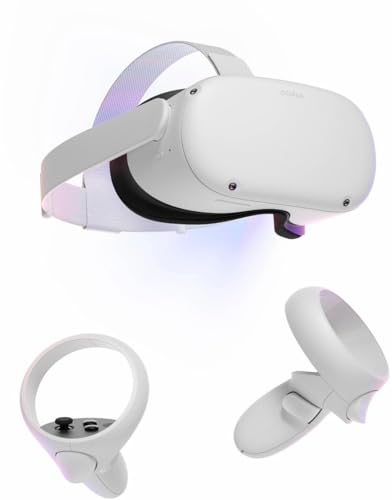
Oculus Newest Quest 2 Gmaing VR Headset 128GB Set - Advanced All-in-One Virtual Reality Headset Cover Set, White
Chosen because it specifies Advanced All-in-One Virtual Reality Headset Cover Set and White.
View on Amazon
COCERKET VR Headset for iPhone & Android, 120° Viewing Angle 3D VR Glasses with Aspherical Lenses & Built-in Headphones, for VR Videos & Mobile Games
Chosen because it specifies for VR Videos & Mobile Games.
View on Amazon
Oculus Rift S PC-Powered VR Gaming Headset
Picked as a relevant option in this category.
View on AmazonWhich headsets offer which rates
Reference specifications list the Valve Index with variable refresh rates of 80, 90, 120 or 144Hz, using two 1440 by 1600 LCD panels. Read the maker’s support notes for the current state of the 144Hz mode before relying on it.
The Meta Quest 3, according to reference specifications, runs its two 2064 by 2208 LCD panels at 90 to 120Hz. Available modes can change with software updates, so read the device settings or maker documentation for your unit. When a Quest is used with a PC through a cable or wireless streaming, the available rates and the resulting quality also depend on the link, the encoder and the application.
Other PC headsets support rates that are listed on their maker pages, and the numbers differ by model. Do not assume a particular headset supports 144Hz; check its specification sheet.
Quick comparison
| Factor | 120Hz | 144Hz |
|---|---|---|
| Time between frames | About 8.3 ms | About 6.9 ms |
| Frames the PC must render per second | 120 | 144, which is 20 percent more |
| Headsets that list it | Several, including Valve Index and Meta Quest 3 range | Fewer; the Valve Index lists it |
| GPU demand | High | Higher still |
| Perceived smoothness gain over the lower rate | Clear over 90Hz for many users | Smaller step over 120Hz |
| Risk of reprojection when GPU is short | Moderate | Higher |
What you actually notice
Higher refresh rates generally reduce flicker, judder during head movement and motion blur on LCD panels, and many people report them as more comfortable. The steps are not equal, though. Moving from 72 or 80Hz up to 90 or 120Hz is typically more noticeable than moving from 120 to 144Hz. Comfort is personal; some players are sensitive to low frame rates and others barely notice the difference between 90 and 120.
Frame consistency matters as much as the number. Dropped frames and reprojection produce stutter that a higher nominal refresh rate does not cure. Many VR players prefer a locked lower rate to a fluctuating higher one.
What your PC needs
VR draws two views per frame at high resolution, so frame rate demands are heavy. A game rendered at 144Hz needs the GPU to finish each frame in under 7 milliseconds, including both eyes and any supersampling. The CPU also has to finish its part of each frame in the same time. Settings that help include lowering render resolution or supersampling, using the headset runtime’s dynamic or motion smoothing options, and choosing a lower refresh rate for demanding titles. If frame times are frequently missing the target, drop the refresh rate one step.
Standalone use is different: a Quest running games on its own chipset follows the game’s own target rate, and many titles are built for 72, 90 or 120Hz.
Pick by situation
| Your situation | Better target | Why |
|---|---|---|
| Mid-range GPU, demanding titles | 90Hz | Easier to hold steady |
| High-end GPU, fast-paced or competitive games | 120Hz | Smooth and widely supported |
| High-end GPU and a headset that lists 144Hz | 144Hz where stable | Slight extra smoothness if frame times allow |
| Wireless streaming from a PC | 90 or 120Hz | Link quality may limit gains from higher rates |
| Sensitive to motion discomfort | Highest stable rate | Consistency over peak number |
Common mistakes when comparing
- Choosing a headset for its top refresh rate alone while ignoring resolution, lenses, field of view and tracking.
- Selecting 144Hz when the GPU cannot hold it, then seeing reprojection artifacts.
- Assuming every game supports every refresh rate; many titles cap or recommend a specific rate.
- Ignoring the cable or wireless bandwidth for PC streaming.
- Judging by a monitor experience. A 144Hz monitor and a 144Hz headset are different because VR renders two views and head motion is constant.
- Forgetting display persistence. Lower persistence modes can reduce blur but are separate from the refresh rate setting.
How to choose a headset on refresh rate
Start from your GPU, not the headset. Work out what frame rate your preferred games hold at your preferred resolution. If you can hold 120Hz consistently, a headset that tops out at 120Hz covers you, and spending extra for 144Hz capability makes little difference. If you play lightweight titles, rhythm games or older games with large performance headroom, 144Hz might actually be used, and the Index-style option becomes worth considering. Then weigh display clarity, comfort, tracking system, wired or wireless use, and the software ecosystem; these usually decide whether you enjoy the headset more than a refresh rate step does.
Simple ways to find your stable rate
Start at 90Hz and play a demanding title for a session while watching the frame timing overlay offered by your VR runtime or a monitoring tool. If the GPU has plenty of headroom, raise the refresh rate one step and repeat. If you see dropped frames, warping at the edges of your view or a stuttering feel, step back down. Close background apps, keep drivers current and make sure the headset connection meets the maker’s requirements. These steps cost nothing and give a better answer than any spec sheet, because your own mix of games, GPU and settings determines the result.
Frequently Asked Questions
Is 144Hz noticeably better than 120Hz in VR?
Most people find the difference small. The step from 90 to 120Hz is typically easier to notice. Whether 144Hz helps depends on whether your PC can hold that frame rate steadily in the game you play.
Which VR headsets support 144Hz?
The Valve Index lists 144Hz among its supported rates, alongside 80, 90 and 120Hz. Many other headsets top out at 90 or 120Hz, so read the maker’s specifications for the exact model.
Will a higher refresh rate reduce motion sickness?
It may help some people because motion looks smoother, but comfort also depends on tracking latency, stable frame rates, the game’s movement style and individual sensitivity. If you feel unwell, stop playing and rest.
Does 120Hz need a more powerful PC than 90Hz?
Yes. The GPU and CPU must prepare about a third more frames each second. If your system struggles, use a lower refresh rate or reduce render resolution.
Should I set the headset to its maximum refresh rate by default?
Only if your PC holds it. A steady 90Hz often feels better than an unstable 120 or 144Hz, so lower the rate when you see stutter or warping.
FAQ
Is 144Hz noticeably better than 120Hz in VR?
Which VR headsets support 144Hz?
Will a higher refresh rate reduce motion sickness?
Does 120Hz need a more powerful PC than 90Hz?
Should I set the headset to its maximum refresh rate by default?
More from Amazon
Programs that pair well with the guide above. Offers and eligibility are set by Amazon and may change.
Free shipping on eligible items, Prime Video and more. Eligible new members can start with a free trial.
Start a Prime free trialAd-free music streaming. Eligible new subscribers can start with a free trial.
Try Music Unlimited freeA Prime membership for ages 18-24 with a trial period. Eligibility is set by Amazon.
See Prime for Young AdultsAudiobooks and podcasts to listen to on the go. Eligible new members can start with a free trial.
Try Audible freeAs an Amazon Associate we earn from qualifying purchases.