Our Top Picks
For gaming on a PC or console, a 2.4GHz wireless headset with its own USB dongle is usually the better choice, because the dongle is built for a dedicated audio link and typically keeps the game audio and the microphone working together. Bluetooth wins on convenience: it pairs straight with phones, tablets and laptops without a dongle, which makes it the better pick for travel and mixed use. Many modern gaming headsets offer both, so the real question is which connection you use for which job.
The short version
Both connection types sit in the same 2.4 GHz radio band, so the name “2.4GHz” on a headset box really means a proprietary wireless link between the headset and a USB transmitter that the maker designed. Bluetooth is the open standard that phones and laptops already include. The Bluetooth specification defines operation between 2.402 and 2.480 GHz, so the two overlap in frequency while differing in how they are built and what they are designed to do.

AOC 2.4GHz Wireless Gaming Headset for PS5, PS4, PC, Switch, 45Hr, Black | Bluetooth 6.0 Gaming Headphones with Noise Canceling Mic, 7.1 Virtual Surround, Great for Fortnite & Call of Duty/FPS Gamers
Chosen because it specifies PS4 and Switch.
View on Amazon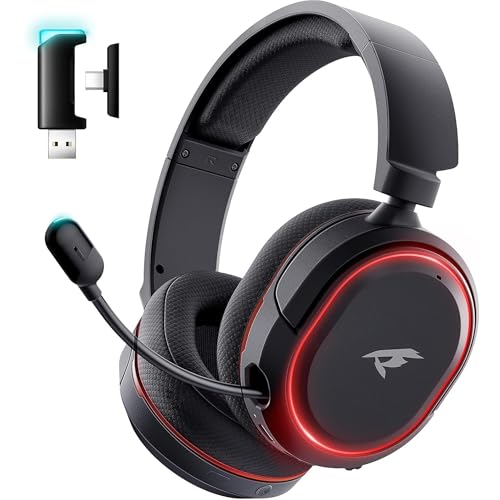
Wireless Gaming Headset for PC PS5 PS4 Mac Switch 7.1 Surround Sound 100-Hr | 2.4Ghz USB Gaming Headphones, Bluetooth 5.4 & Type-C, Noise Canceling Mic, RGB Light, Ideal for FPS, RPG Gamers, Not for Xbox
Chosen because it specifies 2.4Ghz USB Gaming Headphones and Bluetooth 5.4 & Type-C.
View on Amazon
Wireless Gaming Headset for Fortnite & Team Play, 2.4GHz ≤20ms, 3D Sound | Bluetooth 5.4, 50mm Drivers, Noise-Canceling Mic, 100H Playtime, All-Day Comfort, for PS5 PS4 PC Switch & Mac
Chosen because it specifies 2.4GHz ≤20ms and 3D Sound.
View on Amazon
AOC Wireless Headset with Mic for Work, Bluetooth 5.4 Headphones-Dark Black | AI Noise-Canceling Mic for Clear Calls, Computer Headset with Mic Mute & USB A/C Dongle for PC, Computer, Laptop
Chosen because it specifies Bluetooth 5.4 Headphones-Dark Black and AI Noise-Canceling Mic for Clear Calls.
View on AmazonAt a glance
| Feature | 2.4GHz dongle | Bluetooth |
|---|---|---|
| Needs a dongle | Yes, usually USB-A or USB-C | No, uses built-in radio |
| Works with phones | Rarely, unless the dongle supports it | Yes, almost universally |
| Designed for | Low-delay game audio and chat | General-purpose wireless audio and calls |
| Chat plus game audio together | Usually yes, maker-dependent | Often limited by the call profile |
| Setup | Plug in and power on | Pair through system settings |
| Console support | Depends on the dongle model | Often restricted or missing on consoles |
| Multi-device use | One dongle per system | Many headsets remember several devices |
Why latency differs
Latency is the delay between something happening on screen and you hearing it. Bluetooth audio generally passes through compression, buffering and a protocol designed to stay stable across many device types, so the delay is typically noticeable in fast games and in video. A proprietary 2.4GHz link can be tuned by the headset maker for exactly one job, so reviewers generally report it as the lower-delay option. Makers rarely publish a single universal figure, and exact numbers vary by headset, codec and the device on the other end, so treat any precise millisecond claim for a specific model with caution unless the maker or a measuring outlet provides it.
Newer Bluetooth versions help. Bluetooth 5.2 introduced LE Audio with the LC3 codec, which the specification aims at lower power use, and some headsets offer low-delay modes. Support has to exist on both the headset and the computer or console, so a new headset alone does not guarantee better delay.
The microphone problem with Bluetooth
A common frustration is that audio quality drops the moment the microphone turns on. Bluetooth separates music playback from phone-call audio into different profiles. A2DP is designed for stereo streaming and supports codecs such as AAC and aptX. The Hands-Free Profile is built for two-way voice, uses mono audio, and in its standard form relies on narrow-band encoding, with an optional wide-band speech mode added in version 1.6. When a game or chat app activates the headset mic over Bluetooth, the connection often switches to the call profile, and the game sound can turn flat and thin.
A 2.4GHz dongle commonly presents itself to the computer as a separate sound device with a microphone channel, so stereo game audio and voice chat can run at the same time. That is a big reason many players choose a dongle headset for online team play.
Interference and range
Because both link types share a crowded band with Wi-Fi routers, microwave ovens and other wireless gadgets, interference is possible in either. Bluetooth uses adaptive frequency hopping to avoid crowded channels, which helps it coexist with Wi-Fi. Proprietary dongles also manage channels in their own way, and makers describe their implementation differently. Range depends on the radio class, walls and body position. Most consumer Bluetooth devices are Class 2, with typical indoor range around 10 metres, while makers often advertise longer ranges for their dongle links under open conditions. Treat advertised figures as best-case.
Practical tips for either type: keep the dongle in a front port or on a short extension cable rather than behind the case, keep it away from a crowded USB 3 hub, and avoid placing it right next to the router.
Console and mixed-device notes
Consoles are the biggest compatibility trap. Many consoles do not accept standard Bluetooth headsets for game audio, and a dongle that works on one system may not on another. Read the maker’s compatibility list for the exact model and platform before buying. Headsets that include both a dongle and Bluetooth often let you connect the dongle to a PC or console while Bluetooth stays paired to a phone, so you can take a call without removing the headset. Some models let you mix both sources; others only allow one active input.
Pick one if you want
| Your situation | Better fit | Reason |
|---|---|---|
| Competitive online shooters with voice chat | 2.4GHz dongle | Dedicated link, chat and game audio together |
| Playing on a laptop away from home | Bluetooth | No dongle to carry or lose |
| Phone gaming or streaming video | Bluetooth | Phones do not take USB dongles easily |
| Single-player and casual play | Either | Delay matters less for slower games |
| Console play | Dongle model made for that console | Compatibility is maker-specific |
| One headset for everything | Dual-mode headset | Dongle at the desk, Bluetooth on the go |
Common mistakes
- Assuming “wireless” means the same thing everywhere. A headset described only as Bluetooth has no dongle, and a dongle-only model will not pair with a phone.
- Judging by the connection name alone. A well-implemented Bluetooth link can feel fine for slower games, and a poor dongle placement can still stutter.
- Leaving the mic on the call profile. If quality collapses when chat starts, check whether the headset offers a dongle or a wired option for voice.
- Ignoring battery behaviour. Makers state battery life separately for each mode, and low-delay modes can use more power.
- Plugging a dongle into a congested port. Use a port with a clear line to the headset.
Alternatives worth a look
- Wired USB or 3.5 mm headsets: no batteries, no pairing and no radio interference, with the trade-off of a cable.
- Dual-mode wireless headsets: models from makers such as Razer, Logitech and SteelSeries pair a dongle with Bluetooth, which suits desk and travel together. Check the maker’s spec sheet for which features work in which mode.
- A separate Bluetooth transmitter: lets a Bluetooth headset connect to a device without a radio, though it adds another gadget and its own delay characteristics.
Frequently Asked Questions
Is 2.4GHz better than Bluetooth for gaming?
For most online play, yes. A dedicated dongle link is generally lower in delay and handles chat and game audio together more reliably. Bluetooth remains fine for casual or single-player use and is far more convenient across devices.
Is Bluetooth 2.4GHz too?
Yes, Bluetooth also uses the 2.4 GHz band. The difference is that Bluetooth is an open standard with its own protocols, while a 2.4GHz gaming dongle uses a maker-designed link on the same band.
Can I use a 2.4GHz headset with my phone?
Only if the headset also supports Bluetooth or the dongle supports your phone’s port and the maker says so. Many dongles are designed for PCs and consoles.
Why does my Bluetooth headset sound worse when I use the mic?
The connection commonly changes from the stereo music profile to the voice-call profile, which is mono and tuned for speech. That is a limit of the profile, not necessarily a fault in your headset.
Does a dongle headset work on consoles?
Some do, but compatibility is specific to the model and platform. Read the maker’s listed platforms before buying, as many consoles do not support generic Bluetooth headsets for game audio.
Do both types suffer from Wi-Fi interference?
Both share the band with Wi-Fi, so interference can happen. Moving the dongle to a clear port, reducing wireless clutter nearby and keeping firmware updated are the usual first steps.
FAQ
Is 2.4GHz better than Bluetooth for gaming?
Is Bluetooth 2.4GHz too?
Can I use a 2.4GHz headset with my phone?
Why does my Bluetooth headset sound worse when I use the mic?
Does a dongle headset work on consoles?
Do both types suffer from Wi-Fi interference?
More from Amazon
Programs that pair well with the guide above. Offers and eligibility are set by Amazon and may change.
Free shipping on eligible items, Prime Video and more. Eligible new members can start with a free trial.
Start a Prime free trialAd-free music streaming. Eligible new subscribers can start with a free trial.
Try Music Unlimited freeA Prime membership for ages 18-24 with a trial period. Eligibility is set by Amazon.
See Prime for Young AdultsAudiobooks and podcasts to listen to on the go. Eligible new members can start with a free trial.
Try Audible freeAs an Amazon Associate we earn from qualifying purchases.