Our Top Picks
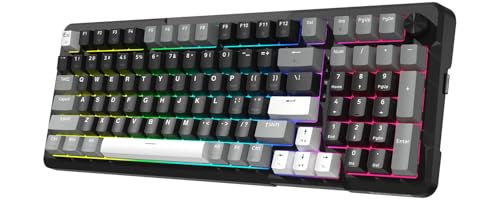 Redragon K742 Wireless Mechanical Gaming Keyboard with Knob15.12 x 5.67 x 1.54 inches0 poundsCheck on Amazon
Pick 2.4GHz for gaming and keep Bluetooth for travel, tablets and battery life. A 2.4GHz dongle gives lower, steadier latency and higher polling rates, while Bluetooth is more convenient because it needs no receiver but adds delay and variability. Tri-mode keyboards let you have both.
Side-by-Side Summary
| Feature | 2.4GHz (dongle) | Bluetooth |
|---|---|---|
| Latency | Commonly reported in the low single-digit milliseconds | Reported anywhere from around 7 to 40 ms or more depending on the source |
| Polling rate | 1,000 Hz is common; some boards list up to 4,000 or 8,000 Hz | Historically about 125 Hz; some newer boards offer higher modes |
| Setup | Plug in a USB receiver | Pair with the device’s built-in Bluetooth |
| Battery life | Shorter, especially at high polling | Usually longer |
| Multi-device | One dongle, one computer at a time | Switch between phones, tablets and laptops |
| Interference | Dedicated link, generally stable | Shares spectrum with other devices and the system stack |
| Best for | Competitive and fast games | Casual play, work and travel |
Most latency figures come from keyboard makers and retailer blogs, so treat the numbers as approximate and not as independent measurements.

Redragon K517 Pro Wireless Gaming Keyboard, RGB Backlit, Tri-Mode BT/2.4GHz/USB-C, Mechanical Feel 94 Keys Computer Keyboard with 4 Macro Keys, Number Pad, 4000mAh Battery for Win/MAC
Chosen because it specifies RGB Backlit and Tri-Mode BT/2.4GHz/USB-C.
View on Amazon
60% Wireless Gaming Keyboard and Mouse Combo, RGB Backlit Rechargeable | LED Light Up keyboards, Wireless Gaming Mouse and Keyboard for Xbox PS4 PS5 PC Laptop
Chosen because it specifies RGB Backlit Rechargeable and LED Light Up keyboards.
View on AmazonRedragon K742 Wireless Mechanical Gaming Keyboard with Knob for PC Computer | Bluetooth 5.0/2.4GHz/USB C Wireless Creamy Keyboard with Number Pad, RGB Backlits, Hot-Swappable with Linear Switches (Black)
Chosen because it specifies RGB Backlits and Hot-Swappable with Linear Switches (Black).
View on Amazon
Redragon K752 60% Wireless Mechanical Gaming Keyboard with RGB Lightbox | Tri-Mode Bluetooth 5.0/2.4GHz/USB-C, RGB Backlit Keys, Creamy Sound, Hot-Swappable, PBT Keycaps for PC/Mac
Chosen because it specifies Tri-Mode Bluetooth 5.0/2.4GHz/USB-C and RGB Backlit Keys.
View on AmazonWhy 2.4GHz Is Faster
A 2.4GHz keyboard talks to its own dedicated receiver using a protocol tuned by the maker for low delay. The receiver presents itself to the computer like a wired USB device, which can poll at 1,000 Hz, meaning one report per millisecond. Razer calls its version HyperSpeed Wireless, and sources describing wireless boards note the connection is often within about a millisecond of wired performance.
Bluetooth goes through the computer’s own Bluetooth radio and software stack. That adds delay and jitter, and low-power design has traditionally capped keyboard polling at around 125 Hz, an 8 ms interval. Some newer implementations offer higher rates, and reviewers report certain gaming boards reaching 200 to 500 Hz in a high-rate Bluetooth mode, but a dedicated dongle still tends to be more consistent.
What Polling Rate Means
Polling rate is how often the keyboard reports its state to the computer. At 1,000 Hz, the computer receives an update every millisecond. Higher rates reduce the wait between a keypress and its report, though the benefit becomes smaller as the number grows, and gains above 1,000 Hz are more noticeable to some players than others. Higher polling also drains the battery faster.
A Real Example: Razer BlackWidow V4 Pro 75%
Razer’s BlackWidow V4 Pro 75% is a tri-mode keyboard with HyperSpeed Wireless (2.4GHz), Bluetooth 5.1 and USB-C. Razer’s own master guide and reviewers such as PC Gamer and Tom’s Guide list up to 4,000 Hz in wireless mode and 1,000 Hz when wired. How-To Geek reported different figures, so rely on the maker’s guide. The keyboard includes a power-saving mode that locks polling to 1,000 Hz and turns off lighting and the OLED display. PC Gamer reported that in 2.4GHz mode at high polling the battery drained quickly, which shows the trade-off of speed against runtime.
Where Bluetooth Wins
- No dongle. It works with laptops, tablets and phones without using a USB port.
- Battery life. Lower power draw usually means longer runtime.
- Multi-device pairing. Many keyboards store several Bluetooth profiles and let you switch quickly.
- Travel. You can leave the receiver at home.
Where 2.4GHz Wins
- Latency and consistency. The dedicated link avoids the Bluetooth stack.
- Polling rate. Gaming boards list higher rates on the dongle than on Bluetooth.
- Stability in crowded rooms. Reports suggest it handles interference from other wireless devices better, though a heavy radio environment can still cause problems.
- Better software support. Gaming drivers often expose polling rate and key settings on the dongle connection.
Which Should You Pick?
| Situation | Choose |
|---|---|
| Competitive shooter or rhythm game | 2.4GHz or wired |
| Single-player or slower games | Either; 2.4GHz still gives smoother input |
| Working across a laptop and tablet | Bluetooth |
| Travelling with a laptop only | Bluetooth to save a port |
| Want maximum battery life | Bluetooth with lighting off |
| Desktop gaming PC, one setup | 2.4GHz, or wired when the battery is a worry |
Common Mistakes
- Plugging the dongle in behind the PC. A rear port behind a case can reduce signal. A short extension cable or front port often helps, and some makers supply an extender.
- Running Bluetooth for competitive games and blaming the keyboard for delay.
- Leaving high polling on all day and wondering why the battery drains.
- Comparing marketing numbers directly. Latency claims depend on how and where they were measured.
- Ignoring wired mode. Most wireless gaming keyboards still have a USB cable option for charging and the lowest delay.
Troubleshooting Quick Reference
| Symptom | Likely cause | What to try |
|---|---|---|
| Occasional dropped keys on 2.4GHz | Weak signal or interference | Move the dongle closer using the supplied extender or a front USB port |
| Lag on Bluetooth | Stack delay or power saving | Switch to 2.4GHz or wired for games |
| Short battery life | High polling, lighting | Lower the polling rate, dim lighting, use a power-saving mode if offered |
| Keyboard will not pair | Wrong mode selected | Check the mode switch and follow the maker’s pairing steps |
Firmware updates and mode behaviour differ by maker, so follow the manual that came with your keyboard.
Wired, 2.4GHz and Bluetooth Together
Most premium wireless gaming keyboards now offer all three connections, and the practical approach is to treat each as a mode. Wired suits charging and the lowest delay at a fixed desk, 2.4GHz suits wireless play on the same desk, and Bluetooth suits other devices. When you switch modes, the keyboard may use a different polling rate and lighting behaviour, so read the maker manual for how each mode is set up.
Latency Claims in Context
Published latency figures are hard to compare because makers use different test methods, and independent measurement requires specialist equipment. A difference of a few milliseconds matters most to players competing at a high level. For most people, key switch type, keyboard layout and comfort affect play more than the connection method, so choose on fit and features once the connection is adequate.
Security Note
Wireless keyboards transmit your keystrokes over the air. Modern gaming boards generally use encryption on both Bluetooth and proprietary 2.4GHz links, but implementations differ by maker. If you type sensitive passwords, a wired connection or a maker that states its encryption is a reasonable precaution, and the maker documentation is the place to confirm what is used.
Frequently Asked Questions
Is Bluetooth good enough for gaming?
For casual and single-player games, many people find it fine. For fast competitive games, the extra delay and lower polling make 2.4GHz or wired the safer choice.
Can I use both on the same keyboard?
Yes, on tri-mode keyboards. A switch or key combination changes between 2.4GHz, Bluetooth and wired, so you can game on the dongle and use Bluetooth for another device.
Does 2.4GHz interfere with Wi-Fi?
Both can share the same band, so crowded environments can cause interference. Makers design dongles to hop channels, and moving the receiver away from routers or USB 3 hubs often helps.
Is wired still faster?
Wired is generally the benchmark for latency and polling. Some makers state that their 2.4GHz modes come close, and some boards poll slower when wired than wireless, so check the maker’s listed figures.
Does higher polling rate improve my gameplay?
Past 1,000 Hz the gain is small and depends on the game and the player. It matters most for very fast reaction games and uses more battery.
What should I buy if I am unsure?
A tri-mode keyboard covers both needs. Use the dongle for games and Bluetooth for everything else.
FAQ
Is Bluetooth good enough for gaming?
Can I use both on the same keyboard?
Does 2.4GHz interfere with Wi-Fi?
Is wired still faster?
Does higher polling rate improve my gameplay?
What should I buy if I am unsure?
More from Amazon
Programs that pair well with the guide above. Offers and eligibility are set by Amazon and may change.
Free shipping on eligible items, Prime Video and more. Eligible new members can start with a free trial.
Start a Prime free trialAd-free music streaming. Eligible new subscribers can start with a free trial.
Try Music Unlimited freeA Prime membership for ages 18-24 with a trial period. Eligibility is set by Amazon.
See Prime for Young AdultsAudiobooks and podcasts to listen to on the go. Eligible new members can start with a free trial.
Try Audible freeAs an Amazon Associate we earn from qualifying purchases.