Our Top Picks
 Redragon M725 Honeycomb Shell Gaming Mouse Wireless Lightweight4.76 x 2.5 x 0.1 inches0.2 poundsCheck on Amazon
A 5-button mouse is enough for shooters, MOBAs and general PC play, while a 7-button mouse starts to pay off when you want extra thumb inputs for macros, push-to-talk or MMO-style hotkeys; just remember that the advertised count often includes buttons you cannot use for actions.
What counts as a button
Marketing counts are inconsistent. A common 5-button layout is left click, right click, a clickable scroll wheel and two side buttons for back and forward. A 7-button layout usually adds extra buttons, but depending on the model those could be a DPI switch behind the wheel, a profile button, a sniper button, or additional thumb buttons. Reviewers who cover mice with many buttons point out that a seven-button listing may have only two or three buttons the thumb can reach comfortably. So the question to ask is not “how many buttons” but “how many can my thumb press without moving my grip.”

SMAIGE Gaming Mouse Wired,6 Buttons, 4 Adjustable DPI Up to 3200 DPI, 7 Circular & Breathing LED Light, Multifunction Wired Mouse Used for Games and Office (Black)
Chosen because it specifies 6 Buttons and 4 Adjustable DPI Up to 3200 DPI.
View on Amazon
Redragon Wireless Gaming Mouse, MMO Gaming Mouse UP 16,000 DPI, 16 Macro Programmable Buttons, RGB Rechargeable with 12 Side Buttons, 70Hrs for PC Laptop MOBA FPS, M901P-KS
Chosen because it specifies MMO Gaming Mouse UP 16 and 000 DPI.
View on AmazonRedragon M725 Honeycomb Shell Gaming Mouse Wireless Lightweight 49g -Black | 8000 DPI Tri-Mode BT5.1/2.4GHz/Type-C Wired Gamer Mouse with 2 Side Buttons, Macro Programmable for PC/Mac/Laptop
Chosen because it specifies Macro Programmable for PC/Mac/Laptop.
View on Amazon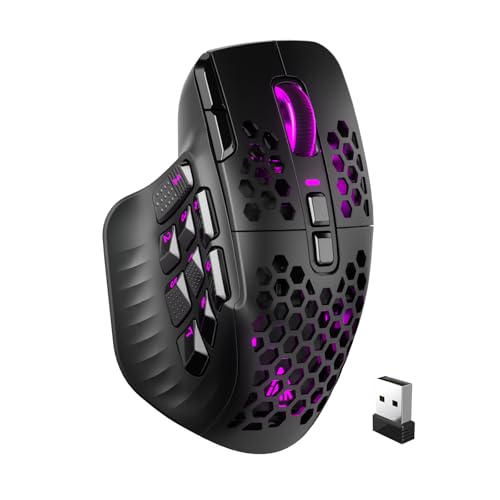
SOLAKAKA SM809 Pro Gaming Mouse with 9 Side Buttons,24000 DPI RGB Mouse for Gamer,16 Programmable Macros MMO Mouse,Black
Chosen because it specifies 24000 DPI RGB Mouse for Gamer and 16 Programmable Macros MMO Mouse.
View on AmazonAt a glance
| Feature | 5-button mouse | 7-button mouse |
|---|---|---|
| Typical layout | Two clicks, wheel click, two side buttons | Same base plus two extra, often DPI, profile or sniper |
| Best for | FPS, MOBA, everyday use | Macros, MMO, streaming or productivity shortcuts |
| Weight tendency | Lighter, simpler shell | Slightly more complex, often a bit heavier |
| Accidental presses | Rare | More likely if extra buttons sit near the grip |
| Learning curve | Minimal | Needs software setup and muscle memory |
Who should stay with 5 buttons
Competitive shooter players often prefer fewer buttons because every extra switch is a place for a stray thumb press. Many esports-focused mice from makers such as Razer, Logitech G and SteelSeries keep to two side buttons so the shell stays light and symmetrical in feel. Models like the Razer DeathAdder Essential are described by the maker as a five-button design, and reviewers treat that layout as ideal for simplicity but too limited for players who juggle many abilities.
- You use side buttons only for back, forward or a single bind such as push-to-talk.
- You care about the lightest, simplest shape.
- You tend to grip with your thumb pressed along the side, which makes extra buttons easy to hit by mistake.
Who benefits from 7 buttons or more
If you play an MMO, an RTS or a game with long ability lists, extra thumb buttons can trigger keyboard-hand actions without reaching. Guides aimed at MMO players commonly suggest six or more side buttons for those games, and some go to twelve; modular designs such as the Razer Naga V3 Pro (per the maker) ship with swappable side plates in two-, six- and twelve-button configurations. A 7-button mouse sits at the entry level of that idea: it adds a couple of inputs, but it is not a dedicated MMO mouse.
- You want separate binds for a voice-chat toggle, screenshot, or in-game ping.
- You work in editing or spreadsheet software and want copy, paste or undo on the thumb.
- You switch DPI or profiles often and want a dedicated button.
Layout and ergonomics beat raw count
Reviewers repeatedly note that position matters more than quantity. A well-placed set of eight buttons can be easier to use than a crowded grid of twelve. More buttons can also change how your thumb rests, which may cause discomfort in long sessions. If you get tingling, pain or numbness from mouse use, stop, adjust your setup and consult a doctor or physiotherapist; no button layout is a substitute for that.
Decision table
| If you … | Pick | Note |
|---|---|---|
| Play Valorant, CS2 or Apex | 5-button | Light, fewer misclicks |
| Play League, Dota or similar | Either | Side buttons are optional |
| Play WoW, FFXIV or Guild Wars style MMOs | 7-button or an MMO mouse | More binds in reach |
| Stream or record often | 7-button | Dedicated hotkeys help |
| Prefer a tiny or ultralight shell | 5-button | Fewer parts to fit |
| Want software-driven profiles | 7-button | Profile button simplifies switching |
Common mistakes
- Trusting the headline number. Read the diagram and count which buttons are on the thumb side.
- Buying many buttons and never binding them. Unused buttons add weight and clutter.
- Ignoring shape. A comfortable shape for your hand size and grip matters more than extra buttons.
- Skipping software. Most makers offer free software for remapping; without it extra buttons may only do defaults like DPI cycling.
- Forgetting game rules. Some competitive games limit macros, so use simple one-press binds.
Alternatives
- Modular MMO mouse: Swappable side plates let you move from two to many buttons.
- Mouse plus keypad: A separate programmable keypad adds buttons without changing the mouse.
- Mouse with a thumb paddle or tilt wheel: A few models add a single easy-reach input instead of a grid.
How to get value from extra buttons
If you do buy a mouse with more buttons, plan the bindings before you start. Put the most frequent, simplest actions on the buttons your thumb reaches without moving, and keep rarely used functions on the far buttons. Use the maker’s software to create a profile per game, and name them clearly so switching is quick. Many people find that two or three well-chosen binds beat a full grid they cannot remember.
- List the keyboard shortcuts you reach for most in your main game.
- Assign the top two or three to the easiest thumb buttons.
- Play a few sessions, then adjust anything you press by accident.
- Save a separate profile for productivity or streaming use.
What to read on a spec sheet
Look at whether the maker lists the number of programmable buttons rather than just the total, whether a profile button or on-board memory is included so bindings follow the mouse to another PC, and where the buttons sit in the product diagram. Also note the stated weight and dimensions, since extra buttons sometimes mean a wider body on the thumb side. A short, low-profile mouse with many buttons can be awkward for large hands, so compare length and width against your hand size.
Wired or wireless
Button count does not depend on the connection type, but more buttons can mean more software features such as on-board profiles. Wireless models carry a battery, so a 7-button wireless mouse may weigh noticeably more than a 5-button wired one. If lightness is a priority, a simple five-button layout is easier to find in ultralight designs.
Frequently Asked Questions
Is a 7-button mouse better than a 5-button one?
Not automatically. It is better only if you will bind the extra buttons to useful actions. For pure aiming games, a simpler 5-button mouse is just as capable.
How many side buttons do MMO players need?
Guides aimed at MMO players commonly suggest six or more side buttons, and some suggest twelve. A 7-button mouse offers fewer thumb inputs than that, so a dedicated MMO mouse suits heavy hotkey users.
Can I remap the buttons?
Nearly all gaming mice allow it through the maker’s software, such as Razer Synapse or Logitech G HUB. Some basic office mice do not, so confirm before buying.
Do extra buttons make a mouse heavier?
Often slightly, because of additional switches and a more complex shell, though design and materials vary. Check the maker’s listed weight rather than guessing.
Will extra buttons cause accidental clicks?
They can if they sit where your thumb or ring finger rests. Choose a layout that matches your grip and test the bindings in a game lobby.
Does the scroll wheel click count as a button?
Yes, most listings count it, along with the two main clicks. That is why a mouse with two side buttons is sold as 5-button.
FAQ
Is a 7-button mouse better than a 5-button one?
How many side buttons do MMO players need?
Can I remap the buttons?
Do extra buttons make a mouse heavier?
Will extra buttons cause accidental clicks?
Does the scroll wheel click count as a button?
More from Amazon
Programs that pair well with the guide above. Offers and eligibility are set by Amazon and may change.
Free shipping on eligible items, Prime Video and more. Eligible new members can start with a free trial.
Start a Prime free trialAd-free music streaming. Eligible new subscribers can start with a free trial.
Try Music Unlimited freeA Prime membership for ages 18-24 with a trial period. Eligibility is set by Amazon.
See Prime for Young AdultsAudiobooks and podcasts to listen to on the go. Eligible new members can start with a free trial.
Try Audible freeAs an Amazon Associate we earn from qualifying purchases.