Our Short List of 3

- Best for: Anyone who wants one wireless keyboard for a full working day — office work, writing and spreadsheets — and who values quiet keys, backlighting and multi-device switching over mechanical switch feel.
- Quiet, stable, low-profile typing feel that suits long workdays
- Smart backlighting that adapts to ambient light and hand proximity
- Pairs with three devices and switches between them at a keypress
- USB-C quick charging, so the board can charge while it is being used

- Best for: Travellers, students and tablet users who want a light wireless keyboard that pairs with several devices and needs no charging routine.
- Extremely portable, and light enough to carry every day
- Pairs with three devices and switches between them instantly
- Battery life measured in years rather than weeks, with no charging routine
- Quiet, laptop-like typing feel with comfortable scooped keys
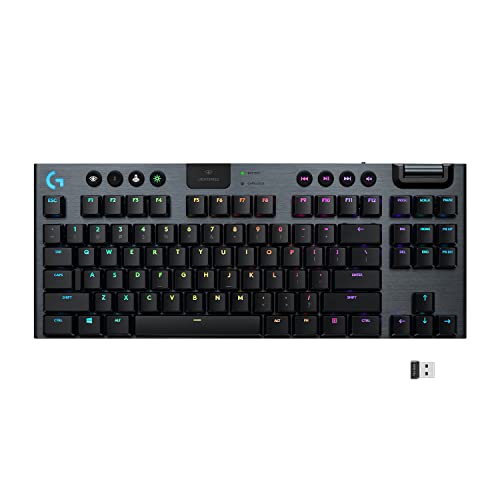
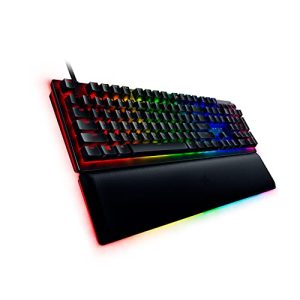
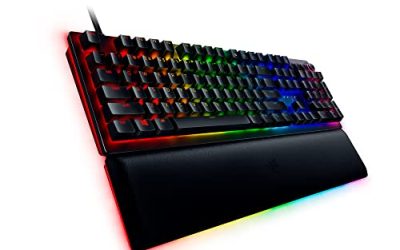
- Best for: PC gamers who want a wireless mechanical keyboard with minimal input lag, a compact footprint for mouse play, and RGB lighting, without giving up Bluetooth for a second device.
- Lightspeed wireless is designed for gaming-grade responsiveness
- Low-profile mechanical switches give a fast, crisp feel in a slim board
- Tenkeyless layout frees up desk space for mouse movement
- Per-key RGB lighting and dedicated media controls
All 4 Picks at a Glance
| Product | Specs | Action |
|---|---|---|
| 1. Logitech MX Keys S — Best Overall Wireless Keyboard |
| Check price on Amazon |
| 2. Logitech Pebble Keys 2 K380s — Best Compact Wireless Keyboard |
| Check price on Amazon |
| 3. Logitech G915 TKL Lightspeed — Best Wireless Gaming Keyboard |
| Check price on Amazon |
 5. Keychron K8 Wireless Mechanical Keyboard — Best Customizable Wireless Mechanical Keyboard |
| Check price on Amazon |
Our Top Picks
- Logitech G915 TKL Tenkeyless Lightspeed Wireless RGB MechanicalTKL15.2 x 5.9 x 0.9 inches1.8 poundsCheck on Amazon
Introduction
A good wireless keyboard changes how a desk feels: no cable dragging across the mousepad, no fixed position dictated by a USB port, and no clutter when it moves from a desk to a lap to a bag. The best keyboards wirless — spelled “wirless” here exactly as the original search keyword reads — range from quiet all-day typing boards to low-latency gaming models, and the right choice depends far more on layout, switches and connection type than on brand alone.
This guide rounds up five wireless computer keyboards listed on Amazon US, from compact Bluetooth boards to full-size workhorses and mechanical gaming models. Every pick connects over Bluetooth, a 2.4 GHz wireless receiver, or both, and works with no cable attached during normal typing. No wired-only keyboards and no musical instrument keyboards are included, because neither matches this keyword.
A note on the spelling: “wirless” is kept exactly as it appears in the original keyword. It is almost certainly a typo for “wireless”, and every keyboard in this guide is wireless in the ordinary sense — it connects to a computer, tablet or phone without a cable.
Disclosure: As an Amazon Associate, we earn from qualifying purchases.
How to Choose a Wireless Keyboard
Wireless keyboards differ from one another far more than their similar shapes suggest: a board that is perfect for a quiet office can be a poor fit for competitive gaming, just as a gaming board can be the wrong tool for a small travel bag.
Connection type: Bluetooth, 2.4 GHz, or both
Most wireless keyboards use Bluetooth, a 2.4 GHz USB receiver, or both. Bluetooth pairs directly with laptops, tablets and phones with no dongle, and many boards remember two or three devices and switch between them with a keypress. A 2.4 GHz receiver usually gives a more stable, lower-latency link for gaming. Boards that offer both give the most freedom, since the receiver can stay plugged into a desktop while Bluetooth handles a tablet or a second machine.
Layout: full-size, tenkeyless, or compact
Layout decides how much desk space a keyboard takes and which keys are within reach. Full-size boards include a numeric keypad and suit spreadsheets, data entry and anyone who types numbers all day. Tenkeyless boards drop the keypad and save roughly a fifth of the width, leaving more room for the mouse on smaller desks. Compact boards go further, trimming keys or shrinking the frame for travel and tablet use. There is no universally best layout, only the one that matches the work and the desk.
Switches and key feel
Keyboards use one of three broad switch families. Membrane and scissor-switch boards, like most office keyboards, are quiet and low-profile, with a soft, laptop-like feel. Mechanical switches give a more distinct tactile bump or click with each keypress and come in linear, tactile and clicky variants. Low-profile mechanical switches split the difference, keeping the slim shape of a laptop board while adding the crisp feel of a mechanical switch. Typists who value silence should lean toward scissor or quiet linear switches; typists who value feedback usually prefer tactile or clicky mechanical switches.
Battery life and charging
Wireless keyboards are powered either by disposable batteries or by a built-in rechargeable cell. Disposable-battery boards can run for months or even years on a set of AAA or AA cells, which makes them almost maintenance-free. Rechargeable boards charge over USB-C and never need new batteries, though they need a charging routine, and battery life drops sharply when bright backlighting is left on. Backlighting is the single biggest drain on a rechargeable keyboard, so a board rated for weeks with the backlight off may last only days with it on.
Multi-device support and operating system
Many wireless keyboards can pair with more than one device at once, which is genuinely useful for people who move between a work laptop, a personal computer and a tablet. Look for a dedicated switch key or button rather than a pairing process that has to be repeated each time. Operating system support matters too: most boards work with Windows and macOS for basic typing, but Mac-specific layouts, function-key behaviour and companion software vary. Mac-layout boards usually label the Command and Option keys, while a Windows-first board may need software to remap keys.
Top Picks
1. Logitech MX Keys S — Best Overall Wireless Keyboard
- Best for: Anyone who wants one wireless keyboard for a full working day — office work, writing and spreadsheets — and who values quiet keys, backlighting and multi-device switching over mechanical switch feel.
- Quiet, stable, low-profile typing feel that suits long workdays
- Smart backlighting that adapts to ambient light and hand proximity
- Pairs with three devices and switches between them at a keypress
- USB-C quick charging, so the board can charge while it is being used
Anyone who wants one wireless keyboard for a full working day — office work, writing and spreadsheets — and who values quiet keys, backlighting and multi-device switching over mechanical switch feel.
The Logitech MX Keys S is the most complete all-rounder in this guide. It is a full-size, low-profile wireless keyboard with spherically dished keys, smart backlighting that brightens as hands approach and dims when they leave, and a rechargeable battery rated at up to 10 days on a full charge with the backlight in use. It connects over Bluetooth Low Energy or the included Logi Bolt USB receiver, pairs with up to three devices, and works with Windows, macOS, Chrome OS, Linux, iPadOS and Android. Programmable Smart Actions in the Logi Options+ app automate repetitive tasks with a single keystroke, and the board is built with recycled plastic and a low-carbon aluminium plate.
Key specifications from the listing: full-size layout with numeric keypad, low-profile keys, Bluetooth Low Energy and Logi Bolt receiver, USB-C charging, 1500 mAh battery, weight 810 g.
Pros:
Cons:
2. Logitech Pebble Keys 2 K380s — Best Compact Wireless Keyboard
- Best for: Travellers, students and tablet users who want a light wireless keyboard that pairs with several devices and needs no charging routine.
- Extremely portable, and light enough to carry every day
- Pairs with three devices and switches between them instantly
- Battery life measured in years rather than weeks, with no charging routine
- Quiet, laptop-like typing feel with comfortable scooped keys
Travellers, students and tablet users who want a light wireless keyboard that pairs with several devices and needs no charging routine.
The Logitech Pebble Keys 2 K380s is the successor to the long-running K380, and it is the smallest board in this guide. Its slim frame and scooped, round, low-profile keys slip easily into a bag with a tablet or laptop, and its defining feature is Easy-Switch: three dedicated keys pair the board with up to three devices, so a laptop, a phone and a tablet can share one keyboard. The listing states battery life of up to 36 months on two AAA batteries, and the board supports customizable shortcuts through the Logi Options+ app. It is Bluetooth-only, with no USB receiver, so the host device needs Bluetooth.
Key specifications from the listing: compact layout with no numeric keypad, Bluetooth, Easy-Switch for up to three devices, two AAA batteries, model number 920-011775, Tonal Graphite colourway.
Pros:
Cons:
3. Logitech G915 TKL Lightspeed — Best Wireless Gaming Keyboard
- Best for: PC gamers who want a wireless mechanical keyboard with minimal input lag, a compact footprint for mouse play, and RGB lighting, without giving up Bluetooth for a second device.
- Lightspeed wireless is designed for gaming-grade responsiveness
- Low-profile mechanical switches give a fast, crisp feel in a slim board
- Tenkeyless layout frees up desk space for mouse movement
- Per-key RGB lighting and dedicated media controls
PC gamers who want a wireless mechanical keyboard with minimal input lag, a compact footprint for mouse play, and RGB lighting, without giving up Bluetooth for a second device.
The Logitech G915 TKL Lightspeed is a tenkeyless wireless mechanical gaming keyboard built around low-profile GL switches. This listing is the Linear switch variant, which gives a smooth, quiet keypress with no tactile bump. It connects over Logitech’s Lightspeed 2.4 GHz wireless for low-latency gaming, plus Bluetooth for a second device. Per-key Lightsync RGB lighting, an aircraft-grade aluminium alloy top plate, dedicated media controls and a volume roller round out a board only 22 mm tall at its highest point. Logitech rates battery life at up to 40 hours, and the board charges over USB-C.
Key specifications from the listing: tenkeyless layout with 87 keys, low-profile GL Linear mechanical switches, Lightspeed 2.4 GHz wireless plus Bluetooth, per-key RGB backlighting, aluminium construction, USB-C charging.
Pros:
Cons:
4. Logitech K780 Multi-Device — Best Full-Size Wireless Keyboard for Multiple Devices
ASIN: B01LZAK8MM
The Logitech K780 Multi-Device is a full-size wireless keyboard with a feature no other board in this guide offers: a built-in cradle along the top edge that holds a phone or tablet upright while typing. It pairs with up to three devices over Bluetooth or the included Unifying USB receiver, switching between them with the Easy-Switch keys. Quiet Perfect Stroke keys, a full numeric keypad and a 24-month battery life on two AAA batteries make it a strong desk keyboard, and Logitech Flow support allows text to be copied between computers with a compatible Logitech mouse.
Key specifications from the listing: full-size layout with numeric keypad, Bluetooth and Unifying receiver, Easy-Switch for up to three devices, integrated device cradle, quiet keys, two AAA batteries, model number 920-008149.
Pros:
- Built-in cradle keeps a phone or tablet visible while typing
- Full-size layout with a numeric keypad for data entry
- Pairs with three devices over Bluetooth or a USB receiver
- Very long battery life on disposable batteries
- Quiet keys that suit shared rooms and open offices
Cons:
- No backlighting, which limits use in dim rooms
- Larger and heavier than compact boards, so it is not a travel keyboard
- No mechanical switch option for typists who prefer tactile feedback
Best for: Desk workers who type on a computer and a phone or tablet all day and want a full-size, quiet wireless keyboard that keeps the second screen in view.
5. Keychron K8 Wireless Mechanical Keyboard — Best Customizable Wireless Mechanical Keyboard
- Best for: Typists and programmers who want a mechanical keyboard with a tactile feel, multi-device Bluetooth and a wired option, and who will trade a numeric keypad for a smaller footprint.
- Tactile mechanical switches with a distinct bump and no loud click
- Bluetooth pairing for three devices plus a wired USB-C mode
- Large 4000 mAh battery for long wireless sessions
- Aluminium frame gives a solid, premium feel
Typists and programmers who want a mechanical keyboard with a tactile feel, multi-device Bluetooth and a wired option, and who will trade a numeric keypad for a smaller footprint.
The Keychron K8 is a tenkeyless wireless mechanical keyboard for typists who want a mechanical feel and a board they can adapt to their setup. This listing has Gateron G Pro Brown tactile switches, an aluminium frame and RGB backlighting. It connects to up to three devices over Bluetooth 5.1 and can also be used wired over USB-C, so it works while charging. Its 4000 mAh battery is one of the largest in this guide, and the board supports both Mac and Windows layouts.
Key specifications from the listing: tenkeyless layout with 87 keys, Gateron G Pro Brown tactile switches, RGB backlight, aluminium frame, Bluetooth 5.1 with three-device pairing, USB-C wired mode, 4000 mAh battery.
Pros:
Cons:
Comparison Table
| Keyboard | Layout | Connection | Switches and Keys | Battery | Best For |
|---|---|---|---|---|---|
| Logitech MX Keys S (B0BKW3LB2B) | Full-size with numpad | Bluetooth LE, Logi Bolt receiver | Low-profile scissor keys, smart backlight | Rechargeable, up to 10 days with backlight | All-round office and everyday work |
| Logitech Pebble Keys 2 K380s (B0BT4DP7SC) | Compact, no numpad | Bluetooth | Low-profile scissor keys, no backlight | 2 AAA batteries, up to 36 months | Travel, tablets and multi-device use |
| Logitech G915 TKL Lightspeed (B085RMD5TP) | Tenkeyless, 87 keys | Lightspeed 2.4 GHz, Bluetooth | GL Linear low-profile mechanical, per-key RGB | Rechargeable, up to 40 hours | Wireless PC gaming |
| Logitech K780 Multi-Device (B01LZAK8MM) | Full-size with numpad | Bluetooth, Unifying receiver | Quiet scissor keys, device cradle | 2 AAA batteries, up to 24 months | Desk work across computer, phone and tablet |
| Keychron K8 (B0869HSZ92) | Tenkeyless, 87 keys | Bluetooth 5.1, USB-C wired | Gateron G Pro Brown tactile mechanical, RGB | 4000 mAh rechargeable | Customizable mechanical typing |
Frequently Asked Questions
What does “wirless” mean in “best keyboards wirless”?
“Wirless” is the spelling used in the original keyword, and it is kept unchanged in this guide. It is almost certainly a typo for “wireless”, and every keyboard recommended here is a wireless computer keyboard that connects over Bluetooth, a 2.4 GHz receiver, or both.
Is Bluetooth or 2.4 GHz wireless better for a keyboard?
It depends on the use. Bluetooth is better for flexibility: it pairs directly with laptops, tablets and phones, needs no dongle, and usually supports several devices at once. A 2.4 GHz receiver is better for gaming and for desktops, because the dedicated link is generally more stable and has lower latency than Bluetooth. Boards that offer both, such as the MX Keys S, G915 TKL and Keychron K8, give the most options, since the receiver can serve the main computer and Bluetooth the second device.
Do wireless keyboards work with Mac, Windows and tablets?
Most wireless keyboards work with Windows and macOS for basic typing, and Bluetooth boards also work with iPadOS, Android and Chrome OS. The differences are in the details: Mac-layout boards label the Command and Option keys, and companion software for remapping keys or adjusting lighting is often limited to Windows and macOS.
How long does a wireless keyboard battery last?
It varies enormously. Disposable-battery boards such as the Pebble Keys 2 K380s and the K780 are rated in months or years, because their low-power Bluetooth radios and unlit keys draw very little current. Rechargeable boards with backlighting last far less: the MX Keys S is rated at up to 10 days with its smart backlight in use, and the G915 TKL at up to 40 hours. Turning the backlight off or down is the simplest way to extend the time between charges.
Are wireless keyboards good for gaming?
For most players, yes. A 2.4 GHz Lightspeed-class connection is designed to keep input lag low enough for competitive play, and mechanical switches give the fast, consistent keypresses that gaming rewards. Bluetooth alone is fine for casual games, menus and chat, but competitive players should choose a board with a dedicated 2.4 GHz receiver, such as the G915 TKL in this guide. Battery life is the main trade-off, since RGB lighting drains a rechargeable cell quickly.
What should I check before buying a wireless keyboard on Amazon?
Confirm four things on the listing before ordering: the exact model and variant, because switch type, colour and layout are often separate listings under one product page; the connection type, to make sure the board works with the devices it will be used with; the layout, since a tenkeyless or compact board has no numeric keypad; and the stated battery type and life, because a rechargeable board and a disposable-battery board demand very different routines. Availability and bundled accessories can also change between listings, so the product page at the time of purchase is the final authority.
Conclusion
There is no single best wireless keyboard, only the best match for a particular desk. The MX Keys S is the safest all-round choice, with quiet low-profile keys, smart backlighting and three-device switching in a full-size frame. The Pebble Keys 2 K380s is the board to take everywhere, pairing with three devices and running for years on two AAA batteries. The G915 TKL is the pick for gaming, trading battery life for low-latency wireless and low-profile mechanical switches. The K780 suits people who type on a phone or tablet beside their computer, thanks to its built-in cradle and full-size layout. And the Keychron K8 is the mechanical option for typists who want tactile switches, a solid aluminium frame and a large battery in a tenkeyless body.
Start with layout and connection type, then narrow by switch feel and battery routine. Any of the five boards above is a genuine wireless keyboard with an Amazon US listing, and the right one is the one whose trade-offs match how it will actually be used.
FAQ
What does “wirless” mean in “best keyboards wirless”?
Is Bluetooth or 2.4 GHz wireless better for a keyboard?
Do wireless keyboards work with Mac, Windows and tablets?
How long does a wireless keyboard battery last?
Are wireless keyboards good for gaming?
What should I check before buying a wireless keyboard on Amazon?
More from Amazon
Programs that pair well with the guide above. Offers and eligibility are set by Amazon and may change.
Free shipping on eligible items, Prime Video and more. Eligible new members can start with a free trial.
Start a Prime free trialAd-free music streaming. Eligible new subscribers can start with a free trial.
Try Music Unlimited freeA Prime membership for ages 18-24 with a trial period. Eligibility is set by Amazon.
See Prime for Young AdultsAudiobooks and podcasts to listen to on the go. Eligible new members can start with a free trial.
Try Audible freeAs an Amazon Associate we earn from qualifying purchases.