Key takeaways
- Green: tactile and clicky. The bump and audible click make each press easy to notice. This is often the most satisfying option for people who enjoy traditional mechanical keyboard feedback, but it can be distracting in shared rooms or on calls.
- Yellow: linear and smooth, with no tactile bump or click. Yellow switches are often preferred for rapid repeated inputs in games. They are not silent, because keycaps and bottom-out impact still make sound, but they are usually less conspicuous than clicky switches.
- Orange: tactile but non-clicky. This is the middle ground for a buyer who wants a noticeable actuation feel without the sharp click associated with green switches.
- Optical switch variants: use light interruption rather than a conventional metal contact mechanism. They are commonly found on higher-priced Razer gaming models and may offer adjustable or very short actuation settings, depending on the specific keyboard.
Most shoppers make the same mistake when choosing a Razer keyboard: they pick a switch color based on a one-line label such as “fast,” “clicky,” or “quiet.” That shortcut misses the parts that determine whether a keyboard will feel right after six months of daily gaming, work, and late-night use.
A proper Razer switch color guide for mechanical keyboards starts with the switch behavior, but it should not end there. Razer’s green, yellow, orange, and newer optical switch options differ in sound, tactile feedback, and actuation style. Yet keyboard size, stabilizer quality, case rigidity, wrist support, and price can matter just as much. A yellow-switch full-size board may suit a competitive player, while a green-switch tenkeyless model may be more satisfying for a typist who enjoys audible feedback.
Our top picks
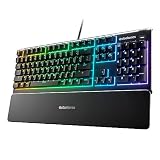
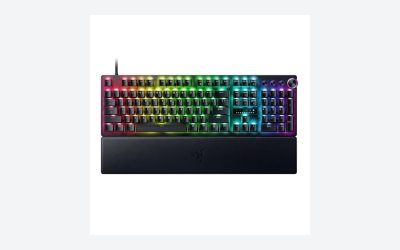
 Razer BlackWidow V4 X Mechanical Gaming Keyboard
- With zero distance between actuation and reset points…
- Expand the arsenal of commands with a set…
- FUNCTION ROLLER and SECONDARY MEDIA KEYS: Pause, play,…
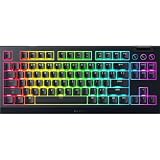
 Razer Ornata V3 Gaming Keyboard
Low-profile keys support natural hand positioning over long sessions
Mecha-membrane switches blend mechanical feedback with a familiar feel
UV-coated keycaps resist fading from frequent use
Magnetic wrist rest is a separate accessory piece to keep track of
Mecha-membrane switches may feel less precise than true mechanical switches
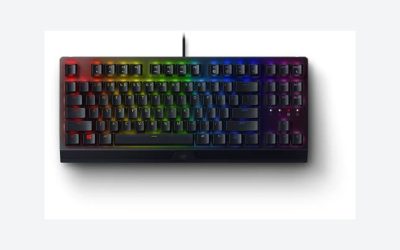
 Razer BlackWidow V3 Tenkeyless Mechanical Gaming Keyboard:
- The #1 Best-Selling Gaming Peripherals Manufacturer in the…
- Signature Mechanical Switch for Gaming: Razer Green switch…
- Ultimate Personalization & Gaming Immersion with Razer Chroma:…
| Product | Key specs | |
|---|---|---|
| Razer BlackWidow V4 X Mechanical Gaming Keyboard | With zero distance between actuation and reset points… Expand the arsenal of commands with a set… FUNCTION ROLLER and SECONDARY MEDIA KEYS: Pause, play,… | Check price |
| Razer Ornata V3 Gaming Keyboard | Check price | |
| Razer BlackWidow V3 Tenkeyless Mechanical Gaming Keyboard: | The #1 Best-Selling Gaming Peripherals Manufacturer in the… Signature Mechanical Switch for Gaming: Razer Green switch… Ultimate Personalization & Gaming Immersion with Razer Chroma:… | Check price |
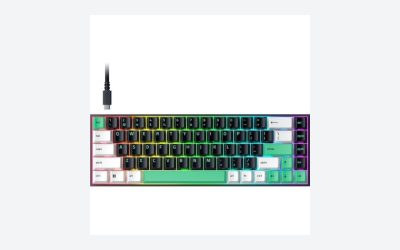
 Razer Reclusa X Mini 65% Hot-Swappable Mechanical Razer Reclusa X Mini 65% Hot-Swappable Mechanical | Personalize your typing and gaming experience with a… Enjoy responsive, satisfying keystrokes with Razer Orange Tactile… Experience cleaner acoustics and a plush bottom-out thanks… | Check price |
As an Amazon Associate we earn from qualifying purchases at no extra cost to you.
For 2026, the best choice is not necessarily the newest or most expensive Razer keyboard. It is the one whose switch type and layout match the way you actually use your desk.
Decide These 3 Things First
- Choose the response you want. Razer Green switches are tactile and clicky. Razer Yellow switches are linear and generally quieter. Razer Orange switches are tactile without the pronounced click sound. Optical switches use light-based actuation and are typically aimed at speed-focused gaming.
- Choose a desk-friendly layout. Full-size boards include a number pad and usually measure about 17 to 18 inches wide. Tenkeyless models remove the number pad and are commonly 14 to 15 inches wide. Compact 65% boards are often 12 to 13 inches wide.
- Set a realistic all-in budget. A sale-priced or renewed Razer keyboard can cost $50 to $80, while a new mechanical model with dedicated controls, RGB lighting, and a sturdier case often runs $100 to $200 or more.
Size and Layout: Start With Your Desk, Not the Switch
Layout changes comfort more than many buyers expect. A full-size keyboard is the practical choice for spreadsheets, finance work, data entry, and games that benefit from a dedicated number pad. Expect a width of roughly 17.5 inches, a depth around 5.5 to 6.5 inches, and a weight between 2.5 and 4 pounds. The Razer BlackWidow V4 X is a full-size example, so it makes sense for buyers who want macro keys and a number pad without adding a separate accessory.
A tenkeyless, or TKL, keyboard eliminates the number pad while keeping the arrow cluster and navigation keys. At approximately 14 inches wide, it gives mouse users an extra 3 to 4 inches of desk space. That additional room can reduce shoulder reach in first-person shooters and other low-sensitivity games. A BlackWidow V3 Tenkeyless is a sensible format for someone who uses function keys and arrows regularly but rarely enters columns of numbers.
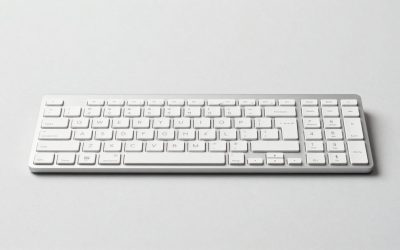
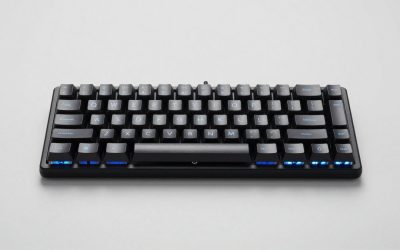
A 65% keyboard keeps letter keys, arrows, and a compact navigation cluster, but it usually moves secondary commands to function layers. Models in this category are typically 12 to 13 inches wide and 4 to 5 inches deep. A compact option such as a 65% hot-swappable board is best for small desks, travel, or a clean minimal setup. Before buying, confirm that you can live without dedicated Home, End, Print Screen, and function-row keys.
Switch Color and Feel: The Most Important Performance Choice
Razer switch colors describe feel more reliably than they describe quality. None is automatically “better”; the right one depends on whether you value feedback, speed, or a lower-noise experience.
- Green: tactile and clicky. The bump and audible click make each press easy to notice. This is often the most satisfying option for people who enjoy traditional mechanical keyboard feedback, but it can be distracting in shared rooms or on calls.
- Yellow: linear and smooth, with no tactile bump or click. Yellow switches are often preferred for rapid repeated inputs in games. They are not silent, because keycaps and bottom-out impact still make sound, but they are usually less conspicuous than clicky switches.
- Orange: tactile but non-clicky. This is the middle ground for a buyer who wants a noticeable actuation feel without the sharp click associated with green switches.
- Optical switch variants: use light interruption rather than a conventional metal contact mechanism. They are commonly found on higher-priced Razer gaming models and may offer adjustable or very short actuation settings, depending on the specific keyboard.
Do not compare switch color alone across every Razer generation. A keyboard’s exact switch version, keycap profile, internal dampening, and stabilizers influence perceived sound and feel. Read the product listing for the named switch, rather than assuming every yellow or green switch has identical specifications.
Materials and Keycaps: Look Beyond RGB Lighting
The case and keycaps determine how a keyboard ages. Entry-level keyboards may use a predominantly plastic chassis and ABS keycaps. ABS is smooth, light, and common, but high-contact keys can develop shine over time. That is not a functional defect; it is normal wear.
Better mechanical models may use doubleshot ABS, doubleshot PBT, or a metal top plate. PBT keycaps tend to resist shine better and often have a slightly textured surface. They are a worthwhile upgrade for people who type several hours per day. If keycap longevity matters, look for PBT or doubleshot construction rather than relying on marketing terms such as “premium keycaps.”
A metal top plate can reduce flex and make a board feel more substantial, though it also increases weight. A durable full-size keyboard commonly weighs 2.8 to 4.0 pounds, while a compact plastic 65% board may weigh 1.2 to 2.0 pounds. Heavier is helpful for a stationary desk; lighter is helpful if the keyboard will travel in a backpack.
Construction and Customization: Fixed Switches Versus Hot-Swap
Most mainstream Razer keyboards are designed as complete, fixed-switch products. That approach is straightforward: select the switch type at purchase, connect the USB cable, and use the keyboard. It is a good fit for buyers who do not want to modify hardware.
A hot-swappable keyboard offers more flexibility. With compatible sockets, you can remove switches with a puller and replace individual switches without soldering. This can be useful if one key fails or if you want to change the feel of frequently used keys. However, “hot-swappable” does not mean every switch on the market will fit. Confirm the socket type, pin compatibility, and supported switch families before ordering replacements.
Also inspect the practical details: detachable versus fixed cable, adjustable feet, onboard profile storage, and dedicated media controls. A fixed cable is not inherently bad, but a detachable USB-C cable is easier to replace and pack. For wired keyboards, cable lengths commonly fall between 5.5 and 6.5 feet. That is enough for most desktops, but measure if your PC sits far from the keyboard tray.
Comfort and Everyday Performance: Noise, Height, and Stabilizers
Switch feel is only part of comfort. Standard-profile mechanical keyboards are often 1.3 to 1.7 inches high at their rear edge before the feet are raised. Many users benefit from a wrist rest, especially when typing for several hours. A low-profile board such as the Razer Ornata V3 sits lower than a conventional mechanical keyboard and can feel easier on the wrists for some users, but it uses a mecha-membrane design rather than a traditional fully mechanical switch assembly.
That distinction matters. The Ornata V3 can be a good value for someone who wants low-profile keys, RGB lighting, and a familiar Razer layout at around $60. But it is not the direct mechanical equivalent of a BlackWidow with green or yellow switches. If traditional mechanical switch feel is your priority, stay within Razer’s mechanical or optical keyboard lines.
Pay attention to the large keys: Spacebar, Enter, Backspace, Shift, and number-pad keys. Their stabilizers have an outsized effect on sound and perceived quality. Product listings rarely provide meaningful stabilizer measurements, so use return policies and hands-on impressions when possible. A keyboard can have excellent switches but still sound rattly if its larger keys are poorly tuned.
Price Tiers: What Your Money Actually Buys
Budget: $45 to $80. This range includes renewed tenkeyless keyboards, older stock, compact boards, and low-profile mecha-membrane options. The approximately $49.99 BlackWidow V3 Tenkeyless renewed listing and $59.99 Ornata V3 fall into this territory. Expect fewer premium materials, fewer convenience controls, and possible cosmetic variation on renewed products. Buy from a seller with a clear return window.
Mid-range: $90 to $140. This is the sweet spot for a new wired mechanical Razer keyboard with a familiar full-size or TKL layout, dedicated media controls on some models, programmable features, and Chroma RGB. At about $99.99, a BlackWidow V4 X with yellow switches is an example of the kind of value to look for when discounted.
Premium: $150 to $280. At this level, look for optical switches, wireless connectivity where applicable, better acoustics, aluminum components, more refined controls, and deeper customization. Do not pay a premium solely for RGB effects. Pay for a feature you will use: wireless freedom, adjustable actuation, a better case, or a preferred layout.
Warranty, Returns, Delivery, and Assembly
Razer keyboards generally require no assembly: plug in the USB cable, adjust the rear feet if desired, and install configuration software only if you want lighting, macros, or remapping. Setup normally takes 5 to 15 minutes. For a wireless model, allow additional time for charging and pairing.
Check the exact warranty terms for the seller and model before purchase. New keyboards commonly include a limited manufacturer warranty, while renewed products may carry a shorter seller-backed coverage period, often 90 days to 1 year. Keep the receipt, serial number, packaging, and any included accessories until the return period closes.
Delivery estimates depend on the retailer and location, but do not overlook packaging dimensions. A full-size keyboard carton is often around 19 by 8 by 3 inches, while a compact board may ship in a box closer to 15 by 7 by 3 inches. If buying as a gift, verify whether the retailer ships in a plain outer carton.
Spec Checklist
| Spec | Budget | Mid | Premium |
|---|---|---|---|
| Typical price | $45–$80 | $90–$140 | $150–$280 |
| Switch options | Older mechanical, mecha-membrane, or renewed stock | New mechanical green, yellow, or orange options | Optical or advanced mechanical options |
| Layout | 65%, TKL, or full-size | TKL or full-size | TKL, full-size, or wireless specialty layouts |
| Keycaps | ABS is common | Doubleshot ABS or upgraded caps | PBT or higher-end doubleshot construction |
| Best for | First mechanical board or secondary setup | Daily gaming and work | Feature-focused enthusiasts |
Red Flags
- A listing says “mechanical feel” but does not identify an actual mechanical or optical switch type.
- You are buying green switches for a shared office, dorm, or bedroom without accepting the extra noise.
- You choose a 65% layout without checking the function-layer placement for Delete, Home, End, and F-keys.
- A renewed keyboard has no stated return window, warranty length, or condition grade.
- A product claims hot-swap compatibility but does not state which switch pins or socket standard it supports.
- You pay more than $150 for features you will not use, such as wireless connectivity or adjustable actuation.
FAQ
Which Razer switch color is best for gaming?
Yellow is the easiest default recommendation for fast-paced gaming because it is linear, smooth, and lacks a tactile bump. Green remains a strong choice if you like clear physical and audible feedback. The better choice is the one you can use comfortably for long sessions.
Are Razer Green switches too loud for home use?
They can be. Green switches produce an intentional click, and the sound becomes more noticeable during rapid typing or gaming. They are best for private rooms or users who enjoy the classic clicky mechanical sound.
Is the Razer Ornata V3 a mechanical keyboard?
It uses Razer’s mecha-membrane key technology rather than conventional individual mechanical switches. It can be a comfortable low-profile value option, but buyers specifically seeking Razer green, yellow, orange, or optical mechanical switch behavior should choose a BlackWidow or another mechanical Razer line.
Should I buy full-size, TKL, or 65%?
Choose full-size if you use a number pad often. Choose TKL for the best balance of familiar keys and mouse space. Choose 65% if desk space and portability matter more than dedicated navigation and function keys.