Our Top Picks
 AOBOR AOZCBOR Flexible Mouse Bungee Mouse Cord Management5.4 x 3.2 x 3.6 inches0.35 PoundsCheck on Amazon
The Razer Gaming Mouse Bungee V3 Chroma is the best all-round mouse bungee in this group: its weighted base with anti-slip feet stays put during fast swipes, its arm holds braided and rubber cables alike, and the lighting is a bonus rather than a requirement. A mouse bungee is a small stand with a springy or flexible arm that holds your mouse cable just above the desk, so the cable stops dragging on the mat and your wired mouse feels closer to a wireless one. Players who want something tiny and clip-on should look at the Pulsar Micro Bungee ES, while those who want a heavy, no-fuss desk stand will like the Sisyphy 360g.
Quick List
- Sisyphy Premium 360g Mouse Bungee – best for a heavy, stable base that will not shift on the desk
- AOBOR AOZCBOR Flexible Mouse Bungee – best for a light, low-cost flexible holder
- Pulsar Micro Bungee ES – best for a compact, adhesive-mounted bungee that saves desk space
- Hotline Games Mouse Bungee 3.0 – best for an adjustable spring arm aimed at FPS players
- SteelSeries Mouse Bungee – best for a weighted, understated stand that matches a SteelSeries setup
- Razer Mouse Bungee V3 Chroma – best overall for stability and a polished look with RGB underglow
Which One Is Right for You?
| If you… | Choose |
|---|---|
| want the most stable, set-and-forget desk stand | Razer Mouse Bungee V3 Chroma or Sisyphy 360g |
| need to save desk space and can attach a mount to a monitor or desk edge | Pulsar Micro Bungee ES |
| want a basic holder you can bend into position | AOBOR AOZCBOR Flexible |
| play FPS games and want a spring arm you can tune for height | Hotline Games Mouse Bungee 3.0 |
| want a simple weighted stand without lighting | SteelSeries Mouse Bungee |
| already use a Razer ecosystem and like RGB underglow | Razer Mouse Bungee V3 Chroma |
Bungees fall into two groups: heavy desk stands, where the weight of the base keeps the arm steady, and light or adhesive types, where the mount does that job. If your desk is cluttered, the second group saves space. If you move your mouse across a large pad with wide arcs, a taller, weighted arm usually gives the cable more freedom.
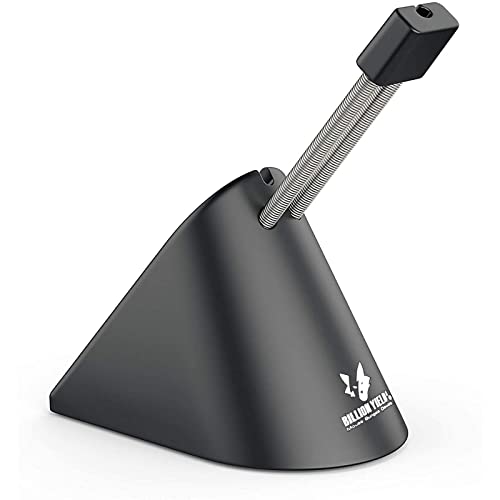
Sisyphy Gaming Mouse Bungee, Mouse Cord Holder and Cable Management Device (Primium Version 360g, Black)
Chosen because it specifies Black).
View on AmazonAOBOR AOZCBOR Flexible Mouse Bungee Mouse Cord Management Fixer Holder (Black)
Picked as a relevant option in this category.
View on Amazon
Pulsar Gaming Gears Micro Bungee ES, Wired Mouse Support, Single Pack | Drag-Free Wired Mouse Support, Free Motion on Your Desk, Super Compact Size, Attach it to Your Monitor, Get More Space
Chosen because it specifies Wired Mouse Support and Single Pack.
View on Amazon
Hotline Games Mouse Bungee Mouse Cord Clip Cord Management System Fixer Holder for Esports FPS Game (3.0 Black)
Picked as a relevant option in this category.
View on Amazon

Razer Gaming Mouse Bungee V3 Chroma, Drag-Free Wired Mouse Support, Black | For Esports-Level Performance, Weighted Base, Anti-Slip Feet
Chosen because it specifies Drag-Free Wired Mouse Support and Black.
View on AmazonAll 6 Picks in Detail
1. Sisyphy Premium 360g Mouse Bungee – Best for a Heavy, Stable Base
As an Amazon Associate we earn from qualifying purchases at no extra cost to you.

The Sisyphy “Premium Version 360g” is named for its base weight, and that weight is the point: a heavier base resists tipping when you yank the cable during a flick shot. Retail listings describe a height-adjustable spring arm that extends up to about 3 inches, a flexible rubber clip with three cable positions and a non-slip rubber base. It suits players who keep the bungee in one place on the desk and want it to stay there.
Think of this as the desk-anchor option. Place it slightly behind and to the side of your mouse pad, where your wrist never reaches, then set the arm height so the cable has a gentle upward curve. Because the base is heavy, you can leave it in place for months and only adjust the clip. If your desk is glass or very glossy, a thin rubber sheet beneath it adds grip, although the rubber underside is designed to cope with most surfaces.
Weight matters most when you swipe fast: a light stand can slide a few millimeters with each tug, which defeats the purpose. A 360g base is among the heaviest in this guide, so it is a good candidate for competitive players on a large cloth pad.
- Premium 360g base version per the listing; a lighter version exists, so make sure you choose the correct one
- Height-adjustable spring arm per retailer descriptions
- Rubber cable clip with multiple positions
- Non-slip rubber underside
- Black finish as listed
Pros:
- Very stable under fast mouse movement
- Adjustable arm height for different setups
Cons:
- Takes up more desk space than a clip-on bungee
- Heavier to move if you often rearrange your desk
It is the closest rival to the Razer V3 Chroma on stability and offers a plainer, lighting-free look.
2. AOBOR AOZCBOR Flexible Mouse Bungee – Best Light, Low-Cost Holder
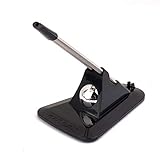
The AOBOR AOZCBOR is a flexible mouse cord holder rather than a spring-arm design. Instead of a coiled spring, the arm bends and holds a shape, so you can position the cable where it feels best. Retail listings describe a plastic and metal build, a weight of roughly 157g and no lighting. It suits casual players, office users with a corded mouse and anyone who wants to try a bungee before investing in a premium stand.
A bendable holder is a sensible first bungee for someone who is not sure whether cable management will matter to them. Bend the arm so the cable clears the pad, and re-check the shape every few weeks, since flexible metal can relax. If you find you like the effect, you can move on to a spring-arm model; if you do not, you have spent very little finding out.
The lighter base means it is more likely to slide, so use it on a desk with some grip, or add a small piece of non-slip material underneath. A flexible arm can also lose its shape over time, so check the position now and then.
- Flexible bendable arm per the listing
- Black finish
- Weight about 157g per retail descriptions
- No RGB lighting
- Works with standard corded mice; confirm cable thickness limits on the listing
Pros:
- Light and easy to reposition
- Simple design with nothing to configure
Cons:
- Lighter base is more likely to drift on smooth desks
- Flexible arm does not provide the same spring feel as a true spring bungee
Compared with the Hotline Games model, it offers less tuning and less structure, but it asks for less from your desk.
3. Pulsar Micro Bungee ES – Best Compact, Adhesive-Mounted Option

The Pulsar Micro Bungee ES is the odd one out in a good way: instead of a big weighted base, it is a very small flexible arm that attaches to a surface such as the edge of a monitor or desk with adhesive. Retailers list it at roughly 60 x 45 x 25 mm and under 10 grams, with a flexible silicone arm and an extra adhesive pad in the box. It suits minimalist setups and players who dislike clutter on the desk.
Mounting is the part to get right. Wipe the surface with an alcohol-based cleaner, press the mount firmly in place and give the adhesive time to bond before attaching the cable. Positioning it on the front edge of a monitor stand or the far edge of a desk keeps the cable lifting upward and away from the pad. Since it is so light, it also suits travel setups, where carrying a heavy stand is a nuisance.
Because it has no weighted base, the mount must be secure, which depends on a clean surface and enough time for the adhesive to bond. It lifts the cable a little, rather than creating a tall arc, and many players find that is enough for low-drag play on a smooth pad.
- Single pack per the listing
- Compact size and light weight per retailer descriptions
- Adhesive mount, with an extra adhesive pad included per retailers
- Flexible silicone arm
- Designed to attach to a monitor or similar surface per the listing
Pros:
- Barely any desk footprint
- Easy to position at the edge of a monitor
Cons:
- Permanent-style adhesive means less flexibility to rearrange
- Lifts the cable less than a tall spring arm
It is the best fit for tidy desks, in contrast with the Sisyphy, which wins on stability.
4. Hotline Games Mouse Bungee 3.0 – Best Adjustable Spring Arm for FPS Play
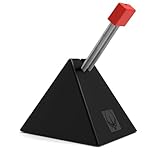
The Hotline Games bungee is marketed to esports and FPS players. Listings for the 3.0 family describe a two-stage spring bracket that can be adjusted in height, a press-in cord clip and anti-slip feet, with total weight in the region of 220 to 230g depending on the version. It suits players who like to dial in how high the cable sits, because a spring arm that is too tall can pull the cable upward while one that is too low lets the cable drag.
Spring brackets reward a few minutes of tuning. Start with the arm at its lowest setting, play a few rounds and raise it one stage if the cable still catches on the pad edge. Because this style is aimed at fast FPS play, it is common to keep the bungee off to one side so it never lies in the path of a wide swipe. The anti-slip feet do most of the work in keeping it steady, so keep the desk surface clean.
The listing here is for the “3.0” version in black, and a separate “3.0+” version exists, so confirm which one you are buying. Check the pull direction too: place the bungee so the cable runs straight back from the mouse to the arm.
- Spring bracket design for esports and FPS play per the listing
- Black finish, 3.0 version
- Press-in cord clip
- Anti-slip rubber feet per retailer descriptions
- Weight and exact height range: confirm on listing
Pros:
- Height adjustment lets you tune the cable angle
- Mid-weight base is stable without being bulky
Cons:
- Version naming (3.0 versus 3.0+) can confuse buyers
- A lighter base than the Razer and Sisyphy stands
Against the AOBOR holder, it adds structure and tuning for slightly more bulk.
5. SteelSeries Mouse Bungee – Best Understated Weighted Stand

The SteelSeries Mouse Bungee is a plain, weighted stand with a rubber clip for different cable sizes. Retailers list it at about 63 x 97 x 88 mm, with a weight in the 260 to 280g range depending on the source, and rubber feet for stability. Some retailer pages mark it as an end-of-life item, so availability may vary; check the current listing. It suits a player with a SteelSeries mouse and keyboard who wants something neat and non-flashy.
A bungee like this one is about getting out of the way. It has no lighting, no software and no setup beyond placing it and clipping in the cable. If you value a calm, tidy desk, that simplicity is the appeal. Because the listing is brief and some sellers describe it as no longer in production, compare it against newer weighted stands if it is hard to find in stock.
Its rubber clip is designed to hold a range of cable thicknesses, which is useful if you switch between a thin braided cable and a thicker rubber one. The listing text for this item is very short, so confirm any details that matter to you on the product page.
- Weighted stand with rubber feet per retailer descriptions
- Rubber clip for varied cable sizes
- Approximate size 63 x 97 x 88 mm per retailers
- No lighting
- Exact weight varies by source; confirm on listing
Pros:
- Solid base and plain look
- Clip works with different cable thicknesses
Cons:
- Limited height adjustment compared with spring-bracket designs
- Listing information is sparse and some sellers note it is end of life
It is the no-lighting alternative to the Razer V3 Chroma, with a similar weighted-stand approach.
6. Razer Mouse Bungee V3 Chroma – Best Overall for Stability and Polish

The Razer Mouse Bungee V3 Chroma pairs a weighted base with anti-slip feet and a spring arm topped by a rubber-coated cable catch. Razer lists a rust-resistant arm, a base weight of roughly 240g and Chroma RGB underglow that cycles through colors by default. The lighting is powered over a USB connection, and customizing it needs Razer’s software, so decide up front whether you want that.
The default lighting cycles through colors, which some players love and others switch off. If you prefer a static color, you will need Razer’s software, and the lighting will only work while the bungee’s USB connection is plugged in. If you want the same weighted stand without that complication, the standard V3 without Chroma is the better match, and this is worth checking on the product page before you order.
It suits players who want something that looks finished on a desk and that stays put. The cable catch is designed for rubber, braided and paracord cables, which covers most gaming mice. A non-Chroma V3 exists without lighting, so choose the correct version for your taste.
- Weighted base with anti-slip feet per the listing
- Drag-free wired mouse support, as described by the manufacturer
- Chroma RGB underglow; software needed to change effects
- Rubber-coated cable catch
- Black finish
Pros:
- Stable, easy to set up and good-looking
- Works with the usual cable types
Cons:
- Lighting needs a USB connection and software for customization
- Bulkier than the Pulsar clip-on
It beats the SteelSeries on features and presentation, though both follow the same weighted-stand idea.
Specs Compared
| Bungee | Type | Base or mount | Weight (retailer figures) | Lighting | Adjustability |
|---|---|---|---|---|---|
| Sisyphy Premium 360g | Spring arm | Non-slip rubber weighted base | About 360g | None | Height-adjustable arm |
| AOBOR AOZCBOR | Flexible arm | Light base | About 157g | None | Bendable |
| Pulsar Micro Bungee ES | Flexible silicone arm | Adhesive mount | Under 10g | None | Confirm on listing |
| Hotline Games 3.0 | Spring bracket | Anti-slip feet | Roughly 220-230g (confirm on listing) | None | Adjustable height |
| SteelSeries Mouse Bungee | Weighted stand | Rubber feet | Roughly 260-280g (varies by source) | None | Confirm on listing |
| Razer V3 Chroma | Spring arm | Weighted base, anti-slip feet | About 240g | Chroma RGB (USB) | Confirm on listing |
How We Chose These
This guide is based on research, not bench work. We began with the six bungees in the catalog set and read each listing for design type, mounting method, cable-clip details and any lighting. We then checked manufacturer pages for Razer, SteelSeries and Pulsar and retailer product pages to verify weights, sizes and features, and noted where figures vary between sources. The criteria were stability, how well the clip holds different cable types, desk footprint and clarity of the published information. Where a value was not stated, the guide asks you to confirm it on the product page.
What to Look For
Weight and stability
A bungee works only if it stays where you put it. Weighted desk stands in the 220 to 360g range resist sliding when you tug the cable, while very light holders need grippy feet or a high-friction desk surface. As a rule of thumb, if you use a low-sensitivity setup with big arm swipes, favor the heavier end of that range. A quick check: pull the cable sharply sideways; if the base shifts, the bungee will shift in games.
Arm style: spring, flexible or adhesive
Spring arms give the cable a gentle rebound and are the classic bungee design. Flexible arms hold a bent shape and suit light use. Adhesive-mounted micro bungees attach to a monitor or desk edge and take almost no space. Spring arms usually offer the most obvious lift, while micro models trade lift for neatness.
Height and cable angle
Aim for the cable to leave the mouse in a straight, slightly upward line toward the clip, with only a small amount of slack. A worked example: if your mouse sits about 30cm in front of the bungee and the cable clip is raised a few centimeters above the desk, the cable should arc up gently without pulling the front of the mouse. If the arm is too tall, it tugs the mouse upward; too low, and the cable still drags on the mat.
Cable clip compatibility
Rubber-lined clips grip most cables, from thin braided cords to thicker rubber ones. Check that the clip holds the cable without squeezing it hard. Avoid overtightening on delicate cables, since pinching can wear the sheathing over time.
Lighting and software
RGB underglow, like the Razer’s Chroma lighting, is purely cosmetic, and in this case it needs a USB connection. If you do not want an extra cable or software, choose a non-lit model. Compare the extra clutter with the value of a matching setup.
Placement tips. Position the bungee on the side your cable exits from, slightly behind the mouse pad, and keep the cable free of tight bends. Right-handed players often place it at the top right of the pad, while left-handed players mirror that. If you play with a low sensitivity and sweep your arm widely, move the bungee further back so that the cable does not catch the arm. When you reposition the bungee, run a few practice flicks and watch for tugging at the full extent of your swipe.
Care and durability. Springs and flexible arms can lose tension after long use, and rubber clips can harden or crack. Wipe the clip occasionally, avoid bending the arm beyond its intended range and replace the bungee if it no longer holds a shape or position. Adhesive mounts are best removed slowly with gentle heat to avoid damaging the finish on a monitor or desk.
Mouse weight and cable type. A thin, flexible cable benefits most from a bungee because even a light drag is noticeable. Heavier, stiffer cables can overpower a light flexible arm, so pair them with a weighted spring bungee. If you use a very lightweight mouse, the cable’s drag is a larger share of the total resistance, which is the main reason ultralight-mouse players are the most enthusiastic about bungees.
Questions
Do mouse bungees actually help with gaming?
They reduce cable drag, which matters most for players using a wired mouse on a cloth pad with low sensitivity. The effect is subtle, and many players simply prefer the cleaner feel.
Which is better, a heavy stand or a clip-on bungee?
Heavy stands are easier to move and very stable, while clip-on or adhesive bungees save space but need a secure mounting surface. Choose based on desk space and whether you rearrange your setup.
Will a bungee damage my mouse cable?
Not if the clip is lined with rubber and you avoid squeezing the cable tightly. Remove sharp bends in the cable and check the sheathing occasionally.
Can I use a bungee with a braided or paracord cable?
Yes. Many clips, including the Razer’s rubber-coated catch, are designed to work with rubber, braided and paracord cables. Confirm the clip size against your cable if it is unusually thick.
How high should I set the arm?
Set it so the cable lifts just clear of the mat with a small amount of slack. If the mouse feels pulled forward, lower the arm or move the bungee closer to the mouse.
Do I need a bungee for a wireless mouse?
No. Bungees are for wired mice. A wireless mouse has no cable to manage.
Update History
- October 20, 2026 – Initial publication; product set drawn from current catalog listings.
- Check the product page for current specifications and availability before buying.
Sources
- Manufacturer product and specification pages for Razer, SteelSeries and Pulsar
- Retailer listing titles and specification fields for each bungee
- Retailer product descriptions for Sisyphy, Hotline Games and AOBOR models