Our Top Picks
The Ryzen 7 7700 is the better pick for most people building a new gaming PC today, because it sits on the AM5 platform with DDR5 and a clear upgrade path, runs at a 65 W rating and ships with a cooler. The Core i7-12700KF makes sense mainly when you already own an LGA1700 board and DDR4, or you find the chip at a very low used or clearance level, and you accept higher power draw and no integrated graphics.
Quick answer by buyer
| Situation | Better fit | Why |
|---|---|---|
| Fresh build, DDR5, long-term upgrades | Ryzen 7 7700 | AM5 socket, newer Zen 4 cores, lower rated power |
| Existing LGA1700 board with DDR4 | Core i7-12700KF | Drops in with no new board or memory |
| Quiet, compact case | Ryzen 7 7700 | 65 W TDP, boxed Wraith Prism cooler |
| Overclocking an unlocked chip | Core i7-12700KF | K-series multiplier, needs a Z-series board and a strong cooler |
| No graphics card yet | Ryzen 7 7700 | Basic integrated Radeon graphics; the KF has none |
Official specs side by side
The figures below come from the makers’ own product listings. AMD lists the Ryzen 7 7700 as a Zen 4 desktop part for socket AM5, and Intel lists the Core i7-12700KF as a 12th generation Alder Lake part for socket LGA1700.
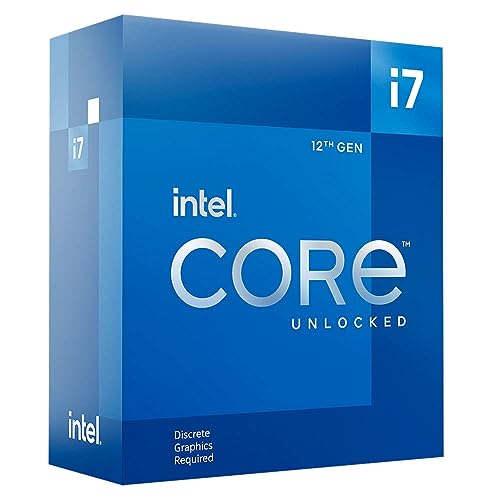
Intel® Core™ i7-12700KF Desktop Processor 12 (8P+4E) Cores up to 5.0 GHz Unlocked LGA1700 600 Series Chipset 125W
Picked as a relevant option in this category.
View on Amazon
Intel Core i7-12700KF Gaming Desktop Processor + MSI PRO B760M-P DDR4 ProSeries Motherboard
Picked as a relevant option in this category.
View on Amazon| Spec | Ryzen 7 7700 | Core i7-12700KF |
|---|---|---|
| Cores and threads | 8 cores, 16 threads | 8 performance plus 4 efficient cores, 20 threads |
| Base clock | 3.8 GHz | 3.6 GHz performance cores, 2.7 GHz efficient cores |
| Maximum boost | Up to 5.3 GHz | Up to 5.0 GHz |
| Cache | 32 MB L3 | 25 MB Intel Smart Cache, 12 MB L2 |
| Rated power | 65 W TDP | 125 W base, 190 W maximum turbo |
| Memory | DDR5 only | DDR5 up to 4800 MT/s or DDR4 up to 3200 MT/s, depending on the board |
| PCI Express | 5.0 | 5.0 and 4.0, 20 lanes from the CPU |
| Integrated graphics | Basic Radeon graphics | None (the F in KF means no graphics) |
| Unlocked multiplier | Yes on AM5, subject to board support | Yes (K series) |
| Box cooler | Wraith Prism included | Not included |
What the numbers mean for gaming
Both chips have eight fast cores, which is more than current games use at once. For games, the deciding factors are per-core speed, cache and memory, not the extra thread count. The Ryzen 7 7700 uses newer Zen 4 cores with a larger L3 cache, and reviewers generally place it ahead of the Core i7-12700KF in most game suites, although the gap depends heavily on the game, resolution and graphics card. No single percentage applies everywhere, so treat any one chart as a snapshot rather than a rule.
At 1080p with a fast graphics card, the processor matters most, because the GPU is not the limit. In that situation the newer architecture tends to show. At 1440p and especially 4K, the graphics card takes over and the two processors land close together, because both can feed a mid-range or high-end GPU. If you play at 1440p or higher with a mid-range card, the difference between these two chips is usually smaller than the difference you would get from changing the card.
Competitive esports titles that run at very high frame rates lean on single-core speed and cache. Open-world and simulation games that stress many threads can use the extra efficient cores of the Intel chip in background tasks, but the Ryzen part keeps up through its 16 threads. Neither chip is a poor choice; the difference is the platform around it.
Platform: the real difference
AM5 versus LGA1700
AM5 is a DDR5-only platform. A new board plus DDR5 memory costs more than a DDR4 setup would, but AMD has positioned AM5 as a socket with several years of support, which means a later move to a faster Ryzen chip may not require a new board. LGA1700 was the home of 12th, 13th and 14th generation Intel desktop chips, and Intel has since moved on to a different socket for its newer Core Ultra desktop parts. A board you buy for the 12700KF today is therefore at the end of its line, though it can still accept the faster 13th and 14th generation chips if the BIOS supports them.
DDR4 versus DDR5 on the Intel side
Intel 12th generation boards come in both DDR4 and DDR5 versions, and the two are not interchangeable. A DDR4 board lets you reuse existing memory and keeps costs down. A DDR5 board costs more but matches the memory type of the AM5 platform. Check the board listing before you buy memory, because the slots are physically keyed differently.
Power, heat and cooling
The 12700KF is rated at 125 W base and 190 W maximum turbo power according to Intel, while the Ryzen 7 7700 carries a 65 W TDP. AMD’s socket allows the chip to draw more than its TDP under load, as reviewers have noted, but total package power for the 7700 stays well below the Intel figure in all-core workloads. A lower draw means less heat, a smaller cooler and a quieter case. The 12700KF benefits from a decent tower cooler or a 240 mm liquid cooler to hold its boost clocks, and it needs a board with a capable power delivery section.
Which games and resolutions suit each
| Use case | Ryzen 7 7700 | Core i7-12700KF |
|---|---|---|
| 1080p high refresh with a high-end GPU | Strong; newer cores help when the CPU is the limit | Good; slightly behind in many reviewer suites |
| 1440p with a mid-range GPU | Very good; GPU is the limit | Very good; GPU is the limit |
| 4K gaming | Either works; GPU decides the result | Either works; GPU decides the result |
| Streaming plus gaming | Good with 16 threads | Good with 20 threads |
| Content creation on the side | Good | Good, extra efficient cores help multi-thread tasks |
Upgrade logic
If you already own a 12th generation board, replacing the 12700KF with the Ryzen chip means buying a new motherboard and DDR5 memory as well as the processor. For a gain that is modest at higher resolutions, that is rarely worth it. A better use of that budget is usually a stronger graphics card. If your board is still on an older platform such as an LGA1200 or AM4 system, the choice is a full platform replacement either way, and then AM5 is the more forward-looking route.
If you are buying used, the 12700KF can be attractive because the platform is mature, DDR4 boards and memory are plentiful, and the chip performs well in games. Make sure the board has a BIOS that supports your processor and that the cooler mounting fits LGA1700, since the socket uses a different hole layout than older Intel sockets.
Common mistakes to avoid
- Forgetting the F suffix. The KF model has no integrated graphics, so you need a discrete graphics card to see any picture at all.
- Buying DDR5 for a DDR4 board. Intel 12th generation boards are either DDR4 or DDR5, and the memory does not cross over.
- Skipping the cooler. The 12700KF is not sold with a cooler, so budget one. The Ryzen 7 7700 includes a Wraith Prism, which is adequate for stock use.
- Ignoring BIOS updates. Boards often need a BIOS version that recognises the chip. Read the board maker’s CPU support list before buying.
- Overspending on the power supply or board for a stock chip. If you do not plan to overclock, a mid-range board is enough for either processor.
- Judging by core count. The 12700KF lists 12 cores and 20 threads against eight cores and 16 threads, but games rarely scale across all of them, so the larger number does not translate into more frames.
Pick X if
| Pick this chip | If |
|---|---|
| Ryzen 7 7700 | You are building from scratch, want DDR5 and PCIe 5.0, care about power and noise, and want room to upgrade later |
| Core i7-12700KF | You own a compatible LGA1700 board or DDR4 memory, can get the chip at a low level, and want an unlocked multiplier |
Alternatives worth a look
- Ryzen 7 7700X: the same Zen 4 core layout with a higher 105 W TDP and slightly higher clocks, sold without a cooler.
- Core i5-13600K: a newer Intel option on the same socket as the 12700KF, with six performance and eight efficient cores according to Intel.
- Ryzen 7 7800X3D: the gaming-focused option on AM5 with a large stacked cache, aimed at buyers who want the strongest game results from a single chip.
Frequently Asked Questions
Is the Ryzen 7 7700 faster than the Core i7-12700KF in games?
Reviewers generally find the Ryzen 7 7700 ahead in most game suites, but the lead is not uniform. At 1440p and 4K with a mid-range graphics card, the two chips often land close together. Results depend on the game and the graphics card used.
Do I need a graphics card with the 12700KF?
Yes. Intel lists the KF version without integrated graphics, so a discrete card is required for any display output. The non-F 12700K includes Intel UHD Graphics 770 if you want a fallback.
Can the 12700KF use DDR4?
Intel lists support for both DDR5 up to 4800 MT/s and DDR4 up to 3200 MT/s, but a given motherboard supports only one type. Pick the board first, then match the memory to it.
Does the Ryzen 7 7700 need a separate cooler?
No, AMD includes a Wraith Prism cooler with the 7700. A larger aftermarket cooler can lower noise and temperatures, but it is optional at stock settings.
Is it worth switching from a 12700KF to a 7700?
Usually not on its own. You would need a new AM5 board and DDR5 memory, and the gain at higher resolutions is often small. Switching makes more sense if you want the AM5 upgrade path or are already replacing the platform.
Which one runs cooler?
The Ryzen 7 7700 has a lower rated power of 65 W, compared with Intel’s 125 W base and 190 W maximum turbo figures for the 12700KF. Under typical gaming load, both draw less than their maximum ratings, but the Ryzen chip generally leaves more thermal headroom.
FAQ
Is the Ryzen 7 7700 faster than the Core i7-12700KF in games?
Do I need a graphics card with the 12700KF?
Can the 12700KF use DDR4?
Does the Ryzen 7 7700 need a separate cooler?
Is it worth switching from a 12700KF to a 7700?
Which one runs cooler?
More from Amazon
Programs that pair well with the guide above. Offers and eligibility are set by Amazon and may change.
Free shipping on eligible items, Prime Video and more. Eligible new members can start with a free trial.
Start a Prime free trialAd-free music streaming. Eligible new subscribers can start with a free trial.
Try Music Unlimited freeA Prime membership for ages 18-24 with a trial period. Eligibility is set by Amazon.
See Prime for Young AdultsAudiobooks and podcasts to listen to on the go. Eligible new members can start with a free trial.
Try Audible freeAs an Amazon Associate we earn from qualifying purchases.