Our Top Picks
A gaming webcam has a harder job than a meeting camera. Your face usually sits in a small window over fast-moving gameplay, often lit by nothing more than monitor glow, and it has to stay sharp and natural for hours at a time. The real decision is matching the camera to how you actually appear on screen: a small overlay rewards smooth motion and good low-light behaviour, while full-screen breaks and recorded facecam footage are where higher resolution earns its place.


This guide is for PC players who stream, record facecam video, or spend long evenings on voice chat with friends. Every pick below was chosen from the product names and specifications stated on its Amazon listing: two 4K models with stated frame rates, a light-sensing 1080p camera, a full-size 4K streaming camera, and a motorised tracking model that follows you around the frame.
Quick Picks
As an Amazon Associate we earn from qualifying purchases.
| Product | Best for | Key spec from title |
|---|---|---|
| Logitech MX Brio | Switching between 4K recording and smooth 60 fps play | 4K Ultra HD, 1080p 60 FPS |
| Razer Kiyo Pro | Dim rooms and evening sessions | 1080p 60FPS with adaptive light sensor |
| Elgato Facecam Pro | Full-screen facecam and high-resolution capture | 2160p60 with Sony STARVIS sensor |
| OBSBOT Tiny 2 | Players who lean, stand and move on camera | 4K PTZ with AI tracking |
| Insta360 Link 2 | Framing that follows you without a camera operator | Up to 4K at 30 fps with AI tracking |
How to Choose
Resolution Is Only Half the Decision
A 4K sensor only pays off when viewers actually see those pixels. In a small corner overlay, the platform downscales your feed and the extra resolution mostly disappears, so a strong 1080p camera can look just as clean. Resolution earns its keep when your face fills the screen during breaks, when you crop into recordings afterwards, or when you record at one size and publish at another. Start from the largest size your face appears at, then buy the resolution that serves that size instead of chasing the biggest number on the box.
Frame Rate Decides How Natural You Look
Motion is where gaming webcams separate. A 60 fps mode keeps head turns and reactions smooth next to fast gameplay, while 30 fps can look steppy by comparison. Read the pairing on each listing carefully: several cameras state 4K only at 30 fps and reserve 60 fps for their 1080p mode, and a couple of listings state no frame rate at all. The headline resolution and the headline frame rate rarely arrive together, so decide which one your audience notices more before you choose.
Sensors and Light Handling for Real Rooms
Gaming rooms are rarely lit like offices. The light is uneven, coloured, and often comes from the screens themselves, which is why listing wording about light matters here. An adaptive light sensor, HDR support, or a physically larger sensor are the clues that a camera expects difficult rooms rather than bright meeting spaces. A model that holds a clean image in a dim room will serve most players better than a sharper model that falls apart once the ceiling light goes off.
Tracking, Gimbals and Fixed Frames
Some players sit still; others lean into tense rounds, stand up between matches, and gesture through every call. Motorised PTZ cameras with AI tracking physically follow that movement and keep you centred, and some add voice or gesture control so you can adjust framing without reaching for the mouse. A fixed camera is simpler, silent, and never loses you by panning the wrong way. Be honest about how much you move: tracking is a genuine feature for animated players and an unnecessary complication for still ones.
The 5 Best Options
Logitech MX Brio
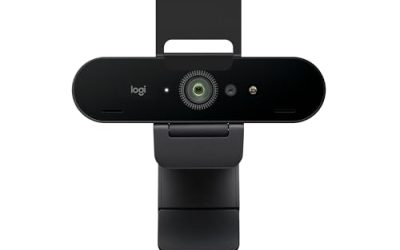
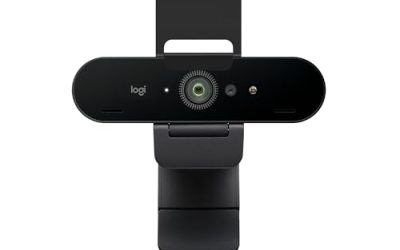
The MX Brio suits players who split their time between live play and recorded content. Its listing states 4K Ultra HD capture alongside an explicit 1080p 60 FPS mode, which maps neatly onto the two jobs: record or present at full resolution when your face fills the screen, then drop to the smoother frame rate when the facecam shrinks into a corner over gameplay. For a single-camera desk that handles streams, recordings and calls without swapping hardware, that stated pairing is the most flexible combination in this roundup.
Specs
- Resolution: 4K Ultra HD, as stated in the listing title
- Frame rate: 1080p at 60 FPS, as stated in the listing title
- Model: 960-001545
Best for: Streamers who record at 4K and play with a 60 fps facecam.
Watch out for: The listing ties its 60 FPS wording to the 1080p mode, so do not assume the same frame rate applies at 4K; check the live listing’s mode table before ordering.
ASIN: B0BFJ4CRKD
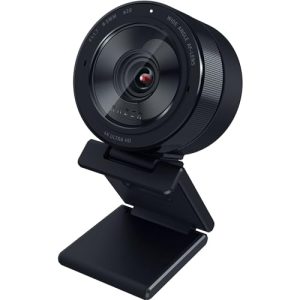
Razer Kiyo Pro
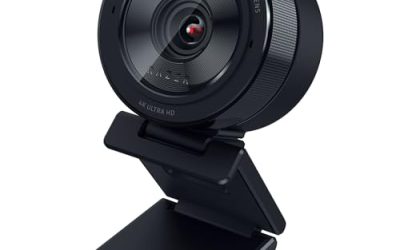
The Kiyo Pro is the pick built around bad lighting. Its title leads with an adaptive light sensor and HDR support alongside its 1080p resolution, which is exactly the combination evening players need when the room runs on monitor glow and a desk lamp. The wide-angle lens has an adjustable field of view, so you can tighten the frame on your face or widen it to show more of the room, and the listing names OBS, XSplit, Twitch, Zoom and Teams among the software it works with, covering both the stream and the weekday call.
Specs
- Resolution and frame rate: Full HD 1080p at 60FPS, per the listing title
- Light handling: adaptive light sensor, HDR enabled, per the listing title
- Lens: wide angle with adjustable FOV, per the listing title
- Works with: OBS, XSplit, Twitch, Zoom, Teams, per the listing title
Best for: Players whose gaming room is dim and who stream in the evening.
Watch out for: There is no 4K mode here, so if you record full-screen facecam video to crop later, one of the 4K picks will serve you better.
ASIN: B08T1MWX6J
Elgato Facecam Pro

The Facecam Pro is the full-size streaming camera of this group, and its listed mode table is the most complete here: 2160p60 and 2160p30 for high-resolution work, plus 1080p and 720p modes at both frame rates for everyday streaming. A Sony STARVIS sensor and a USB Type-C connection round out a listing aimed squarely at creators who treat the facecam as a primary camera rather than an accessory. If your channel puts your face on screen at large sizes for long stretches, this is the specification sheet written for that job.
Specs
- Supported resolutions, as listed: 2160p60, 2160p30, 1080p60, 1080p30, 720p60, 720p30
- Sensor: Sony STARVIS
- Connection: USB Type-C
- Dimensions: W 116 x H 38 x D 79 mm, without mount
- Model: 20WAB9901
Best for: Streamers who broadcast or record facecam at full screen.
Watch out for: This is a full-size camera, not a compact clip-on; check the stated dimensions against your monitor and mount before ordering.
ASIN: B0BJL7Q3SR
OBSBOT Tiny 2

The Tiny 2 answers a different problem: staying in frame. It is a PTZ camera, meaning the camera itself pans and tilts, and its listing pairs 4K capture at 60 FPS with AI tracking plus voice and gesture control. Lean towards a second monitor, stand up between rounds, or walk a controller over to the couch, and the framing follows instead of cropping you out. The listing also states HDR light correction and a 1/1.5 inch sensor, which speaks to the dim-room problem most gaming setups share.
Specs
- Resolution and frame rate: 4K at 60 FPS, per the listing title
- Sensor: 1/1.5 inch, per the listing title
- Light handling: HDR light correction, per the listing title
- Design: PTZ camera with AI tracking and voice and gesture control, per the listing
Best for: Animated players who move around while they stream or call.
Watch out for: A motorised camera needs clear space to move and a view worth tracking; in a tight, static setup its main feature goes unused.
ASIN: B0C3B6ZR1V
Insta360 Link 2

The Link 2 brings the gimbal approach to a more call-friendly package. Its listing states up to 4K at 30 fps and up to 1080p at 60 fps, so you choose per session between the sharper mode and the smoother one, and AI tracking with a 1/2 inch sensor and HDR support covers the framing and lighting sides of the job. The listing positions it for gaming and streaming as well as calls, which makes it a sensible single camera for a desk that hosts ranked nights and work meetings in the same week.
Specs
- Resolution and frame rate: up to 4K at 30 fps, up to 1080p at 60 fps, as listed
- Sensor: 1/2 inch, as listed
- Tracking: AI tracking, as listed
- Light handling: HDR, as listed
- Model: CINSABNB
Best for: Players who want tracking for both game nights and video calls.
Watch out for: Do not confuse this model with the fixed Link 2C; they are different cameras, and only this listing carries the tracking design described here.
ASIN: B0DDTH3HX8
Which One Fits Your Situation
You Stream to a Small Facecam Window
When your face occupies a corner of the screen, smoothness and light handling beat raw resolution. The Kiyo Pro was built for exactly this: 1080p at 60 fps with an adaptive light sensor for dim rooms. The MX Brio’s stated 1080p 60 FPS mode covers the same ground if you also record. Either way, spend on how the camera handles your room rather than on pixels your overlay throws away.
You Record Full-Screen Facecam Videos
Large faces reward resolution and frame rate together. The Facecam Pro’s listed 2160p60 mode is the strongest capture specification here, and the Tiny 2 matches the 4K at 60 FPS pairing while adding tracking. Choose the Facecam Pro for a fixed, deliberate setup, or the Tiny 2 if your recordings involve movement. Both give you footage that survives cropping and editing afterwards.
Your Room Is Darker Than Your Monitor Glow
Low light is the normal condition for gaming, not the exception. Look for the listing wording that addresses it: the Kiyo Pro’s adaptive light sensor and HDR, the Tiny 2’s HDR light correction and larger sensor, or the Link 2’s HDR support. Any of the three takes the problem seriously; the Kiyo Pro makes it the headline feature, which is why it leads for evening-only players.
You Move Around While You Play and Talk
If you lean, stand, pace or play standing games, a fixed frame will keep losing you. The Tiny 2 and the Link 2 both use AI tracking to follow the subject, with the Tiny 2 adding voice and gesture control. Pick the Tiny 2 for streaming-first desks and the Link 2 if the same camera also handles your daytime calls. Still players can skip this category entirely.
Common Mistakes
- Buying 4K for a tiny overlay window, then never seeing the extra resolution because the platform downscales the feed.
- Assuming a camera’s headline resolution and headline frame rate apply at the same time, when the listing pairs 4K with 30 fps and 60 fps with 1080p.
- Ignoring room lighting and blaming the camera, when no listing wording about light handling was ever checked.
- Expecting a fixed webcam to keep you framed when you lean or stand; tracking is a hardware feature, not a software setting.
- Treating a full-size streaming camera like a compact clip-on and discovering the stated dimensions do not suit the monitor or mount.
Frequently Asked Questions
Is 4K worth it for a gaming facecam?
It depends on the size of the window. In a small overlay, viewers see a downscaled image and 4K adds little. When your face fills the screen during breaks, or you crop recorded footage, the extra resolution becomes visible and useful. Match the camera to the largest size your face actually appears at on screen.
Does 60 fps matter on a webcam?
For gaming, usually yes. Fast gameplay beside a 30 fps facecam makes your movements look steppy by contrast, while 60 fps keeps reactions looking natural. Several listings here state a 60 fps mode, though often at 1080p rather than 4K. If your facecam is small and always moving, the smoother mode is the one your audience will notice.
Can a tracking webcam replace a fixed one for calls?
For most desks, yes. The tracking models here are positioned for calls as well as streaming, and the framing help is just as useful in a meeting as in a match. The trade-off is complexity: a motor needs space to move and can occasionally follow the wrong subject, while a fixed camera simply shows one dependable frame.
What if my room has poor light?
Start with the listings that address light directly: an adaptive light sensor, HDR support, or a larger stated sensor size. Those features exist because gaming rooms are dim. Adding even a small lamp aimed at your face still helps any camera, but a model specified for low light gives you a far better starting point than resolution alone.
FAQ
Is 4K worth it for a gaming facecam?
Does 60 fps matter on a webcam?
Can a tracking webcam replace a fixed one for calls?
What if my room has poor light?
More from Amazon
Programs that pair well with the guide above. Offers and eligibility are set by Amazon and may change.
Free shipping on eligible items, Prime Video and more. Eligible new members can start with a free trial.
Start a Prime free trialAd-free music streaming. Eligible new subscribers can start with a free trial.
Try Music Unlimited freeA Prime membership for ages 18-24 with a trial period. Eligibility is set by Amazon.
See Prime for Young AdultsAudiobooks and podcasts to listen to on the go. Eligible new members can start with a free trial.
Try Audible freeAs an Amazon Associate we earn from qualifying purchases.