Key takeaways
- Cooling Performance: Top air coolers dissipate 220-250W effectively, keeping most gaming CPUs at 70-80C. A 240mm AIO handles 250-280W, while a 360mm AIO like the ARCTIC Liquid Freezer III Pro 360 extends that to 300W+, typically 6-12C cooler at the same fan speed.
- Noise Level: Air coolers ramp fans quickly under load, reaching 34-38 dBA. AIOs spread heat over a larger radiator area, allowing fans to run 200-400 RPM slower and often stay at 30-34 dBA during gaming.
- Price and Value: Premium air cooling costs $35-55. A 240mm AIO like the Thermalright Aqua Elite 240 V3 starts around $70-90, while 360mm A-RGB models are $110-150. Custom loops with parts like the BXQINLENX Fittings Kit and DIYhz Radiator cost $250-500+.
- Reliability and Maintenance: Air coolers have only fans as failure points and last 6-10 years with simple dust cleaning. AIOs add a pump with a 4-6 year lifespan and a small risk of permeation or leakage, requiring radiator dusting and occasional mounting checks.
- Compatibility and Installation: Large air coolers need 157-160mm CPU clearance and can block tall RAM. AIOs need radiator support (240mm or 360mm) in your case, but free up space around the socket. Cases like the MUSETEX K2 with 7 pre-installed fans and wide radiator support simplify either option.
- Aesthetics: Air coolers dominate the motherboard view. AIOs offer a minimal pump block, customizable A-RGB, and a clean radiator-mounted look that showcases the build through tempered glass.
In 2026, gaming CPUs and GPUs push more heat than ever. A Core i7-14700K or Ryzen 7 7800X3D can easily hit 90-95C under sustained gaming loads with a stock cooler, leading to thermal throttling, louder fans, and lower boost clocks. Choosing the right cooler is not just about temperatures — it affects noise, case compatibility, overclocking headroom, and long-term reliability.
Air cooling and water cooling both have real advantages for gaming PCs, but they serve different types of builders. This comparison breaks down performance, noise, cost, maintenance, and aesthetics with concrete numbers and real 2026 hardware to help you decide which solution fits your build, budget, and expectations.
Our top picks




As an Amazon Associate we earn from qualifying purchases at no extra cost to you. Ratings are shown as listed on Amazon.
⚡ Save on Your Next PC — Amazon Prime
Prime members get fast free shipping on the systems above, plus early access to Prime Day & Black Friday PC deals. New members get a 30-day free trial.
Watch: Air vs Water Cooling for Gaming PCs — Video Review
Quick Verdict
For most gamers, a high-end dual-tower air cooler offers the best balance of price, reliability, and performance. A cooler like the Thermalright Peerless Assassin 120 SE handles even a 150W gaming load at 70-75C with noise under 35 dBA, and there is no pump to fail or liquid to maintain. Choose a 240mm or 360mm AIO like the ARCTIC Liquid Freezer III Pro 360 A-RGB or Thermalright Aqua Elite 240 V3 if you want 5-10C lower peak temperatures, quieter operation under sustained loads, and a cleaner look — especially in compact cases or for overclocked CPUs drawing 200W+.
Key Differences
- Cooling Performance: Top air coolers dissipate 220-250W effectively, keeping most gaming CPUs at 70-80C. A 240mm AIO handles 250-280W, while a 360mm AIO like the ARCTIC Liquid Freezer III Pro 360 extends that to 300W+, typically 6-12C cooler at the same fan speed.
- Noise Level: Air coolers ramp fans quickly under load, reaching 34-38 dBA. AIOs spread heat over a larger radiator area, allowing fans to run 200-400 RPM slower and often stay at 30-34 dBA during gaming.
- Price and Value: Premium air cooling costs $35-55. A 240mm AIO like the Thermalright Aqua Elite 240 V3 starts around $70-90, while 360mm A-RGB models are $110-150. Custom loops with parts like the BXQINLENX Fittings Kit and DIYhz Radiator cost $250-500+.
- Reliability and Maintenance: Air coolers have only fans as failure points and last 6-10 years with simple dust cleaning. AIOs add a pump with a 4-6 year lifespan and a small risk of permeation or leakage, requiring radiator dusting and occasional mounting checks.
- Compatibility and Installation: Large air coolers need 157-160mm CPU clearance and can block tall RAM. AIOs need radiator support (240mm or 360mm) in your case, but free up space around the socket. Cases like the MUSETEX K2 with 7 pre-installed fans and wide radiator support simplify either option.
- Aesthetics: Air coolers dominate the motherboard view. AIOs offer a minimal pump block, customizable A-RGB, and a clean radiator-mounted look that showcases the build through tempered glass.
Air Cooling
Modern dual-tower air cooling remains remarkably competitive. The Thermalright Peerless Assassin 120 SE is the benchmark for value in 2026, using six heat pipes with AGHP technology and dual 120mm PWM fans rated to 1550 RPM. On an AM5 or LGA1700/1851 system, it keeps a Ryzen 7 7700 or i5-14600K at 68-74C in a 21C room during a demanding game like Cyberpunk 2077, while drawing 125-150W. It installs with a simple mounting kit, weighs under 1kg, and needs no software or pump power.
The main limitations are physical size and thermal ceiling. In a compact mATX case or a case without excellent front-to-back airflow, heat can soak the heatsink and raise temperatures by 4-7C compared to an open test bench. Sustained all-core workloads above 200W, such as compiling shaders or streaming with CPU encoding, can push air coolers to 85C+, where fan noise becomes noticeable. For pure gaming at stock settings, however, it is quiet, failure-resistant, and easy to live with for years.
Water Cooling
AIO water cooling moves heat more efficiently from the CPU to a large radiator. The ARCTIC Liquid Freezer III Pro 360 A-RGB uses a 360mm radiator and an efficient PWM-controlled pump to handle 200-280W loads at 62-70C where an air cooler would be 8-12C hotter at the same noise level. The smaller Thermalright Aqua Elite 240 V3 offers similar S-FDB bearing fans and PWM control in a 240mm form factor that fits most mid-towers, delivering most of the benefit without requiring a large case.
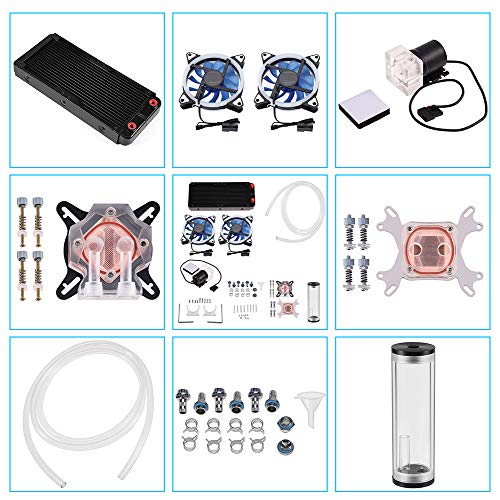
Beyond AIOs, custom loops represent the enthusiast peak but add complexity. Builders using a DIYhz 12-pipe aluminum radiator and a BXQINLENX 24-Piece G1/4″ Fittings Kit can create a loop tailored to CPU and GPU cooling, often dropping liquid delta temperatures another 3-5C. Performance is excellent and visuals are unmatched, but you take on leak testing, coolant replacement every 12 months, and higher upfront cost. For most gamers, a sealed AIO provides 90% of the thermal benefit with none of the ongoing maintenance.
Which Should You Buy?
- Choose Air Cooling if: You want the best value, lowest failure risk, and simple installation. Ideal for builds under $1,400, 65-150W CPUs, and cases with at least 160mm cooler clearance.
- Choose a 240mm AIO if: You have a mid-tower like the MUSETEX K2, want a cleaner interior and slightly lower noise, and run a mid-range to high-end CPU at stock or with light overclocking.
- Choose a 360mm AIO if: You run a Core i7/i9 or Ryzen 9 at sustained 180W+, overclock regularly, or want the quietest possible gaming experience under prolonged loads.
- Choose a Custom Loop if: You enjoy building as a hobby, want to cool both CPU and GPU in one circuit, and accept the maintenance and cost for maximum aesthetics and thermal headroom.
- Consider Your Case First: Measure radiator support and CPU cooler height before buying. A high-airflow case with PWM ARGB fans reduces temperatures for both cooler types by 3-6C compared to a closed front panel.
Frequently Asked Questions
Is water cooling really much cooler than air for gaming?
For typical gaming loads of 90-150W, the gap is modest — often 4-8C. The difference grows under sustained heavy loads. A 360mm AIO will hold a 220W load around 68-72C, while a strong air cooler may be at 78-85C with the same ambient temperature and fan curve. For competitive gaming and stock settings, both are safe and will not throttle.
Do AIO coolers leak and how long do they last?
Modern AIOs are sealed and factory-tested; leak rates in 2026 are below 0.1% in the first three years. Pump lifespan is the main limit, typically 50,000-70,000 hours or 5-7 years. You may also see 1-2% coolant permeation per year, which gradually reduces performance. Air coolers have no such wear aside from fans, which are easily replaced.
Which is quieter in a real gaming setup?
At idle both are near-silent at 28-31 dBA. During gaming, a 360mm AIO is usually 2-4 dBA quieter because the large radiator lets fans spin at 900-1100 RPM instead of 1250-1500 RPM on an air cooler. In a case like the MUSETEX K2 with seven PWM fans, overall system noise is dominated more by GPU fans and case airflow tuning than CPU cooler choice.
Can I install an AIO in any case?
No. You need dedicated radiator mounting points. A 240mm radiator needs a 280mm-long slot, typically on top or front, and a 360mm needs 400mm of clearance. Also check RAM and VRM heatsink clearance for the pump block. Mid-tower ATX cases with full tempered glass and Type-C front I/O, such as the MUSETEX K2, usually support 240mm and 360mm on top and front, making them versatile for either cooling method.
Final Verdict
Both air and water cooling are excellent in 2026, but they win in different categories. If you prioritize reliability, value, and plug-and-play simplicity, the Thermalright Peerless Assassin 120 SE is tough to beat and will cool any mainstream gaming CPU without fuss. If you want the lowest temperatures, quietest sustained operation, or a showpiece build with A-RGB lighting, a sealed AIO such as the ARCTIC Liquid Freezer III Pro 360 A-RGB or the more compact Thermalright Aqua Elite 240 V3 is the logical step up. Reserve custom components like the DIYhz radiator and BXQINLENX fittings kit for enthusiast loops where the build itself is the project. Match your cooler to your CPU wattage, case support, and budget, and either route will keep your gaming PC fast and quiet for years.