Key takeaways
- Always hold fans still while blowing compressed air to protect the bearings and prevent voltage spikes.
- Clean or replace intake dust filters regularly; they are your first line of defense against buildup.
- Never use a household vacuum directly on components due to static; use compressed air instead.
- Clean every three to six months, more often if you have pets or a dusty room.
Dust is the silent enemy of a gaming PC. It coats fan blades, clogs filters, and blankets heatsinks, forcing your components to run hotter and your fans to spin louder just to keep up. A regular cleaning is the cheapest maintenance you can do to preserve performance and lower noise.
You do not need special skills, just a can of compressed air, a soft brush, and a little care around the delicate parts. This guide covers how to safely clean your fans and dust filters, how often to do it, and how to keep dust out in the first place with the right filtration.
Our top picks


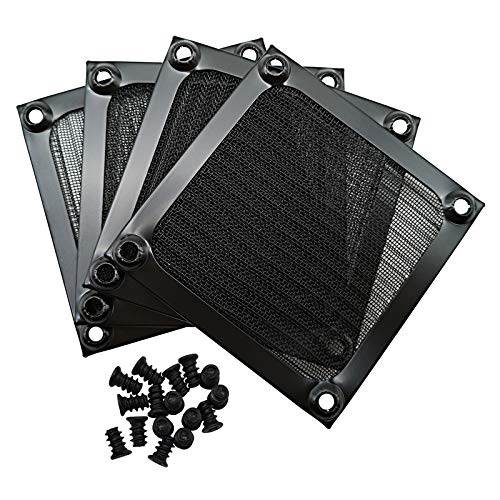
![MoKo 400x300mm DIY PC Case Dust Mesh Filter, [4 Pack] PVC Dustproof Magnetic Dust Filter Cover, PC Mesh Grill with Magnetic Frame Strip Computer Cooler Fan Dust Filter for Computer PC Case, Black](https://m.media-amazon.com/images/I/51YgJYNN2-L._SL500_.jpg)

As an Amazon Associate we earn from qualifying purchases at no extra cost to you. Ratings are shown as listed on Amazon.
⚡ Save on Your Next PC — Amazon Prime
Prime members get fast free shipping on the systems above, plus early access to Prime Day & Black Friday PC deals. New members get a 30-day free trial.
Watch: How to Clean Your PC Fans and Filters — Video Review
Power down and open the case
Shut the PC off completely, unplug the power cable, and press the power button once to discharge residual electricity. Move the case somewhere you can make a mess, ideally outdoors or in a garage, since cleaning blows dust everywhere. Remove the side panels to access the interior, and detach any magnetic or clip-in dust filters from the front, top, and bottom.
Clean the dust filters
Filters catch the bulk of the dust, so clean them first. Rinse washable mesh filters like a MoKo or magnetic PC dust filter under water, let them dry fully before reinstalling, or simply vacuum and brush them if they are not water-safe. Doing this regularly is what keeps the interior clean, so make filter maintenance the core of your routine.
Blow out the fans correctly
Use short bursts of compressed air to clear the fan blades, but first hold each fan still with a finger. Letting a fan spin freely under compressed air can generate voltage that damages components and over-spins the bearing. Blow from the clean side outward so dust exits rather than lodging deeper into the heatsink fins below.
Detail the heatsinks and hard-to-reach spots
The CPU cooler and GPU heatsinks trap dust between their fins, which chokes airflow. Blow compressed air through them in the direction of the fins, and use a soft brush for stubborn buildup. A small vacuum held nearby, not directly on components, catches the dislodged dust. Avoid touching the PCB with the brush aggressively.
Reassemble and test
Once everything is dust-free and any washed filters are completely dry, reattach the filters, close the panels, reconnect power, and boot up. Check that all fans spin and listen for any new noises that would indicate a fan was bumped. Your temperatures should drop and the system should run quieter immediately.
Tips
- Always hold fans still while blowing compressed air to protect the bearings and prevent voltage spikes.
- Clean or replace intake dust filters regularly; they are your first line of defense against buildup.
- Never use a household vacuum directly on components due to static; use compressed air instead.
- Clean every three to six months, more often if you have pets or a dusty room.
Frequently Asked Questions
How often should I clean my PC fans?
Every three to six months for most people, and more frequently if you have pets, carpet, or a dusty environment. Cleaning the intake filters monthly keeps the interior far cleaner between deep cleans.
Can I use a vacuum to clean my PC?
Avoid using a household vacuum directly on components because it can generate static electricity that damages parts. Compressed air is safer; if you use a vacuum, keep the nozzle a few inches away to catch dislodged dust.
Why do I need to hold the fans still?
A fan spun rapidly by compressed air acts as a small generator and can send voltage back into the system, and over-spinning stresses the bearing. Holding each blade still while you clean protects both.
Do dust filters really make a difference?
Absolutely. Good intake filters trap the majority of incoming dust, dramatically slowing interior buildup. Adding magnetic mesh filters to unfiltered intakes is a cheap way to cut how often you need to deep-clean.
Conclusion
Regular cleaning keeps your PC cool, quiet, and reliable for years. Power down, wash or vacuum the dust filters, blow out the fans while holding them still, detail the heatsinks, and reassemble. Make filter cleaning a monthly habit and a full interior clean every few months, and dust will never rob your components of the performance you paid for.