Key takeaways
- Core and thread count: Streaming benefits from more cores. A 12-core, 24-thread chip like the Ryzen 9 7900X or 5900X can dedicate threads to encoding while gaming runs uninterrupted. Six-core chips work with GPU encoding but leave less headroom.
- Encoding method: If you use your GPU’s encoder (NVENC on NVIDIA), CPU load drops dramatically and even a Core i5-12400 streams well. For CPU (x264) encoding at higher quality, prioritize core count.
- Platform and upgrade path: AMD’s AM5 platform (Ryzen 7000 series) offers a longer upgrade runway with DDR5, while AM4 chips like the 5900X are budget-friendly on mature, cheaper motherboards and memory.
- Cooling needs: High-core chips generate heat under a gaming-plus-streaming load. Budget for a capable air or liquid cooler so the CPU sustains boost clocks during long broadcasts.
- Prebuilt option: If you want to skip building, a prebuilt with a strong CPU and GPU, like a system with a Ryzen 7 7800X3D and RTX 5070, delivers streaming-ready performance out of the box.
Streaming while you game is one of the most demanding things you can ask of a PC, because the processor has to run the game and encode your live video at the same time. That is why core count matters so much for streamers: more cores mean the CPU can hand game duties and encoding duties to separate threads without either one stuttering. In 2026, high-core-count chips have become affordable, making a smooth 1080p or 1440p stream achievable without a second PC.
This roundup reviews the best CPUs for streaming this year, from the 12-core AMD Ryzen 9 7900X to the value-packed Intel Core i5-12400, plus a prebuilt gaming PC option for streamers who want a turnkey setup. We explain cores, threads, and encoding so you can build a rig that games and broadcasts flawlessly.
Our top picks






![AMD Ryzen 9 5000 5900X Dodeca-core [12 Core] 3.70 GHz Processor - OEM Pack](https://m.media-amazon.com/images/I/31aFpyGywEL._SL500_.jpg)
As an Amazon Associate we earn from qualifying purchases at no extra cost to you. Ratings are shown as listed on Amazon.
⚡ Save on Your Next PC — Amazon Prime
Prime members get fast free shipping on the systems above, plus early access to Prime Day & Black Friday PC deals. New members get a 30-day free trial.
Watch: Best CPU for Streaming — Video Review
How to Choose
- Core and thread count: Streaming benefits from more cores. A 12-core, 24-thread chip like the Ryzen 9 7900X or 5900X can dedicate threads to encoding while gaming runs uninterrupted. Six-core chips work with GPU encoding but leave less headroom.
- Encoding method: If you use your GPU’s encoder (NVENC on NVIDIA), CPU load drops dramatically and even a Core i5-12400 streams well. For CPU (x264) encoding at higher quality, prioritize core count.
- Platform and upgrade path: AMD’s AM5 platform (Ryzen 7000 series) offers a longer upgrade runway with DDR5, while AM4 chips like the 5900X are budget-friendly on mature, cheaper motherboards and memory.
- Cooling needs: High-core chips generate heat under a gaming-plus-streaming load. Budget for a capable air or liquid cooler so the CPU sustains boost clocks during long broadcasts.
- Prebuilt option: If you want to skip building, a prebuilt with a strong CPU and GPU, like a system with a Ryzen 7 7800X3D and RTX 5070, delivers streaming-ready performance out of the box.
The Best Picks Reviewed
AMD Ryzen 9 7900X (12-Core, 24-Thread)
This is the top streaming pick. Twelve cores and 24 threads on the modern AM5 platform give you ample headroom to game and encode simultaneously, even with demanding CPU-based x264 streaming. The Ryzen 7000 architecture is fast in games too, and the DDR5 platform leaves room to upgrade later. For serious streamers who want no compromises, the 7900X is the one to beat.
AMD Ryzen 9 5900X (12-Core, 24-Thread)
The 5900X delivers the same 12-core, 24-thread muscle on the mature, budget-friendly AM4 platform. Paired with cheaper DDR4 memory and affordable motherboards, it is the value streaming powerhouse, offering excellent multitasking performance for a lower total build cost than an AM5 setup. A superb choice for streamers upgrading an existing AM4 system.
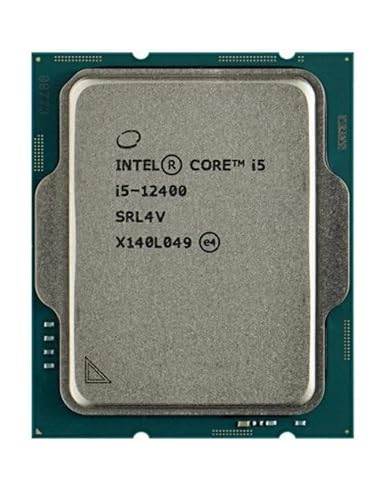
Intel Core i5-12400 (6-Core)
For streamers on a budget who use GPU (NVENC) encoding, the Core i5-12400 is a smart, efficient pick. Its six cores handle gaming smoothly, and offloading encoding to the GPU keeps the CPU free, delivering clean 1080p streams at a fraction of the cost of a flagship chip. It even includes a cooler in the box, saving money on the build.
Streaming-Ready Prebuilt (Ryzen 7 7800X3D, RTX 5070)
The STORMCRAFT Falcon prebuilt pairs a Ryzen 7 7800X3D with an RTX 5070, 32GB of DDR5, and a 1TB SSD, making it a turnkey streaming and gaming rig. The 7800X3D is a gaming standout, and the RTX 5070 handles NVENC encoding effortlessly, so you get a broadcast-ready machine without building or troubleshooting anything.
Matching Your CPU to Your Encoding
The right CPU depends heavily on how you encode. If you rely on GPU NVENC, a six-core chip like the i5-12400 is plenty. If you want the highest-quality x264 CPU encoding or run heavy multitasking alongside your stream, step up to a 12-core Ryzen 9 so nothing drops frames when your channel gets busy.
Frequently Asked Questions
How many cores do I need to stream and game?
With GPU (NVENC) encoding, six cores like the i5-12400 stream 1080p smoothly. For CPU (x264) encoding or heavier multitasking, a 12-core chip such as the Ryzen 9 7900X or 5900X gives the headroom to keep both game and stream running without stutter.
Should I use CPU or GPU encoding?
GPU encoding (NVENC on NVIDIA cards) is efficient, offloads work from the CPU, and looks excellent, making it the easiest choice for most streamers. CPU x264 encoding can offer slightly higher quality at high bitrates but demands a high-core-count processor to avoid dropped frames.
Is the Ryzen 9 7900X or 5900X better for streaming?
Both have 12 cores and 24 threads. The 7900X is faster and on the newer AM5 platform with DDR5 and a longer upgrade path, while the 5900X is a better value on the mature AM4 platform. Choose based on your budget and whether you want future upgradability.
Do I need a special cooler for a streaming CPU?
High-core chips like the 7900X run hot under simultaneous gaming and encoding, so a good air or liquid cooler is important to maintain boost clocks. Budget chips like the i5-12400 run cooler and include a stock cooler that handles typical streaming loads.
Final Thoughts
For the best streaming experience in 2026, a 12-core CPU like the AMD Ryzen 9 7900X gives you the headroom to game and encode without compromise, while the Ryzen 9 5900X delivers the same core count for less on AM4. Budget streamers using GPU encoding will be well served by the efficient Intel Core i5-12400, and anyone wanting a ready-made solution can grab a prebuilt with a 7800X3D and RTX 5070. Match the chip to your encoding method and your channel will run smoothly.