Key takeaways
- Buying by percentage alone. A 75% keyboard can be deeper than a slim TKL. Compare the manufacturer’s width, depth, and front height, not just the layout label.
- Forgetting the mouse zone. A full-size board may technically fit, yet force the mouse into an awkward position on a narrow desk.
- Ignoring height. Taller mechanical cases may need a wrist rest, which adds depth and changes your sitting position.
- Assuming compact means easier. A 60% keyboard saves space but moves arrows, F-keys, Print Screen, and navigation commands to layers. That can slow office tasks.
- Choosing a number pad “just in case.” If you rarely type columns of numbers, a TKL can be more comfortable every day and free valuable desk space.
- Not accounting for cables and accessories. USB passthrough ports, charging cables, speakers, and monitor bases can reduce the usable area around a keyboard.
The Short Answer
For most people, a tenkeyless (TKL) Razer keyboard is the best balance of desk space, comfortable typing, and gaming room. It measures roughly 14.3 inches wide (36.2 cm), compared with about 17.5 to 18 inches (44.5 to 45.7 cm) for a full-size board. Removing the number pad gives your mouse hand several more inches of room without making everyday typing feel radically different.
Choose a full-size Razer keyboard if you enter numbers frequently for work, school, budgeting, spreadsheets, or creative software. Choose a 60% or 65% model if your desk is narrow, you play low-sensitivity PC games, travel with your keyboard, or simply prefer a cleaner setup. A 75% keyboard is the middle-ground choice for buyers who want dedicated arrow keys and a function row in a compact footprint.
Our top picks
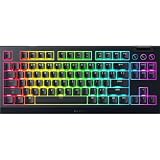
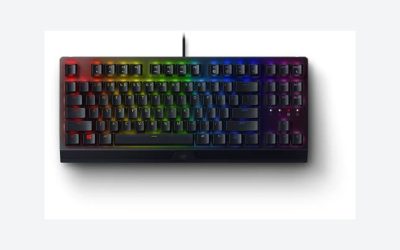
 Razer BlackWidow V3 TKL Mechanical Gaming Keyboard
- Razer Yellow Mechanical Switches: Built for speed with…
- Ultimate Personalization & Gaming Immersion with Razer Chroma:…
- Compact form factor: The tenkeyless design allows for…
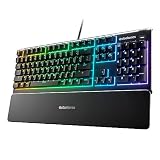
 Razer Ornata V3 Gaming Keyboard
Low-profile keys support natural hand positioning over long sessions
Mecha-membrane switches blend mechanical feedback with a familiar feel
UV-coated keycaps resist fading from frequent use
Magnetic wrist rest is a separate accessory piece to keep track of
Mecha-membrane switches may feel less precise than true mechanical switches
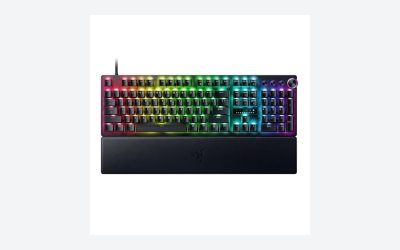
 Razer BlackWidow V3 Mechanical Gaming Keyboard: Green
- High-Quality Tactile and Clicky Switches: This Gaming Keyboard…
- Vibrant Chroma RGB Lighting: The keyboard features Razer's…
- Compact Form Factor: The Razer BlackWidow V3 Mechanical…
| Product | Key specs | |
|---|---|---|
| Razer BlackWidow V3 TKL Mechanical Gaming Keyboard | Razer Yellow Mechanical Switches: Built for speed with… Ultimate Personalization & Gaming Immersion with Razer Chroma:… Compact form factor: The tenkeyless design allows for… | Check price |
| Razer Ornata V3 Gaming Keyboard | Check price | |
| Razer BlackWidow V3 Mechanical Gaming Keyboard: Green | High-Quality Tactile and Clicky Switches: This Gaming Keyboard… Vibrant Chroma RGB Lighting: The keyboard features Razer's… Compact Form Factor: The Razer BlackWidow V3 Mechanical… | Check price |
 Razer BlackWidow V3 Mechanical Gaming Keyboard Razer BlackWidow V3 Mechanical Gaming Keyboard | Clicky, tactile feel with satisfying feedback in every… Clear design that displays the true brilliance of… More durable than regular keycaps and more resistant… | Check price |
As an Amazon Associate we earn from qualifying purchases at no extra cost to you.
In 2026, the practical question is not just how many keys you want—it is whether the keyboard leaves enough clearance for your mouse, monitor stand, desk accessories, and wrists.
Standard Sizes
Keyboard percentages describe the number and arrangement of keys compared with a conventional full-size layout. Measurements vary slightly by model because of bezels, media controls, wrist rests, and case shapes, but the dimensions below reflect common Razer examples and give useful planning measurements.
| Form factor | Keys and layout | Typical Razer example | Keyboard dimensions | Best for |
|---|---|---|---|---|
| Full-size (100%) | 104 or more keys; includes number pad, arrows, navigation cluster, and function row | Razer Ornata V3 | 17.46 x 5.68 x 1.23 in 44.35 x 14.43 x 3.12 cm |
Number entry, office work, general home use |
| Full-size (100%) mechanical | Full layout; may add media controls, macro keys, or USB passthrough | Razer BlackWidow V3 | About 17.8 x 6.1 x 1.7 in 45.2 x 15.5 x 4.3 cm |
Buyers who want every key and a substantial mechanical feel |
| Tenkeyless (TKL / 80%) | About 87 keys; removes the number pad | Razer BlackWidow V3 TKL | About 14.3 x 6.1 x 1.6 in 36.2 x 15.5 x 4.1 cm |
Most gamers and shared work-and-play desks |
| 75% | Function row, arrows, and compact navigation keys; tightly grouped layout | Razer BlackWidow V4 75% | About 12.6 x 6.1 x 1.5 in 32.0 x 15.5 x 3.8 cm |
Compact desks without giving up function keys |
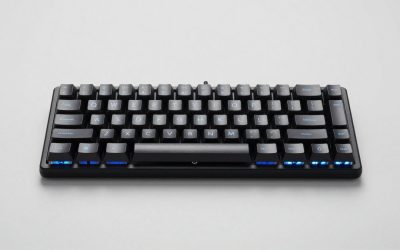
| 65% | Usually includes arrows and a small navigation column; no dedicated function row | Razer BlackWidow V3 Mini HyperSpeed | About 12.5 x 4.1 x 1.5 in 31.8 x 10.4 x 3.8 cm |
Small desks, wireless setups, occasional travel |
| 60% | About 61 keys; no arrows, navigation cluster, or dedicated function row | Razer Huntsman Mini | About 11.5 x 4.1 x 1.5 in 29.2 x 10.4 x 3.7 cm |
Maximum mouse space and minimalist gaming setups |
Depth matters nearly as much as width. A low-profile keyboard such as the Ornata V3 sits about 1.23 inches high before its feet are raised, while a conventional mechanical board can be around 1.6 to 1.7 inches tall. If you dislike a sharply bent wrist position, budget for a wrist rest or choose a low-profile design.
Price also tends to rise with wireless features, premium switches, lighting, and controls—not only size. Basic full-size Razer models can start around $60, while mechanical full-size and TKL boards often fall around $75 to $150. For context, a BlackWidow V3 TKL may be priced around $95, an Ornata V3 around $60, and a BlackWidow V3 mechanical model from roughly $76 renewed to about $140 in a specialty color or configuration.
How to Measure Your Space
- Measure the clear desk width. Measure the usable area between a desktop tower, speaker, drawer unit, monitor arm, or other permanent obstacles. Do not measure the entire desktop if part of it is occupied.
- Reserve space for the mouse. Plan for at least 10 to 12 inches (25 to 30 cm) of open mouse area beside the keyboard for ordinary use. Low-sensitivity gaming can require 16 to 20 inches (41 to 51 cm) or more.
- Add clearance around the keyboard. Leave at least 1 inch (2.5 cm) at each side so the board does not feel wedged in. If you use a large desk mat, this also prevents the keyboard from sitting on its stitched edge.
- Measure desk depth. A desk depth of 24 inches (61 cm) works for most keyboards, but 20 inches (51 cm) can feel tight once you add a wrist rest. Leave roughly 3 to 4 inches (7.6 to 10.2 cm) between the keyboard’s front edge and the desk edge for forearm support.
- Include a wrist rest if you will use one. A full-size or TKL wrist rest commonly adds 3 to 4 inches (7.6 to 10.2 cm) of depth. This is especially important with taller mechanical keyboards.
- Mock up the footprint. Tape a rectangle on the desk using the measurements of your preferred model. Sit down, place your mouse where you naturally use it, and check whether your shoulders and wrists remain relaxed.
By Room or Use Case
Small Bedroom Desk or Apartment Workstation
Choose a 65%, 75%, or TKL keyboard for a desk that is 36 to 48 inches wide (91 to 122 cm). A 60% board is the strongest space saver at about 11.5 inches wide, but it requires function-layer shortcuts for arrows, function keys, and navigation commands. A 75% board is often easier to live with because it preserves dedicated arrow keys and the F-row while remaining close to 12.6 inches wide.
Home Office and Spreadsheet Work
Choose full-size if you type invoices, enter financial figures, work with inventory, or use spreadsheet shortcuts regularly. The number pad is about 4 inches (10 cm) of additional width compared with a TKL board, but it is faster and more natural for repeated numeric entry. A low-profile full-size option such as the Ornata V3 can also be appealing for users who prefer a lower front edge and a less bulky visual profile.
Gaming Desk With a Large Mouse Pad
Choose TKL, 75%, 65%, or 60%. For first-person shooters, the missing number pad lets you move the keyboard left and bring the mouse closer to your body’s centerline. TKL is the safest recommendation if you still use arrow keys, Home/End, or function keys often. Pick 60% only if you are comfortable using secondary key functions and prioritize the widest possible mouse sweep.
Living Room, Media PC, or Flexible Setup
A 65% wireless keyboard is usually the easiest size to store in a cabinet or carry between rooms. Its roughly 12.5-inch width fits more easily on a lap desk, side table, or coffee table than a 17.5-inch full-size model. Check the actual model’s connectivity before buying: keyboard dimensions do not indicate whether it supports wired USB, Bluetooth, or a 2.4 GHz wireless receiver.
Shared Family Computer
Use a full-size keyboard when several people use one computer for homework, forms, passwords, and casual games. The familiar layout has the smallest learning curve. If the desk is only 40 inches wide (102 cm), a TKL is a sensible compromise: it keeps the standard main typing area, arrows, and navigation keys while reducing width by roughly 3.5 inches (9 cm).
Common Sizing Mistakes
- Buying by percentage alone. A 75% keyboard can be deeper than a slim TKL. Compare the manufacturer’s width, depth, and front height, not just the layout label.
- Forgetting the mouse zone. A full-size board may technically fit, yet force the mouse into an awkward position on a narrow desk.
- Ignoring height. Taller mechanical cases may need a wrist rest, which adds depth and changes your sitting position.
- Assuming compact means easier. A 60% keyboard saves space but moves arrows, F-keys, Print Screen, and navigation commands to layers. That can slow office tasks.
- Choosing a number pad “just in case.” If you rarely type columns of numbers, a TKL can be more comfortable every day and free valuable desk space.
- Not accounting for cables and accessories. USB passthrough ports, charging cables, speakers, and monitor bases can reduce the usable area around a keyboard.
FAQ
What Razer keyboard size is best for most people?
A TKL keyboard is best for most people. At roughly 14.3 inches wide (36.2 cm), it retains the function row, arrow keys, and navigation cluster while removing the number pad. It works well for gaming, schoolwork, writing, and typical home-office tasks.
Should I get a 60% or 65% Razer keyboard?
Get a 65% keyboard if you want compact dimensions but use arrow keys frequently. It is only about 1 inch (2.5 cm) wider than many 60% models, yet it usually provides dedicated arrows and a few navigation keys. Choose 60% when desk space and mouse room matter more than shortcut convenience.
Is a full-size Razer keyboard too big for gaming?
No, but it is less space-efficient. A full-size board is typically 17.5 to 18 inches wide, which can crowd a mouse pad on smaller desks. It remains a good choice for games that use the number pad, players who need many bound keys, and anyone who also does substantial numeric work.
How much desk width do I need for a full-size keyboard?
A 48-inch-wide desk (122 cm) is comfortable for a full-size keyboard and a normal mouse area. A 40-inch desk (102 cm) can work, but a TKL or 75% model will leave more room for the mouse, speakers, and other accessories. For a 60% or 65% keyboard, a 36-inch desk (91 cm) is often plenty when the monitor is mounted or centered efficiently.