Our Top Picks
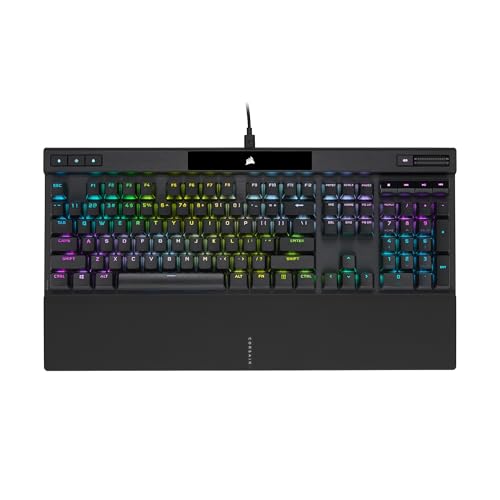
 Corsair K70 RGB MK.2 Mechanical Gaming KeyboardMX Red- Linear17.24 x 6.53 x 1.53 inches2.76 poundsCheck on Amazon
As an Amazon Associate we earn from qualifying purchases.
Cherry MX Red is one of the easiest mechanical switches to live with. It is linear, which means the key travels straight down with no tactile bump and no click, and it is light, so repeated presses in fast games feel quick and effortless. That combination made it a favourite for first-person shooters, action games and anyone who double-taps movement keys all evening, and it also suits long typing sessions for people who prefer a smooth keystroke over a pronounced bump.
There is a catch when you shop for one today. Many keyboards advertise a red switch that is not made by Cherry at all. Gateron Red, Kailh Red, HyperX Red and various optical red switches can feel similar, but they are different products. If you want the genuine German switch, the listing has to say Cherry MX Red in plain language. Every keyboard here was chosen because its Amazon listing or product record names Cherry MX Red as the fitted switch.
Below are five genuine Cherry MX Red keyboards: a modern full-size flagship, a classic full-size board with a USB passthrough, two HyperX models with steel frames and media controls, and a tenkeyless Ducky for smaller desks.
Disclosure: This article contains affiliate links. If you buy through a link on this page, we may earn a commission at no extra cost to you.
Quick Picks
- Best overall: Corsair K70 RGB PRO — genuine Cherry MX Red switches, very fast polling, PBT double-shot keycaps and a tournament switch in a full-size aluminium frame.
- Best classic full-size: Corsair K70 RGB MK.2 — Cherry MX Red switches, per-key RGB, a USB passthrough port, onboard profile storage and a detachable wrist rest.
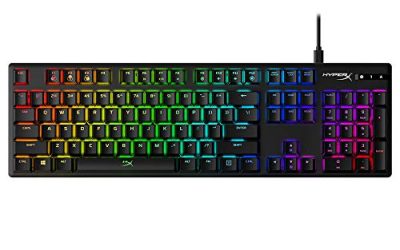
- Best for RGB and media controls: HyperX Alloy Elite RGB — Cherry MX Red switches, a solid steel frame, a light bar, dedicated media buttons and a USB passthrough.
- Best simple red-backlit board: HyperX Alloy Elite — the original model with Cherry MX Red switches, red backlighting, a steel frame, an included wrist rest and extra gaming keycaps.
- Best tenkeyless: Ducky One 3 TKL — Cherry MX Red switches in a compact layout, with hot-swappable sockets, PBT double-shot keycaps and a detachable USB-C cable.
What Cherry MX Red Actually Feels Like
A Cherry MX Red switch actuates with a light force of around forty-five grams, registers partway down its travel and bottoms out smoothly with no bump in between. Because there is nothing to push past, fast repeated presses feel direct, and strafing, counter-strafing and rapid ability keys become easy to repeat without finger fatigue. The trade-off is feedback. With no tactile point to confirm a press, new users sometimes trigger neighbouring keys by resting their fingers too heavily, and touch typists who like a bump often prefer a brown or blue switch instead.
Noise is the other practical point. A standard Cherry MX Red is not silent, because the keycap still makes a sound when it bottoms out, but it has no click mechanism, so it is far easier to use in a shared room or on voice chat than a clicky board. Note that Cherry MX Silent Red is a different, dampened variant. It is a fine switch, but it is not the standard Red, so check which one a listing describes before you buy.
The Best Cherry MX Red Keyboards
1. Corsair K70 RGB PRO — Best Overall
The K70 RGB PRO is the modern version of Corsair’s long-running K70 line, and its Amazon listing is explicit about the hardware that matters here: Cherry MX Red linear switches. Corsair builds the board around its AXON hyper-processing technology, which polls the keyboard far faster than a conventional wired board, and pairs that with full n-key rollover and anti-ghosting, so complex inputs register cleanly even when several keys go down at once.
The frame is anodised aluminium, the keycaps are PBT double-shot, which resists shine and keeps legends crisp, and the lighting is per-key RGB controlled through Corsair’s iCUE software. A tournament switch on the back flips the board into a competition-ready state by disabling macros and locking the lighting to a static colour. There is onboard storage for multiple profiles, a detachable USB-C cable and a magnetic soft-touch palm rest.
This is the pick for a player who wants one full-size board that does everything: fast polling for competitive play, durable keycaps, proper media controls including a volume roller, and the smooth, light travel of genuine Cherry MX Red switches.
Key specs
- Switch: Cherry MX Red, linear
- Layout: Full-size, QWERTY North American layout
- Frame: Anodised aluminium
- Keycaps: PBT double-shot
- Polling: AXON hyper-polling up to the board’s highest wired rate
- Features: Per-key RGB, tournament switch, onboard profile storage, detachable USB-C cable, magnetic palm rest, n-key rollover
Pros
- Genuine Cherry MX Red switches named in the listing title
- Very fast wired polling for competitive games
- Durable PBT double-shot keycaps
- Tournament switch and onboard profiles suit organised play
Cons
- Full-size footprint takes up a lot of desk space
- Wired only, with no wireless option
- iCUE software is needed to get the most from lighting and macros
See the Corsair K70 RGB PRO on Amazon
2. Corsair K70 RGB MK.2 — Best Classic Full-Size
The K70 RGB MK.2 is the earlier generation of the same formula, and for many buyers it remains the sweet spot. Its listing describes a mechanical gaming keyboard with USB passthrough and media controls, linear and quiet operation, and Cherry MX Red switches behind RGB LED backlighting. The model number for the Red version is CH-9109010-NA, which is worth checking on any listing, because the MK.2 was also sold with other Cherry MX switch types.
You get the same aircraft-grade anodised aluminium frame the K70 line is known for, per-key RGB lighting, dedicated multimedia controls with a volume roller, and a USB passthrough port that is handy for a mouse receiver or headset dongle. Onboard storage keeps lighting and macro profiles on the keyboard itself, and a detachable soft-touch wrist rest is included. Textured replacement keycaps for the most-used gaming keys are another practical touch carried over from the line’s gaming roots.
Choose the MK.2 if you like the K70 shape and feature set and value the passthrough port and onboard storage, and make sure the variant in the basket is the Cherry MX Red one rather than the Speed or Brown version.
Key specs
- Switch: Cherry MX Red, linear
- Layout: Full-size, model CH-9109010-NA
- Frame: Anodised aluminium
- Keycaps: Large-font keycaps with textured gaming replacements
- Features: Per-key RGB, USB passthrough, dedicated media controls and volume roller, onboard profile storage, detachable wrist rest, n-key rollover
Pros
- Genuine Cherry MX Red variant clearly identified by model number
- USB passthrough is genuinely useful on a desk setup
- Strong aluminium build with a wrist rest included
- Onboard storage keeps profiles without software running
Cons
- Older generation, so no detachable cable
- Keycaps are not the PBT set fitted to the newer PRO model
- Several switch variants exist, so the variant must be checked carefully
See the Corsair K70 RGB MK.2 on Amazon
3. HyperX Alloy Elite RGB — Best for RGB and Media Controls

The Alloy Elite RGB takes a different route to the same switch. Its Amazon listing names Cherry MX Red in the title and describes software-controlled light and macro customisation, a wrist rest and media controls. Under the lighting sits a solid steel frame, which gives the board a planted, heavy feel that does not slide around during intense sessions.
HyperX adds a wide light bar across the top of the board on top of per-key RGB, plus dedicated media buttons and a large volume wheel that are easy to find without looking down. There is a USB 2.0 passthrough port, a detachable wrist rest, and textured titanium-coloured gaming keycaps in the box for the keys your fingers need to locate by touch. Customisation runs through HyperX NGenuity software, where lighting and macros can be saved to onboard profiles.
This model suits a gamer who wants a full-featured, full-size board with strong lighting and proper media hardware, and who wants the reliability of genuine Cherry MX switches rather than HyperX’s own switches, which are fitted to the later Alloy Elite 2 instead.
Key specs
- Switch: Cherry MX Red, linear
- Layout: Full-size, model HX-KB2RD2-US/R1
- Frame: Solid steel
- Keycaps: ABS, with textured titanium-coloured gaming keycaps included
- Features: Per-key RGB plus light bar, dedicated media buttons and volume wheel, USB 2.0 passthrough, detachable wrist rest, NGenuity software
Pros
- Genuine Cherry MX Red switches named in the listing title
- Steel frame feels exceptionally solid
- Dedicated media controls and a large volume wheel
- Light bar and per-key RGB give strong desk presence
Cons
- Heavy, so it is not a board to carry between setups
- Stock keycaps are ABS rather than PBT
- Cable is fixed rather than detachable
See the HyperX Alloy Elite RGB on Amazon
4. HyperX Alloy Elite — Best Simple Red-Backlit Board
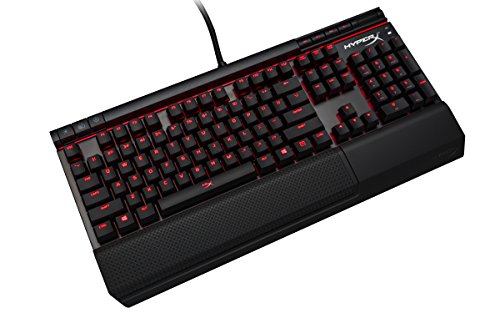
The original Alloy Elite keeps the steel frame and the Cherry MX Red switches and drops the full RGB system in favour of straightforward red LED backlighting with a row of lighting effects and an eighteen-LED light bar along the top. Its listing describes a radiant light bar, an included wrist rest and gaming keycaps, media controls, and linear and quiet Cherry MX Red switches, with model number HX-KB2RD1-US/R1.
For a lot of desks, that simpler formula is exactly right. You still get dedicated media controls, a USB passthrough, anti-ghosting with n-key rollover, Game Mode, and the same solid steel construction as the RGB version, without needing software to manage a complex lighting setup. The included textured gaming keycaps and keycap puller make the most-used keys easy to find by feel.
Pick this version if you want genuine Cherry MX Red switches in a durable full-size board and prefer a single-colour backlight you can set and forget. As with the Corsair models, confirm the Red variant at checkout, because this board was also sold with Cherry MX Blue and Brown switches.
Key specs
- Switch: Cherry MX Red, linear
- Layout: Full-size, model HX-KB2RD1-US/R1
- Frame: Solid steel
- Backlighting: Red LED with light bar
- Features: Dedicated media controls, USB passthrough, detachable wrist rest, textured gaming keycaps and puller included, Game Mode, n-key rollover
Pros
- Genuine Cherry MX Red switches named in the listing title
- Simple, effective single-colour backlighting
- Steel frame and included wrist rest
- Extra textured gaming keycaps in the box
Cons
- No per-key RGB customisation
- Fixed cable and a heavy chassis
- Shared model family with Blue and Brown variants, so check before buying
See the HyperX Alloy Elite on Amazon
5. Ducky One 3 TKL — Best Tenkeyless

The Ducky One 3 TKL trims the number pad away and adds the enthusiast features the big gaming brands often skip. Listings for this model name Cherry MX Red as the fitted switch, and the board is hot-swappable, using Kailh sockets on the PCB, so the Cherry MX Red switches it ships with can later be pulled and replaced without soldering if you ever want to experiment.
Ducky’s QUACK Mechanics design shows up in the details: true PBT double-shot keycaps, sound-dampening layers in the case, well-tuned stabilisers for the large keys, three-level adjustable feet and a detachable braided USB-C cable. Lighting is per-key RGB, macros are handled on the board itself rather than through heavy software, and the tenkeyless layout leaves far more room for wide mouse movements, which is why so many competitive players prefer this size.
This is the right choice if you want genuine Cherry MX Red switches in a compact board with premium keycaps out of the box and the freedom to change switches later. Because Ducky sells the One 3 in many switch and colour combinations, check that the listing variant says Cherry MX Red, not Silent Red, Brown or Blue.
Key specs
- Switch: Cherry MX Red, linear, hot-swappable
- Layout: Tenkeyless, eighty-seven keys
- Keycaps: PBT double-shot
- Connection: Detachable USB-C, wired
- Features: Per-key RGB, Kailh hot-swap sockets, sound dampening, adjustable feet, onboard macros, n-key rollover
Pros
- Genuine Cherry MX Red variant with hot-swap sockets for later changes
- Excellent PBT double-shot keycaps as standard
- Compact layout frees up mouse space
- Detachable cable and minimal software dependence
Cons
- No number pad, media roller or passthrough port
- Many colour and switch variants make careful checking essential
- Wired only
See the Ducky One 3 TKL on Amazon
How to Choose a Cherry MX Red Keyboard
Verify the switch first. This is the whole point of the category. The listing should say Cherry MX Red in the title, the style name or the switch specification. A keyboard described only as having red switches, linear red switches or a named house switch is a different product. The HyperX Alloy Elite 2, for example, uses HyperX Red switches, and Corsair’s Rapidfire models use Cherry MX Speed, so neither belongs in a Cherry MX Red shortlist even though both are linear and red in name or colour.
Pick a layout that fits your desk. Full-size boards keep the number pad and usually add media controls, volume rollers and passthrough ports. Tenkeyless boards drop the pad, sit more centrally and leave room for your mouse. If you play shooters with a low sensitivity, the extra mouse room of a TKL board is a real advantage.
Look at the keycaps. PBT double-shot keycaps, as fitted to the K70 RGB PRO and the Ducky One 3, resist shine and wear far better than basic ABS caps. If you type all day on the same board you game on, this difference shows within a year or two.
Decide which extras matter. A USB passthrough, detachable cable, onboard profiles and a tournament switch are all useful, but to different people. Tournament players should value the lock-down switch, desk workers the passthrough and media wheel, and enthusiasts hot-swap sockets.
Remember what Red does not do. There is no tactile confirmation and no click. If you bottom out heavily, any of these boards will still make noise, and if you want a quieter genuine Cherry option you should look at the separate Cherry MX Silent Red variant rather than assuming a standard Red board is silent.
FAQs
Are Cherry MX Red switches good for typing?
Yes, for many people. The light, smooth travel is easy on the fingers. Typists who rely on tactile feedback to avoid mistakes may make more errors at first, because there is no bump to signal a press, but most adapt quickly.
What is the difference between Cherry MX Red and Cherry MX Silent Red?
Silent Red adds dampening inside the switch to soften the sound at the top and bottom of the stroke. The feel is slightly softer and the sound is lower. It is a separate variant, so a listing for one should not be read as the other.
How can I tell a real Cherry MX Red keyboard from a lookalike?
Read the switch line, not the headline colour. The listing should name Cherry MX Red as the switch and ideally give a manufacturer model number for that variant. House switches such as Gateron Red, Kailh Red or HyperX Red are legitimate products, but they are not Cherry switches.
Is a tenkeyless Cherry MX Red keyboard better for gaming?
It can be. Dropping the number pad lets you place the mouse closer and sweep it more widely, which helps in shooters. You lose the pad for spreadsheet work and some games with many bindings, so it depends on how you use the board outside matches.
Do Cherry MX Red switches wear out quickly?
No. Cherry MX switches are rated for very long service lives, and the switch is rarely the part that ends a keyboard’s life. Keycap shine, cables and stabilisers are more common reasons to upgrade, which is why PBT keycaps and detachable cables are worth looking for.
Conclusion
Genuine Cherry MX Red keyboards are harder to find than the flood of red-switch boards suggests, which is why the switch line in the listing matters more than the marketing. For most gamers, the Corsair K70 RGB PRO is the complete package: real Cherry MX Red switches, fast polling, PBT keycaps and a tournament switch. The K70 RGB MK.2 and the two HyperX Alloy Elite models deliver the same genuine switch in proven full-size designs, while the Ducky One 3 TKL is the compact, customisable option with hot-swap sockets and excellent stock keycaps. Whichever shape fits your desk, confirm the variant says Cherry MX Red before you check out, and you will get the light, smooth, linear feel that made this switch a standard.
More from Amazon
Programs that pair well with the guide above. Offers and eligibility are set by Amazon and may change.
Free shipping on eligible items, Prime Video and more. Eligible new members can start with a free trial.
Start a Prime free trialAd-free music streaming. Eligible new subscribers can start with a free trial.
Try Music Unlimited freeA Prime membership for ages 18-24 with a trial period. Eligibility is set by Amazon.
See Prime for Young AdultsAudiobooks and podcasts to listen to on the go. Eligible new members can start with a free trial.
Try Audible freeAs an Amazon Associate we earn from qualifying purchases.