Escape from Tarkov punishes sloppy aim more than most shooters. Raids run long, fights often end with a single well-placed shot, and a sensor that drifts or smooths movement can cost a full kit. The right mouse tracks exactly where the hand moves, stays light through a 40-minute raid, and keeps the binds that matter under the thumb. This guide compares five mice that fit that job, chosen from current Amazon listings for their sensors, shapes, and layouts.
The five picks cover different Tarkov players: methodical angle-holders, aggressive pushers, and bind-heavy looters. Lightweight wireless models lead the list for their tracking and comfort, while a wired ergonomic option and a marathon-battery wireless mouse round it out. Every mouse here uses a current sensor from its maker, so the choice comes down to grip, weight, and how many buttons the raid demands.
Quick Picks
As an Amazon Associate we earn from qualifying purchases
Product
Best for
Key spec
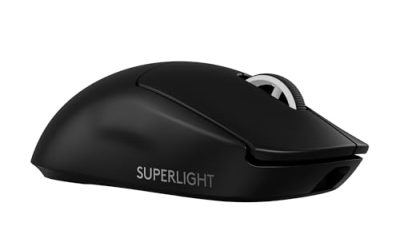
Logitech G Pro X Superlight 2 DEX
Tournament-grade tracking in long raids
HERO 2 sensor, 44K DPI, 60 g
Razer DeathAdder V3
Palm-grip comfort with no battery to charge
Focus Pro 30K sensor, 59 g
Glorious Model O 2 Wireless
Fast flicks in a light symmetrical shell
BAMF 2.0 sensor, 68 g
Logitech G502 X Lightspeed
A button for every Tarkov action, wireless
HERO 25K sensor, 13 controls
SteelSeries Aerox 5 Wireless
Extra binds plus marathon battery
TrueMove Air 18K sensor, 9 buttons
How to Choose
Sensor Accuracy Above All
Tarkov rewards patience: holding an angle, tracking a distant figure across a field, and landing one clean shot. A sensor with smoothing or acceleration shifts the crosshair away from where the hand moves, which costs fights at range. Look for a modern optical sensor that tracks without filtering, with high IPS so fast flicks stay on target. DPI range matters less than tracking quality, since most Tarkov players run low sensitivity. Every mouse in this guide uses a sensor from its maker’s current lineup, so the choice comes down to shape and extras rather than raw tracking power.
Weight and Shape for Long Raids
A Tarkov raid can run 40 minutes, and a full session stretches for hours. A heavy mouse drags on the wrist during slow, careful movement, while a light mouse stays nimble for flicks and quick turns. Shape matters just as much: a palm grip needs a tall, full shell, while claw and fingertip grips favor lower, shorter bodies. Match the mouse to the grip you already use rather than forcing a new one. If possible, check hand measurements against the shell dimensions on the listing before ordering.
Buttons and DPI Control
Tarkov has more binds than most shooters: lean left and right, slow walk, hold breath, check chamber, reload, heal, and switch fire mode. Extra side buttons keep those actions under the thumb instead of stretching for the keyboard. A DPI-shift button also helps, since scoped shots call for lower sensitivity than hipfire. On-mouse DPI controls let you change sensitivity mid-raid without opening software. Count the buttons you actually use before buying, since a crowded layout can cause misclicks under pressure.
Connection and Battery Life
Wireless mice have closed the gap with wired models, and the flagship wireless mice in this guide poll at 1,000 Hz or higher with no perceptible lag. What matters is reliability: a stable 2.4 GHz link, a charged battery, and a polling rate that stays high during long sessions. Battery life varies widely, from 95 hours to 180 hours across the wireless mice here, so check the figure on the listing and charge between sessions. The wired DeathAdder V3 sidesteps the issue entirely, since it draws power from its cable.
The 5 Best Options
Logitech G Pro X Superlight 2 DEX
Top Pick
Logitech G Pro X Superlight 2 DEX
Best for: Tarkov players who want tournament-grade tracking in a light right-handed shell.
HERO 2 sensor, up to 44,000 DPI, 888 IPS, 88g acceleration
Tarkov players who want tournament-grade tracking in a light right-handed shell.
Watch out for
The shape suits right-handed palms and claws; left-handed players should look elsewhere. Confirm the DEX variant on the listing before ordering, since earlier Superlight models share a similar name.
The Superlight 2 DEX is Logitech’s right-handed redesign of its competition flagship, and it suits Tarkov’s slow, deliberate gunfights. Its HERO 2 sensor tracks cleanly at up to 44K DPI with no smoothing, so long-range shots across Woods or Shoreline land where the crosshair sits. At 60 grams it stays light through a full raid, and LIGHTSPEED wireless runs at up to 8 kHz polling for a wired-like feel. Five programmable buttons cover the essentials without clutter.
Watch out for: The shape suits right-handed palms and claws; left-handed players should look elsewhere. Confirm the DEX variant on the listing before ordering, since earlier Superlight models share a similar name.
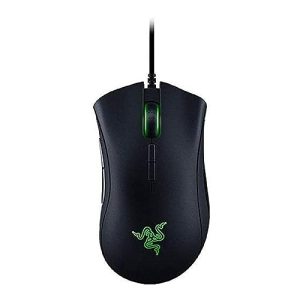
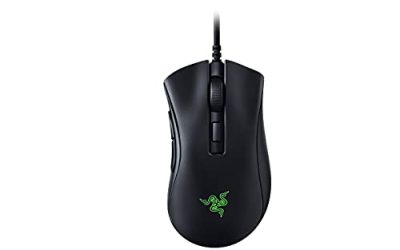
Razer DeathAdder V3
Runner-Up
Razer DeathAdder V3
Best for: Palm-grip players who want ergonomic comfort, flagship tracking, and no battery to watch.
The DeathAdder V3 is the wired version of Razer’s ergonomic flagship, and it keeps the same Focus Pro 30K sensor as the Pro in a lighter 59-gram shell while polling at 8,000 Hz over its Speedflex cable. That combination suits Tarkov’s slow, deliberate gunfights: tracking stays clean during long holds, and the cable never runs out of charge mid-raid. Gen-3 optical switches give a crisp click for single shots, and the right-handed shape supports the palm through long sessions. Six programmable buttons cover lean, heal, and DPI shift without clutter.
Watch out for: The wired V3 shares its name with the V3 Pro and V3 HyperSpeed, so confirm the listing names the wired model (RZ01-04640100-R3U1) before ordering.
Glorious Model O 2 Wireless
Glorious Model O 2 Wireless
Best for: Claw and fingertip players who flick between targets and want a light wireless shell.
BAMF 2.0 optical sensor, up to 26,000 DPI
68 g weight
2.4 GHz wireless and Bluetooth 5.2
Up to 110 hours of battery life on 2.4 GHz (210 hours on Bluetooth)
Claw and fingertip players who flick between targets and want a light wireless shell.
Watch out for
The Model O 2 also comes in wired and PRO versions with different weights and polling rates, so confirm the listing names the wireless model in Black before ordering.
The Model O 2 Wireless is the lightest wireless mouse in this guide after the Superlight 2 DEX, and its symmetrical shell suits claw and fingertip grips that favor quick flicks. Its BAMF 2.0 sensor tracks cleanly at low sensitivity, which suits Tarkov players who run a low DPI and a large mousepad. Two wireless modes cover different setups: 2.4 GHz for raids and Bluetooth for a laptop on the side. Battery runs up to 110 hours on 2.4 GHz, so a full week of evening raids runs on one charge.
Watch out for: The Model O 2 also comes in wired and PRO versions with different weights and polling rates, so confirm the listing names the wireless model in Black before ordering.
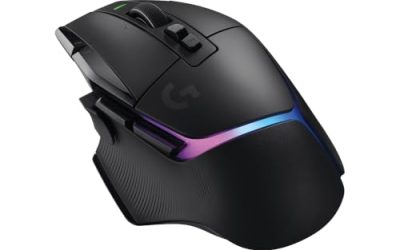
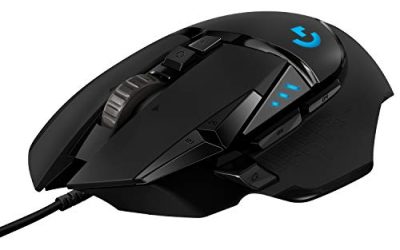
Logitech G502 X Lightspeed
Logitech G502 X Lightspeed
Best for: Tarkov players who want a button for every action and wireless freedom.
The G502 X Lightspeed is the pick for Tarkov players who bind everything: lean, peek, heal, reload, and loot all get a dedicated button across its 13 programmable controls. Its HERO 25K sensor tracks without smoothing, and LIGHTFORCE hybrid optical-mechanical switches keep clicks crisp. The dual-mode scroll wheel spins freely for fast inventory scrolling or clicks step by step for weapon selection. LIGHTSPEED wireless runs up to 140 hours on a charge, and the mouse stays charged on a POWERPLAY pad if you own one.
Watch out for: At 102 grams it is the heaviest mouse here, and the wired G502 X shares the name, so confirm the listing names LIGHTSPEED before ordering.
SteelSeries Aerox 5 Wireless
SteelSeries Aerox 5 Wireless
Best for: Tarkov players who want many binds, marathon battery life, and a light shell.
The Aerox 5 Wireless brings nine buttons and a 74-gram honeycomb shell to Tarkov, a useful mix for players who want binds without a heavy mouse. Its TrueMove Air sensor tracks up to 18,000 DPI, and Quantum 2.0 wireless runs on 2.4 GHz or Bluetooth, so the mouse can pair with a laptop for a second setup. Battery life runs up to 180 hours, and the IP54 water-resistant shell shrugs off spills during a long night of raids.
Watch out for: The honeycomb shell lets dust in more easily than a solid shell, and the shape runs narrow, so large hands should check the fit first.
Which One Fits Your Situation
You hold angles and play slow
Pick the Logitech G Pro X Superlight 2 DEX or the Razer DeathAdder V3. Both track cleanly at low sensitivity and stay comfortable during long holds. The Superlight 2 DEX suits right-handed players who want the lightest wireless shell here, while the DeathAdder V3 fits larger palm grips that need a full, supportive shape, and its cable means no battery to watch.
You push hard and flick between targets
Pick the Glorious Model O 2 Wireless. At 68 grams it moves fast, and its symmetrical shell suits claw and fingertip grips that favor quick flicks. Its BAMF 2.0 sensor tracks cleanly at low sensitivity, so a scoped shot stays steady, then you can switch back for close quarters without pausing.
You bind every action to the mouse
Pick the Logitech G502 X Lightspeed or the SteelSeries Aerox 5 Wireless. The G502 X Lightspeed offers 13 programmable controls and up to 140 hours of battery life, while the Aerox 5 Wireless packs 9 buttons into a 74-gram shell with marathon battery life. Either one keeps lean, heal, and loot binds under the thumb.
You raid for hours and hate charging
Pick the SteelSeries Aerox 5 Wireless. Its battery runs up to 180 hours, the longest in this guide, so a full week of evening raids runs on one charge. The G502 X Lightspeed also lasts up to 140 hours, and the Model O 2 Wireless up to 110 hours, so either one covers long sessions.
Common Mistakes
Running maximum DPI: Tarkov favors low sensitivity for precise aim, and a huge DPI number does not help if the crosshair jumps past targets.
Choosing a mouse by weight alone: a light mouse with the wrong shape still causes fatigue during long raids.
Ignoring the grip: palm, claw, and fingertip grips need different shell shapes, so match the mouse to your grip.
Forgetting a DPI shift for scopes: scoped shots need lower sensitivity than hipfire, so a DPI button or on-mouse control helps.
Buying wireless without checking battery life: a dead mouse mid-raid ends the run, so charge between sessions.
Frequently Asked Questions
What DPI should I use in Tarkov?
Most Tarkov players run 400 to 800 DPI with a low in-game sensitivity, since slow, precise aim matters more than fast turns. The exact number depends on mousepad size and grip, so lower the sensitivity until crosshair movement feels steady, then adjust in small steps. Any mouse in this guide tracks cleanly at those settings.
Is a wireless mouse good enough for Tarkov?
Yes. Modern wireless mice from Logitech, Razer, and SteelSeries poll at 1,000 Hz or higher with no perceptible lag, and their sensors match wired models. Keep the battery charged and the receiver close to the mouse for a stable link. If you never want to think about charging, a wired mouse like the DeathAdder V3 removes the question entirely.
Do I need extra buttons for Tarkov?
Extra buttons help but are not required. Lean, slow walk, hold breath, and healing all sit on the keyboard by default, so a standard five-button mouse works fine. Extra side buttons simply move those actions to the thumb, which speeds up play during fights. Players who bind heavily should look at the G502 X Lightspeed or Aerox 5 Wireless.
Does mouse weight matter in Tarkov?
Yes, over a long session. A raid can run 40 minutes, and a heavy mouse adds wrist fatigue during slow movement and repeated flicks. Light mice from 59 to 74 grams stay nimble across hours of play, while heavier models suit players who value a planted, steady feel. Shape matters as much as weight, so fit comes first.
R
Razer Gaming Series Editorial Team
We compare specs, materials and verified owner reviews before a product earns a spot. Rankings are never paid.
FAQ
What DPI should I use in Tarkov?
Most Tarkov players run 400 to 800 DPI with a low in-game sensitivity, since slow, precise aim matters more than fast turns. The exact number depends on mousepad size and grip, so lower the sensitivity until crosshair movement feels steady, then adjust in small steps. Any mouse in this guide tracks cleanly at those settings.
Is a wireless mouse good enough for Tarkov?
Yes. Modern wireless mice from Logitech, Razer, and SteelSeries poll at 1,000 Hz or higher with no perceptible lag, and their sensors match wired models. Keep the battery charged and the receiver close to the mouse for a stable link. If you never want to think about charging, a wired mouse like the DeathAdder V3 removes the question entirely.
Do I need extra buttons for Tarkov?
Extra buttons help but are not required. Lean, slow walk, hold breath, and healing all sit on the keyboard by default, so a standard five-button mouse works fine. Extra side buttons simply move those actions to the thumb, which speeds up play during fights. Players who bind heavily should look at the G502 X Lightspeed or Aerox 5 Wireless.
Does mouse weight matter in Tarkov?
Yes, over a long session. A raid can run 40 minutes, and a heavy mouse adds wrist fatigue during slow movement and repeated flicks. Light mice from 59 to 74 grams stay nimble across hours of play, while heavier models suit players who value a planted, steady feel. Shape matters as much as weight, so fit comes first.
Affiliate disclosure. As an Amazon Associate we earn from qualifying purchases at no extra cost to you. Prices accurate as of the date shown.
Logitech Superlight 2, Razer Viper 8KHz, DeathAdder V3 HyperSpeed, G502 X and SteelSeries Aerox 3 Wireless lead this guide to the most precise gaming mice.
Best keyboards with RGB compared: ten wired, wireless and combo listings, plus a zone-versus-per-key table, a desk-port worked example and common mistakes.


 Logitech G502 X Lightspeed
 SteelSeries Aerox 5 Wireless