5 Best Gaming Mice for Precise Tracking (November 2026)
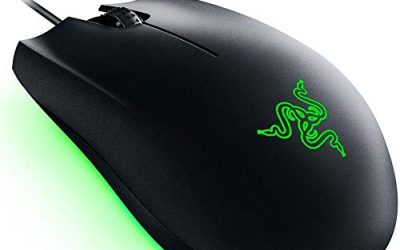
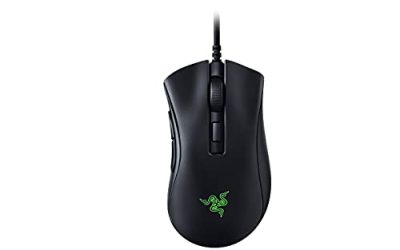
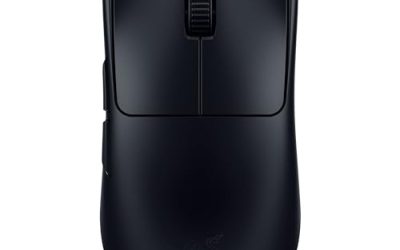
Logitech Superlight 2, Razer Viper 8KHz, DeathAdder V3 HyperSpeed, G502 X and SteelSeries Aerox 3 Wireless lead this guide to the most precise gaming mice.
Tracking accuracy is the difference between a flick that lands and one that sails past a target. A mouse with a flawless sensor holds its line during fast swipes, keeps 1-to-1 movement at low sensitivity, and never adds smoothing, jitter, or angle snapping that bends your aim. That matters most in competitive shooters, where crosshair placement lives or dies on small corrections. The five mice below were picked from their Amazon product pages for sensor quality first, with weight, polling, and shape as supporting factors.
This guide suits competitive FPS players who want dependable aim, low-sensitivity arm aimers who need clean tracking across a large pad, and anyone replacing a mouse that loses the surface during fast flicks. Every pick below lists its sensor, maximum DPI, polling, and weight exactly as shown on its Amazon listing, so you can compare the hardware before choosing.
Quick Picks
As an Amazon Associate we earn from qualifying purchases
Product
Best for
Key spec
Logitech G Pro X Superlight 2
Competitive FPS players who want the lightest pro-grade shell
HERO 2 sensor, 44,000 DPI, 8K polling
Razer Viper 8KHz
Symmetrical-shape fans who flick fast in ranked matches
Focus+ 20K sensor, 8K polling, 71 g
Razer DeathAdder V3 HyperSpeed
Palm-grip players who want an ergonomic right-handed shape
Focus X 26K sensor, 55 g, 100-hour battery
Logitech G502 X
Button-heavy players who want a wired mouse with many controls
HERO 25K sensor, 25,600 DPI, 13 controls
SteelSeries Aerox 3 Wireless
Lightweight fans who want long battery life and water resistance
TrueMove Air sensor, 18,000 CPI, 200-hour battery
How to Choose
Sensor quality comes first
The sensor decides whether the cursor follows your hand exactly. Look for a modern flagship optical sensor with no smoothing, filtering, or acceleration across its DPI range, and a high maximum DPI so you have headroom even if you play at 400 or 800 DPI. Spec sheets quote IPS (inches per second) and G acceleration; higher figures mean the sensor keeps up during violent flicks instead of losing the trail. A mouse that advertises 750 IPS and 50 G will hold its line better than an older sensor capped at 400 IPS. Glass tracking is a bonus if your desk has a glass surface, but most players should weigh raw accuracy above extra surface support.
Polling and lift-off distance
Polling is how often the mouse reports its position to your PC each second. A 1000 Hz mouse reports every millisecond, which is enough for most players, while 4000 Hz and 8000 Hz mice report far more often and feel slightly smoother in fast aim. The gain is real but small, and very high polling draws more battery in wireless mice, so weigh it against battery life. Lift-off distance matters just as much: a low lift-off distance near 1 mm stops the cursor from drifting when you lift the mouse to reposition it. If you lift often during low-sensitivity play, pick a mouse with adjustable lift-off distance in its software.
Weight and shape
A lighter mouse changes direction faster and tires your wrist less during long sessions, which is why most tracking-focused mice sit between 50 and 70 grams. Weight alone does not fix a bad shape, though. Your grip decides the shape: palm grippers need a taller, longer shell that fills the hand, claw grippers need a shorter shell with a defined hump, and fingertip grippers need a narrow, low shell. A mouse that fights your grip will hurt your aim no matter how good its sensor is. When possible, compare the length, width, and height figures on the listing with a mouse you already own before ordering.
Wired or wireless, and battery life
Wireless mice have closed the gap with wired models, and the flagship sensors in this guide perform the same over a 2.4 GHz link as they do on a cable. The real question is upkeep: a wireless mouse needs charging, and heavy polling shortens battery life, so check the rated hours at your polling setting, not just the headline figure. A wired mouse never needs charging and usually weighs less without a battery, but the cable can drag on the pad unless you route it with a bungee or a paracord-style cable. If you travel with your mouse, wireless wins on convenience; if you never want to think about charging, wired wins.
The 5 Best Options
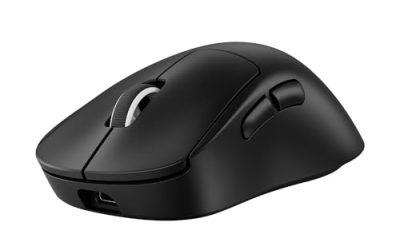
Logitech G Pro X Superlight 2
Top Pick
Logitech G Pro X Superlight 2
Best for: Competitive FPS players who want the lightest pro-grade mouse with a flagship sensor.
Competitive FPS players who want the lightest pro-grade mouse with a flagship sensor.
Watch out for
The symmetrical shape has no thumb rest, so palm grippers with large hands should check the dimensions first. Also confirm the listing shows the standard new model, since renewed units appear under similar titles.
The Superlight 2 is the default pick for players who want proven tracking in the lightest pro-grade shell Logitech makes. Its HERO 2 sensor tracks cleanly at up to 44,000 DPI with no smoothing, and the 60-gram body lets you change direction without fighting inertia. LIGHTSPEED wireless keeps the connection steady during fast play, and the five-button layout stays out of your way. This mouse suits competitive FPS players who value a simple, symmetrical shape and a sensor that never becomes the excuse for a missed shot.
Watch out for: The symmetrical shape has no thumb rest, so palm grippers with large hands should check the dimensions first. Also confirm the listing shows the standard new model, since renewed units appear under similar titles.
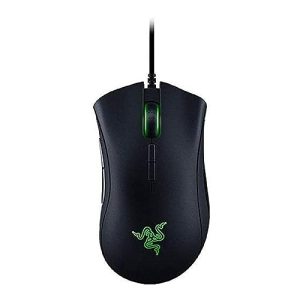
Razer Viper 8KHz
Runner-Up
Razer Viper 8KHz
Best for: Claw and fingertip players who want a wired mouse with true 8,000 Hz polling for ranked play.
Sensor: Focus+ 20K Optical Sensor, up to 20,000 DPI
Claw and fingertip players who want a wired mouse with true 8,000 Hz polling for ranked play.
Watch out for
The wired-only design means cable routing matters, so keep slack above the desk or use a bungee. Also confirm the listing is the standard black model, since the ESL edition carries a separate listing.
The Viper 8KHz pairs a true 8,000 Hz polling rate with a 71-gram symmetrical shell built for fast flicks. Its Focus+ 20K optical sensor holds 1-to-1 tracking at up to 20,000 DPI, while HyperPolling reports its position 8,000 times per second, keeping fast swipes smooth and cutting input delay to a fraction of a millisecond. Second-generation optical switches click with a crisp feel and no debounce delay, and the Speedflex cable stays out of the way during wide swipes. This mouse suits players who use a claw or fingertip grip and want a wired mouse with the fastest reporting rate in this guide for ranked play.
Watch out for: The wired-only design means cable routing matters, so keep slack above the desk or use a bungee. Also confirm the listing is the standard black model, since the ESL edition carries a separate listing.
Razer DeathAdder V3 HyperSpeed
Razer DeathAdder V3 HyperSpeed
Best for: Palm-grip players who want a light ergonomic mouse with strong tracking and wireless freedom.
Sensor: Focus X 26K Optical Sensor, up to 26,000 DPI
Tracking: 500 IPS, 40 G acceleration
Polling: 1,000 Hz HyperSpeed wireless, upgradeable to 8,000 Hz with the HyperPolling dongle (sold separately)
Palm-grip players who want a light ergonomic mouse with strong tracking and wireless freedom.
Watch out for
The 8,000 Hz mode needs the HyperPolling Wireless Dongle, sold separately. The compact shape is shorter and narrower than the DeathAdder V3 Pro, so players with large hands should check the dimensions first.
The DeathAdder V3 HyperSpeed gives palm grippers flagship tracking in a wireless shell that weighs only 55 grams. Its Focus X 26K sensor tracks cleanly at up to 26,000 DPI with 500 IPS and 40 G acceleration, and HyperSpeed wireless keeps the link steady during fast play. The compact ergonomic shape keeps the classic DeathAdder curve in a shorter, narrower body, while Gen-3 optical switches click without debounce delay. This mouse suits palm grippers who play shooters for hours and want comfort plus strong tracking without a cable in the way.
Watch out for: The 8,000 Hz mode needs the HyperPolling Wireless Dongle, sold separately. The compact shape is shorter and narrower than the DeathAdder V3 Pro, so players with large hands should check the dimensions first.
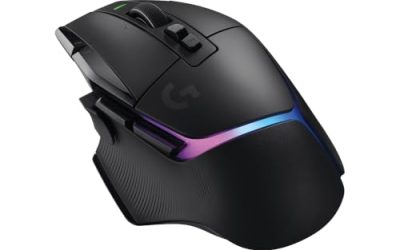
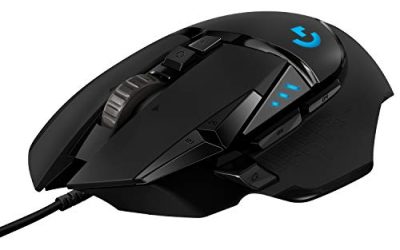
Logitech G502 X
Logitech G502 X
Best for: Players who want many programmable controls and a wired connection with no charging.
Players who want many programmable controls and a wired connection with no charging.
Watch out for
The cable can drag on the pad during wide swipes, so route it with a bungee or keep slack above the desk. At 89 g it is heavier than the wireless picks here.
The G502 X is the tracking pick for players who want a wired mouse loaded with controls. Its HERO 25K sensor delivers clean, accurate tracking at up to 25,600 DPI, while the 13 programmable controls cover weapon swaps, grenades, and push-to-talk without moving your left hand. The dual-mode scroll wheel flips between notched steps and free spin, and the 89-gram body keeps the familiar G502 shape that many players already know. This mouse suits MMO and battle-royale players who need many buttons plus dependable aim.
Watch out for: The cable can drag on the pad during wide swipes, so route it with a bungee or keep slack above the desk. At 89 g it is heavier than the wireless picks here.
SteelSeries Aerox 3 Wireless
SteelSeries Aerox 3 Wireless
Best for: Players who want a light wireless mouse with very long battery life and splash protection.
Sensor: TrueMove Air optical sensor, up to 18,000 CPI
Players who want a light wireless mouse with very long battery life and splash protection.
Watch out for
The holey shell lets dust inside over time, so clean it now and then. Also confirm the listing is the new model, since a newer Gen 2 version exists and renewed units appear under similar titles.
The Aerox 3 Wireless is the pick for players who want strong tracking plus the longest battery life in this guide. Its TrueMove Air sensor tracks 1-to-1 at up to 18,000 CPI with 400 IPS and 40 G acceleration, which covers every flick most players can make. The holey shell drops the weight to 68 grams, and AquaBarrier shielding guards the internals against splashes and dust. This mouse suits players who want a light wireless mouse that keeps working through long sessions without frequent charging.
Watch out for: The holey shell lets dust inside over time, so clean it now and then. Also confirm the listing is the new model, since a newer Gen 2 version exists and renewed units appear under similar titles.
Which One Fits Your Situation
You play ranked FPS every night
Pick the Logitech G Pro X Superlight 2 or the Razer Viper 8KHz. Both pair a flagship sensor with fast reporting, so flicks stay smooth and the mouse never feels like it lags behind your hand. Choose the Superlight 2 for the lighter wireless shell and the Viper 8KHz if you want true 8,000 Hz polling on a cable and side buttons on both sides.
You use a low sensitivity and a big pad
Pick the Razer DeathAdder V3 HyperSpeed. Low sensitivity means long arm swipes and frequent lifts, and the DeathAdder’s low lift-off distance plus its ergonomic palm shape keep those movements steady. The Focus X 26K sensor holds its line across the whole pad, and the 100-hour battery means a single charge covers weeks of play. The 55-gram shell also stays light through long sessions.
You want many buttons for MMOs and battle royale
Pick the Logitech G502 X. Its 13 programmable controls put weapon swaps, healing, and push-to-talk under your thumb and index finger, while the HERO 25K sensor keeps your aim honest. The wired connection removes charging from your routine entirely, which matters when sessions run long. The dual-mode scroll wheel also helps you switch weapons or scroll through loot quickly.
You want one mouse that lasts all week on a charge
Pick the SteelSeries Aerox 3 Wireless. Its 200-hour battery outlasts every other mouse here by a wide margin, and the TrueMove Air sensor still tracks cleanly at 18,000 CPI. The 68-gram holey shell keeps it light for long sessions, and Bluetooth lets you pair it with a laptop when you travel.
Common Mistakes
Chasing the highest DPI number instead of sensor quality: most players aim best at 400 to 1600 DPI, so a flawless sensor at low DPI beats a weak sensor with a huge ceiling.
Ignoring lift-off distance: a mouse that drifts when you lift it will ruin low-sensitivity aim, no matter how good its sensor looks on paper.
Picking a shape that fights your grip: a palm-shaped mouse will cramp a fingertip gripper, and a narrow mouse will strain a palm gripper.
Running 8K polling on a wireless mouse and wondering why the battery drains: very high polling draws more power, so match the polling setting to your play.
Skipping the pad check: a worn or glossy pad can make even a flagship sensor skip, so try your mouse on the pad you actually use.
Frequently Asked Questions
What DPI should I use for precise tracking?
Most competitive players use 400 to 1600 DPI with a low in-game sensitivity, because that range gives fine control without making the cursor jumpy. Set your mouse to 800 DPI, set your in-game sensitivity low, and adjust from there in small steps. The sensor matters more than the number: a clean sensor at 800 DPI will out-aim a noisy sensor at any DPI.
Does a higher polling rate improve tracking?
A higher polling rate reports your position more often, which makes motion look smoother and cuts input delay. The jump from 125 Hz to 1000 Hz is easy to feel, while the jump from 1000 Hz to 8000 Hz is subtle and costs battery life on wireless mice. For most players, 1000 Hz is enough; 4000 Hz or 8000 Hz suits players chasing the last bit of smoothness.
Is a wireless mouse as accurate as a wired mouse?
Yes, with a modern flagship sensor. The wireless mice in this guide use dedicated 2.4 GHz links that match wired latency closely enough that most players cannot tell the difference. The sensor does the tracking work either way. What changes is upkeep: wireless mice need charging, and very high polling shortens battery life, so keep the cable handy.
Why does my mouse spin out during fast flicks?
Spin-out happens when the sensor loses the surface during a fast swipe, because the mouse moves faster than the sensor’s IPS limit or the pad surface confuses it. A mouse with a high IPS figure and clean PTFE feet fixes most cases. Also lower the lift-off distance, since a high setting lets the sensor read the pad while the mouse is in the air.
R
Razer Gaming Series Editorial Team
We compare specs, materials and verified owner reviews before a product earns a spot. Rankings are never paid.
FAQ
What DPI should I use for precise tracking?
Most competitive players use 400 to 1600 DPI with a low in-game sensitivity, because that range gives fine control without making the cursor jumpy. Set your mouse to 800 DPI, set your in-game sensitivity low, and adjust from there in small steps. The sensor matters more than the number: a clean sensor at 800 DPI will out-aim a noisy sensor at any DPI.
Does a higher polling rate improve tracking?
A higher polling rate reports your position more often, which makes motion look smoother and cuts input delay. The jump from 125 Hz to 1000 Hz is easy to feel, while the jump from 1000 Hz to 8000 Hz is subtle and costs battery life on wireless mice. For most players, 1000 Hz is enough; 4000 Hz or 8000 Hz suits players chasing the last bit of smoothness.
Is a wireless mouse as accurate as a wired mouse?
Yes, with a modern flagship sensor. The wireless mice in this guide use dedicated 2.4 GHz links that match wired latency closely enough that most players cannot tell the difference. The sensor does the tracking work either way. What changes is upkeep: wireless mice need charging, and very high polling shortens battery life, so keep the cable handy.
Why does my mouse spin out during fast flicks?
Spin-out happens when the sensor loses the surface during a fast swipe, because the mouse moves faster than the sensor’s IPS limit or the pad surface confuses it. A mouse with a high IPS figure and clean PTFE feet fixes most cases. Also lower the lift-off distance, since a high setting lets the sensor read the pad while the mouse is in the air.
Affiliate disclosure. As an Amazon Associate we earn from qualifying purchases at no extra cost to you. Prices accurate as of the date shown.
Best keyboards with RGB compared: ten wired, wireless and combo listings, plus a zone-versus-per-key table, a desk-port worked example and common mistakes.


 Logitech G502 X
 SteelSeries Aerox 3 Wireless