Choosing a Logitech wireless gaming mouse comes down to how you actually play. A featherweight mouse with a top-tier sensor suits fast flick shots in shooters, while a heavier mouse with a dozen buttons suits MMOs and strategy games where every command needs a key close at hand. Battery life, shape, and the number of programmable buttons matter just as much as the sensor, and Logitech covers all of those angles across its LIGHTSPEED lineup.
This guide is for competitive shooter players, MMO fans, laptop gamers, and anyone replacing a wired mouse with a wireless one. Every pick below comes from a live Amazon listing, with specs taken from the product page, so you can compare weight, sensor, battery life, and buttons on equal terms. Whether you want the lightest mouse Logitech makes or the most buttons it sells, one of these five fits.
Quick Picks
As an Amazon Associate we earn from qualifying purchases
Product
Best for
Key Spec
Logitech G502 X PLUS
Players who want the redesigned G502 with RGB lighting and a longer battery
106 g, HERO 25K sensor, 130-hour battery
Logitech G502 LIGHTSPEED
MMO and strategy players who want many buttons
HERO 25K sensor, 11 buttons, 114 g
Logitech G PRO 2 LIGHTSPEED
Players who switch hands or share one mouse
Ambidextrous, HERO 2 sensor, 44K DPI
Logitech G305 LIGHTSPEED
Laptop gamers and anyone on a tight budget
99 g, HERO 12K sensor, 250-hour battery
Logitech G903 LIGHTSPEED
Ambidextrous players who want marathon battery life
HERO 25K sensor, 140+ hour battery, 107 g
How to Choose
Sensor and DPI Range
The sensor decides how faithfully the mouse tracks your hand. Logitech’s HERO 2 sensor, found in the G PRO 2, tracks at up to 44,000 DPI with speeds over 500 IPS, which covers even the fastest flick shots. The HERO 25K sensor in the G502, G502 X PLUS, and G903 reaches 25,600 DPI and still tracks cleanly at high speeds. The G305 uses the HERO 12K sensor at 12,000 DPI, which is plenty for most players. Ignore the headline DPI number on its own: what matters is consistent tracking at the sensitivity you actually use, and every mouse here delivers that.
Weight and Shape
Weight changes how a mouse feels after an hour of play. The G PRO 2 weighs 88 grams and suits low-sensitivity players who move the mouse across a large pad, while the G305 at 99 grams and the G502 X PLUS at 106 grams sit in the middle ground. The G502 at 114 grams and the G903 at 107 grams feel steadier for palm-grip players who rest their whole hand on the shell. Shape matters just as much: the G502 and G502 X PLUS are right-handed, while the G PRO 2 and G903 are symmetrical and work for either hand. Match the shape to your grip before you look at anything else.
Battery Life and Charging
Wireless mice live or die by battery life, and the spread here is wide. The G903 runs for over 140 hours on a charge, the G502 X PLUS reaches 130 hours with its lighting off, and the G PRO 2 reaches up to 95 hours, so most players charge once a week or less. The G502 manages around 48 hours, which still covers several long sessions. The G305 takes a different route with a single AA battery that lasts up to 250 hours, so you swap a cell instead of plugging in. If you hate cables entirely, the G502, G502 X PLUS, and G903 also work with the POWERPLAY charging pad, which tops the battery up while you play.
Buttons and Software
Extra buttons turn a mouse into a control panel, but only if you can reach them without thinking. The G502 and G903 each carry 11 programmable buttons, including a thumb cluster and a DPI-shift sniper button, which suits MMO and strategy players. The G502 X PLUS goes further with 13 programmable controls and a reversible DPI-shift button, and the G PRO 2 uses four magnetic side buttons you can move or remove, which suits shooter players who want a clean layout. Every mouse here works with Logitech G HUB software, where you set DPI steps, remap buttons, and tune lighting. Check that the button layout matches your hand before you buy.
The 5 Best Options
Logitech G502 X PLUS
Top Pick
Logitech G502 X PLUS
Best for: Players who want the newest G502 with RGB lighting, more buttons, and a long battery.
Players who want the newest G502 with RGB lighting, more buttons, and a long battery.
Watch out for
The RGB lighting cuts battery life to around 37 hours when left on, and the G502 X PLUS shell is a different shape from the original G502, so check that it fits your grip; the POWERPLAY pad is sold separately.
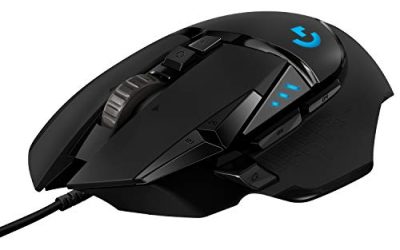
The G502 X PLUS is the redesigned version of Logitech’s most popular gaming mouse with RGB lighting, and it fixes the two things players asked for: less weight and longer battery life. At 106 grams it is 8 grams lighter than the G502 LIGHTSPEED, and the battery stretches to 130 hours with the lighting off, so you can go weeks between charges. Thirteen programmable controls include a reversible DPI-shift button and a dual-mode scroll wheel that flips between free spin and ratcheted steps. LIGHTFORCE hybrid switches pair optical speed with a mechanical click, and the HERO 25K sensor tracks at up to 25,600 DPI.
Watch out for: The RGB lighting cuts battery life to around 37 hours when left on, and the G502 X PLUS shell is a different shape from the original G502, so check that it fits your grip; the POWERPLAY pad is sold separately.
Logitech G502 LIGHTSPEED
Runner-Up
Logitech G502 LIGHTSPEED
Best for: MMO and strategy players who want the most buttons and a tunable feel.
Sensor: HERO 25K, up to 25,600 DPI
Buttons: 11 programmable buttons
Weight: 114 grams, with tunable weights up to 16 grams
The G502 LIGHTSPEED is the button-rich workhorse of this lineup, built for players who map half their keyboard to the mouse. Eleven programmable buttons include a thumb cluster and a DPI-shift sniper button, while the dual-mode scroll wheel flips between notched steps and free spin. Tunable weights let you add up to 16 grams, and LIGHTSYNC RGB lights the logo and side strip. The HERO 25K sensor reaches 25,600 DPI, and the battery lasts around 48 hours. It is the heaviest pick here, so it suits palm-grip players who like a solid, planted feel.
Watch out for: At 114 grams it is the heaviest mouse here, and the right-handed shape does not suit left-handed players.
Logitech G PRO 2 LIGHTSPEED
Logitech G PRO 2 LIGHTSPEED
Best for: Players who switch hands, share a mouse, or want a symmetrical shape with a flagship sensor.
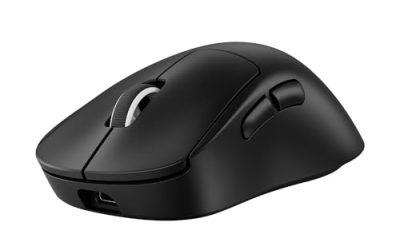
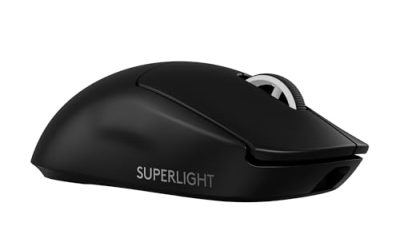
The G PRO 2 is the most flexible mouse in this guide because its symmetrical shell works for either hand. Four magnetic side buttons can be moved, removed, or swapped to match left- or right-handed play, which makes it a smart pick for households where more than one person uses the same mouse. The HERO 2 sensor reaches 44,000 DPI with an 8,000 Hz polling rate, and the battery lasts up to 95 hours. At 88 grams it is the lightest mouse in this guide, well below the heavier G502, so it feels quick without feeling fragile.
Watch out for: Unused side-button slots leave open holes on the side you do not use, and there is no RGB lighting.
Logitech G305 LIGHTSPEED
Logitech G305 LIGHTSPEED
Best for: Laptop gamers, travelers, and anyone who wants long battery life without charging cables.
The G305 proves that a wireless gaming mouse does not need a flagship sensor to feel great. Its HERO 12K sensor reaches 12,000 DPI with clean tracking, and the 1 ms LIGHTSPEED connection keeps input lag out of the picture. A single AA battery powers up to 250 hours of play, so you swap a cell every few months instead of hunting for a cable. The compact, symmetrical 99-gram shell suits claw and fingertip grips, and the receiver stores inside the mouse for travel. Six programmable buttons cover the basics without clutter.
Watch out for: The AA battery adds weight at the rear, and the mouse has no rechargeable battery or USB-C port.
Logitech G903 LIGHTSPEED
Logitech G903 LIGHTSPEED
Best for: Ambidextrous players who want the longest battery life in this guide.
The G903 is the marathon runner of this lineup, with a rechargeable battery that lasts over 140 hours. Its ambidextrous shell carries 11 programmable buttons, including a thumb cluster on both sides, and a 10-gram weight lets you tune the balance. The HERO 25K sensor reaches 25,600 DPI, LIGHTSYNC RGB lights the logo, and the dual-mode scroll wheel switches between precise steps and free spin. POWERPLAY support means the battery can charge from a compatible pad while you play. It is a strong pick for players who want maximum battery life and a symmetrical shape.
Watch out for: The side buttons on the unused side can get in the way, and the shell is larger than the G PRO 2.
Which One Fits Your Situation
You Play Competitive Shooters
Pick the G PRO 2. Its 88-gram shell and HERO 2 sensor with 8,000 Hz polling keep flick shots precise, and the 95-hour battery covers a full week of matches. If you want more buttons and RGB lighting, the G502 X PLUS trades a little weight for 13 controls and a 130-hour battery.
You Play MMOs or Strategy Games
Pick the G502 LIGHTSPEED. Its 11 buttons, thumb cluster, and sniper button put abilities and commands under your thumb, and tunable weights let you dial in the feel. The G903 is the backup pick if you want the same button count in a symmetrical shell with far longer battery life.
You Game on a Laptop or Travel Often
Pick the G305 LIGHTSPEED. It weighs 99 grams, the receiver stores inside the shell, and a single AA battery lasts up to 250 hours, so you can leave the cable at home. The compact shape also fits easily into a laptop bag next to a slim notebook.
You Share a Mouse or Play Left-Handed
Pick the G PRO 2 LIGHTSPEED. Its magnetic side buttons move to either side, so left- and right-handed players can use the same mouse without compromise. The G903 is the alternative if you want more buttons and a 140-hour battery in a symmetrical shell.
Common Mistakes
Buying the highest DPI number instead of the shape that fits your grip and hand size.
Ignoring battery life and then discovering the mouse needs a cable mid-session.
Choosing a right-handed mouse when you play left-handed, or when someone else in the house plays with the other hand.
Skipping G HUB setup, which leaves DPI steps, button mapping, and lighting on defaults.
Forgetting that POWERPLAY charging needs a compatible pad, which is sold separately.
Frequently Asked Questions
Is a wireless gaming mouse as fast as a wired one?
Yes. Logitech LIGHTSPEED wireless uses a 1 ms report rate, which matches a wired connection in practice, and the mice in this guide also support polling rates up to 8,000 Hz. The difference between wireless and wired is no longer something most players can feel, so shape, weight, and battery life matter more than the connection type.
How long does the battery last on a Logitech wireless gaming mouse?
It depends on the model. The G903 lasts up to 140 hours and the G502 X PLUS up to 130 hours with lighting off (37 hours with RGB on), and the G PRO 2 reaches up to 95 hours, while the G502 manages around 48 hours. The G305 runs up to 250 hours on a single AA battery. Turning off lighting stretches battery life further.
Do Logitech wireless gaming mice work with Mac?
Yes, every mouse in this guide lists PC and Mac compatibility, and the LIGHTSPEED receiver works on both. Logitech G HUB software is available for Mac as well, so you can remap buttons and adjust DPI steps. A few advanced features may vary by system, so check the product page for the exact model you choose.
What is LIGHTSPEED and do I need anything extra?
LIGHTSPEED is Logitech’s wireless technology for gaming mice, built for a fast, stable connection with a 1 ms report rate. Each mouse ships with its own USB receiver, so you only need a free USB port. The optional POWERPLAY charging pad is the one extra worth knowing about: it charges the G502, G502 X PLUS, and G903 while you play.
R
Razer Gaming Series Editorial Team
We compare specs, materials and verified owner reviews before a product earns a spot. Rankings are never paid.
FAQ
Is a wireless gaming mouse as fast as a wired one?
Yes. Logitech LIGHTSPEED wireless uses a 1 ms report rate, which matches a wired connection in practice, and the mice in this guide also support polling rates up to 8,000 Hz. The difference between wireless and wired is no longer something most players can feel, so shape, weight, and battery life matter more than the connection type.
How long does the battery last on a Logitech wireless gaming mouse?
It depends on the model. The G903 lasts up to 140 hours and the G502 X PLUS up to 130 hours with lighting off (37 hours with RGB on), and the G PRO 2 reaches up to 95 hours, while the G502 manages around 48 hours. The G305 runs up to 250 hours on a single AA battery. Turning off lighting stretches battery life further.
Do Logitech wireless gaming mice work with Mac?
Yes, every mouse in this guide lists PC and Mac compatibility, and the LIGHTSPEED receiver works on both. Logitech G HUB software is available for Mac as well, so you can remap buttons and adjust DPI steps. A few advanced features may vary by system, so check the product page for the exact model you choose.
What is LIGHTSPEED and do I need anything extra?
LIGHTSPEED is Logitech’s wireless technology for gaming mice, built for a fast, stable connection with a 1 ms report rate. Each mouse ships with its own USB receiver, so you only need a free USB port. The optional POWERPLAY charging pad is the one extra worth knowing about: it charges the G502, G502 X PLUS, and G903 while you play.
Affiliate disclosure. As an Amazon Associate we earn from qualifying purchases at no extra cost to you. Prices accurate as of the date shown.
Logitech Superlight 2, Razer Viper 8KHz, DeathAdder V3 HyperSpeed, G502 X and SteelSeries Aerox 3 Wireless lead this guide to the most precise gaming mice.
Best keyboards with RGB compared: ten wired, wireless and combo listings, plus a zone-versus-per-key table, a desk-port worked example and common mistakes.


 Logitech G305 LIGHTSPEED
 Logitech G903 LIGHTSPEED