Key takeaways
- Dual-channel over single: Two matched sticks nearly double memory bandwidth versus one, which directly improves editing responsiveness. Always populate two slots rather than one large module when possible.
- DDR5 vs DDR4: Newer DDR5 offers higher bandwidth that helps timeline scrubbing and effects. Machines like the NIMO creator laptops and Getorli mini PC ship with fast LPDDR5 or DDR5 for exactly this reason.
- Frequency: Faster RAM (higher MHz) feeds the CPU quicker, shaving time off memory-bound tasks. Pair fast RAM with a capable CPU to see the benefit.
What's inside
Video editing is one of the most memory-hungry tasks you can throw at a computer. Timelines with 4K footage, multiple layers, color grades, and effects all live in RAM while you work, and running short forces your system to swap to disk, causing dropped previews, stuttering scrubbing, and long render waits. Getting your memory right, both the amount and the speed, is often a bigger real-world upgrade for editors than a faster CPU alone.
This guide explains how much RAM video editing actually needs in 2026, why speed and dual-channel matter, and how to choose between upgrading a desktop or buying a pre-configured creator machine. Because memory is soldered or paired with the system in many laptops and mini PCs, we also point to ready-to-edit options like the 32GB NIMO creator laptops and the Getorli mini PC so you can match memory to your workflow.
As an Amazon Associate we earn from qualifying purchases at no extra cost to you.




⚡ Save on Your Next PC — Amazon Prime
Prime members get fast free shipping on the systems above, plus early access to Prime Day & Black Friday PC deals. New members get a 30-day free trial.
Watch: Best RAM for Video Editing — Video Review
How Much RAM Do You Really Need?
The right amount depends on your footage. For 1080p editing, 16GB is the workable minimum, though it fills up fast with modern editors and background apps. For 4K editing, 32GB is the recommended sweet spot in 2026, giving smooth playback and headroom for effects. Serious professionals working in 6K/8K, heavy motion graphics, or multi-cam projects benefit from 64GB or more so the system never runs out of working memory mid-project.
Why Speed and Channels Matter
- Dual-channel over single: Two matched sticks nearly double memory bandwidth versus one, which directly improves editing responsiveness. Always populate two slots rather than one large module when possible.
- DDR5 vs DDR4: Newer DDR5 offers higher bandwidth that helps timeline scrubbing and effects. Machines like the NIMO creator laptops and Getorli mini PC ship with fast LPDDR5 or DDR5 for exactly this reason.
- Frequency: Faster RAM (higher MHz) feeds the CPU quicker, shaving time off memory-bound tasks. Pair fast RAM with a capable CPU to see the benefit.
Upgrade a Desktop or Buy a Creator Machine?
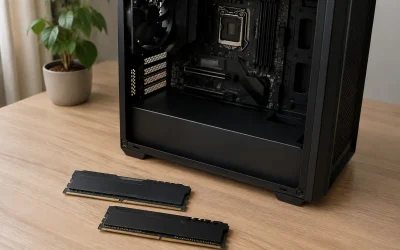
If you have a desktop with free DIMM slots, adding a matched 32GB DDR5 kit is the cheapest path to smoother 4K editing. But many editors work on laptops or compact systems where memory is fixed at purchase, so buying the right configuration up front matters. Pre-built creator laptops like the NIMO 32GB AMD Ryzen models and the Getorli Ryzen 7 6800H mini PC with 32GB LPDDR5 come ready to edit, pairing ample fast memory with capable processors and SSD storage.
Balancing RAM With the Rest of Your System
Memory works alongside your CPU, GPU, and storage. There is little point pairing 64GB with a weak processor, or fast RAM with a slow hard drive. Editors get the best results from a balanced machine: enough RAM to hold the timeline, a strong multi-core CPU for rendering, a capable GPU for effects and playback, and a fast NVMe SSD for cache and media. The NIMO and Getorli systems are tuned around this balance for creators.
Tips
- Close background apps and browser tabs before editing; they eat RAM you need for your timeline.
- Set your editor’s cache and scratch disk to a fast SSD to reduce reliance on RAM swapping.
- Always install RAM in matched pairs to enable dual-channel bandwidth.
- For 4K work, target 32GB; only step to 64GB if you regularly hit memory limits in 6K/8K or heavy graphics.
Frequently Asked Questions
Is 16GB of RAM enough for video editing?
For 1080p projects, 16GB is workable but tight once your editor, browser, and background apps are open. For 4K editing, 16GB will cause stutters and dropped previews, so 32GB is strongly recommended for a smooth modern editing experience.
Do I need 64GB of RAM for editing?
Most editors do not. 32GB handles 4K comfortably. Step up to 64GB only if you work in 6K/8K, run heavy motion graphics, or juggle large multi-cam timelines where 32GB fills up. For those workloads, 64GB prevents slowdowns.
Does RAM speed matter for editing?
Yes. Faster RAM and dual-channel configurations increase bandwidth, which improves timeline scrubbing and memory-bound effects. DDR5 systems like the NIMO creator laptops and Getorli mini PC use fast memory to keep editing responsive.
Should I buy a creator laptop or upgrade my desktop?
If your desktop has free slots, adding a matched 32GB DDR5 kit is the cheapest upgrade. If you edit on the go or your system’s memory is fixed, a pre-configured creator machine like a 32GB NIMO laptop ensures you have the right RAM from day one.
Conclusion
For video editing in 2026, 32GB of fast, dual-channel memory is the target that keeps 4K timelines smooth, with 64GB reserved for the most demanding 6K/8K and graphics-heavy work. Desktop owners can simply add a matched DDR5 kit, while editors on laptops or compact systems should buy the right configuration up front, such as the 32GB NIMO creator laptops or the Getorli Ryzen mini PC. Balance your RAM with a strong CPU, GPU, and SSD, and your edits will render faster and play back without a stutter.