Key takeaways
- 60Hz is the old baseline, fine for slower single-player games but clearly dated for anything fast.
- 144Hz is the sweet spot and the upgrade almost everyone feels immediately; it’s the target for most gamers.
- 165Hz is a common, near-free bump over 144Hz that’s easy to recommend.
- 240Hz and beyond mainly benefit competitive esports players chasing every millisecond in shooters.
What's inside
- Watch: What Is Refresh Rate? Gaming Monitors Explained — Video Review
- What Refresh Rate Actually Measures
- Refresh Rate and Frame Rate Must Work Together
- How Much Refresh Rate You Actually Need
- Pair It With Adaptive Sync
- Panel Type Affects How Refresh Rate Feels
- Tips
- Related Guides
- Frequently Asked Questions
- Conclusion
- Related Articles
Refresh rate is the spec that turns a good gaming monitor into one that feels alive, yet it’s often overshadowed by resolution on the box. Measured in hertz, it describes how many times per second your screen redraws the image, and the difference between a standard 60Hz office panel and a 144Hz or 240Hz gaming display is the kind of thing you feel instantly the moment you move your mouse. Once you’ve gamed on high refresh, going back feels like wading through mud.
- Watch: What Is Refresh Rate? Gaming Monitors Explained — Video Review
- What Refresh Rate Actually Measures
- Refresh Rate and Frame Rate Must Work Together
- How Much Refresh Rate You Actually Need
- Pair It With Adaptive Sync
- Panel Type Affects How Refresh Rate Feels
- Tips
- Related Guides
- Frequently Asked Questions
- Conclusion
- Related Articles
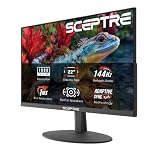
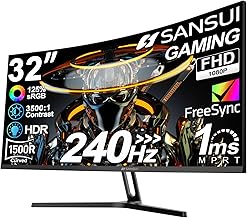
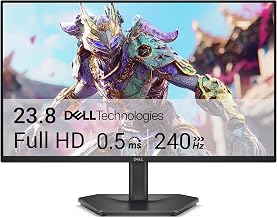
This guide explains what refresh rate really is, how it works together with frame rate and adaptive sync, and how much of it you actually benefit from depending on what you play. You’ll learn why the jump from 60Hz to 144Hz is the one everyone notices and where the returns start to flatten out. The high-refresh gaming monitors below are the ones that make this upgrade so immediately obvious.
As an Amazon Associate we earn from qualifying purchases at no extra cost to you. Product prices and availability are accurate as of the date shown and are subject to change.






⚡ Save on Your Next PC — Amazon Prime
Prime members get fast free shipping on the systems above, plus early access to Prime Day & Black Friday PC deals. New members get a 30-day free trial.
Watch: What Is Refresh Rate? Gaming Monitors Explained — Video Review
What Refresh Rate Actually Measures
A 144Hz monitor redraws the image on screen 144 times every second, versus 60 times on a standard 60Hz panel. More refreshes per second mean smoother motion and, crucially, less blur when the camera or your view moves quickly. That smoothness is why fast-paced games feel so much sharper and more responsive on a high-refresh display, even before you factor in the competitive advantage of seeing updated frames sooner. It’s a motion upgrade, distinct from the sharpness upgrade that resolution provides.
Refresh Rate and Frame Rate Must Work Together
Here’s the catch: a 144Hz monitor only shows 144 smooth frames if your GPU is actually producing at least 144 frames per second in that game. Refresh rate is the ceiling; frame rate is what fills it. Buying a 240Hz panel but running a game at 80 fps means you’re leaving most of that refresh unused. So plan the two together, matching a monitor’s refresh rate to the frame rates your graphics card can realistically hit in the games you play most.
How Much Refresh Rate You Actually Need
- 60Hz is the old baseline, fine for slower single-player games but clearly dated for anything fast.
- 144Hz is the sweet spot and the upgrade almost everyone feels immediately; it’s the target for most gamers.
- 165Hz is a common, near-free bump over 144Hz that’s easy to recommend.
- 240Hz and beyond mainly benefit competitive esports players chasing every millisecond in shooters.
Pair It With Adaptive Sync
Frame rates fluctuate constantly, and when they fall out of step with the refresh rate you get screen tearing. Adaptive sync technologies, FreeSync and NVIDIA G-SYNC Compatible, solve this by syncing the monitor’s refresh to the GPU’s output in real time, eliminating tearing and stutter. Nearly every good gaming monitor now includes one or both, and it’s a feature you should treat as essential rather than optional. Panels like the LG UltraGear 144Hz models and the ASUS TUF Gaming VG249QE5A advertise exactly this pairing.
Panel Type Affects How Refresh Rate Feels
Refresh rate doesn’t work in isolation. A fast IPS panel delivers high refresh alongside good colors and viewing angles, which is why it’s the popular all-round choice for 144Hz gaming. Response time, measured in milliseconds, also matters: a high refresh rate paired with a sluggish 1ms-plus response can still show smearing. The best experience comes from a monitor that combines a high refresh rate, a low response time, and adaptive sync, rather than just chasing the biggest hertz number.
Tips
- Aim for 144Hz as your target; it’s the upgrade that delivers the most noticeable smoothness for the money.
- Confirm your GPU can actually push high frame rates in your games before paying for a 240Hz-plus panel.
- Turn on the monitor’s rated refresh rate in Windows display settings, since new monitors sometimes default to 60Hz.
- Enable FreeSync or G-SYNC in both the monitor menu and your GPU control panel to kill tearing.
Frequently Asked Questions
Is 144Hz really that noticeable over 60Hz?
Absolutely. It’s one of the most immediately obvious upgrades in PC gaming; moving the mouse on the desktop alone feels dramatically smoother, and in-game motion clarity improves across the board.
Do I need 240Hz?
Only if you play competitive shooters seriously and have a GPU that can feed that many frames. For the vast majority of gamers, 144Hz or 165Hz is the smarter, more affordable target.
Will a high refresh rate help if my frame rate is low?
Not much. Refresh rate is a ceiling your GPU has to reach. If your card only manages 60 fps in a game, a 144Hz panel can’t invent the missing frames, though adaptive sync still smooths things out.
Does refresh rate matter for single-player games?
It still helps motion clarity and feel, but it’s less critical than in fast competitive games. Single-player fans often prioritize resolution and visual fidelity, with high refresh as a welcome bonus.
Conclusion
Refresh rate is the motion half of the gaming display equation, and for most people the jump to 144Hz is the single most satisfying monitor upgrade they’ll ever make. Just remember it works as a team with your frame rate and adaptive sync, so match the panel to what your GPU can actually deliver. The monitors above bring high refresh, low response times, and sync together, making that buttery-smooth motion easy to unlock.