Our Top Picks
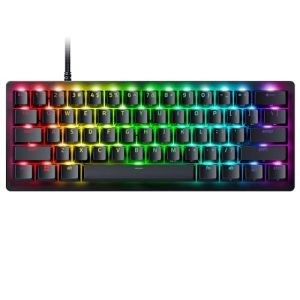
 Razer BlackWidow V3 Mini HyperSpeed 65% Wireless MechanicalBlackWidow V3 Mini13.74 x 6.85 x 2.2 inches2.2 poundsCheck on Amazon
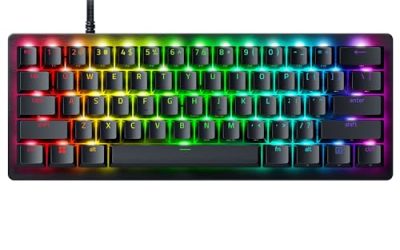
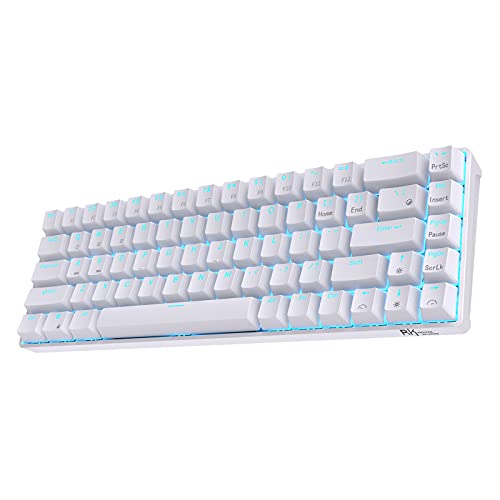 RK ROYAL KLUDGE RK68 Wireless Hot Swappable 65%Hot-Swappable Red Switch13.86 x 5.94 x 1.77 inchesCheck on Amazon
A 65 percent mechanical keyboard is the sweet spot for gamers who want arrow keys without surrendering desk space: 67 or 68 keys, a dedicated arrow cluster, and no function row or numpad. The Razer BlackWidow V3 Mini HyperSpeed is the best overall pick for wireless play, the Keychron K6 Pro is the best board for switch swapping and remapping, and the RK ROYAL KLUDGE RK68 is the cheapest way into the layout. For typing feel, the Ducky One 3 SF leads the pack, while the HyperX Alloy Origins 65 is the cleanest wired option.

This guide is for three kinds of buyers: competitive gamers who need a compact board with fast wireless, enthusiasts who want to tune switches and keymaps, and desk workers who type all day and want a board that feels good. Every pick below is a true 65 percent board verified against its Amazon listing, with the exact switch variant, key count, and connectivity the listing states.
Quick Picks
As an Amazon Associate we earn from qualifying purchases
| Product | Best for | Key spec |
|---|---|---|
| Razer BlackWidow V3 Mini HyperSpeed | Wireless gaming | Green clicky switches, tri-mode, 68 keys |
| Keychron K6 Pro | Switch swapping and remapping | Hot-swappable Brown switches, QMK/VIA, 68 keys |
| RK ROYAL KLUDGE RK68 | Budget 65 percent board | Quiet Red linear switches, Bluetooth, 68 keys |
| Ducky One 3 SF | Typing feel and build quality | Cherry MX Blue, hot-swappable, 67 keys |
| HyperX Alloy Origins 65 | Clean wired setup | Red linear switches, aluminium body, 68 keys |
How to Choose
Count the Keys Before You Buy
A true 65 percent board has 67 or 68 keys, dedicated arrow keys, and no function row or numpad. That definition matters because listings often blur the lines: 60 percent boards have 61 keys and no arrows, while 75 percent boards add a function row and sometimes a knob. Check the key count on the listing before ordering, and confirm the arrow keys are physically present in the product photos. Four of the five boards here have 68 keys; the Ducky One 3 SF has 67 because of its compact SF layout. If a listing calls a board 60 percent and 68 keys in the same breath, trust the key count and the photos, not the headline.
Pick the Switch Feel First
Switches decide how a board feels and sounds, so choose the feel before the brand. Clicky switches like Razer Green and Cherry MX Blue give a loud tactile snap that suits typing but can annoy anyone sharing the room. Tactile switches like Keychron K Pro Brown give a bump without the click, while linear switches like RK Quiet Red and HyperX Red travel smoothly and quietly. One listing pins one switch variant, so the Green Razer and the linear Yellow Razer are different products with different codes. Always confirm the switch name on the listing you are about to order.
Hot-Swap and Programmability Are Not Universal
Only three of the five boards here let you pull switches out without a soldering iron: the Keychron K6 Pro, the RK68, and the Ducky One 3 SF. The Razer and HyperX boards have soldered switches, so the switch you buy is the switch you keep. Programmability is rarer still: only the K6 Pro runs QMK and VIA, which let you remap any key and build layers. The other boards rely on maker software or onboard macros, which is fine for most gamers but limiting if you want deep customisation. Decide how much tinkering you actually plan to do before paying for features you will never open.
Wireless, Battery Life, and Keycaps
Wireless is not one feature. The Razer and Keychron boards offer 2.4 GHz wireless plus Bluetooth plus a wired mode, while the RK68 offers Bluetooth only, with no 2.4 GHz option. The Ducky and HyperX boards are wired only, with no battery at all. Battery figures always carry a condition: Razer quotes up to 200 hours with the backlight off, and the RK68 manages about 13 hours with its lightest backlight setting. Keycaps matter too: PBT caps on the Keychron, Ducky, and HyperX boards resist shine, while the ABS caps on the Razer and RK68 wear faster.
The 5 Best Options
Razer BlackWidow V3 Mini HyperSpeed
Razer’s compact flagship is the most complete wireless gaming board in this roundup. Tri-mode connectivity pairs HyperSpeed 2.4 GHz wireless with Bluetooth and a wired USB-C mode, so it covers a desktop, a laptop, and a living-room setup without swapping boards. Razer Green switches are tactile and clicky, doubleshot ABS keycaps keep legends sharp, and Chroma RGB lights the board through Razer Synapse. Battery life runs up to 200 hours with the backlight off, and Snap Tap is listed on the Amazon title. The switches are soldered, so buy the switch feel you want on day one.
Specs
- 65 percent layout, 68 keys, dedicated arrow keys
- Razer Green mechanical switches, tactile and clicky
- Tri-mode: HyperSpeed 2.4 GHz wireless, Bluetooth, USB-C wired
- Doubleshot ABS keycaps, Razer Chroma RGB
- Battery up to 200 hours with backlight off
- Model RZ03-03891400-R3M1
Best for: Competitive gamers who want one wireless board for every setup.
Watch out for: Switches are soldered, not hot-swappable; Green switches are loud, so check with anyone sharing your room.
Keychron K6 Pro
The K6 Pro is the enthusiast pick, and the only board here that runs QMK and VIA for full remapping. Its PCB accepts 3-pin and 5-pin MX-style switches, so you can pull the Brown switches out and try linear or clicky ones later without soldering. Tri-mode connectivity covers Bluetooth 5.1 for up to three devices, 2.4 GHz wireless, and USB-C wired, while south-facing RGB, screw-in stabilizers, and double-shot PBT keycaps round out a genuinely customisable package. One flag: the Amazon title and Color field say Brown, but the part-number field reads K6P-H3, so confirm the switch on the live listing before ordering.
Specs
- 65 percent layout, 68 keys, dedicated arrow keys
- Keychron K Pro Brown switches, tactile, hot-swappable (3-pin and 5-pin)
- QMK/VIA programmable, remap via Keychron Launcher or VIA
- Tri-mode: Bluetooth 5.1 (3 devices), 2.4 GHz, USB-C wired
- Double-shot PBT keycaps (OSA profile), south-facing RGB, screw-in stabilizers
- 4000 mAh rechargeable battery, Mac/Windows keycaps included
Best for: Enthusiasts who want to swap switches and remap keys.
Watch out for: Switch and part-number conflict on the listing (title says Brown, part number reads K6P-H3) — confirm the switch live before ordering; no battery-hours figure is quoted for the Pro.
RK ROYAL KLUDGE RK68
The RK68 is the cheapest genuine 65 percent board here, and the best way to test whether the layout suits you. It keeps the arrow keys and control keys that 60 percent boards drop, its hot-swappable PCB accepts 3-pin and 5-pin switches, and Bluetooth 5.0 pairs with multiple devices. The trade-offs are clear: there is no 2.4 GHz wireless, the backlight is single-colour blue rather than RGB, and the 1450 mAh battery lasts about 13 hours with the lightest backlight setting. ABS keycaps and Windows-only remapping software keep the cost down. For the money, nothing else in this roundup gets you a hot-swappable 65 percent board this cheaply.
Specs
- 65 percent layout, 68 keys, standalone arrow and control keys
- RK custom Quiet Red switches, linear, hot-swappable (3-pin and 5-pin)
- Bluetooth 5.0 (multi-device) and USB-C wired, no 2.4 GHz
- Single-colour blue backlight, 20 dynamic modes, not RGB
- 1450 mAh battery, about 13 hours with lightest backlight
- ABS keycaps, RK remapping software (Windows)
Best for: Budget buyers trying the 65 percent layout for the first time.
Watch out for: Some listings wrongly call it a 60 percent board — it has arrow keys; the wired-only RK68 is a different ASIN, so order the wireless version.
Ducky One 3 SF

The Ducky is the typing-feel pick, built like a board that costs far more. Its 67-key SF layout keeps the arrows while trimming the footprint further than the 68-key boards, and Cherry MX Blue switches give a crisp click under double-shot PBT keycaps. Inside, dual-layer silicone and EVA foam dampeners with V2 stabilizers make every keystroke sound solid rather than hollow. The board is wired USB-C only, with no battery and no wireless, and it uses Ducky’s onboard macro recording rather than QMK or VIA. Buy the Pure White Cherry MX Blue version only: the Daybreak colourway was already unavailable in late November.
Specs
- 65 percent layout, 67 keys (SF layout), dedicated arrow keys
- Cherry MX Blue switches, clicky, hot-swappable (Ducky Kailh Yellow sockets)
- Wired USB-C only, no wireless, no battery
- Double-shot PBT keycaps, per-key RGB
- QUACK Mechanics: dual-layer silicone and EVA foam dampeners, V2 stabilizers
- Model DKON2167ST-CUSPDPWWWSC1
Best for: Typists who want the best sound and feel in a compact board.
Watch out for: Only the Pure White Cherry MX Blue variant is verified; the Daybreak colourway was unavailable as of late November, so confirm the listing live.
HyperX Alloy Origins 65

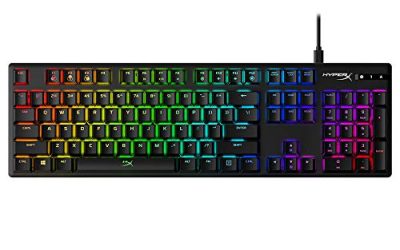
The Alloy Origins 65 is the cleanest wired gaming board here: no battery to charge, no wireless mode to manage, just a solid aluminium body and a detachable braided USB-C cable. HyperX Red switches are linear and quiet enough for late sessions, double-shot PBT keycaps resist shine, and RGB lighting runs through NGENUITY software. At 68 keys it keeps the full arrow cluster, and the compact frame leaves room on the desk for wide mouse sweeps. The switches are soldered, so the Red variant you buy is the one you keep. Order the new retail listing only; the Renewed listing was already unavailable in late November.
Specs
- 65 percent layout, 68 keys, dedicated arrow keys
- HyperX Red switches, linear (Aqua tactile is a different ASIN)
- Wired USB-C only, no wireless, no battery
- Double-shot PBT keycaps, RGB LED backlight
- Aircraft-grade aluminium body, detachable braided USB-C cable
- NGENUITY software
Best for: Gamers who want a solid wired board with no battery to manage.
Watch out for: Switches are soldered, not hot-swappable; buy the new retail listing, not the Renewed one.
Which One Fits Your Situation
You Play Wirelessly and Move Between Setups
Pick the Razer BlackWidow V3 Mini HyperSpeed. HyperSpeed 2.4 GHz wireless keeps latency low in games, Bluetooth covers a laptop or tablet, and the wired USB-C mode is there when the battery runs low. Chroma RGB and Synapse tie it into a Razer setup, and the 200-hour backlight-off battery figure means long stretches between charges. Just remember the Green switches are loud and soldered, so this is a commitment to clicky.
You Want to Customise Switches and Keymaps
Pick the Keychron K6 Pro. It is the only board here with QMK and VIA, so every key can be remapped and layered, and the hot-swappable PCB lets you try new switches without a soldering iron. Tri-mode connectivity and PBT keycaps mean you are not giving up everyday usability for the tinkering. Confirm the Brown switch on the live listing first, given the part-number conflict noted above.
You Are on a Tight Budget
Pick the RK ROYAL KLUDGE RK68. It is the cheapest true 65 percent board in this roundup, and it still gives you arrow keys, a hot-swappable PCB, and Bluetooth for multiple devices. You give up 2.4 GHz wireless and RGB, settling for a single-colour blue backlight, and the battery is modest at about 13 hours with the lightest backlight. For a first 65 percent board, those are fair trade-offs.
You Type All Day and Want the Best Feel
Pick the Ducky One 3 SF. Cherry MX Blue switches under thick double-shot PBT keycaps, foam dampening, and V2 stabilizers give the most satisfying keystroke in this roundup. The 67-key SF layout is the smallest footprint here while keeping the arrows. It is wired only, so it suits a fixed desk rather than a bag. If you need wireless instead, the Razer is the better desk-to-couch pick.
Common Mistakes
- Buying a 60 percent or 75 percent board by mistake — check the key count and the arrow keys before ordering.
- Assuming every board is hot-swappable — the Razer and HyperX switches are soldered.
- Assuming Bluetooth means 2.4 GHz wireless — the RK68 has Bluetooth only, with no 2.4 GHz mode.
- Ordering the wrong switch variant — the ASIN pins one switch, so Green versus Yellow or Brown versus Blue are different listings.
- Judging battery life from a bare hours figure — Razer’s 200 hours is backlight-off only, and the RK68’s 13 hours is with the lightest backlight.
Frequently Asked Questions
What is a 65 percent mechanical keyboard?
A 65 percent keyboard has 67 or 68 keys, dedicated arrow keys, and no function row or numpad. It sits between 60 percent boards, which drop the arrows, and 75 percent boards, which add a function row. You keep the arrows and the navigation keys that matter for gaming and editing while freeing up desk space for the mouse.
Are 65 percent keyboards good for gaming?
Yes. The compact frame leaves more room for wide mouse sweeps, and the arrow keys stay available for menus, inventory, and movement in some games. Wireless models like the Razer add low-latency 2.4 GHz play, while wired boards like the HyperX remove battery worries entirely. The layout changes nothing about switch speed or response.
Can I swap the switches on these keyboards?
Only on three of the five: the Keychron K6 Pro, the RK68, and the Ducky One 3 SF have hot-swappable PCBs that accept 3-pin and 5-pin MX-style switches. The Razer BlackWidow V3 Mini HyperSpeed and the HyperX Alloy Origins 65 have soldered switches, so the switch you buy is permanent. Check the hot-swap line in the specs before ordering.
Do 65 percent keyboards work with Mac?
Yes, as standard USB or Bluetooth keyboards, though software support varies. The Keychron K6 Pro is the most Mac-friendly pick here, with Mac keycaps included and QMK and VIA working across platforms. Razer Synapse and HyperX NGENUITY are Windows-focused, so Mac users should expect basic keyboard function without the full software suite.
FAQ
What is a 65 percent mechanical keyboard?
Are 65 percent keyboards good for gaming?
Can I swap the switches on these keyboards?
Do 65 percent keyboards work with Mac?
More from Amazon
Programs that pair well with the guide above. Offers and eligibility are set by Amazon and may change.
Free shipping on eligible items, Prime Video and more. Eligible new members can start with a free trial.
Start a Prime free trialAd-free music streaming. Eligible new subscribers can start with a free trial.
Try Music Unlimited freeA Prime membership for ages 18-24 with a trial period. Eligibility is set by Amazon.
See Prime for Young AdultsAudiobooks and podcasts to listen to on the go. Eligible new members can start with a free trial.
Try Audible freeAs an Amazon Associate we earn from qualifying purchases.