Key takeaways
- Typing feel: Mechanical switches give a crisp, defined actuation point, while membrane keys feel softer and more cushioned.
- Durability: Mechanical switches are rated for tens of millions of presses, far outlasting the rubber domes in membrane boards.
- Noise: Membrane boards are naturally quieter, whereas mechanical switches range from silent linears to loud, clicky blues.
- Price: Membrane keyboards are markedly cheaper, while mechanical commands a premium for switches and build.
- Customization: Hot-swap mechanical boards let you change switches and keycaps, something membrane simply cannot offer.
- Performance features: Mechanical designs more often include full anti-ghosting and N-key rollover for reliable simultaneous presses.
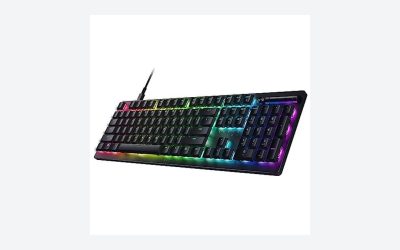
Every gamer eventually hears the clack. Mechanical keyboards have become the enthusiast default, but membrane boards still ship on millions of desks, and in 2026 the difference between them is bigger than ever. A mechanical keyboard uses an individual spring-loaded switch under each key for crisp, tactile actuation, while a membrane keyboard presses keys against a soft rubber-dome layer for a quieter, mushier feel at a lower cost.
The decision matters because a keyboard is the one peripheral your fingers touch nonstop, and the typing feel shapes both comfort and performance. Hot-swappable mechanical boards like the AULA F75 Pro and premium options like the Keychron K8 Ultra now offer deep customization, while hybrid designs such as the Logitech G213 Prodigy blur the line by chasing mechanical feel at membrane prices.
Our top picks
 Redragon Mechanical Gaming Keyboard Wired
- Brilliant Color Illumination- With 11 unique backlights, choose…
- Support Macro Editing: The K671 Mechanical Gaming Keyboard…
- Hot-swappable Linear Red Switch- Our K671 gaming keyboard…
 AULA F75 Pro Wireless Mechanical Keyboard
- Tri-mode Connection Keyboard: AULA F75 Pro wireless mechanical…
- Hot-swap Custom Keyboard: This custom mechanical keyboard with…
- Advanced Structure and PCB Single Key Slotting: This…
 Keychron K8 Ultra 8K Wireless Mechanical Keyboard
- 8000Hz Polling Rate for Fast Response
- 80% TKL Layout for Work and Gaming
- Triple Connectivity with Long Battery Life
| Product | Key specs | |
|---|---|---|
| Redragon Mechanical Gaming Keyboard Wired | Brilliant Color Illumination- With 11 unique backlights, choose… Support Macro Editing: The K671 Mechanical Gaming Keyboard… Hot-swappable Linear Red Switch- Our K671 gaming keyboard… | Check price |
| AULA F75 Pro Wireless Mechanical Keyboard | Tri-mode Connection Keyboard: AULA F75 Pro wireless mechanical… Hot-swap Custom Keyboard: This custom mechanical keyboard with… Advanced Structure and PCB Single Key Slotting: This… | Check price |
| Keychron K8 Ultra 8K Wireless Mechanical Keyboard | 8000Hz Polling Rate for Fast Response 80% TKL Layout for Work and Gaming Triple Connectivity with Long Battery Life | Check price |
 Redragon K580 Wired RGB Mechanical Gaming Keyboard Redragon K580 Wired RGB Mechanical Gaming Keyboard | Record Combos On the Fly, No Software Required… Swap Switches Without Soldering, Hype Clicky Feedback -… Built to Outlast Daily Gaming - Rated for… | Check price |
 SteelSeries USB Apex 5 Hybrid Mechanical Gaming SteelSeries USB Apex 5 Hybrid Mechanical Gaming | Hybrid blue mechanical gaming switches OLED smart display Aircraft-grade aluminum alloy frame | Check price |
 Razer BlackWidow V4 X Mechanical Gaming Keyboard Razer BlackWidow V4 X Mechanical Gaming Keyboard | With zero distance between actuation and reset points… Expand the arsenal of commands with a set… FUNCTION ROLLER and SECONDARY MEDIA KEYS: Pause, play,… | Check price |
 Logitech G413 SE Full-Size Mechanical Gaming Keyboard Logitech G413 SE Full-Size Mechanical Gaming Keyboard | Take your gaming skills to the next level:… Tenkeyless option: Compact, TKL layout PC gaming keyboards… 6-Key rollover anti-ghosting performance: Experience reliable key input… | Check price |
 Logitech G213 Prodigy Wired RGB Gaming Keyboard Logitech G213 Prodigy Wired RGB Gaming Keyboard | Personalize the RGB keyboard's 5 customizable lighting zones… Customize lighting, game mode, and macro programming on… G213 wired gaming keyboard features dedicated media controls… | Check price |
As an Amazon Associate we earn from qualifying purchases at no extra cost to you.
⚡ Save on Your Next PC — Amazon Prime
Prime members get fast free shipping on the systems above, plus early access to Prime Day & Black Friday PC deals. New members get a 30-day free trial.
Watch: Mechanical vs Membrane Keyboard: 2026 Guide — Video Review
Quick Verdict
Choose a mechanical keyboard if you want satisfying tactile feedback, durability measured in tens of millions of keystrokes, and the ability to tune the feel with different switches. Stick with membrane if you want the lowest price, the quietest typing for shared or office spaces, and a lightweight board where premium feel is not a priority.
Key Differences
- Typing feel: Mechanical switches give a crisp, defined actuation point, while membrane keys feel softer and more cushioned.
- Durability: Mechanical switches are rated for tens of millions of presses, far outlasting the rubber domes in membrane boards.
- Noise: Membrane boards are naturally quieter, whereas mechanical switches range from silent linears to loud, clicky blues.
- Price: Membrane keyboards are markedly cheaper, while mechanical commands a premium for switches and build.
- Customization: Hot-swap mechanical boards let you change switches and keycaps, something membrane simply cannot offer.
- Performance features: Mechanical designs more often include full anti-ghosting and N-key rollover for reliable simultaneous presses.
Mechanical Keyboards: Feel, Durability, and Control
A mechanical keyboard wins on tactile satisfaction and longevity. Each key has its own switch with a precise actuation point, so you feel exactly when a press registers, which many gamers say improves both speed and confidence. Boards like the Redragon K580 with tactile blue switches and the Razer BlackWidow V4 X with linear yellows show how switch choice lets you dial the feel from crisp clicks to smooth silence.
Durability and customization seal the case. Mechanical switches routinely survive tens of millions of presses, and hot-swappable boards such as the AULA F75 Pro let you pull and replace switches without soldering, so one keyboard can evolve as your taste changes. Add reliable N-key rollover and anti-ghosting for chaotic key combos, and mechanical becomes the enthusiast pick that rewards the extra spend.
Membrane Keyboards: Quiet, Cheap, and Practical
A membrane keyboard is the pragmatic choice when budget and quiet matter more than feel. A single rubber-dome layer under the keys keeps costs low and typing soft and hushed, which is ideal for late-night sessions, shared apartments, or offices where a clacking mechanical board would annoy everyone nearby. Hybrid mech-dome designs like the Logitech G213 Prodigy even add RGB and a firmer feel while staying affordable.
These boards are also light, spill-tolerant, and utterly fuss-free. There is nothing to customize and nothing to break in, so they suit casual players and anyone who sees a keyboard as a tool rather than a hobby. The compromise is a mushier feel, shorter lifespan, and fewer performance guarantees, but for a secondary rig or a tight budget, a good membrane board gets the job done.
Which Should You Buy?
- For the best typing and gaming feel: pick mechanical because the defined actuation improves comfort and confidence.
- For the lowest budget: pick membrane, which delivers a functional board for a fraction of the cost.
- For quiet shared spaces: pick membrane, or a mechanical board with silent linear switches if you want both.
- For long-term durability: pick mechanical since its switches outlast rubber domes many times over.
- For customization and upgrades: pick a hot-swappable mechanical board so you can change switches and keycaps anytime.
Frequently Asked Questions
Do mechanical keyboards actually improve gaming performance?
They can help through clearer actuation, reliable anti-ghosting, and faster resets, but the gain is modest. The bigger benefits are feel, durability, and consistency rather than raw speed.
Are mechanical keyboards too loud for streaming or offices?
Not necessarily. Linear or silent switches are quiet enough for most rooms, while clicky blue switches are the loudest. You can choose the noise level with your switch type.
How long do membrane keyboards last?
Typically several years of normal use, but their rubber domes wear out faster than mechanical switches and the feel degrades over time, especially on heavily used keys.
What does hot-swappable mean?
It means you can pull out and replace individual switches by hand, without soldering. This lets you change the feel of a mechanical keyboard without buying a whole new board.
Final Verdict
For gamers who care about feel, durability, and long-term value, a mechanical keyboard is the clear 2026 upgrade, while a membrane board remains a smart, quiet, budget-friendly option for casual use or a secondary setup where premium switches would be overkill.