Key takeaways
- Pro: Full-array local dimming produces excellent HDR contrast and highlight punch.
- Pro: Native 4K at 160Hz suits both PS5 and high-end PCs.
- Pro: DisplayPort 2.1 and HDMI 2.1 make it genuinely future-ready.
- Pro: Cohesive design and three-year warranty add long-term confidence.
Sony built the INZONE line to bring PlayStation-grade display engineering to the desktop, and the INZONE M9 family sits at the center of that push. If you’re shopping the M9 name, you’re really looking at a 4K, high-refresh gaming monitor with full-array local dimming, tuned for both console and PC play.
This review examines the INZONE M9 II and the wider INZONE ecosystem around it, then stacks it against the OLED and QD-OLED rivals it now competes with. The goal is to tell you where the M9 excels and who should consider one of the alternatives instead.
Our top picks
 Acer Nitro 27in QHD 2560x1440 IPS 180Hz
- Quality Visuals: The KG271U 27" IPS monitor with…
- AMD FreeSync Technology: Say “goodbye” to stuttering and…
- Up to 180Hz: The 180Hz refresh rate speeds…
 Hikers 27 Inch 240Hz Curved Gaming Monitor
- Hikers 27 inch FHD 240Hz curved gaming monitor…
- Fast and Smooth Gaming Experience - High refresh…
- Multiple Ports for Daily Use - One HDMI…
 Sony INZONE M10S 27” 1440p 480Hz OLED
- The INZONE M10S delivers ultra-low latency and 480Hz…
- The 4mm thin base maximizes desk space, offering…
- Developed with Fnatic e-sports team and packed with…
| Product | Key specs | |
|---|---|---|
| Acer Nitro 27in QHD 2560x1440 IPS 180Hz | Quality Visuals: The KG271U 27" IPS monitor with… AMD FreeSync Technology: Say “goodbye” to stuttering and… Up to 180Hz: The 180Hz refresh rate speeds… | Check price |
| Hikers 27 Inch 240Hz Curved Gaming Monitor | Hikers 27 inch FHD 240Hz curved gaming monitor… Fast and Smooth Gaming Experience - High refresh… Multiple Ports for Daily Use - One HDMI… | Check price |
| Sony INZONE M10S 27” 1440p 480Hz OLED | The INZONE M10S delivers ultra-low latency and 480Hz… The 4mm thin base maximizes desk space, offering… Developed with Fnatic e-sports team and packed with… | Check price |
 LG 27GX704A-B 27-inch Ultragear QHD LG 27GX704A-B 27-inch Ultragear QHD | LG UltraGear OLED Goes Glossy - Experience ultra-smooth,… Next-Level OLED Brightness, for Next-Level Play - The… VESA DisplayHDR True Black 400 - An OLED… | Check price |
 Samsung 32” OLED M9 Samsung 32” OLED M9 | Immerse yourself in astounding picture quality Experience true blacks and vibrant colors with minimal… Thermal Modulation System uses algorithms to automatically control… | Check price |
 Sony INZONE E9 Wired Black in-Ear Monitor Sony INZONE E9 Wired Black in-Ear Monitor | Precision-Tuned Audio: Designed for FPS gaming with a… Noise-Isolating Sealed Design: Fully enclosed body and multiple… Customizable Sound: USB-C audio box with 7.1ch virtual… | Check price |
 KTC 27 Inch 1440p 200Hz Curved Gaming KTC 27 Inch 1440p 200Hz Curved Gaming | Dual Mode High Refresh Rate: This 27 inch… 1500R Immersive Curved Monitor: The 1500R curved design… Adaptive-Sync Technology: Adaptive-Sync functionality eliminates screen tearing and… | Check price |
 Alienware AW3423DWF Curved QD-OLED Gaming Monitor Alienware AW3423DWF Curved QD-OLED Gaming Monitor | Quantum Dot Display Technology enables a slim panel… Experience ultra-low latency gameplay, support for HDR and… The jaw-dropping new design features a sleek QD-OLED… | Check price |
As an Amazon Associate we earn from qualifying purchases at no extra cost to you.
🎮 Get More From Your Setup — Free
Prime Gaming gives you free PC games every month, in-game loot, and a free Twitch channel sub — plus fast free shipping on all the gear above. New members get a 30-day free trial.
Watch: Sony Inzone m9 Monitor: Review & Buyer’s Guide — Video Review
Design & Build
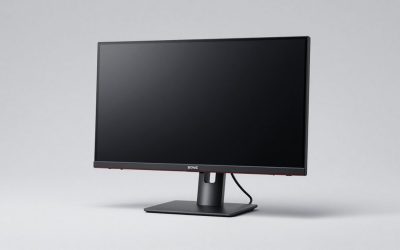
The INZONE M9 II carries Sony’s clean, PlayStation-inspired aesthetic, a white-and-black shell with a tripod-style stand that frees up desk space. The 27″ 4K UHD panel is a full-array LED with DisplayHDR 600 certification, and the build feels premium without being flashy. Connectivity is forward-looking, with DisplayPort 2.1 (UHBR10) and HDMI 2.1 with VRR, so it’s ready for both a modern GPU and a PS5. Built-in speakers and a three-year warranty round out a package clearly aimed at buyers who want a polished, cohesive setup.
Performance
Where the M9 II earns its keep is brightness and contrast control. The full-array backlight delivers punchy HDR highlights that edge-lit panels can’t match, and the 160Hz refresh with 1ms GtG and G-SYNC keeps fast motion clean. For a mixed diet of console blockbusters and PC gaming, it’s a confident performer with accurate color out of the box. That said, the monitor world has shifted toward OLED, and Sony’s own INZONE M10S with its 480Hz 1440p OLED panel shows where the bleeding edge now lives. The M9 II answers with resolution and sustained brightness rather than raw speed or per-pixel contrast.
Pros & Cons
- Pro: Full-array local dimming produces excellent HDR contrast and highlight punch.
- Pro: Native 4K at 160Hz suits both PS5 and high-end PCs.
- Pro: DisplayPort 2.1 and HDMI 2.1 make it genuinely future-ready.
- Pro: Cohesive design and three-year warranty add long-term confidence.
- Con: LED panel can’t match OLED black levels or motion clarity.
- Con: 160Hz trails the 240Hz-plus OLED competition for esports.
- Con: Premium pricing puts it against strong QD-OLED rivals.
Alternatives to Consider
If per-pixel contrast is your priority, the Sony INZONE M10S delivers a 27″ 1440p 480Hz OLED experience built for speed. The LG 27GX704A UltraGear pushes 240Hz QHD OLED with G-Sync compatibility, while the Samsung 32″ OLED M9 (M90SF) brings 4K QD-OLED and a smart-TV feature set to a larger 32″ canvas. Each trades the M9 II’s sustained brightness for OLED’s inky blacks, so the right choice depends on whether you game in a bright room or a dim one.
Frequently Asked Questions
Is the INZONE M9 II good for PS5?
Yes. Its HDMI 2.1 with VRR, 4K resolution, and full-array HDR were designed with PlayStation in mind, and it supports Auto HDR Tone Mapping features on Sony consoles.
LED or OLED for the INZONE M9?
The M9 II uses full-array LED, which sustains high brightness better than OLED. If you play in a bright room or worry about burn-in, LED is the safer pick; for darkroom cinematic contrast, OLED wins.
Does it support the latest GPUs fully?
DisplayPort 2.1 UHBR10 gives it more bandwidth headroom than older DP 1.4 monitors, so it pairs well with current NVIDIA and AMD cards.
Are the built-in speakers usable?
They’re fine for casual audio and system sounds, but serious players will still want a headset or dedicated speakers.
Verdict
The INZONE M9 II is a standout for gamers who want true 4K, strong HDR, and seamless PS5 integration in one confident package. If your priority is raw refresh rate or OLED contrast, the INZONE M10S or an OLED rival like the LG UltraGear will serve you better, but for a bright-room, do-everything 4K display, the M9 remains an easy recommendation.