Key takeaways
- Length: leave room for front fans, radiators, and drive cages.
- Thickness: a 3.5-slot card can block neighboring expansion slots.
- Height: the power cable may need extra side-panel clearance.
- Connector position: top-mounted or side-mounted connectors can change whether the panel closes.
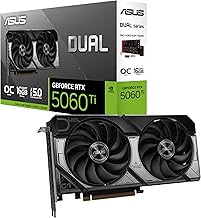
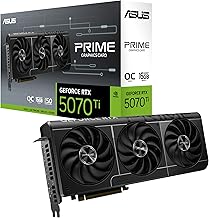
For most buyers, ASUS TUF Gaming, MSI Gaming Trio, Gigabyte Gaming OC, Zotac Trinity, and PNY XLR8 are the best graphics cards GPUs brands for Nvidia, while Nvidia’s Founders Edition remains the best choice for compact builds and reference dimensions.
Quick verdict: which Nvidia board brand fits you?
| Buyer priority | Best-fit brand or range | Why it stands out | Watch for |
|---|---|---|---|
| Quiet gaming PC | ASUS TUF Gaming, MSI Gaming Trio, Gigabyte Gaming OC | Large heatsinks, multiple fans, and conservative fan curves | Usually 3-slot or thicker; check case clearance |
| Small or ordinary mid-tower case | Nvidia Founders Edition, PNY XLR8 compact models, Zotac Twin Edge | Shorter or slimmer options are easier to install | Smaller coolers may produce more audible fan noise |
| Factory-overclocked performance | ASUS ROG Strix, MSI Suprim, Gigabyte Aorus | Higher boost clocks and stronger power delivery | Premium pricing, large dimensions, and diminishing returns |
| Long warranty emphasis | PNY, Zotac, ASUS, MSI, or Gigabyte depending on region | Established support programs and multiple product tiers | Warranty length and registration rules vary by country |
| Lowest sensible price | PNY, Zotac, Palit, or basic Gigabyte Windforce models | Often deliver the same Nvidia GPU and VRAM for less | Basic coolers may have less thermal and acoustic headroom |
What actually differs between Nvidia brands?
Every board partner uses an Nvidia GPU, such as the GeForce RTX 5070, RTX 5070 Ti, RTX 5080, or RTX 5090. The brand does not change the GPU architecture, ray-tracing feature set, DLSS support, or amount of VRAM. It changes the card surrounding the chip: cooler, circuit board, firmware, factory clock, power limit, dimensions, connectors, lighting, software, and customer support.

ASUS Dual GeForce RTX 3050 6GB GDDR6 OC Edition Gaming Graphics Card
Included for 'Best Nvidia GPU Brands for Graphics Cards' as a relevant option in this category; details come from the product listing.
View on Amazon
GIGABYTE GeForce RTX 3050 WINDFORCE OC V2 6G Graphics Card, 2X WINDFORCE Fans, 6GB GDDR6 96-bit GDDR6, GV-N3050WF2OCV2-6GD Graphics Card
Included for 'Best Nvidia GPU Brands for Graphics Cards' because the listing specifies 2X WINDFORCE Fans and 6GB GDDR6 96-bit GDDR6, details this guide uses to compare options.
View on Amazon
NVIDIA GeForce RTX 5080 Founders Edition
Included for 'Best Nvidia GPU Brands for Graphics Cards' as a relevant option in this category; details come from the product listing.
View on Amazon
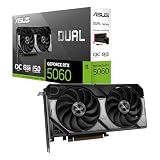
ASUS Prime GeForce RTX 5060 8GB GDDR7 OC Edition Gaming Graphics Card
Included for 'Best Nvidia GPU Brands for Graphics Cards' as a relevant option in this category; details come from the product listing.
View on AmazonA factory-overclocked card is rarely dramatically faster. A higher advertised boost clock may produce only a small frame-rate gain because modern Nvidia GPUs adjust frequency according to temperature, power, and workload. Cooler operation can matter more: it may keep the card at a higher sustained clock while reducing fan speed and noise.
Head-to-head brand comparison
ASUS: TUF for value, ROG Strix for maximum cooling
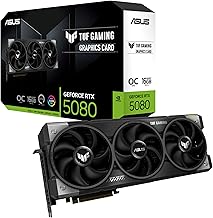
ASUS offers two especially relevant ranges. TUF Gaming cards generally use thick heatsinks, three-fan coolers on higher-end models, reinforced frames, and a restrained factory overclock. They are strong all-rounders for a quiet desktop PC, but many are around three slots thick and can be long.
ROG Strix models typically add a larger cooler, higher power limits, more aggressive factory clocks, and premium features such as dual BIOS or extensive lighting. They suit users who want maximum thermal headroom and do not mind paying a premium. For an RTX 5090-class card, measure both length and thickness carefully before buying.
ASUS warranty terms differ by country and product line. Registration, proof of purchase, and regional service restrictions can apply, so confirm the exact policy rather than assuming that every ASUS card has the same coverage.
MSI: Gaming Trio and Suprim prioritize quiet operation
MSI Gaming Trio cards are commonly among the better-balanced choices. Their large triple-fan coolers, broad fin stacks, and semi-passive fan modes are designed for low noise during ordinary gaming. Suprim models move further toward premium construction, higher clocks, and more substantial cooling.
MSI Ventus is usually a simpler and less expensive alternative. It can make sense when the price is substantially lower or the GPU is a moderate-power model, but it may have less acoustic headroom than a Gaming Trio with the same chip. Compare the actual cooler and dimensions instead of choosing by brand name alone.
MSI cards frequently use one 16-pin connector on recent high-end Nvidia GPUs. Some lower-power models may use a standard eight-pin connector or a newer compact power arrangement. Always inspect the specific product page and ensure the included adapter is fully inserted.
Gigabyte: broad selection from Windforce to Aorus
Gigabyte’s Windforce models are often practical value picks. They generally provide a multi-fan cooler without the price premium of the company’s flagship range. Gaming OC versions add a factory-overclocked BIOS and may use a stronger cooler, making them a useful middle ground.
Aorus cards sit at the enthusiast end, with larger heatsinks, stronger power delivery, and more elaborate displays or lighting on selected models. They can be excellent for sustained heavy loads, but their size may interfere with front radiators, drive cages, or adjacent expansion cards.
Check the warranty language for the country where the card will be purchased. Gigabyte support and warranty procedures can differ between regions, and registering the product may be required for some extended coverage programs.
Zotac: useful when length matters
Zotac’s Twin Edge designs are particularly relevant for compact or mid-sized cases, while Trinity cards provide more cooling capacity for higher-power GPUs. The compact approach can simplify installation, but a smaller heatsink may require higher fan speeds under a sustained load.
Zotac has offered extended warranty registration in some markets, but the duration and registration deadline are not universal. Treat the written regional policy as the deciding source. Zotac is often worth considering when its dimensions fit your case and its market price is below larger triple-fan competitors.
PNY: understated cards with sensible pricing
PNY XLR8 Gaming cards usually focus on the essentials: Nvidia’s GPU, a conventional multi-fan cooler, and a relatively understated design. They are attractive when you want performance without a large lighting ecosystem or decorative shroud.
PNY can be a strong value choice for RTX 5060-, RTX 5070-, and similar classes, especially if the card is meaningfully cheaper than a premium model. Verify the exact cooler thickness, fan-stop behavior, and warranty terms for your region before ordering.
Nvidia Founders Edition: the reference-size alternative
Founders Edition cards are designed by Nvidia rather than a board partner. Their compact, tightly integrated designs can be easier to fit than oversized partner cards, and their appearance is clean and consistent. They are often appealing for compact premium builds.
The trade-off is less flexibility. Founders Edition cards do not usually offer the same range of cooler sizes, factory-clock options, or brand-specific support programs as partner cards. Availability can also be more limited. Choose one when case compatibility and reference dimensions matter more than the quietest possible cooler.
Cooler, noise, and factory-clock differences
A triple-fan cooler is not automatically quieter than a dual-fan cooler. Fan diameter, heatsink mass, fin density, vapor-chamber design, fan curve, and the GPU’s power draw all matter. A large dual-fan card can be quieter than a thin triple-fan model, while a small card may be the only option for a restricted case.
Premium cards commonly include a zero-RPM mode, stopping their fans at idle or during light desktop use. Under gaming load, a useful target is a sustained GPU temperature around 65–75°C with noise that suits your room. Exact results depend on case airflow, ambient temperature, and the selected BIOS mode.
Factory clocks should be treated as a tie-breaker, not the main buying reason. If two cards use the same RTX GPU and one costs $100 more only for a small advertised clock increase, the cheaper card often offers better value. Spend extra for a better cooler, longer warranty, or suitable dimensions instead.
Power connectors and a practical power-budget calculation
Many current high-end Nvidia cards use a 16-pin 12V-2×6-style connector, while lower-power models may use eight-pin connectors or a motherboard power connection. Connector count is not the same as total power consumption, so check the card’s recommended power supply and the PSU’s native cable support.
For example, consider a 450-watt GPU, a 150-watt processor, 60 watts for the motherboard, memory, storage, and fans, plus 75 watts of transient headroom. The calculation is:
450W + 150W + 60W + 75W = 735W.
A quality 850-watt power supply would therefore provide reasonable margin, while a 650-watt unit would be an uncomfortable match even if the PC rarely reaches its theoretical maximum. For an RTX 5090-class system, a high-quality 1000-watt or larger ATX 3.x supply may be appropriate depending on the processor and the card’s specified recommendation.
Use a separate PSU cable for each required connector where applicable, avoid sharply bending the 16-pin cable directly at the plug, and make sure it is fully seated. A poorly inserted connector can create heat at the contact point.
Dimensions: the compatibility checks people miss
Do not compare only card length. Check four measurements:
- Length: leave room for front fans, radiators, and drive cages.
- Thickness: a 3.5-slot card can block neighboring expansion slots.
- Height: the power cable may need extra side-panel clearance.
- Connector position: top-mounted or side-mounted connectors can change whether the panel closes.
As a practical rule, reserve at least 30 mm of cable-bending space beyond the card’s listed height when using a high-power 16-pin connector. Also confirm that the case supports the card’s official slot thickness, not merely its length.
Best buying decision by GPU class
- RTX 5060 or RTX 5060 Ti: choose the least expensive reputable dual-fan card that fits; premium factory overclocks rarely justify much extra.
- RTX 5070 or RTX 5070 Ti: a quiet dual-fan or reasonably priced triple-fan model from ASUS TUF, MSI Gaming, Gigabyte Gaming OC, Zotac, or PNY is usually the best balance.
- RTX 5080: prioritize cooler size, case clearance, and a suitable ATX 3.x power supply over a small clock advantage.
- RTX 5090: compare connector clearance, PSU requirements, support reputation, and warranty before considering lighting or a factory-overclock label.
Final recommendation
Buy the best-fitting model rather than the most prestigious logo. ASUS TUF, MSI Gaming Trio, and Gigabyte Gaming OC are dependable middle-ground choices for cooling and noise; Zotac and PNY can provide better value or easier fit; ROG Strix, Suprim, and Aorus suit large premium systems; and Founders Edition is compelling when compact dimensions are the priority. Compare the exact model’s cooler, factory clock, warranty, noise-oriented features, dimensions, and power connector before paying extra.